Vavoo Proxy Stream Live - New discussion & support

There are 79 replies in this Thread which was already clicked 41,493 times. The last Post () by casteddus.

    • Official Post

    Even if blocked, you can access it via FTP to:

    - remove the plugin folder ---> /usr/lib/enigma2/python/Plugins/Extensions

    - recover the debug log file, which will go to /tmp/output.log


    So use these commands from telnet and don't give me a headache. :exploding head:


    for Dreambox and CVS images.


    Code

    Code
    systemctl stop enigma2.service
    killall -9 enigma2
    journalctl -f -u enigma2 >> /tmp/output.log 2>&1 &


    for OpenPLi or Atv images .. etc.. instead use


    Code

    Code
    init 4
    killall -9 enigma2
    ENIGMA_DEBUG_LVL=4 enigma2.sh > /tmp/debug.log 2>&1 &

    first

    install from telnet

    wget -q --no-check-certificate https://raw.githubusercontent.com/Belfagor2005/vavoo/main/installer.sh -O - | /bin/sh

    • Official Post

    VAVOO PROXY PLUGIN


    ## Quick Start Guide

    -it works with Cloudflare DNS

    -it work with or without serviceapp

    -it work..... (maybe LOL)


    ### First-Time Setup

    1. **Open the Vavoo Plugin** – The proxy will start automatically

    2. **Select a Country** – Choose your desired country (e.g., "Italy")

    3. **Press GREEN Button** – Export favorites to Enigma2 bouquets

    4. **Return to TV** – Your channels will appear in the channel list!


    ### Automatic Updates (Recommended)

    - Go to **Menu Config** → Enable **"Scheduled Bouquet Update: ON"**

    - Choose update interval (5 minutes)

    - The proxy will handle everything automatically


    ### Manual Use

    - If auto-update is OFF, simply open the plugin when you want to update

    - The proxy starts automatically when plugin opens

    - Select country and press GREEN to export


    or use plugin for show channel with player (is better)

    #################


    very simple .. but a lot of work..................


    Let me explain better


    - I ran my tests with

    - serviceapp DEFAULT and EXTEPLAYER: ALL OK.

    - Cloudfire DNS 1.1.1.1 - 1.0.0.1 (DNS *GOOGLE NOT WORKING FOR ME)

    - in the latest 1.46 update I added

    - other CODES to the proxy to keep it alive and forcefully reactivate it if it expires. (But we can only do this when it expires.)

    - IF THE PROXY IS NOT READY, YOU CAN'T ENTER THE PLUGIN'S CHANNELS (obviously, you'd then have to turn off the box using the button; it's too slow and the wait would be long (No date items).)

    - If the proxy isn't ready and everything is configured correctly, you can restart the box or enigma2.

    - The plugin is designed to always have the proxy active (it consumes a bit), but at least you can view the channel list of the exported bouquet or bouquets.

    - For this reason, I recommend exporting the bouquets every 5-10 minutes to update the list token. But the proxy also has an autonomous token update system, constantly updating the token automatically.

    There are detections even for 30 seconds.

    It wasn't easy, and I said so.

    But if in the end you don't see anything, your provider is blocking Vavoo and there's nothing you can do ( KiddaC told me his provider is blocking Vavoo. And he had no video, everything (black)


    The rest for you users is simple, just a few things to know. In the quick guide I've included,


    If you read the Readme carefully, you can also connect from a browser;

    there are many commands to view the status, channels, proxies, etc. etc.


    Don't mess it up, though; as I said, everyone is responsible for their own knowledge.

    That said, I'm retiring. I'm going to dinner and rest; it's been a terrible day.


    Here are some of the browser commands:


    127.0.0.1, you need to replace it with your box's IP address.


    IP_BOX:4323/command


    BROWSER COMMANDS / API ENDPOINTS

    """

    """


    eg:


    192.168.1.78:4323/status

    pasted-from-clipboard.png


    192.168.1.78:4323/catalog

    pasted-from-clipboard.png


    192.168.1.78:4323/countries


    pasted-from-clipboard.png


    192.168.1.78:4323/channels?country=Italy


    pasted-from-clipboard.png


    192.168.1.78:4323/refresh_token

    Code
    {  
    "status": "success",
    "message": "Token refreshed"
    }


    192.168.1.78:4323/health


    192.168.1.78:4323/shutdown

    Code
    Proxy shutting down...


    it's better to restart the box every now and then... that would be much better.

    'text': self.refresh_proxy,


    If shutdown RESTART BOX for now..


    :goodluck:

    • Official Post

    Make a contribution to the forum,

    Shop - Linux Satellite Support Community

    at least offer a coffee to the forum, if you don't want to give it to me, I always say it and I always will!

    Servers cost an arm and a leg for your hobbies.

    Let's not comb dolls' hair. I could do something else and earn a lot.

    • Official Post

    ---->>>>>>>>>>>>> START PROXY<<<<<<<<<----------

    • Menu config
    • On proxy
    • Save
    • Reopen plugin.

    This System it’s good for enigma2 thread.

    Box now it’s very speed if proxy off.

    • Official Post

    same this compatible py/py3
    wget -q --no-check-certificate https://raw.githubusercontent.com/Belfagor2005/vavoo/main/installer.sh -O - | /bin/ sh


    or try


    wget -q --no-check-certificate https://raw.githubusercontent.com/pQu4k3r/Vavoo_py2/main/installer.sh -O - | /bin/ sh

    • Official Post

    pasted-from-clipboard.png


    pasted-from-clipboard.png    pasted-from-clipboard.png


    pasted-from-clipboard.png


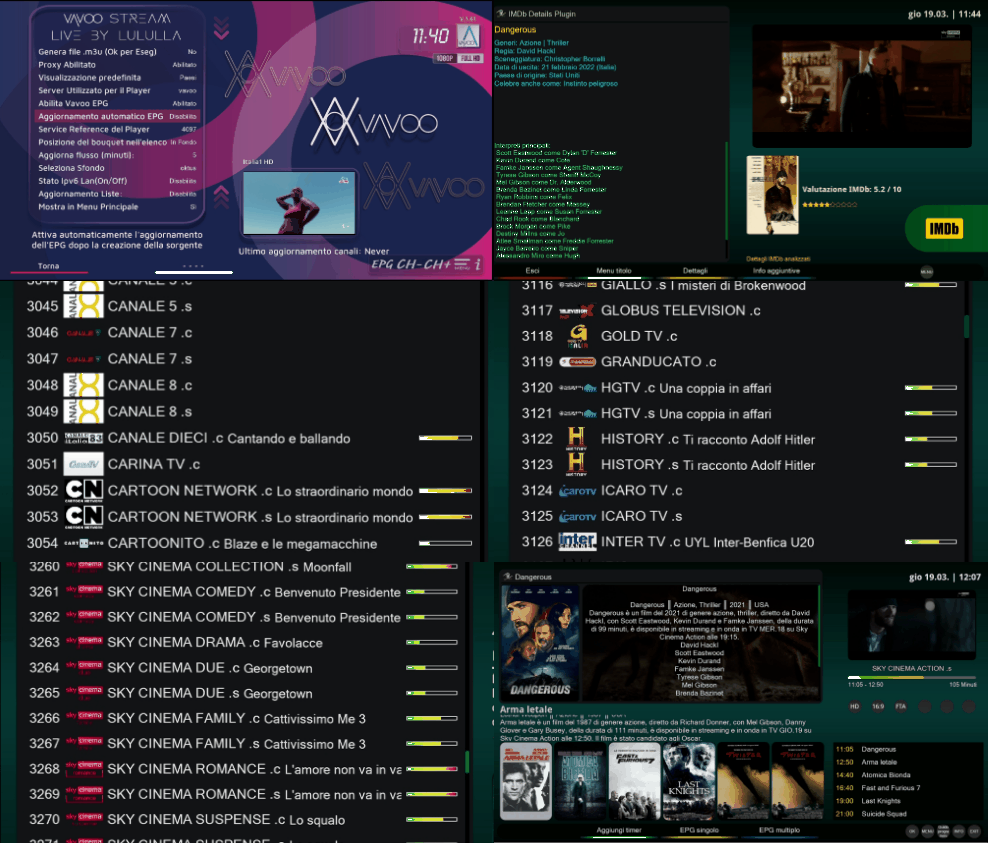
    TEST WITH SUCCESS EPG ON LIST :party-time:


    and..

    pasted-from-clipboard.png


    step all epg on all cowntry. : success


    pasted-from-clipboard.png

    • Official Post

    I tried to keep the EPG system simple,

    always via proxy,

    always via my GitHub.

    My Git creates EPGs every 6 hours.


    The plugin exports the channels, exports sources and channel list to /etc/epgimport.


    But above all: it first checks this file for service references :)

     "/etc/enigma2/vavoo_epg_cache.json"


    It inserts all the channels into the .tv list.

    But.... it inserts the non-matched EPGs into this file: this way, it's easier to find them in the other file


     "/etc/enigma2/vavoo_epg_unmatched_cache.json"


    and insert the correct one (sref).


    Advantages of the full cache:

    Speed - immediate match, no recalculation

    Persistence - matches persist across sessions

    Completeness - both matches and unmatches

    Updatable - you can manually edit unmatches


    2 seconds for epg on list ;)


    So, in the future, I can upload this file online :)

    And then it will be very easy to have all the EPGs for all the channels.


    But this will only happen if everyone helps create this.

    when everything is complete you will have your epg..


    vavoo/vavoo_epg_cache.json at main · Belfagor2005/vavoo

  • I set Lululla as source files provider in EPG-Import and everything was copied to etc/epgimport. Vavoo_source.xml and channels_source.xml are also there. In the plugin, as in your picture, there is no Enable Vavoo EPG (enabled) in the settings and there is no Vavoo source XMLTV in the EPG Import. I wrote that I am willing to fix the sources in the Balkans and Croatia section. If we don't have insight into which epg works or doesn't work, how will we know which references need to be changed. Let everyone (or several users) who live in those countries do it because they know best about the channels offered in the plugin.


    Also , what about vavoo_epg_cache.json. Copy to etc / enigma2 folder or not. Thanks.

    • Official Post

    the system it's simply


    "matched": false,

    "sref": "4097:0:0:0:0:0:0:0:0:0:",


    When we update the sref... mathed must become True.


    Now, to simplify things, I'll put a new file online that only has the vavoo_epg_unmatched_cache.json ones.

    vavoo/vavoo_epg_unmatched_cache.json at main · Belfagor2005/vavoo


    Maybe it'll be easier for me to update.

    Anyway, even the updated ones or those in the other file need to be checked to make sure the srefs are correct, but we can share them here.

    vavoo_epg_cache.json

    raw.githubusercontent.com/Belfagor2005/vavoo/refs/heads/main/vavoo_epg_cache.json


    Maybe we can point out which ones to change and what to insert.

    Each for their own country.


    I'll update this file often. ;)

    From the epg importer, update the sources from "lululla" so you'll have a better match.


    I could never write thousands of lines alone. The coffees you don't offer wouldn't be enough :)

    I think I'll have to put it online, so I can check better. If you promise to participate in the EPG setup... and... obviously... offer a beer this time, it's really deserved... No strings attached, haha.

    • Official Post

    the new features on proxi fo epg..


    IP_BOX:4323/epg/it.xml

    IP_BOX:4323/epg/pl.xml
    ...... etc,,..


    v.1.60 (py2 not tested)


    - EPG data is generated per country and stored in `/etc/epgimport/vavoo_<country>.channels.xml`

    - A master source file (`vavoo.sources.xml`) is created for EPGImport

    - The player fetches EPG via the proxy redirect to GitHub raw files

    - Channel matching uses a persistent cache (`vavoo_epg_cache.json`) with Rytec IDs

    - Service references are matched against Rytec database for EPG compatibility

    - EPG mapping files are automatically generated for each country

    - Location: `/etc/epgimport/vavoo_*.channels.xml`

    - Source: `https://raw.githubusercontent.…/vavoo-player/master/epg_<country>.xml`

    - Updated automatically via GitHub Actions every 6 hours


    ## Common Issues

    @@ -114,12 +132,15 @@ cat /tmp/vavoo.log

    | Bouquets don't open | Ensure proxy is running |

    | Stream doesn't start | Proxy should auto-refresh tokens |

    | M3U export fails | Verify port 4323 is accessible |

    | "No programme found" | Clear EPG cache and re-export bouquet; check country EPG file exists |

    | EPG not updating | Verify EPG is enabled in config and GitHub files are accessible |

    ## Important Notes

    - Old bouquets won't work with new system – re-export required

    - Proxy runs in background – bouquets work even after closing plugin

    - Minimal memory usage (~20-50MB)

    - Only `vavoo_proxy.py` needs updates if Vavoo API changes

    - EPG cache is now stored in `/etc/enigma2/vavoo_epg_cache.json` (not in /tmp)

    - The proxy no longer downloads EPG files locally – uses GitHub redirects

    - Use **TEXT button** in main menu to manually refresh proxy token

    - Proxy status is displayed in real-time in the main interface

  • To have an epg you have to create a usebouquet (green button) as Lululla explained. I created two bouquets (Italy, Balkans). You will notice that you have an epg of channels (see picture) e.g. like in the Pluto plugin. The advantage of watching in bouquets is that you don't have a static infobar like in the plugin and there is no need to use the OK button for the epg. I prefer it that way. Unfortunately, the Balkan bouquet doesn't have an epg anywhere. I will change the references and test in the next few days those channels that should have an epg because I noticed a lot of wrong references and IDs, especially in the Balkan bouquet.


    PS


    It can be like this. The infobar disappears after a few seconds.

    • Official Post

    ### Version 1.61 (2026-03-19)

    - **Cache Format Fix**: Added YELLOW button to fix cache format and remove duplicates

    - **HTTP 451 Handling**: Automatic fallback to kool.to mirror when vavoo.to is blocked

    - **Enhanced Proxy Monitoring**: Added active stream tracking and token age display

    - **Improved Satellite Priority**: Better detection of user-configured satellites

    - Fixed EPG cache consistency issues

    - Resolved duplicate entry problems in unmatched cache

    - Optimized EPG matching performance

    - Updated documentation with new features


    screen9.gif


    pasted-from-clipboard.png


    :growing heart: thank's for coffee... to all :hot beverage:

    • Official Post

    REMEMBER

    CHECK FILE XML FOR EPG.
    Belfagor2005/vavoo-player


    I put these files on my GitHub, but they might be different from yours.

    So, whoever can help, please take a look. If we update them, we won't need to write that the EPG doesn't work.

    I've already explained several times how it works and what needs to be done.

    I have my own EPG. Besides, I don't care if there's no collaboration.


    in your box:


    /etc/enigma2


    CHECK FILE FOR EDIT/UPDATE/ADD CHANNEL AND SERVICE REFERENCE ID
    (This file is the command file; it is used during the (online) match.

    It takes priority over the local file, then the online one; otherwise, no match.)

    vavoo/vavoo_epg_cache.json at main · Belfagor2005/vavoo


    This file, however, has some matches that weren't found. It helps you find them. Can you send me your CORRECT AND UPDATED file?

    AND I EXPLAINED THIS ABOVE.

    CHECK FILE SIMPLE FOR NOT UN MATCHED CHANNELS:
    vavoo/vavoo_epg_unmatched_cache.json at main · Belfagor2005/vavoo


    Regards..


    ps. Now nobody's complaining about freezing during playback, right? :shushing face:


    Read from here

    • Official Post
    • Official Post

    Shall we test it?


    Delete the two .json files in the /etc/enigma2 folder

    vavoo_epg_unmatched_cache.json

    vavoo_epg_cache.json


    Remove the bouquets from the plugin (green)


    Export and wait


    I deleted the online json for now to do this test. Otherwise, during the export, the match will be made with the online one.


    on menu config..


    pasted-from-clipboard.png


    You can adjust the similarity threshold during the match.
    Feedback..

    Since you don't want to update the EPGs (service references), you'll have to do it yourself :)

Get community help for all other Enigma2 plugins

This is your forum for support, questions, and guides for plugins not covered in our specialized sections. Support for uncategorized and miscellaneous Enigma2 plugins. Find help, troubleshooting, and discussions for plugins that don't fit other forum categories.

Participate now!

Don’t have an account yet? Register yourself now and be a part of our community!