


Have you set the recording paths?
If you cannot see that option change the setup mode to expert then reboot & it will be available.
Posts by master G
-
-
Post the oscam log so we can see what the errors are.
-
Unzip the plugin, FTP to /tmp/ Green > Yellow > Manual install > Enigma2 restart > Press Green
Open TSpanel plugin and browse through the plugins and cams for the VU+
-
Once they have transferred you need to click reload settings then your VU will automatically reboot & you should see the new bouquets when done.
-
I don't understand what you are trying to do here with these text files.
1. connect the programme with your receiver.
2. click ftp then receive files from dreambox.
3. make the changes you need then click save.
4. send the files back to your box then click reload. -
Install TSpanel plugin and get the cams from there or download the cam pack from HERE and FTP to /tmp/ then Green > Yellow > Manual install.
-
After making your changes just click save, then click ftp then send files to dreambox.
You will see the files being transferred once done click reload settings on dreambox. -
Install TSpanel plugin and you will find all the cams and plugins you need there.
-
Older versions of CCcam wont decode AAC-HE audio, try updating to CCcam 2.2.1 or use oscam.
-
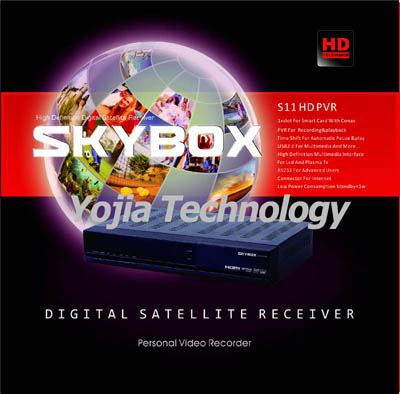
DVB-S2 ***BOX / OPENBOX S11 HD
1, 300MHz MIPS Processor
2, Supports HDMI 1.3
3, PVR Functions
4, NIT search Supported
Feature:
- Linux Operating System,
- Support 1080i/720p/570p/576i/480p;
- DVB-S/S2 digital TV signal modulated in QPSK/8PSK/16APSK;
- SCPC & MCPC receivable from C/Ku band satellites;
- Support USB 2.0 PVR. MP3, JPG photo playback
- Electronic Program Guide(EPG) for 7 days;
- Support software upgrade through USB2.0 port;
- NIT search supported;
- Support MHEG-5;
- Support HDMI 1.3;
- Teletext and subtitle out through OSD;
- Support multi-lingual DVB subtitle and teletext;
- Automatic and manual channel scan options;
- Powerful program management function, parent lock;
- MPEG-II / H.264 Hardware decoding
- Tuner Module, Plug&Play
- Channel-change time < 1 second
- Automatic service scan
- Directly bouquet-lists
- OSD in many languages and skin-support
- Videotext Decoder -
Did the channel info update and reboot but getting the same output in cccam webif
I think its due to having slightly different setups in the tm500s boxes with edg-nemesis
think I will change both boxes back to UR image as I prefer it.One last question - I was looking at ddclient for the linux dyndns updates - any comments re dyndns update?
The image used wont make any difference try downloading a different provider file instead.
I use this myself for dns, easy to setup and works like a charm
Tutorial - Installing DNS Updater On Ubuntu Server -
If you are using oscam as cardreader you will have to telnet lsusb and edit device in oscam.server with the new device code for the hub.
-
Display More
working ok now m8 much appreciated
Connected clients: 2
2 ACTIVE CLIENTS IN LAST 20 SECONDS
+---------+---------------+------------+------------+---------+-----+--------+------------------------+----------+
| Username| Host | Connected | Idle time | ECM | EMM | Version| Last used share | Ecm time |
+---------+---------------+------------+------------+---------+-----+--------+------------------------+----------+
|user1 |109.145.xx.xxx |00d 01:48:52|00d 00:00:04|813 (608)|0 (0)|2.1.3 |$lyUK - $ly1 [NDS3] (ok)| 0.1489s |
|user2 |217.42.xxx.xxx |00d 00:02:08|00d 00:00:08|13 (13) |0 (0)|2.1.3 |0963:000000:178c (ok) | 0.1446s |
+---------+---------------+------------+------------+---------+-----+--------+------------------------+----------++---------+---------------------------------------+
| Username| Shareinfo |
+---------+---------------------------------------+
| user1|local 0963:000000 813(608) |
| user2|local 0963:000000 13(13) |
+---------+---------------------------------------+any idea why user 2 channel info is not displayed as a channel name?
Download the latest Latest Cccam Channel Info/ Cccam Providers and put them into var/ect then reboot and they will show correct names.
-
Nothing wrong there so forward only port 51000 & the clines you put in your technomates should be
C: ip_of_server 51000 user1 pass1
C: ip_of_server 51000 user2 pass2
-
If you were to "hang it outside lol" you will require a seperate power supply for a 3.5" as it has a greater power consumption.
-
You will get a second hand 2.5" sata drive just as cheap mate.A far better option imo.
-
DM800 has an E sata connection on the rear so you can connect it that way or convert it to a usb HDD drive.
-
Portforward just a single port like 51000 and add both users to that port.
-
Yup any hard drive from a sly+ box can be used in an 800,500 or vu..
Seen them knocking around the freebie sites and on ebay very cheap!
***+ Hard drives are 3.5" so will not fit dm800,500 or vu solo before anyone buys one for this.
-
You should only have one server listen port, how have you made the 2 clines?

