
Add the following lines to your oscam.server file.
blockemm-s = 1
blockemm-g = 1
blockemm-unknown = 1
This will still allow your card to update while blocking all un-necessary/potentially harmful emm.


Add the following lines to your oscam.server file.
blockemm-s = 1
blockemm-g = 1
blockemm-unknown = 1
This will still allow your card to update while blocking all un-necessary/potentially harmful emm.
Green screen in device manager usually happens when the hard drive hasnt been formatted, initialized or mountpoints properly setup. Check the mountpoint is setup correctly, if it is then you may need to reformat and initialize again. If you have any files on the hard drive ftp into /media/hdd/movie and backup.
Connect via ftp and navigate to the recording path of the hard drive, example media/hdd/movie. You can delete what you want from this folder.
Lots of people have reported their cards being damaged within a few hours because of the heat that is generated inside the receiver, so you use at your own risk.
You need to use CCcam 2.1.3 with the 256 trick to make the n line hop0. An n line will always take priority over c line.
You could try this sly uk ready ViX Team v2.2.100 Vu+DUO backup. Just add your boxkey and away you go.

Whats New ?
This image is sly uk ready with Oscam and CCcam editted for updating entitlements
Mgcamd 1.35a
CCcam 2.1.3
Oscam 5703
CCcam Providers update to 23.07.2011
CCcam Channel Info update to 23.07.2011
Catseye E2 Settings File 75 East-58 West 09.07.2011
Nephilim 28.2E Picons (usr/share/enigma2)
Cooltvguide Coolman V4.0.0
TSpanel 3.2
Screenshots
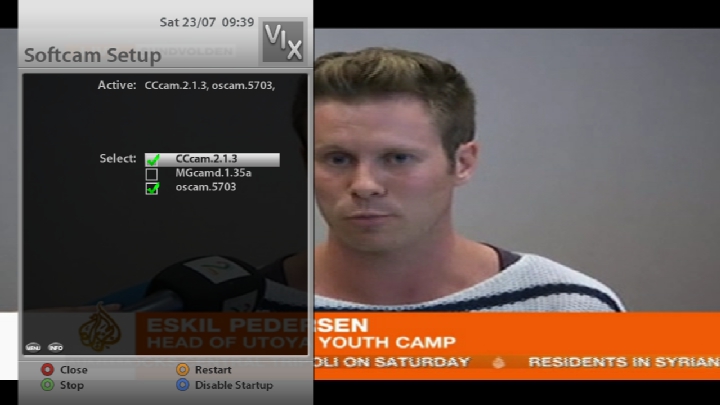

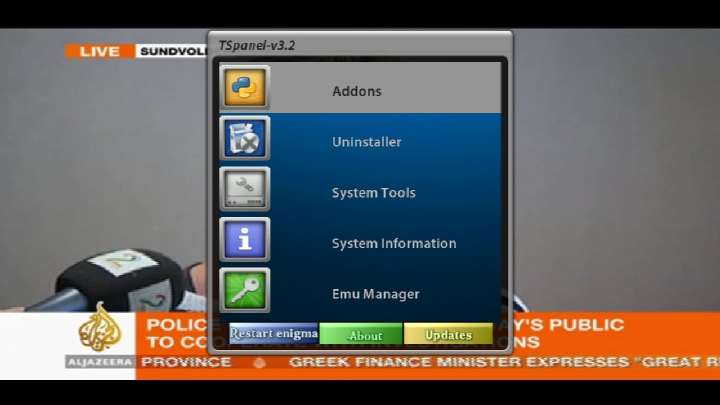
PASSWORD:
vuplus
Enjoy
Linuxsat-support Team
Still will not allow what op asked for. ( cut off after 3 hours viewing )
Display Moreok i have found a solution to this problem, i now have all channels clearing using oscam/cccam:
thanks to spud on the cccam forum, i hope its ok to post this, its all his work:
Tested on Vu+ Duo for ***UK Caid 0963, anything in red you have to change to suit.
Oscam.server
Quote:
[reader]
label = ***uk
protocol = internal
device = /dev/sci0
caid = 0963
boxid = xxxxxxxx
detect = cd
mhz = 500
cardmhz = 357
ident = 0963:000000
group = 1
emmcache = 1,3,2
Oscam.conf
Quote:
[global]
logfile = /var/local/oscam.log
cachedelay = 120
nice = -1
maxlogsize = 0
[monitor]
hideclient_to = 15
appendchaninfo = 0
[cs357x]
port = 15750
serverip = 127.0.0.1
[newcamd]
port = 15500@0963:000000
key = 0102030405060708091011121314
allowed =
keepalive = 1
mgclient = 1
[webif]
httpport = 15000
httpuser = user
httppwd = password
httprefresh = 10
httpallowed = 127.0.0.1,192.168.0.0-192.168.255.255
Oscam.user
Quote:
[account]
user = uksat
pwd = bSlyb
group = 1
au = ***uk
You can use either of the configs for Camd3 or Newcs to connect oscam to cccam. Use either one or the other, not both.
Use this line in cccam.cfg if you want to use the Camd3 protocol to connect to CCcam. Only use 256 if using CCCam 2.1.3 or below.
Quote:
L: 127.0.0.1 15750 uksat bSlyb 0963 000000 256 # *** UK
Use this line in cccam.cfg if you want to use the Newcs protocol to connect to CCcam. Only use 256 if using CCCam 2.1.3 or below.
Quote:
N: 127.0.0.1 15500 uksat bSlyb 01 02 03 04 05 06 07 08 09 10 11 12 13 14 256
Are you aware you are allowing all emm with this config (unknown, global, shared & unique ). Not recommended, especially for your card.
I still cannot see why the configs Master G gave you did not work for you, did you find out why?
Enable debug mod in cccam & look at the logs for any clues but with a receiver as server i would probably be tempted just to reflash, some great new images released this week.
Thank you very much Ten Below. You know if with unique can I activate PPV too?
I cannot see any reason why not but like i said i know nothing about the card you are using, hopefully another member can advise you better on this.
I have no experience of your card but as long as only your dm500 is sending the emm that config looks fine. I would also block shared emm as only unique is needed to update, so change to
blockemm-s = 1
Not possible, speak to him & explain that he should select fta when not viewing. If he cannot do this then ask yourself if he is worth keeping.
Thanks for the reply..
can someone though suggest on config files for both oscam and cccam for resharing ?
Should my setup be a linux pc with oscam installed and card in smargo which connects to another pc or dream with the clients and cccam ?
Setup Oscam & CCcam on your linux machine & use CCcam to share to your local receivers & external clients, use CCcam to control the reshare level, info on how to can be found here.
Getting Started - Flines & Clines For Beginners
Also have a read of this
End to end setup of debian server with oscam and one dreambox
He may well have 50 clients but its very unlikely all are active at the same time. You can add as many as you like just keep an eye on the number active at any one time, you will know yourself when you have too many as glitching will occur. I have seen 45 peers to an nds card but very rarely were over 10 active at the same time, keep an eye out for heavy users and it will be fine.
i am doing the method what caz said there is scam version on the vix 2.5 version
i have got it running
black screen had it running for a hour now nothing
If you are sure scam is running properly contact the seller and ask them to resend the refresh signal.
GSU Full ver. 3.52
- added oscam - ymod (cams)
- fix oscam users (channel time)
- oscam info blocked - if ocsam ymod is active (local, remote)
- vizcam removed (cams)
- update gbox to 798fix1 version
Quotewhere does server file go? where does user file go??
If you mean oscam.server and oscam.user files ten below has already explainned where the config files should go.
You will need to edit oscam.server, boxid = ******** and enter your boxkey, (example boxid =1a2b3c4d)
Look at oscam webif and check the log files to see if you get any errors, post them here if you find any..

