if all the above are ok, i do not find the reason, why you can't see something like i show, when you are typing 192.168.43.113:16001
maybe something is wrong in cccam file (not just CCcam.cfg ) and does not run???


if all the above are ok, i do not find the reason, why you can't see something like i show, when you are typing 192.168.43.113:16001
maybe something is wrong in cccam file (not just CCcam.cfg ) and does not run???
something is going wrong there...
in a working cccam, you should see something like this ( if you type correct the ip+port)
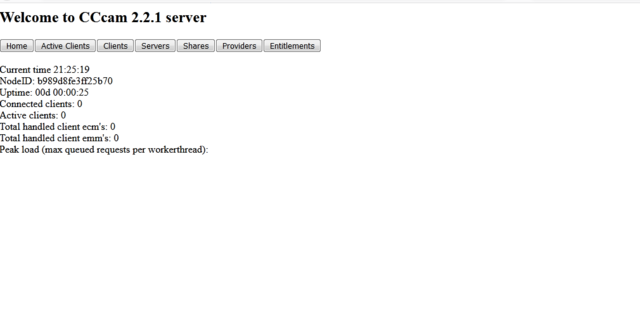
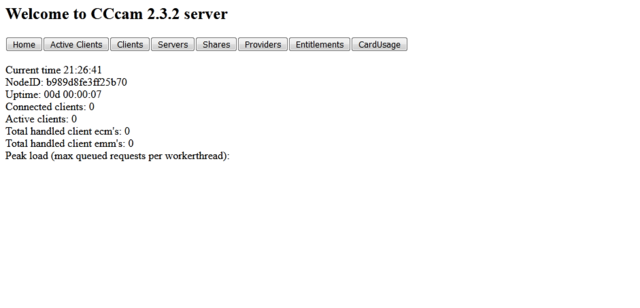
is the cccam working alone? try to type in your browser the receivers ip:16001 (for example 192.168.1.1:16001)
also... have you done any restart your cccam, after the CCcam.cfg replace or any changes? (blue button/cam manager...)
do we have any news about???
in the original receiver, if i remember...
you have to install first the secondstage #84 (i do not know if it will install through lan, or if you need serial/null modem cable) and than you can install any image.
yes, it says multiboot, but it isn't the latest multiboot version, and it does not contain the new kernel...
the result... it will overwritte all what we have installed in our receiver.
(posts #324 and below https://forums.openpli.org/top…port/page-17#entry1200530 )
except openpli, all the other teams latest images (lets say all in june to have and latest changes) has internal multiboot...
openpli will add this function in openpli 7.3 release...(so it does not excist yet)
ωραια... πηρες γραμμη και το λαθος στην εντολη, φαινεται να το εκανε εγκατασταση, δωσε reboot και ξαναδες τι γινεται στα πακετα...
το .ipk θα φυγει στο reboot
ναι μια χαρα...
αστο το screen, υπαρχει μεσα αυτο που νομιζα πως λειπει... οποτε, ακυρο...
παμε αλλη μια δοκιμη , ξαναπερασε το αρχειο στο /tmp και δωσε εντολη
cd /tmp
opkg install *.ipk --force-reinstall
αν μπορεις, θελω
ενα screenshoot απο το dcc στο etc/opkg
και αν μπορεις να παρεις τα αρχεια απο μεσα και να μου τα ανεβασεις...?
σαν να λειπει κατι απο μεσα...
μπορεις και μεσα απο τον file manager του image
σε telnet (για να αφησει και το αποτελεσμα)
cd /tmp
opkg install *.ipk
αρχικα βγαζει σφαλμα εγκαταστασης στο servicemp3 ...
ομως, η διαδρομη που ψαχνει, αρχικα δεν υπαρχει,
το αρχειο ομως που ζηταει, υπαρχει σε αλλη διαδρομη...
δοκιμασε μια να το περασεις χειροκινητα απο εδω, εως να δουμε το προβλημα...
στο dcc, θα πας στο πρωτο πεδιο "configuration" και εχει εκει επιλογη "telnet protocol" ...που μπορεις να μαρκαρεις/αντιγραψεις
"control C" αν χρησιμοποιεις putty...
τι μυνημα βγαζει οταν δινεις τις εντολες???
you do not need any multiboot tool for this receiver (as openmultiboot,nfr boot etc ...)
sf8008 has own internal multiboot. the only one that you have to do, is to install through usb stick and flash recovery menu, a new image (except openpli which not support multiboot yet) .
install openatv,or openeight or satdreamgr (i can help you more in that) in flash, and than you can install 3 more images from internall installer...
open oscam webif (from your browser/pc) .
go to config /dvbapi and change the "API for extended CWs" (i think it will work in "1-O.E 2.2 )
save (bottom of the page) and restart emu in every change...
no... i do not hink that you can find image in that size, or even if you will find, it will be an old one too, and may missing features...
but anyway, i do not think that the receiver can't accept an image about 60mb...
edit: i just saw that you are talking about a clone... and i am not sure which image is safe about it...

Hi, Image is an old Vix 2.1
This is the only image I can get to work in this Duo, I think because it's the smallest,
this receiver is the "second " one? (without sat cable...?)
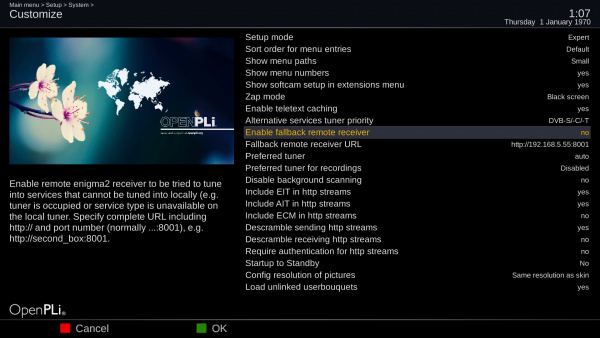
check again in customize menu...
also... i think that you can use and other images in older versions... (both openpli,satdreamgr etc) and newest from 2.1 openvix...
https://wiki.openpli.org/Fallback_remote_receiver