
i look forward to it having a GUI interface
Try the program and you see de GUI


i look forward to it having a GUI interface
Try the program and you see de GUI

They appear exactly as on the Operator's TVBox.
Obviously

can i install this skin on a OE2.6 image (Dreambox 1) or DM900 2.5 images?
nop
OpenPLI Based Skins
 Display More
 Display More
Emo,
Could you give me a repository of images for the Dreambox One Combo UHD?
Is there any link/web with alot of flashable images for this model?
P.S In order to avoid any errors in the near future
Thank you all
send me email at emosim@gmail.com and I will give you all infos
Emo
!!!!!!!!!!!!!!
So ...
Do you want to use your Meo card in this box?
Only payservers problem
With real card or cardsharing there are no problems

Is there any way to watch these channels through VLC streaming? Thanks.
edit bouquet and change for box ip
example for local network
#SERVICE 1:0:1:216:3157:1F41:0:0:0:0:http%3a//0.0.0.0%3a9999/abertis/pid8001:La 1 HD
#DESCRIPTION La 1 HD
it will be
#SERVICE 1:0:1:216:3157:1F41:0:0:0:0:http%3a//192.168.0.94%3a9999/abertis/pid8001:La 1 HD
#DESCRIPTION La 1 HD
to change everything at once just use a text editor and the tool
find and replace

number of Nilesat for the picon folder
Nilesat 201 (7.0°W) - 3530
Howto
East sats - orbital positionx10 - EX: 19,2 E - 19,2x10=192
West sats - 3600-(orbital positionx10) - Ex: 7.0W - 3600-7x10=3600-70=3530

No support payserver
Update with problems
just wait to solve it
But I would never use firms other than DreamOs in a Dreambox and never OpenATVJust a opinion
Original image + GP4 + camfeed is for me the best option
But exists other teams DreamOs based
You don't need a backup
Use Newnigma for example
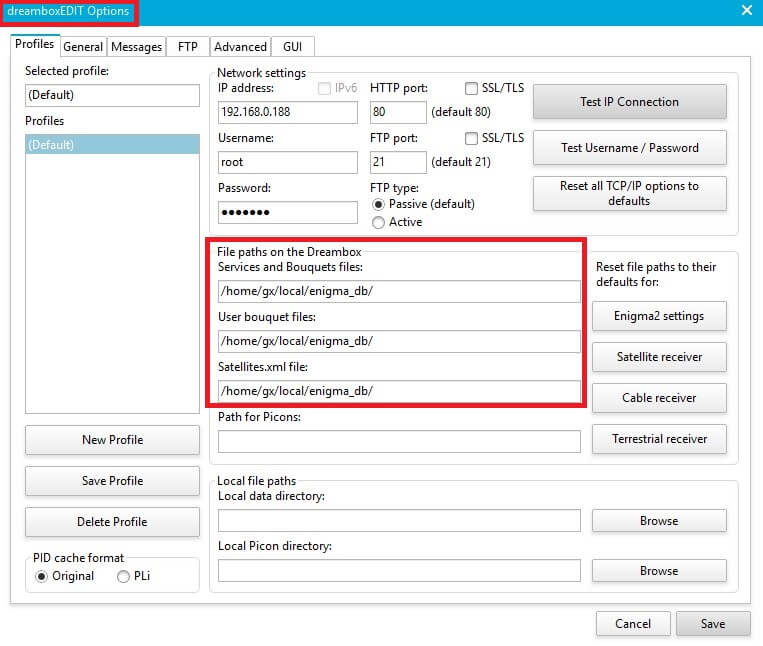
It's possible to use enugma2 list
must change file paths

I thought Octagon was able to spot DTT Abertis channels without installing further stuff.
Yes but only SX88 / SX888 series or SF8008 with Define OS
Here are some tips if anyone is interested:
1. Send the attached channel list ( use Dreamboxedit )
2. Install astra-sm by telnet:
opkg update
opkg install astra-sm
Reboot
3. Put the file "abertis" in etc / astra / script
Give permissions 755
(Use an appropriate Abertis file , attached for the arm and mips receivers)
4. Put the astra.conf file in / etc / astra.
Permissions 755
5. Copy the sysctl.conf file to / etc
( thnaks Pirilampo Satuniverse for conf file )
6. Correct keys in softcamKey
Latest from enigma1969 is OK
Reboot
 Display MoreQuoteDisplay More
Here are some tips if anyone is interested:
1. Send the attached channel list ( use Dreamboxedit )
2. Install astra-sm by telnet:
opkg update
opkg install astra-sm
Reboot
3. Put the file "abertis" in etc / astra / script
Give permissions 755
(Use an appropriate Abertis file , attached for the arm and mips receivers)
4. Put the astra.conf file in / etc / astra.
Permissions 755
5. Copy the sysctl.conf file to / etc
( thnaks Pirilampo Satuniverse for conf file )
6. Correct keys in softcamKey
Latest from enigma1969 is OK
Reboot
..:: ciefpsettings ::..
Copy file to USB flash drive
Menu - Firmware Update OK - 0000 - USB