


merciiiiiiiiiiiiiiiiiiiiiiiiiiiiiii
Posts by laverman
-
-
DDNS is the answer for those networking devices that have no access to a static IP address and a common need for residential users. In this post I have a Linux server at home and need to have remote access to it from any location.
First install the required SSH and SSL socketSelf explanatory we want to be able to send the account password via a secure connection.
sudo apt-get install ssh libio-socket-ssl-perl
Install DDclient.
sudo apt-get install ddclient
Installation wizard
Select the DDNS provider
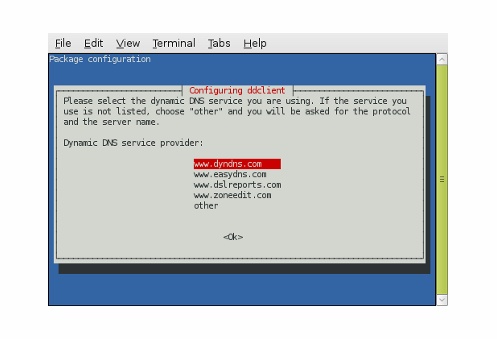
Provide the assigned qualified domain name
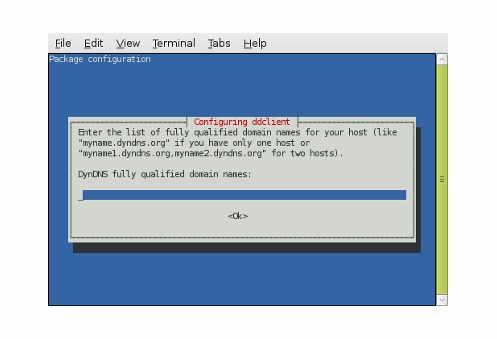
Provide your username
Provide your password
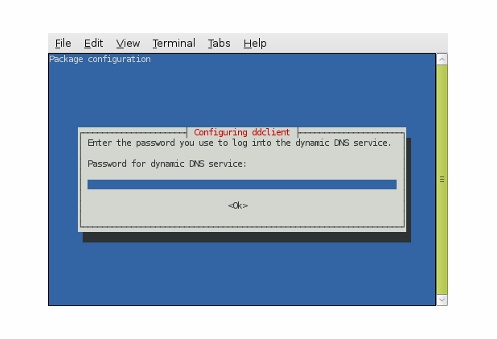
And the interface
The configuration file is located at /etc/ddclient.conf. Edit your configuration to make use of the secure configuration.
sudo nano /etc/ddclient.conf
# Configuration file for ddclient generated by debconf
#
# /etc/ddclient.confdaemon=300
pid=/var/run/ddclient.pid
ssl=yes
use=web, web=checkip.dyndns.com/, web-skip='IP Address'
login=username
password=password
protocol=dyndns2
server=members.dyndns.org
hostname.dyndns.orgNow make sure DDclient is set to work as a daemon. You need to change run_daemon=”false” to run_daemon=”true”.
sudo nano /etc/default/ddclient
# Configuration for ddclient scripts
# generated from debconf on Tue Dec 9 19:52:12 EST 2008
#
# /etc/default/ddclient
# Set to “true” if ddclient should be run every time a
# new ppp connection is established. This might be useful,
# if you are using dial-on-demand
run_ipup=”false”# Set to “true” if ddclient should run in daemon mode
run_daemon=”true”# Set the time interval between the updates of the dynamic DNS name in seconds.
# This option only takes effect if the ddclient runs in daemon mode.
daemon_interval=”300″Now verify DDclient is working by rebooting first and issuing the following two commands.
sudo /etc/init.d/ddclient restart
sudo /etc/init.d/ddclient status
If the client is working correctly you should see the same output.
Status of Dynamic DNS service update utility: ddclient is running
In case you want to reconfigure the client issue the following command.
dpkg-reconfigure ddclient
Don’t forget to allow port forwarding on your router otherwise all attempts will fail. Flashed routers like the Linksys WRT54GL with Tomato firmware allow for a wide range of options when it come to choosing a DDNS provider from the web interface. This means centralisation and easy configuration.
-
hi steve, I tell you, my server works fine thank you very much, I did other research and I succeeded, I'll post how I do that everyone can enjoy.
thank you -
thanks for you, i will try it and i answer you
-
hi Steve, the port is already done, this is the same thing to share with a dreambox or vu +. example I'm using port 12000 on my cfg file, I open the port in my router (TCP 12000 / UDP).
as I said before, I can not properly configure ddclient is a bit complicated, I do not understand what it means eth0/wlan0/ppp0 / ... and use = web ...
and thank you for your help -
bonjour, quelqu'un pourra m'aider pour faire marcher mon pc serveur, pour partager mes clines avec des amis.
Je teste mon serveur sur pc, localement avec ma vu+ solo its working, le probleme est avec inadyn, j'arrive pas à le démarrer ou le parametrer. Please help me
j'utilise ubuntu-12.04.1-server, inadyn et aussi no-ipQuote
hello, someone can help me to run my server pc to share my clines with friends.
I test my server pc, locally with my vu + solo icts working, the problem is with inadyn, I can not start or parameterize. Please help me
I use ubuntu-12.04.1-server, and also inadyn no-ip

