LiveGardenTVPlus – IPTV Player for Windows
LiveGardenTVPlus is a desktop IPTV player for Windows (WPF / .NET 10) that plays HLS streams (m3u8) using WebView2 and hls.js.
It loads local or online M3U playlists, organizes channels by groups, and provides a modern, themeable interface.
Screenshots


Changelog
🚀 LiveGardenTVPlus – Changelog (v1.9)
🛠️ Playlist Editor Enhancements
- URL Check – Tests only filtered channels; shows deterministic progress bar. Channels with zero working URLs get status "FAIL".
- Export OK / FAIL – Export only working or failed channels (based on URL check).
- Enrich with EPG – Adds missing
tvg-idtags using fuzzy matching. - Check Duplicates – Detects duplicate URLs across channels.
- Multiple URLs per channel – Comma‑separated URLs in cell edit mode; stored as list in JSON.
- Channel Details Window – Double‑click row or click edit button to open a dedicated window with full channel details (name, URL, group, logo, tvg-id, favorite, country, geoblocked, languages, logo preview). Includes Previous / Next navigation through playlist and live logo preview update.
- Icon column – Small logo preview before channel name in the grid.
🎨 Interface & Usability
- Dynamic Theme Support – All windows respect the selected theme (16 themes + Light/Dark). Standard brush keys (
WindowBackgroundBrush,ForegroundBrush,ControlBackgroundBrush,BorderBrush,AccentBrush,AlternateRowBackgroundBrush) unified across all theme files. - Localization – All UI texts (EPG, logos, editor, settings, detail window, URL editor) translatable via
LanguageManager. Added language change event handling to all windows. - Progress Feedback – Indeterminate progress while downloading logos index; deterministic progress during Fetch Logos.
- Resizable Sidebar – Draggable
GridSplitterbetween channel list and player. - Clickable Credits – Links to CORVOBOYS.ORG and LINUXSAT-SUPPORT.COM.
🐛 Bug Fixes
- Fixed thread safety issues in timeshift timer and EPG parsing.
- Fixed export OK/FAIL after URL check – channels with zero working URLs now get "FAIL" status.
- Fixed theme colors in SettingsWindow and PlaylistEditorWindow (all controls now use
DynamicResource). - Fixed
UrlToImageConverterand other converters (syntax errors removed). - Fixed window background being black – added fallback brushes in App.xaml and unified theme keys across all theme files.
- Fixed language change event subscription (use
LanguageManager.LanguageChanged += ApplyLanguagewithout parameters). - Fixed channel details window counter positioning (moved below buttons, centered).
🆕 New Features & Improvements – Version 1.8
🖼️ Remote Logos Management
- Logo Source Selector – Choose from predefined repositories (OwnerPlugins/logos, picons/picons) or enter a custom URL in Settings.
- Subfolder Filtering – Limit logos to specific folders (SNP, PROVIDER, ALL) for faster matching.
- Fetch Logos – Automatically assign logos to playlist channels using fuzzy matching (Levenshtein distance) with adjustable threshold.
- Logo Picker Window – Browse available logos with search, thumbnails (on/off toggle), and double‑click selection. Virtualized list for performance.
- Manual Logo Assignment – Click the “...” button in the Logo cell to open the picker and assign a logo manually.
- Persistent Cache – Logos index and thumbnails are cached locally. First load is slower; subsequent loads are instant.
📺 EPG (Electronic Program Guide)
- Adjustable Matching Threshold – Slider in Settings (0.5 – 1.0) controls how strictly channel names are matched to EPG ids. Lower = more matches, higher = exact or very similar names.
- EPG Source Selector – Choose from multiple XMLTV files (epgshare01) or enter a custom URL (already present, now with threshold control).
🛠️ Playlist Editor Enhancements
- Unified Save As – Export playlist to M3U, JSON, or CSV from a single dialog.
- New Playlist Button – Create an empty playlist directly from the editor.
- Reorganized Toolbar – Buttons grouped into bordered sections (Playlist & Groups, URL Check, JSON, Filtered Export, EPG & LOGOS, Actions) for clarity.
- Enhanced Filters Section – Each filter group has its own border and label; each field has a descriptive label above it.
- Improved Export Logic – Channels without a valid URL are skipped when saving M3U (avoids empty entries).
- Group Management – Add, rename, delete groups with multi‑select support; new group creates an empty channel row.
🎨 Interface & Usability
- Dynamic Theme Support – All UI elements (ComboBoxes, filter labels, etc.) now respect the selected theme. Added fallback brushes to prevent black backgrounds.
- Progress Feedback – Deterministic progress bar during “Fetch Logos” (channel‑by‑channel) and indeterminate progress while downloading the logos index.
- Localization – All new texts (threshold labels, logos picker, editor buttons, filter labels) are translatable via LanguageManager.
🐛 Bug Fixes
- Fixed
NullReferenceExceptionin LogoPickerWindow and SettingsWindow (added null checks and Loaded event initialization). - Fixed M3U export – URLs are no longer missing; channels without a valid URL are skipped.
- Fixed PlaylistEditorWindow constructor – removed erroneous line that caused compile errors.
- Fixed theme colors in SettingsWindow (ComboBoxes and labels now follow the selected theme).
- Fixed filter section colors in PlaylistEditorWindow (text boxes and labels use dynamic resources).
🆕 New Features & Improvements – Version 1.7
📺 EPG (Electronic Program Guide)
- Full TV Guide Window – Dedicated EPG window accessible from the main toolbar.
- Program List – Select a channel and view all programmes for the day (start/end time, title, description, category).
- Program Details – Double‑click any programme (or use the "Details" button) to see the full description.
- Fuzzy Channel Matching – Automatically matches M3U channels to XMLTV channels even when
tvg-idis missing or differs (Levenshtein distance). - Selectable EPG Source – Choose from multiple XMLTV files (epgshare01) or enter a custom URL in Settings.
- XMLTV Support – Parses
.xmland.gzcompressed files with timezone offset handling. - Current Programme – Status bar shows the current programme title and local time for the selected channel.
- Enrich M3U – Editor button adds missing
tvg-idtags to your playlist based on fuzzy matching.
⏪ Timeshift (Live DVR)
- Pause / Resume – Pause a live HLS stream and resume from the same point (circular buffer).
- Timeshift Slider – Appears automatically when buffer is available; drag to seek backwards in the live stream.
- "Live" Button – Instantly return to the most recent point of the live stream.
- Works with HLS (
.m3u8) and direct video files (.mp4,.mkv,.ts).
🎨 Interface & Usability
- Channel Logos – Logos (
tvg-logo) are downloaded and shown next to each channel, with fallback icon. - M3U8 Support – Player correctly plays
.m3u8(HLS) streams via HLS.js. - Improved M3U Parser – Skips unknown tags and extra comment lines, ensures all channels load.
- Resizable Sidebar – Draggable
GridSplitterbetween channel list and player. - Larger UI Elements – Logos 32x32, channel text 16px, status bar height 55px.
- Clickable Credits – Links to
CORVOBOYS.ORGandLINUXSAT-SUPPORT.COM. - Dynamic Language Switching – UI updates instantly (no restart required).
- Stable Streaming – Fixed issues that caused playback to fail after EPG and logos were added.
🐛 Bug Fixes
- Fixed playlist URL not loading correctly on startup.
- Fixed language persistence and UI refresh.
- Fixed parser bug where channels with extra metadata lines were skipped.
- Fixed thread safety issues in timeshift timer and EPG parsing.
- Fixed settings dialog crashing on save (no more full restart).
🆕 New Features & Improvements – Version 1.6
Playlist Editor (PlaylistEditorWindow)
- Full channel view in an editable
DataGridwith columns:Name,URL (primary),Group,Logo,TvgId,Favorite,Country,GeoBlocked,Nanoid,Languages,Youtube URLs,Stream URLs,Status. - Inline editing of all fields (except read‑only columns like
LanguagesandURLswhich display concatenated lists). - Group management:
Add Group– assigns a new group to all channels without a group.Rename Group– renames the group of the selected channel (and all channels in that group).Delete Group– deletes all channels belonging to the selected group.
- URL check:
- Tests all URLs in
stream_urlsandyoutube_urls. - Displays status in the
Statuscolumn (e.g.2/3 OK,No URLs,FAIL). - Shows a progress bar and completion message.
- Tests all URLs in
- Advanced filters (above the DataGrid):
- Filters for every column (text, checkboxes) with placeholders and tooltips.
Apply FilterandClear Filterbuttons.- Dynamic counter
(n / total)of currently visible channels. - Visual border with the title
FILTERS.
- Selective export:
Export OK– exports only channels withOKstatus to an M3U file.Export Failed– exports only channels withFAILstatus to an M3U file.Export Filtered M3U– exports the currently filtered channels to an M3U file.Export Filtered JSON– exports the currently filtered channels to a JSON file (full format).Export JSON– exports the entire playlist to a JSON file (all fields).Import JSON– loads a playlist from a JSON file (replaces current data).
- Save:
Save As M3U– saves the current playlist (after edits) as an M3U file (standard fields only).
- Close – button to exit the editor.
📄 JSON format example (import/export)
[  {    "nanoid": "A7FjWEoxfZfQRg",    "name": "BBC News Europe",    "stream_urls": [      "https://aegis-cloudfront-1.tubi.video/bb1fc6ad-9948-42ea-aaf3-20acfcdeecac/playlist.m3u8",      "https://amg00793-amg00793c6-firetv-us-4067.playouts.now.amagi.tv/playlist.m3u8",      "https://amg00793-amg00793c6-xumo-us-2669.playouts.now.amagi.tv/BBCStudios-BBCEarthA-hls/playlist.m3u8",      "https://pb-zjy36qhp8e8cz.akamaized.net/BBC_Earth_US.m3u8"    ],    "youtube_urls": [],    "languages": [      "eng"    ],    "country": "uk",    "isGeoBlocked": true,    "logo_url": "https://example.com/logos/bbc.png",    "group": "International",    "tvg_id": "bbc.world",    "isFavorite": false  },  {    "nanoid": "il2nOFg4MhHcyB",    "name": "BBC Four",    "stream_urls": [      "https://streamer.nexyl.uk/48559ccd-6400-457d-8acc-06b9e24c2ed8.m3u8"    ],    "youtube_urls": [],    "languages": [      "eng"    ],    "country": "uk",    "isGeoBlocked": true,    "logo_url": "https://example.com/logos/bbc.png",    "group": "International",    "tvg_id": "bbc.world",    "isFavorite": false  }
]
🆕 New Features & Improvements – Version 1.5
- Playlist Editor – Built‑in editor to modify channel names, URLs, logos, groups, tvg‑id, and favorites. Save changes as a new M3U file.
- Group Management – Add, rename, or delete entire channel groups directly from the editor.
- URL Health Check – Test all channel URLs (with GET + range header) and display status (OK/FAIL) in the editor.
- Export OK / FAIL Channels – Export working or non‑working channels to separate CSV files for further inspection.
- Save Status Report – Export complete channel list with status to a CSV file.
- Save Playlist As – Button in main toolbar to save the current playlist (including any in‑memory edits) to a new M3U file.
- Export Favorites – Export only favourite channels to a standalone M3U playlist.
- Persistent Favorites – Favourites are saved in
favorites.jsonand automatically restored when reloading the same playlist (URL‑based matching with normalisation). - Timeshift (Pause Live) – Pause/Resume button in status bar allows pausing live HLS streams (works within the buffer window).
- Improved About Window - Dedicated about dialog with logo, animated avatar and a changelog that loads directly from the GitHub README (offline fallback included).
- Larger UI & Better Layout - Bigger icons, larger fonts, a resizable sidebar (GridSplitter) and clickable credit links (CORVOBOYS.ORG / LINUXSAT‑SUPPORT.COM). Much more comfortable on modern screens.
🐛 Bug Fixes
- Fixed false negatives in URL health check (now uses GET with range header).
- Fixed favourite star being cut off in the channel list (redesigned with a Grid layout).
- Fixed groups collapsing after toggling favourites (no more full refresh).
- Fixed playback starting with audio muted.
- Fixed several XAML binding errors and improved TreeView performance.
- Fixed image resources not showing in runtime (proper
pack://applicationURIs). - Fixed
Environment.Exit(0)causing the app to close instead of restarting during update. - Fixed missing
IsFavoritecolumn in the playlist editor.
✨ Features (Version 1.4
- Full EPG Support – Electronic Program Guide now fully functional with timezone handling. Current programme info displayed in the status bar.
- Channel Logos – Logos (
tvg-logo) are downloaded and shown next to each channel, with a fallback icon if missing. - M3U8 Support – Player now correctly plays
.m3u8(HLS) streams via HLS.js integration. - Improved M3U Parser – Skips unknown tags (
#EXTSIZE,#EXTVLCOPT, etc.) and extra comment lines, ensuring all channels load properly. - Resizable Sidebar – Added draggable
GridSplitterbetween channel list and player. - Larger UI Elements – Increased icon and font sizes for better readability (logos 32x32, channel text 16px, status bar height 55px).
- Clickable Credits – Split credits with separate clickable links for
CORVOBOYS.ORGandLINUXSAT-SUPPORT.COM. - Dynamic Language Switching – UI updates instantly when changing language in Settings (no restart required).
- Stable Streaming – Fixed issues that caused playback to fail after EPG and logos were added.
🐛 Bug Fixes
- Fixed playlist URL not loading correctly on startup.
- Fixed language persistence and UI refresh.
- Fixed parser bug where channels with extra metadata lines were skipped.
- Fixed
Environment.Exit(0)causing app to close instead of restart during update.
✨ Features (Version 1.3
- Electronic Program Guide (EPG) support
- EPG URL (
x-tvg-url) is automatically extracted from the M3U playlist header. - Program data is downloaded in the background (supports
.gzcompressed XMLTV). - Current programme title, start and end times are displayed in the status bar, automatically converted to the user’s local timezone.
- Timezone handling: supports UTC with explicit offset (e.g.,
+0200) or assumed UTC.
- EPG URL (
- Channel logos
- Channel icons (
tvg-logo) are now displayed next to each channel in the TreeView. - Images are loaded from remote URLs with a fallback default icon when the logo is missing or fails to load.
- Improved visual appearance with larger, adjustable icon sizes (32x32) and bigger font for channel names.
- Channel icons (
🔧 Fixes
- M3U parser improvements
- The parser now correctly skips extra metadata lines (e.g.,
#EXTSIZE,#EXTVLCOPT) that were breaking URL extraction. - All channels, including those with additional tags, are now properly loaded.
- The parser now correctly skips extra metadata lines (e.g.,
- Streaming stability
- Restored reliable HLS playback that was temporarily affected by parser changes.
- WebView2 player initialisation simplified to avoid race conditions.
- UI enhancements
- Added a draggable
GridSplitterbetween channel list and player (resizable sidebar). - Toggle sidebar button now hides both the channel column and the splitter.
- Channel list items (logos, folder icons, text) enlarged for better readability.
- Added a draggable
✨ Features (Version 1.2
- Auto‑update – A new fix for "Update" and restarts the app after replacing files.
✨ Features (Version 1.1
- Auto‑update – A new "Update" button (toolbar or Help menu) checks for a newer version on GitHub.
If found, it downloads the ZIP, extracts it, and restarts the app after replacing files. - Version display – The current version (e.g.,
1.0) now appears in the main window title, in the Help dialog, and in the "No updates available" message. - Improved installer (Inno Setup)
- Multi‑language selection at startup (English, Italian, Arabic, French, Turkish, Polish, German, Spanish, Dutch, Portuguese, Russian).
- Donation page with QR codes (PayPal & Ko‑fi).
- Optional .NET Runtime info page with a clickable download link.
- Cleaner distribution – The ZIP and setup no longer include WebView2 cache or duplicate folders (
Languages\Languages,PlayerHost\PlayerHost). - Translations – All update‑related messages now use
LanguageManager.GetTranslation()for easier localization.
✨ Features (Version 1.0)
- Playlist support – Load M3U/M3U8 files from your PC or from a remote URL.
- GitHub playlist browser – Automatically fetches all
.m3ufiles from the TivuStreamList repository (root +local/subfolder). Includes a fallback static list. - Channel grouping – TreeView with group drill‑down, search, favorites.
- Themes – 16 predefined color themes + Light/Dark mode, changeable at runtime.
- Player controls – Play/Pause, speed (0.5×, 1×, 2×), buffer slider (1–10 seconds), Picture‑in‑Picture (PIP).
- Fullscreen mode – Hides all UI; press ESC to exit.
- Sidebar toggle – Collapse the channel list to focus on video.
- Settings window – Change buffer size, select online playlist (GitHub refresh), and choose UI language (see note below).
- Persistent preferences – Saves last playlist URL, buffer, theme, and language (language not yet fully applied).
🚀 Getting started
Prerequisites
- Windows 10 / 11 (x64 or x86)
- .NET 10 Runtime (or SDK for development)
- WebView2 Runtime (usually pre‑installed on Windows 11)
Download & run
- Go to the Releases page (or clone the repository).
- Download
LiveGardenTVPlus.exe(standalone) or the installer. - Run the application – no additional configuration required.
Build from source
git clone https://github.com/OwnerPlugins/LiveGardenTVPlus.git
cd LiveGardenTVPlus
dotnet build -c Release
The executable will be in bin/Release/net10.0-windows/.
📂 Project structure (main)
LiveGardenTVPlus/
├── App.xaml / App.xaml.cs
├── MainWindow.xaml / MainWindow.xaml.cs
├── Views/
│   ├── SettingsWindow.xaml(.cs)
│   ├── AboutWindow.xaml(.cs)
│   ├── PlaylistEditorWindow.xaml(.cs)
│   ├── ColorPickerWindow.xaml(.cs)
│   ├── XtreamLoginDialog.xaml(.cs)
│   ├── EpgWindow.xaml(.cs)
│   └── LogoPickerWindow.xaml(.cs)
├── Converters/
│   ├── StringToVisibilityConverter.cs
│   ├── UrlToImageConverter.cs
│   ├── BoolToStarKindConverter.cs
│   ├── BoolToStarColorConverter.cs
│   ├── BoolToVisibilityConverter.cs
│   └── FirstUrlConverter.cs
├── Services/
│   ├── M3uParser.cs
│   ├── LanguageManager.cs
│   ├── TranslationHelper.cs (o TranslationService.cs)
│   ├── FavoritesManager.cs
│   ├── UserPreferences.cs
│   ├── ThemeManager.cs
│   ├── GitHubPlaylistFetcher.cs
│   ├── EpgService.cs
│   ├── LogoService.cs
│   └── ImageCache.cs
├── Models/
│   ├── Channel.cs
│   ├── EpgModels.cs (EpgChannel, EpgProgramme)
│   ├── EpgProgram.cs
│   ├── ChannelGroup.cs
│   ├── ChannelJson.cs
│   └── LogoInfo.cs
├── Updater/
│   └── Updater.cs
├── Languages/              (92+ .lng files)
├── Themes/                 (16 .xaml theme files)
└── PlayerHost/player.html (hls.js wrapper)🛠️ Usage
- Load a playlist
- Click
Load M3U(local file) orOnline M3U(enter raw URL). - Or go to
Settings→Refresh from GitHub→ select a playlist → pressLOADorSAVE.
- Click
- Play a channel
- Click any channel in the tree view. The video starts automatically.
- Manage groups
- Click a group name to see only its channels.
- Click
← Back to all groupsto return.
- Favorites
- Right‑click a channel (or use the star icon) to add/remove favorites.
- Toggle the
⭐ Favorites onlycheckbox.
- Search
- Type in the search box to filter channels (flat result list).
- Theme & UI
- Use the palette icon to choose a color theme.
Hide Listcollapses the sidebar.Fullscreenhides all UI (press ESC to exit).- Speed buttons change playback speed.
- Drag & drop a
.m3ufile onto the window.
🙏 Credits
- Development: Beatrice (original author) & community contributions.
- Playlist repository: OwnerPlugins/TivuStreamList – massive collection of Italian and international M3U streams.
- HLS playback: hls.js (MIT license)
- UI components: MaterialDesignThemes.Wpf
- WebView2: Microsoft Edge WebView2 (Microsoft)
- Inspiration and testing: CorvoBoys community (corvoboys.org) | Linuxsat-Support community (linuxsat-support.com)
📄 License
This project is released under the MIT License – see LICENSE file for details.
🤝 Contributing
Bug reports and pull requests are welcome. Please open an issue first to discuss major changes.
For language translation fixes (the current limitation), any help is highly appreciated!
📬 Contact
For questions or suggestions, visit the GitHub repository or the official website corvoboys.org.
Happy streaming! 🎥


-
Version 3.0
- Lululla
- 20.75 kB
- 134 Downloads
## Changelog
## LiveGardenTVPlus – Changelog (v3.0)
**Added:**
- New **Enigma2** menu in toolbar with:
- Send to Enigma2
- Telnet Console
- Telnet Configuration (direct access to Telnet settings)
- New **Favorites** menu in toolbar:
- Save Favorites (toggle all channels as favorite/unfavorite)
- Export Favorites (export favorite channels to M3U)
- Recent files now open on hover (mouse over "Recent" in File menu)
- Images for PayPal and Ko-fi in About window (clickable)
- Default EPG source set to "it1" in Settings
- Gradient colors for titles in About window
**Improved:**
- File menu now closes automatically after actions (Close Playlist, Recent selection)
- "Favorites only" toggle is now disabled when no playlist is loaded
- Toggle shows message "No favorite channels found" when no favorites exist
- Centralized all images in `/Themes/` folder (removed `/Images/` duplication)
- `tv.png` and `radio.png` now properly copied to output directory
### 📋 Channel Info Window (Context Menu)
- **New "Info" menu item** – Added to the right‑click context menu on channels in the main TreeView.
- **Channel Info window** – Displays all channel fields in an editable window:
- Name, URL, Group, TvgId, Favorite, Radio, Status.
- Logo preview with live update (URL → image preview).
- **Live editing** – Modify any field, click **Save** to update the channel in the current playlist.
- **Refresh after save** – TreeView and favorites are automatically refreshed.
### 🖱️ Right‑Click Selection without Playback
- **Right‑click now selects the channel** without starting the stream.
- EPG info is still updated, but playback is skipped.
- Context menu appears without interrupting the current stream.
### 📁 Sidebar Visibility
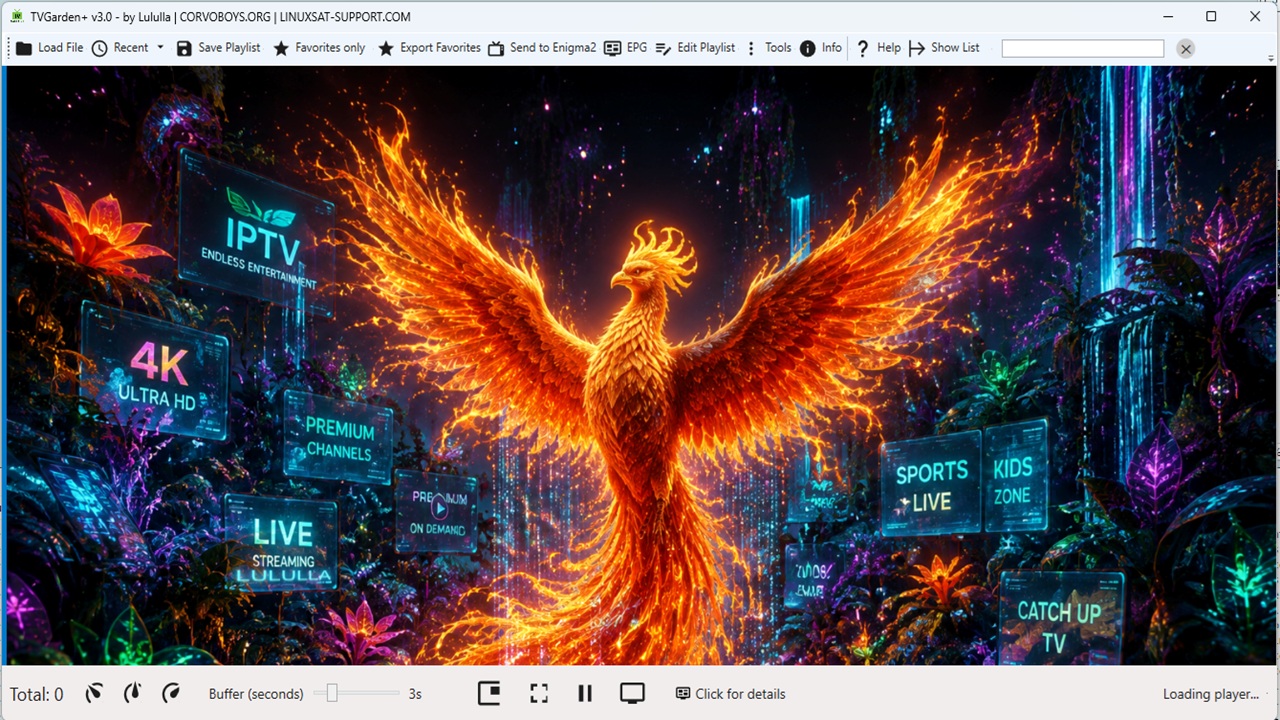
- **Sidebar hidden at startup** – The channel list (left panel) is now hidden when the application starts.
- **Auto‑show on playlist load** – When a playlist is loaded (M3U or JSON), the sidebar automatically opens.
- **Toggle button** – The existing "Show List / Hide List" button works as before (manual toggle).
### 🎨 TV / Radio Background
- **Player background** – When no stream is playing or for radio channels:
- `tv.png` is shown for TV channels.
- `radio.png` is shown for radio channels.
- **Auto‑detection** – Radio channels are detected based on URL extensions (`.mp3`, `.aac`, `.ogg`, `.m4a`, `.wma`, `.flac`, `.opus`, `.wav`) and keywords (Radio, FM, Audio).
- **Background hides when video starts** – For TV channels, the background is hidden when the stream begins.
### 🔧 Language Manager Improvements
- **Separator support** – Fixed `LanguageManager` to correctly parse `.lng` files using `::` (double colon) as the primary separator, with fallback to `:` and `=`.
- **Keys with spaces** – Keys containing spaces (e.g., `"Language: "`) are now correctly matched and translated.
### 🌐 New Translations
All new strings for the Channel Info window and right‑click menu are fully localizable via `LanguageManager`.
### 🐛 Bug Fixes
**Fixed:**
- Images not loading in About window (paypal.png, kofi.png)
- Recent popup not opening correctly on hover
- Menu File not closing after selecting a recent file
- Playlist not refreshing after closing playlist
- EPG combo not setting default value
- right‑click selection – no longer starts playback accidentally.
- `LanguageManager` parsing for `.lng` files with `::` separator.
- sidebar visibility – now shows correctly after playlist load (both JSON and M3U).
### Need more help?
Visit the [GitHub repository](https://github.com/OwnerPlugins/LiveGardenTVPlus) for updates and support.

https://github.com/OwnerPlugins/LiveGardenTVPlus/raw/refs/heads/main/LiveGardenTVPlus_Setup.zip
-
Version 2.9
- Lululla
- 48.2 MB
- 115 Downloads
## Changelog
## LiveGardenTVPlus – Changelog (v2.9)
### Code Editor Tab in Playlist Editor
- **New "Code" Tab** – Added a second tab in the Playlist Editor alongside the existing "Grid" tab.
Allows viewing and editing the playlist content as raw code (M3U or JSON).
- **Two‑way synchronization** –
- **Grid → Code**: Switch to the "Code" tab to see the current playlist formatted as JSON (default) or M3U.
- **Code → Grid**: Paste or edit M3U/JSON code, click **"Apply / Import"**, and the playlist grid updates instantly.
- **Display Format Selection** – Choose how the code is displayed in the editor:
- **JSON** – full structured view with all metadata.
- **M3U** – classic M3U format with `#EXTM3U`, `#EXTINF`, and channel URLs.
- **Import Format Selection** – Choose how the pasted code should be interpreted:
- **Auto (recommended)** – automatically detects whether the code is JSON or M3U.
- **JSON** – forces JSON parsing.
- **M3U** – forces M3U parsing.
- **Copy to Clipboard** – One‑click copy of the current code (JSON or M3U) to the system clipboard.
- **Refresh Code** – Regenerates the code from the current grid state.
- **Fast performance** – Handles playlists with 10,000+ channels smoothly.
### Mini Player in Playlist Editor
- **"▶ Play" button** – Added to the Actions group in the playlist editor.
- **Mini Player window** – Small, draggable, borderless window with WebView2 player.
- **Play/Pause** – Toggle playback with icon change (▶ / ❚❚).
- **Stop** – Stops playback and resets to beginning.
- **Fullscreen** – Toggle fullscreen mode.
- **Channel Up / Down** – Navigate through the playlist channels without closing the player.
- **Status display** – Shows current state (Loading, Ready, Playing, Paused, Stopped).
- **Themed & Translatiable** – Fully respects application themes and language settings.
### New Translations
All new strings for filters, export selected, context menu, and comparison features are fully localizable via `LanguageManager`.
### Bug Fixes
- Fixed auto‑detection for M3U code (now recognizes `#EXTM3U` and `#EXTINF` even with leading whitespace).
- Added specific error messages for JSON and M3U parsing failures.
- Prevented UI freezes when generating code for large playlists (async generation).
### Need more help?
Visit the [GitHub repository]for updates and support.
-
Version 2.8
- Lululla
- 48.21 MB
- 46 Downloads
## LiveGardenTVPlus – Changelog (v2.8)
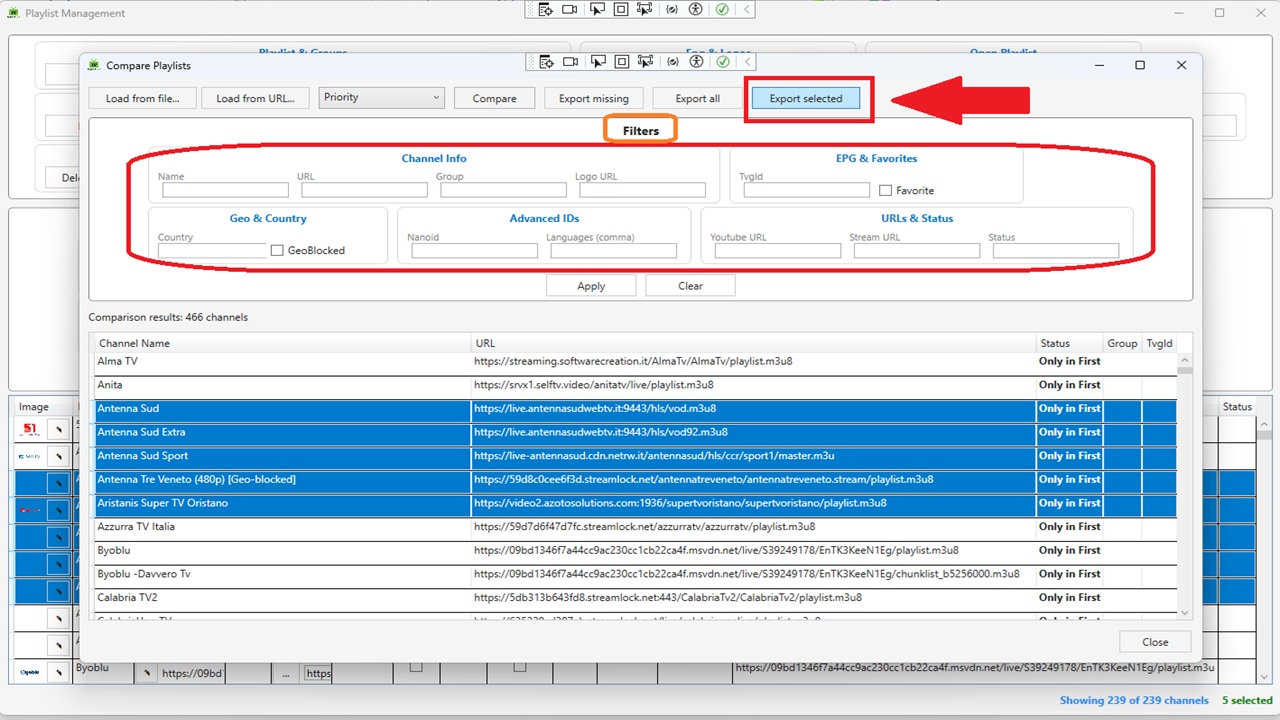
### 📊 Playlist Comparison (Compare)
- **New "Compare..." button** in the playlist editor toolbar.
- **Load second playlist** from local file (JSON/M3U) or from URL.
- **Full filter panel** – Same filters as the playlist editor: Name, URL, Group, Logo URL, TvgId, Favorite, Country, GeoBlocked, Nanoid, Languages (comma), Youtube URL, Stream URL, Status.
- **Compare by field** – Choose between: Name, URL, TvgId, Logo, Group, Country, Languages, Nanoid.
- **Smart (Priority) mode** – Intelligent matching with priority:
1. **URL** – normalized (removes protocol, domain, extensions, common segments). If at least one URL matches, channels are considered equal.
2. **Name** – normalized (removes quality indicators like `(1080p)`, `[HD]`, etc.).
3. **TvgId**
4. **Logo**
- **Results grid** – Shows status (`Only in First`, `Only in Second`, `In Both`). Click column headers to sort.
- **Export results**:
- **Export missing** – exports only channels present in the second playlist but not in the first (useful for integration).
- **Export all** – exports the entire second playlist.
- **Export selected** – exports only the rows selected in the results grid.
- Supported formats: JSON (all fields) and M3U.
### 🖥️ Playlist Editor Enhancements
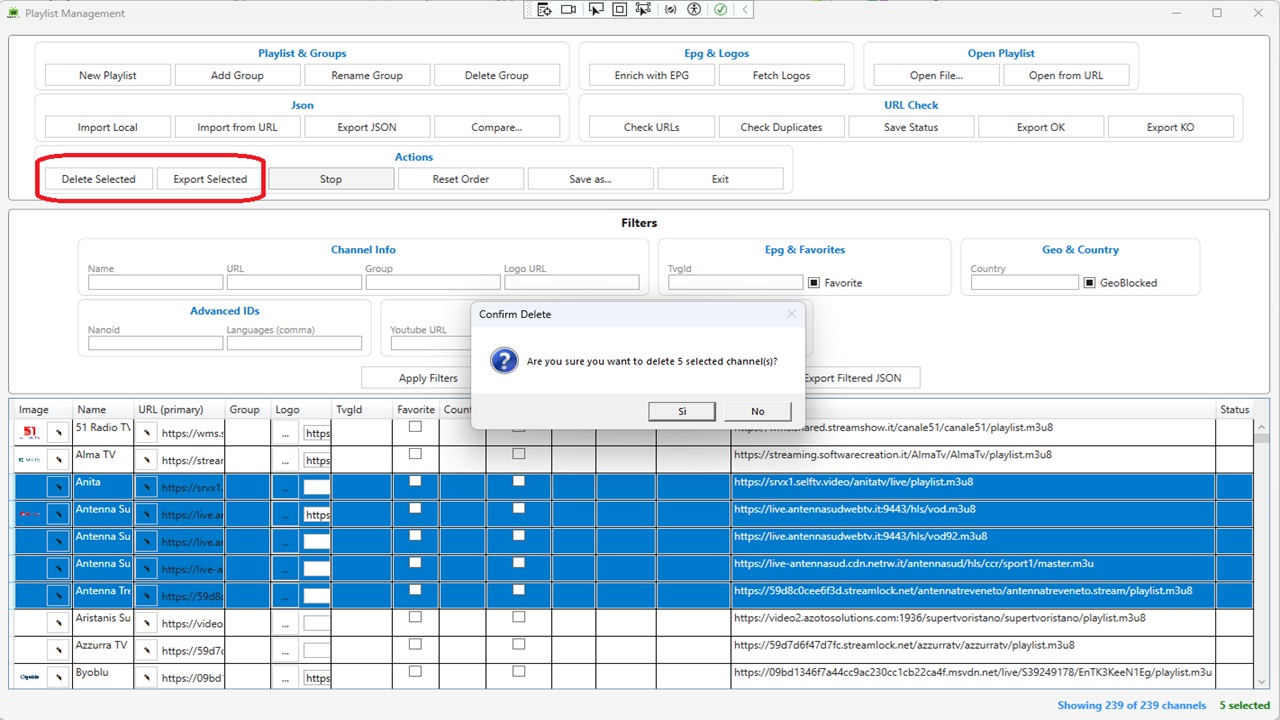
- **Export Selected** – New button in the Actions group. Exports only the channels selected in the DataGrid (M3U or JSON).
- **Delete Selected** – Supports multi‑row deletion with confirmation, automatically updates filters and channel count.
- **Stop Button** – Cancels long‑running operations (URL checks, logo fetching, etc.).
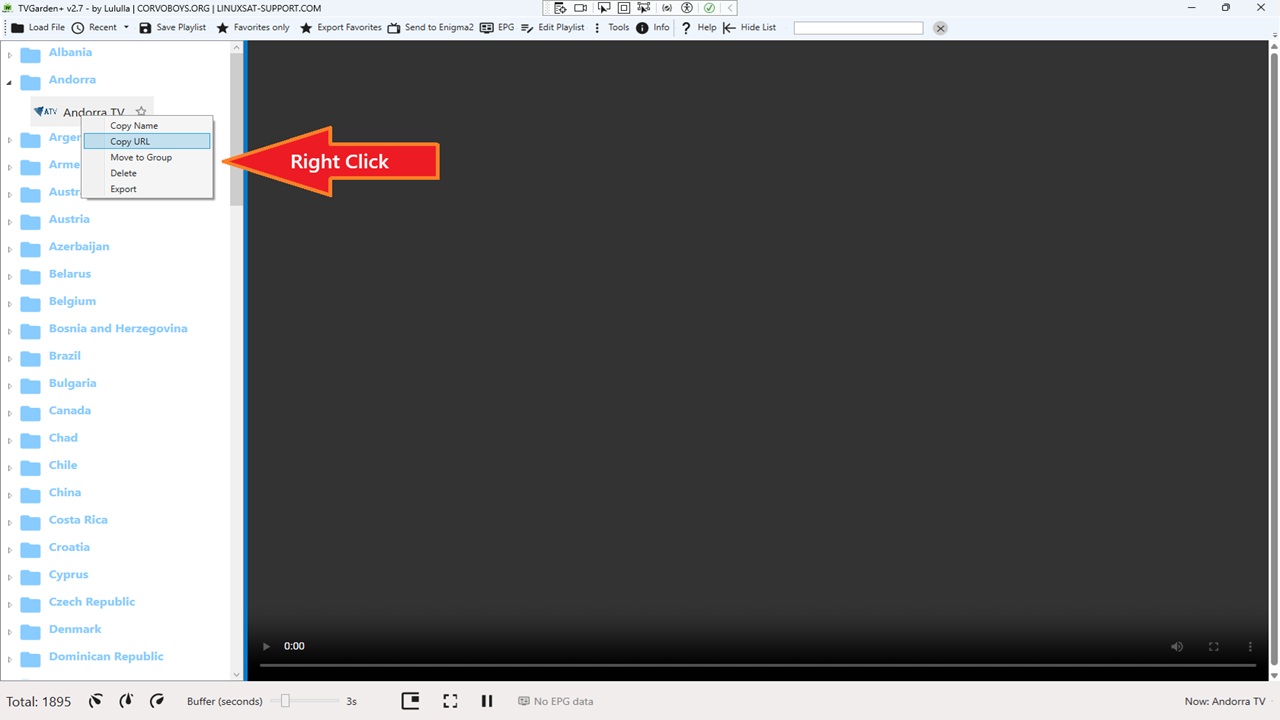
### 📋 Main Window Context Menu
Right‑click any channel in the left TreeView to access:
- **Copy Name** – Copies the channel name to the clipboard.
- **Copy URL** – Copies the channel URL to the clipboard.
- **Move to Group** – Opens a dialog to select an existing group (or create a new one) and moves the channel.
- **Delete** – Removes the selected channel with confirmation.
- **Export** – Exports the single channel as M3U or JSON.
### 🎨 Theme Fixes
- Added `DataGridCell` and `DataGridRow` selection styles to all 16 themes.
- Selected rows and cells now correctly display with the theme's `AccentBrush` background and white text, eliminating white‑on‑white or black‑on‑black visibility issues.
### 🐛 Bug Fixes
- Fixed DataGrid row selection – text no longer white‑on‑white (or black‑on‑black) across themes.
- Fixed URL comparison – matching now works URL‑by‑URL (any match = match).
- Fixed JSON import for deeply nested structures (e.g., `tvg.id`, `tvg.logo`, `group.title`, `http.referrer`).
### 🌐 New Translations
All new strings for filters, export selected, context menu, and comparison features are fully localizable via `LanguageManager`.
-
Version 2.7
- Lululla
- 48.2 MB
- 163 Downloads
## Changelog
## LiveGardenTVPlus – Changelog (v2.7)
### 📊 Playlist Comparison (Compare)
- **New "Compare..." button** in the playlist editor toolbar.
- **Load second playlist** from local file (JSON/M3U) or from URL.
- **Compare by field** – Choose between: Name, URL, TvgId, Logo, Group, Country, Languages, Nanoid.
- **Smart (Priority) mode** – Intelligent matching with priority:
1. **URL** – normalized (removes protocol, domain, extensions, common segments). If at least one URL matches, channels are considered equal.
2. **Name** – normalized (removes quality indicators like `(1080p)`, `[HD]`, etc.).
3. **TvgId**
4. **Logo**
- **Results grid** – Shows status (`Only in First`, `Only in Second`, `In Both`). Click column headers to sort.
- **Export results**:
- **Export missing** – exports only channels present in the second playlist but not in the first (useful for integration).
- **Export all** – exports the entire second playlist.
- Supported formats: JSON (all fields) and M3U.
### 📥 JSON Import Improvements
- **Support for nested structures** – Now recognizes paths like `tvg.id`, `tvg.logo`, `group.title`, `http.referrer`, etc.
- **Smart auto‑detection** – Assigns confidence scores to JSON properties to suggest the correct mapping.
- **Mapping persistence** – Mappings are saved per filename for future imports.
- **Mapping window** – Preview of the first 5 channels, manual add/remove of mappings.
### 🎨 Interface & Usability
- **Themes** – Added selection brushes (`HighlightBrushKey`, `HighlightTextBrushKey`) to all 16 themes. Selected text is now always readable.
- **Localization** – All new windows (Compare Playlists, Import JSON mapping) are fully translatable via `LanguageManager`.
### 🐛 Bug Fixes
- Fixed DataGrid row selection – text no longer white‑on‑white (or black‑on‑black) across themes.
- Fixed URL comparison – matching now works URL‑by‑URL (any match = match).
### Need more help?
Visit the [GitHub repository](https://github.com/OwnerPlugins/LiveGardenTVPlus) for updates and support.
-
Version 2.6
- Lululla
- 54.03 MB
- 205 Downloads
- Fixed Send to E2 – Now app work and no crash on send channels..
- Fix minor
- Logger added : C:\Users\%profile%\AppData\Local\LiveGardenTVPlus\Logs\
-
Version 2.5
- Lululla
- 52.71 MB
- 132 Downloads
## 📋 LiveGardenTVPlus – Changelog (v2.5)
- **Export OK / KO**
– Now prompts for output format (M3U or JSON) via SaveFileDialog with filter, preserving all tags/metadata.
- **Delete Selected**
– Allows multiple row deletion with confirmation, automatically updates filters and channel count.
- **Stop Button**
– Added to Playlist Editor to cancel long‑running operations (URL checks, logo fetching, etc.).
### Need more help?
Visit the [GitHub repository](https://github.com/OwnerPlugins/LiveGardenTVPlus) for updates and support.

-
Version 2.4
- Lululla
- 52.72 MB
- 145 Downloads
Telnet & Enigma2 Integration
- **Telnet Console** – Full terminal window to connect and send commands to your Enigma2 decoder.
- Persistent connection settings (host, port, username, password).
- Quick‑command list loaded from a JSON file (or editable XML), with categories for easy management.
- Command output displayed in real time.
- **Send playlist to Enigma2** – One‑click button in main toolbar.
- Converts the loaded playlist (M3U/JSON) into a valid Enigma2 bouquet (`userbouquet.name.tv`).
- Uploads the bouquet via FTP, automatically updates `/etc/enigma2/bouquets.tv` and reloads the channel list via Enigma2 web interface.
- Asks for a custom bouquet name and warns if the file already exists (option to overwrite).
- **EPG Enhancements**
- Local cache (24 hours) to avoid repeated downloads.
– EPG source selector directly in the EPG window.
– Date and time displayed in program grid.
– Search‑as‑you‑type with debouncing.
-
Version 2.2
- Lululla
- 52.38 MB
- 184 Downloads
# LiveGardenTVPlus – IPTV Player for Windows
---
## Changelog
## 📋 LiveGardenTVPlus – Changelog (v2.2)
### 🆕 New Features
- **Modern Help Window** – Replaced old MessageBox help with a fully translatable, expandable `HelpWindow`.
Includes sections: Playlist Loading, Playlist Editor, Player Controls, EPG & Logos, Settings, Themes, Updates, Credits.
Accessible via new `Help` button in main toolbar.
- **Total Channels Counter** – Added `TotalChannelsText` in status bar (leftmost).
Shows number of real channels (excludes "← Back to all groups" and other navigation items).
Updates dynamically when filtering (favorites only, search, drill‑down).
- **Favorites Only Toggle** – Replaced old checkbox with a `ToggleButton` styled uniformly with other toolbar buttons (icon + text).
Shows star icon and fully translatable text.
- **AboutWindow Full Translation** – Added `x:Name` to all labels and buttons; now fully localizable via `LanguageManager`.
Avatar GIF displays correctly (removed duplicate `Source` attribute).
### 🐛 Fixes
- **M3U online loading crash** – Restored `Task.Run` for playlist parsing (v1.6 behaviour).
Eliminated crash when loading remote M3U playlists.
- **Total counter correction** – Fixed total count to exclude pseudo‑groups and navigation items.
- **Theme picker colors** – Added proper colors for Pink, Cyan, Lime, Indigo themes in `ColorPickerWindow`.
- **Ambiguous `Channel` reference** – Removed `using System.Threading.Channels` conflict.
- **UI translations** – Completed all missing translations in toolbar, status bar, and context menus.
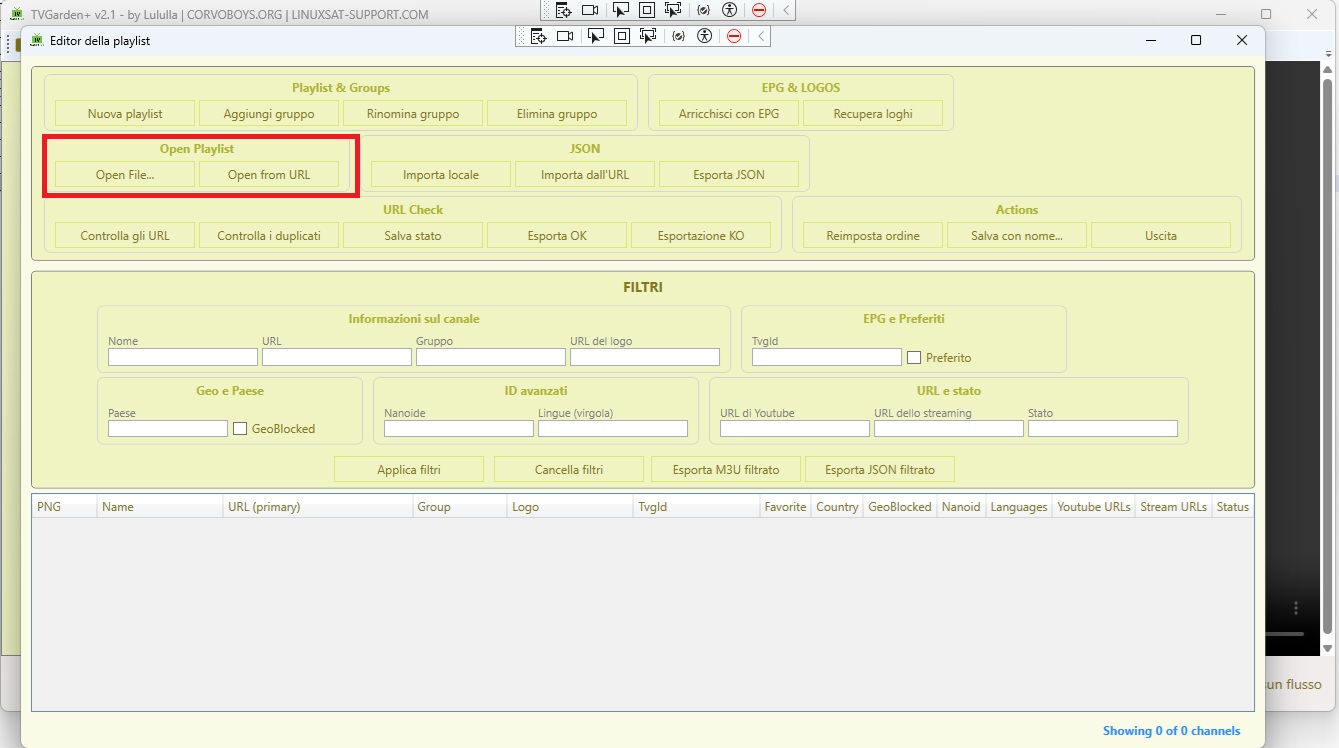
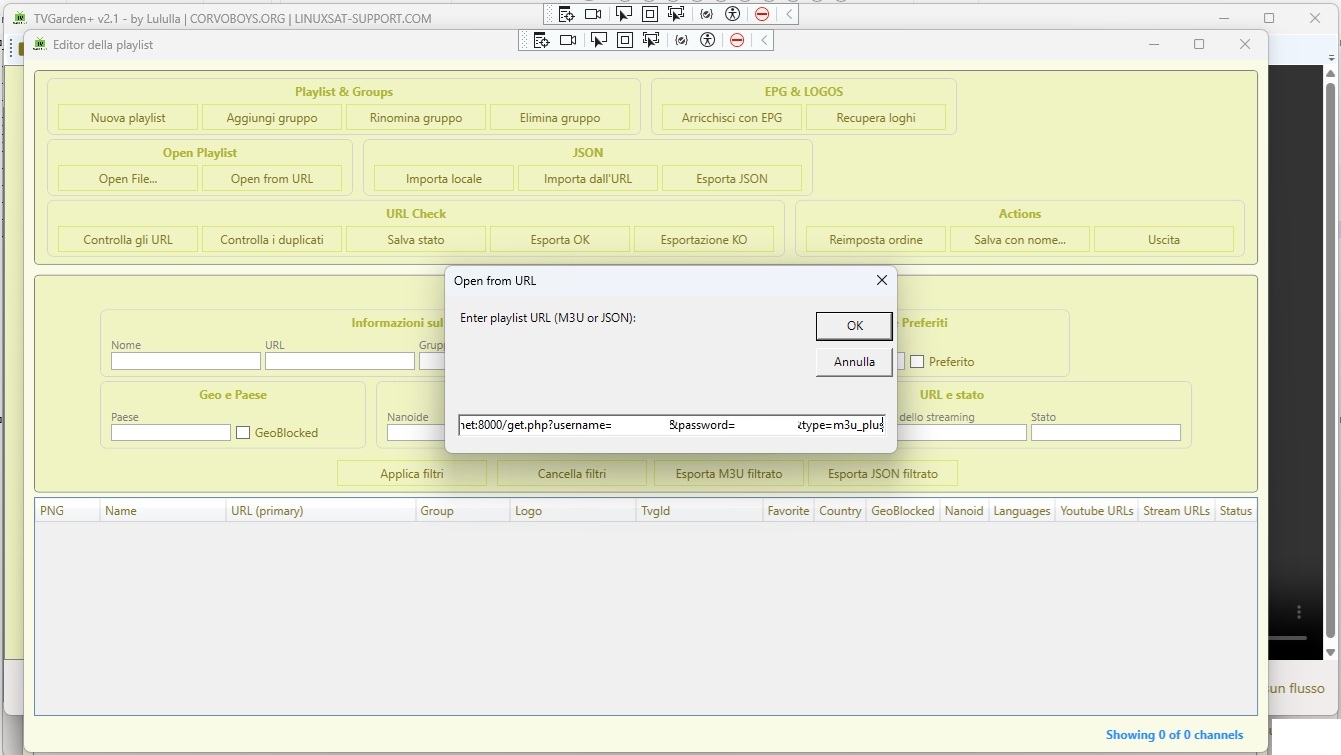
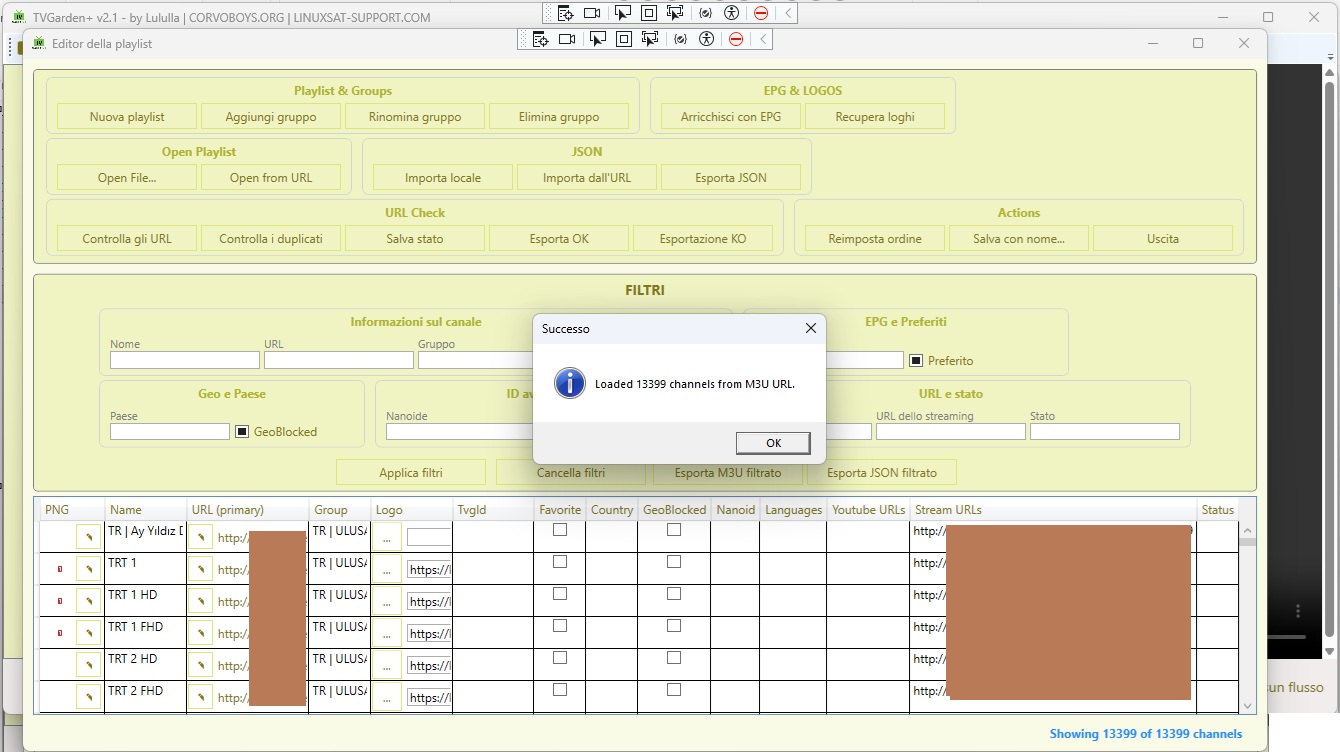
### Need more help?
Visit the [GitHub repository](https://github.com/OwnerPlugins/LiveGardenTVPlus) for updates and support.
-
Version 2.1
- Lululla
- 52.11 MB
- 174 Downloads
LiveGardenTVPlus – Changelog (v2.1)

📁 Flexible JSON Import
- Import Local JSON – New button
Import Localin the playlist editor.
Opens a mapping window that allows associating any JSON property with internal fields (name,stream_urls,logo_url,group,tvg_id, etc.).- Auto‑detect properties using common heuristics.
- Save mapping for reuse with similar files.
- Preview first 5 channels before import.
- Import JSON from URL – New button
Import from URLin the playlist editor.
Enter a remote (raw) JSON URL, download content and apply the same mapping procedure.
🔄 JSON Support in Main Loaders
- "Load File" button (ex "Load M3U"): now filters both
.m3u/.m3u8and.jsonfiles.
Auto‑detects format and directly imports JSON structured like the internal model (no mapping needed for compatible files). - "Load Online" button: now accepts both M3U and JSON URLs.
Content is analysed and handled accordingly.
Tooltip and button label updated to reflect dual support.
🖥️ Playlist Editor UI Improvements
- Added
Namecolumn to the DataGrid (previously missing).
Channel names are now visible immediately. - JSON group buttons renamed for clarity:
Import Local,Import from URL,Export JSON. - All labels are fully translatable via
LanguageManager. - Column sorting enabled for all columns, including template columns (URL primary, Logo, etc.).
- Reset Order button added to restore original channel order after sorting.
🐛 Fixes & Technical Improvements
- Fixed
PrimaryUrlproperty change notification inChannelJson.
The main URL now appears correctly in the grid right after import. - Robust handling of
nullvalues forgroup,tvg_id,country,nanoid,logo_urlduring JSON import. - JSON import now supports:
- Root arrays
[...] - Objects containing arrays e.g.,
{"channels":[...]} - Comma‑separated objects
{...},{...}(automatic wrapping into array).
- Root arrays
- Import no longer appends to existing list – it replaces the current playlist.
- Added debug output for easier troubleshooting.
🌐 New Translations
- All new strings added to language files (e.g.,
Load File,Import Local,Import from URL,Export JSON,Enter playlist URL (M3U or JSON):, etc.).
📝 Notes for Users
- JSON files imported from a remote URL must be publicly accessible and in raw format (e.g.,
raw.githubusercontent.com). - The mapping window is available only from the playlist editor; direct loading via
Load FileorLoad Onlineassumes the JSON already matches theChannelJsonmodel (avoids manual mapping for already compatible streams). - Click any column header to sort; use
Reset Orderbutton to revert to original order.
Help
Loading an M3U playlist from a URL
- Click the "Load Online" button on the main toolbar.
- Enter the full URL of the remote M3U playlist.
- The app will automatically detect the format and load the channels.
Example M3U URL (Italian channels):
https://raw.githubusercontent.com/OwnerPlugins/TivuStreamList/refs/heads/list/ios/playlist.m3uLoading a JSON playlist from a URL
- Click "Load Online" on the main toolbar.
- Paste the URL pointing to a raw JSON file.
- The app will recognise the JSON format and import the channels (structure must match the
ChannelJsonmodel).
Example JSON URL (Italian channels):
https://raw.githubusercontent.com/OwnerPlugins/famelack-data/main/tv/raw/countries/it.jsonImporting local JSON files with mapping
- Open the Playlist Editor (
Edit Playlistbutton). - Click "Import Local" (JSON group).
- Select a JSON file from your computer.
- A mapping window will appear – use "Auto-detect" to suggest field mappings or manually assign JSON properties to internal fields.
- Click "Import" to add the channels.
Importing JSON from a remote URL (with mapping)
- In the Playlist Editor, click "Import from URL".
- Enter the raw JSON URL.
- Map the fields (auto‑detect helps) and import.
Supported JSON structures
- Root array:
[ {...}, {...} ] - Object containing an array:
{ "channels": [...] } - Comma‑separated objects:
{...},{...}(automatically wrapped into an array)
Sorting and resetting order
- Click any column header to sort channels by that field.
- Click "Reset Order" (in the editor’s Action group) to revert to the original channel order.
Need more help?
Visit the GitHub repository for updates and support.
🚀 LiveGardenTVPlus – Changelog (v2.0)

🕘 Recent Playlists
- Recent files button – New button in the main toolbar (clock icon + “Recent”) that shows a popup list of the last 5 opened M3U files.
- Persistent list – The list of recent playlists is saved between sessions and updated each time you load a local M3U file.
- Quick access – Click any entry in the popup to reload the playlist immediately.
- Popup alignment – Both the “Recent” and “Tools” popups are now properly aligned to the left side of their respective buttons.
🎨 Interface & Usability
- Localization – All UI texts (EPG, logos, editor, settings, detail window, URL editor) translatable via
LanguageManager. Added language change event handling to all windows. - Clickable Credits – Links to CORVOBOYS.ORG and LINUXSAT-SUPPORT.COM.
-
Version 1.9
- Lululla
- 51.8 MB
- 118 Downloads
LiveGardenTVPlus – Changelog (v1.9)
🛠️ Playlist Editor Enhancements
- URL Check – Tests only filtered channels; shows deterministic progress bar. Channels with zero working URLs get status "FAIL".
- Export OK / FAIL – Export only working or failed channels (based on URL check).
- Enrich with EPG – Adds missing
tvg-idtags using fuzzy matching. - Check Duplicates – Detects duplicate URLs across channels.
- Multiple URLs per channel – Comma‑separated URLs in cell edit mode; stored as list in JSON.
- Channel Details Window – Double‑click row or click edit button to open a dedicated window with full channel details (name, URL, group, logo, tvg-id, favorite, country, geoblocked, languages, logo preview). Includes Previous / Next navigation through playlist and live logo preview update.
- Icon column – Small logo preview before channel name in the grid.
🎨 Interface & Usability
- Dynamic Theme Support – All windows respect the selected theme (16 themes + Light/Dark). Standard brush keys (
WindowBackgroundBrush,ForegroundBrush,ControlBackgroundBrush,BorderBrush,AccentBrush,AlternateRowBackgroundBrush) unified across all theme files. - Localization – All UI texts (EPG, logos, editor, settings, detail window, URL editor) translatable via
LanguageManager. Added language change event handling to all windows. - Progress Feedback – Indeterminate progress while downloading logos index; deterministic progress during Fetch Logos.
- Resizable Sidebar – Draggable
GridSplitterbetween channel list and player. - Clickable Credits – Links to CORVOBOYS.ORG and LINUXSAT-SUPPORT.COM.
🐛 Bug Fixes
- Fixed thread safety issues in timeshift timer and EPG parsing.
- Fixed export OK/FAIL after URL check – channels with zero working URLs now get "FAIL" status.
- Fixed theme colors in SettingsWindow and PlaylistEditorWindow (all controls now use
DynamicResource). - Fixed
UrlToImageConverterand other converters (syntax errors removed). - Fixed window background being black – added fallback brushes in App.xaml and unified theme keys across all theme files.
- Fixed language change event subscription (use
LanguageManager.LanguageChanged += ApplyLanguagewithout parameters). - Fixed channel details window counter positioning (moved below buttons, centered).
New Features & Improvements – Version 1.8
🖼️ Remote Logos Management
- Logo Source Selector – Choose from predefined repositories (OwnerPlugins/logos, picons/picons) or enter a custom URL in Settings.
- Subfolder Filtering – Limit logos to specific folders (SNP, PROVIDER, ALL) for faster matching.
- Fetch Logos – Automatically assign logos to playlist channels using fuzzy matching (Levenshtein distance) with adjustable threshold.
- Logo Picker Window – Browse available logos with search, thumbnails (on/off toggle), and double‑click selection. Virtualized list for performance.
- Manual Logo Assignment – Click the “...” button in the Logo cell to open the picker and assign a logo manually.
- Persistent Cache – Logos index and thumbnails are cached locally. First load is slower; subsequent loads are instant.
📺 EPG (Electronic Program Guide)
- Adjustable Matching Threshold – Slider in Settings (0.5 – 1.0) controls how strictly channel names are matched to EPG ids. Lower = more matches, higher = exact or very similar names.
- EPG Source Selector – Choose from multiple XMLTV files (epgshare01) or enter a custom URL (already present, now with threshold control).
🛠️ Playlist Editor Enhancements
- Unified Save As – Export playlist to M3U, JSON, or CSV from a single dialog.
- New Playlist Button – Create an empty playlist directly from the editor.
- Reorganized Toolbar – Buttons grouped into bordered sections (Playlist & Groups, URL Check, JSON, Filtered Export, EPG & LOGOS, Actions) for clarity.
- Enhanced Filters Section – Each filter group has its own border and label; each field has a descriptive label above it.
- Improved Export Logic – Channels without a valid URL are skipped when saving M3U (avoids empty entries).
- Group Management – Add, rename, delete groups with multi‑select support; new group creates an empty channel row.
🎨 Interface & Usability
- Dynamic Theme Support – All UI elements (ComboBoxes, filter labels, etc.) now respect the selected theme. Added fallback brushes to prevent black backgrounds.
- Progress Feedback – Deterministic progress bar during “Fetch Logos” (channel‑by‑channel) and indeterminate progress while downloading the logos index.
- Localization – All new texts (threshold labels, logos picker, editor buttons, filter labels) are translatable via LanguageManager.
🐛 Bug Fixes
- Fixed
NullReferenceExceptionin LogoPickerWindow and SettingsWindow (added null checks and Loaded event initialization). - Fixed M3U export – URLs are no longer missing; channels without a valid URL are skipped.
- Fixed PlaylistEditorWindow constructor – removed erroneous line that caused compile errors.
- Fixed theme colors in SettingsWindow (ComboBoxes and labels now follow the selected theme).
- Fixed filter section colors in PlaylistEditorWindow (text boxes and labels use dynamic resources).