


The SMPlayer Project

There are 13 replies in this Thread which was already clicked 5,060 times. The last Post () by W@Rp.

    • Official Post


    The SMplayer is intended as a substitute for the VLC player,
    have so streaming tested and go!
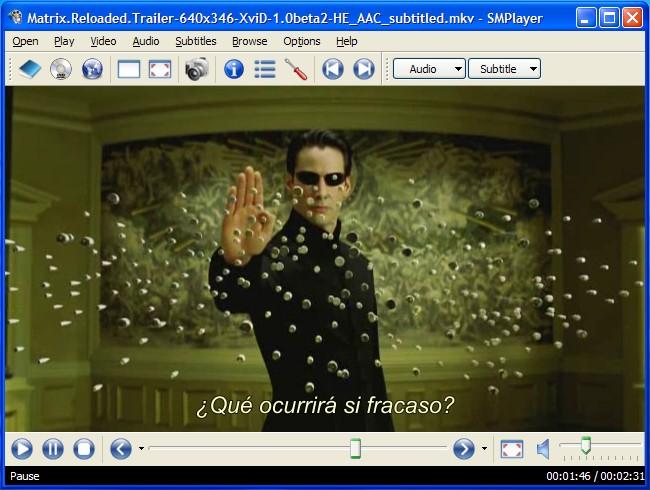


    SMPlayer intends to be a complete front-end for MPlayer, from basic features like
    playing videos, DVDs, and VCDs to more advanced features like support for MPlayer
    filters and more.


    One of the most interesting features of SMPlayer: it remembers the settings of all
    files you play. So you start to watch a movie but you have to leave... don't worry,
    when you open that movie again it will resume at the same point you left it, and
    with the same settings: audio track, subtitles, volume...


    Other additional interesting features:


    Version 0.7.1.4080 unstable (Mar 13, 2012)


    Version 0.7.1.


    This version include some bug fixes, some of them important. It's highly recommended to update.


    Fixes:
    * SMPlayer took more than 10 seconds to show when running for the very first time.
    * The links to download subtitles from Opensubtitles were wrong.
    * SMPlayer crashed in the favorite editor when trying to select a file if the KDE open dialog was used.
    * Some translations were missing in the Windows package.


    New:
    * By default the screenshots are saved in the user's pictures folder instead of the SMPlayer's config folder.
    * Now it's possible to change the opensubtitles server.
    * Youtube: seeking is slow with flv videos, so now flv videos have the lowest priority.
    * Youtube: now it's possible to search and download videos from youtube.
    This is provided by an external application (in linux you have to install
    an independent package: smtube).


    Download latest beta version


    Download latest beta 64 bit version


    Download portable version


    Download Linux version


    • Official Post

    SMPlayer 0.7.1.4233 beta

    31 Mar 2012[

    SMPlayer is a complete front-end for MPlayer, from basic features like playing videos, DVDs, VCDs to more advanced features like support for MPlayer filters, edl lists, and more.


    Download [ SMPlayer 0.7.1.4233 beta ]


    Download [ SMPlayer 0.7.1.4233 beta - x64 ]

    • Official Post

    SMPlayer 0.7.1.4269 beta


    4 Apr 2012


    Code
    • Fixes:
    - SMPlayer took more than 10 seconds to show when running for the very first time.
    - The links to download subtitles from Opensubtitles were wrong.
    - SMPlayer crashed in the favorite editor when trying to select a file if the KDE open dialog was used.
    - Some translations were missing in the Windows package.
    • New:
    - By default the screenshots are saved in the user's pictures folder instead of the SMPlayer's config folder.
    - Now it's possible to change the opensubtitles server.
    - Youtube: seeking is slow with flv videos, so now flv videos have the lowest priority.
    - Youtube: now it's possible to search and download videos from youtube. This is provided by an external application (in linux you have to install an independent package: smtube).


    Download [ SMPlayer 0.7.1.4269 beta ]

    • Official Post

    SMPlayer 16.8.0 / 16.8.0.8082 Unstable


    Latest version
    16.8.0 / 16.8.0.8082 Unstable (August 2016)


    * The playlist has been improved. Now it's possible to sort by any column. There's a new column, with the path of the file (or URL) (this allows you to sort the list by folder). Now it's possible to search (actually filter) in the playlist. And finally there's a new option to load a playlist from internet. As example, you can enter this URL: http://smplayer.info/onlinetv.php It will download a playlist with some online TV streams.
    * Bug fixes.


    DOWNLOAD SMPlayer

    • Official Post

    SMPlayer 16.8.0 / 16.8.0.8102 Unstable


    Latest version
    16.8.0 / 16.8.0.8102 Unstable (August 27, 2016)


    * The playlist has been improved. Now it's possible to sort by any column. There's a new column, with the path of the file (or URL) (this allows you to sort the list by folder). Now it's possible to search (actually filter) in the playlist. And finally there's a new option to load a playlist from internet. As example, you can enter this URL: http//smplayer.info/onlinetv.php It will download a playlist with some online TV streams.
    * Bug fixes
    .


    DOWNLOAD SMPlayer

    • Official Post

    SMPlayer 16.8.0 / 16.8.0.8123 Unstable


    Latest version
    16.8.0 / 16.8.0.8123 Unstable (September 02, 2016)


    The playlist has been improved. Now it's possible to sort by any column. There's a new column, with the path of the file (or URL) (this allows you to sort the list by folder). Now it's possible to search (actually filter) in the playlist. And finally there's a new option to load a playlist from internet. As example, you can enter this URL: http//smplayer.info/onlinetv.php It will download a playlist with some online TV streams.
    * Bug fixes.


    DOWNLOAD SMPlayer

    • Official Post

    SMPlayer 16.9.0


    Latest version
    16.9.0 (September 10, 2016)


    * New option to send the audio to the specified audio device. It can be useful to send the audio to a TV via a HDMI cable or wireless headphones via bluetooth.
    * Some improvements on the playlist. Now it's possible to hide any column (right click to see the options). The search field is also hidden by default, a new search button shows/hides it. This changes are intended to prevent the playlist window to be too wide. * Due to bugs and problems with Qt 5, the packages for Ubuntu are now built again with Qt 4 by default.
    * Bug fixes.


    DOWNLOAD SMPlayer

    • Official Post

    SMPlayer 16.9.0 / 16.9.0.8168 Unstable


    Latest version
    16.9.0 / 16.9.0.8168 Unstable (September 27, 2016)


    Quote

    * New option to send the audio to the specified audio device. It can be useful to send the audio to a TV via a HDMI cable or wireless headphones via bluetooth.
    * Some improvements on the playlist. Now it's possible to hide any column (right click to see the options). The search field is also hidden by default, a new search button shows/hides it. This changes are intended to prevent the playlist window to be too wide.
    * Due to bugs and problems with Qt 5, the packages for Ubuntu are now built again with Qt 4 by default.
    * Bug fixes.


    DOWNLOAD SMPlayer

    • Official Post

    SMPlayer 16.9.0 / 16.9.0.8235 Unstable


    Latest version
    16.9.0 / 16.9.0.8235 Unstable (October 30, 2016)


    * New option to send the audio to the specified audio device. It can be useful to send the audio to a TV via a HDMI cable or wireless headphones via bluetooth.
    * Some improvements on the playlist. Now it's possible to hide any column (right click to see the options). The search field is also hidden by default, a new search button shows/hides it. This changes are intended to prevent the playlist window to be too wide. * Due to bugs and problems with Qt 5, the packages for Ubuntu are now built again with Qt 4 by default.
    * Bug fixes.


    smplayer-16.9.0.8235-win32.exe


    smplayer-16.9.0.8235-x64.exe

    • Official Post

    SMPlayer 16.11


    Latest version
    16.11 (November 06, 2016)


    Quote

    * More options in Preferences -> Playlist to better control the behaviour of the playlist. Changing some of the options makes easier to use the playlist for bookmarks.
    * New option 'Show info on OSD' in View -> OSD (shortcut Shift + I). It displays info about the current media (resolution, bitrate...) on the OSD.
    * Bug fixes.


    smplayer-16.11.0-win32.exe


    smplayer-16.11.0-x64.exe

    • Official Post

    SMPlayer 17.1


    Latest version
    17.1 (January 20, 2017)


    smplayer-17.1.0-win32.exe


    smplayer-17.1.0-x64.exe

    • Official Post

    SMPlayer 17.1 / 17.1.0.8420 Unstable


    Latest version
    17.1 / 17.1.0.8420 Unstable (February 1, 2017)


    Quote

    * Fix for YouTube.
    * The option to delete files from the disk in the playlist is back but it's disabled by default (you can enable it in Preferences -> Playlist -> Misc.
    * On Linux SMPlayer now uses a different *** server, included in the packages, to serve files for Chromecast. If you installed the package webfs you can uninstall it now since SMPlayer won't use it anymore.
    * New translation: Norwegian Bokmål.


    smplayer-17.1.0.8420-win32.exe
    smplayer-17.1.0.8420-x64.exe

    • Official Post

    SMPlayer 17.2


    Latest version
    17.2 (February 3, 2017)


    Quote

    * Fix for YouTube.
    * The option to delete files from the disk in the playlist is back but it's disabled by default (you can enable it in Preferences -> Playlist -> Misc.
    * On Linux SMPlayer now uses a different *** server, included in the packages, to serve files for Chromecast. If you installed the package webfs you can uninstall it now since SMPlayer won't use it anymore.
    * New translation: Norwegian Bokmål.


    smplayer-17.2.0-win32.exe


    smplayer-17.2.0-x64.exe

    • Official Post

    SMPlayer 17.3


    Latest version
    17.3 (March 6, 2017)


    Quote

    * Add experimental support for subtitles for Chromecast.
    * Bug fixes


    smplayer-17.3.0-win32.exe


    smplayer-17.3.0-x64.exe

Your hub for Enigma2 tools and utilities

Get downloads, support, and toolboxes for configuration and management software on Windows, Linux, and Android. Find essential Enigma2 tools for all platforms. Access downloads, support, and utilities for Windows, Linux, and Android to manage your receiver.

Participate now!

Don’t have an account yet? Register yourself now and be a part of our community!
