NordVPN-Connector Plugin

There are 147 replies in this Thread which was already clicked 116,079 times. The last Post () by alen5555.

    • Official Post

    [Plugin] NordVPN-Connector v 0.1 for DreamOS and OE2.0


    In order to be able to manage my VPN provider NordVPN more comfortably on my E2 boxes, I made a plugin.


    So that I don't have to use it alone, I also make it available to those who also use NordVPN as a VPN provider and may need a plugin.


    The connection lists can be downloaded online in the plugin, so there is no need to add the lists manually.


    The appropriate connection is initiated by selecting the appropriate connection and pressing the OK button.


    The connections are sorted by country, on the left in the table you can select the countries,


    The respective connection options are then listed on the right.


    The plugin itself should be self-explanatory.
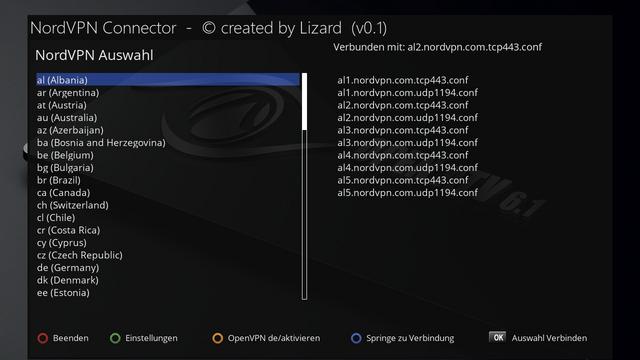

    image.jpg


    Exit the plug-in with "Exit" (red).


    With "Settings" (green) you get to the settings described below.


    With "OpenVPN de / activate" (yellow) you can temporarily activate or deactivate the VPN connection.


    With "Jump to connection" (blue) the list will jump to the currently used VPN connection, this is only for orientation.


    With "Select Connect" (OK) the selected connection is initiated from the list on the right.
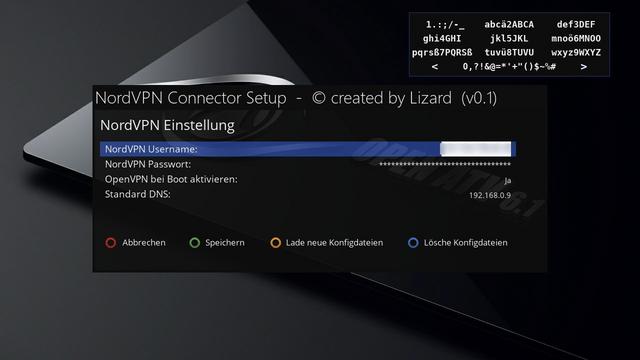

    image.jpg


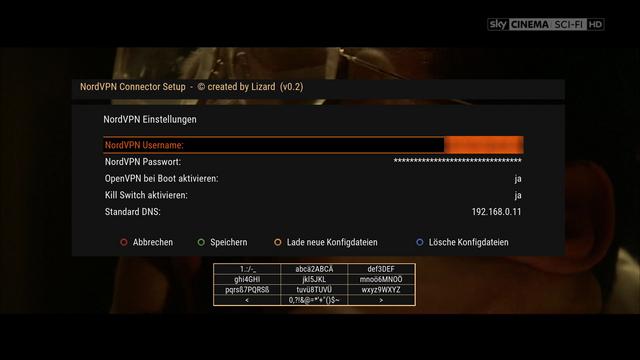
    The personal details for the NordVPN user account, such as username and password, are then entered under Settings.


    You can also choose whether OpenVPN should be activated at boot.


    The preselected DNS from the network settings is then entered as the standard DNS,


    this only needs to be changed if a different DNS is to be entered when OpenVPN is deactivated again.


    When the VPN connection is activated, the DNS of the VPN provider is also used as the DNS in order to bypass the DNS leak.


    when the VPN connection is deactivated again, the corresponding standard DNS is written back.


    With "Save" (green) the entered / set data are saved, with "Cancel" (red) the process can be canceled.


    With "Load new config files" (yellow) the config files are downloaded from NordVPN and processed.


    With "Delete config files" (blue) you can get rid of these config files and delete them from the box.


    On the subject of DNS leak:


    The best VPN connection is of no use if you make a direct DNS request to the DNS of the I-Net provider or even Google despite the activation of the VPN connection.


    Here is a small attempt to explain NordVPN:


    DNS explains:


    The Domain Name System (DNS) is responsible for resolving the domain names such as "nordvpn.com" into actual IP addresses that can be connected to.

    Basically, it translates the long, complex, and hard-to-remember numeric names of web servers into human language and vice versa.

    Whenever your computer needs access to a certain website, e.g. when entering "google.com" in your browser,

    it first contacts a DNS server and asks for the website's unique IP address.


    What is a DNS Leak ?:


    When trying to keep your online activities safe and private with a VPN service, it is extremely important to

    all traffic from your computer is routed over the VPN network.

    This includes the aforementioned DNS requests,

    these should go through the VPN tunnel to the DNS server of your VPN provider instead of the server of your Internet provider.

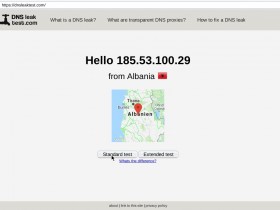
    DNS leaks can be tested e.g. at "dnsleaktest.com", here is a small example:


    Connection without VPN:
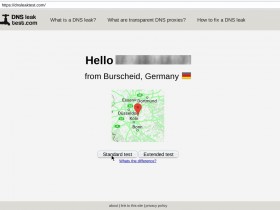

    image.jpg


    Connection with VPN:


    image.jpg


    Here it is nice to see that when the VPN connection is active, the DNS request also goes through the VPN connection,


    otherwise, as in the example, the German provider would be listed there.


    If the German provider should appear in the picture on the right, as in the example, there is a DNS leak.


    If this plug-in is to be installed on a freshly flashed image, then it is best to use Telnet beforehand with OE2.0:


    Code
    opkg update


    and at DreamOS a:

    Code
    apt-get update


    run so that the package list is updated, otherwise problems with the necessary dependencies can arise,


    that these cannot be found.


    This plug-in was tested for OE2.5 under the original Drembox image and under Merlin, so all other OE2.5 images should work as well.


    Images based on OE2.0 were tested with OpenNFR, OpenATV and OpenPli.


    Thanks Lizard
    • Official Post

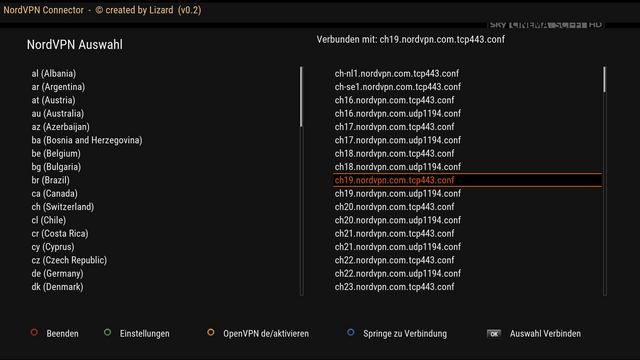
    NordVPN-Connector v 0.2


    Function extension "Kill Switch":

    To ensure that if the OpenVPN connection is interrupted, no further request can be made from or to the Internet,

    I have used iptables, which only allows requests for the currently used VPN-IP address and its DNS,

    For this, under Settings also "Kill Switch" must be activated.

    So if no OpenVPN connection is active when the kill switch is activated, no request to the internet is possible.


    Additionally fixed some bugs.


    image.jpg

    image.jpg


    Thanks Lizard

    • Official Post

    what are the needs for vpn in Dreambox or Enigma devices as most cccam servers don't allow it .?

    Lizard wrote:

    I doesn't use any cardsharing, i use it e.g. with MediaPortal and other things, that not really legal, i don't use it only on Dreambox or other Enigma Devices,
    i use it with all my Devices.

    • Official Post

    Привет, я могу изменить этот плагин и для других серверов У меня есть Для примера ЗЕМЛЯ VPN SERVER благодаря

    The Plugin it's only written for NordVPN, for other provider the code must be adapted

    • Official Post

    Any reason why UK servers are missing from the list?

    is as ''GB'' instead "UK",

    that's the reason why UK is missing

    the UK-Connections are present in next version.


    Now, if you want to fix it yourself, edit the "countries" file under "/usr/lib/enigma2/python/Plugins/Extensions/NordVPNConnector/configs" and search for United Kindom and change the first two Letters from ''GB'' to ''UK''

    • Official Post

    NordVPN-Connector v 0.3

    Function extension:
    Representation of the respective server load
    Optional presentation of the plugin in the menu
    Optional presentation of the server load in the menu
    Display if Killswitch is active
    Display of the currently used public IP address on the Internet
    Page-by-page scrolling with Page buttons now possible

    Various fixes regarding killswitch
    Other fixes


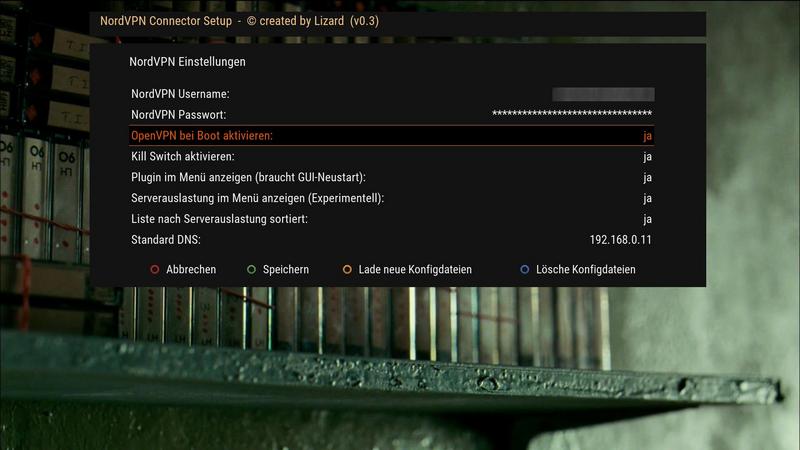
    Under Settings, additional options have been added:


    image.jpg


    Show plugin in the menu:
    This will display the plugin "NordVPN Connector" in the menu area for quicker selection,
    For this setting to take effect, a GUI restart is necessary.


    Show server usage in the menu:
    With this setting you can display the current utilization of the currently used server in the menu item.
    This point is currently marked as "Experimental", since the current load of the server is determined at the menu call,
    there may be a momentary delay in the display of the menu, but this also depends on which VPN server (country) is currently being used,
    the delays have different effects.
    This point is to be regarded as "Nice to have", who has problems with it or who it bothers, can / should disable this setting.

    List sorted by server load:
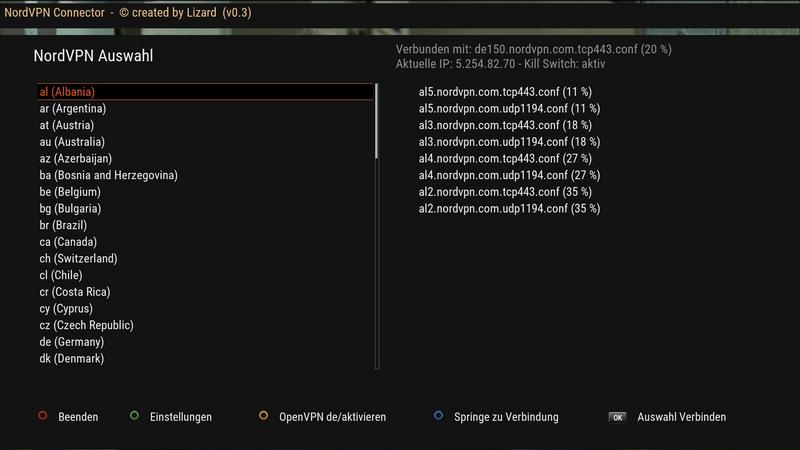
    This will sort the server selection list in ascending order of server load, to help make selecting a suitable server faster.


    Screenshot of the menu:

    image.jpg


    Screenshot of server selection (sorted):


    image.jpg


    In the open server selection above, the view of the server loads is updated every 60 seconds and sorted accordingly when sorting.


    Thanks Lizard

  • Is it possible to provide a feature in the plugin to filter the list by server type?


    By that I mean only display 'Standard VPN' and do not display other types like 'Double VPN', 'P2P', 'Dedicated IP' and 'Obfuscated'.


    Some type of filter drop down box might be the way to do it.


    Main use on enigma2 box would be 'Standard VPN' only.

    • Official Post

    NordVPN-Connector v 0.3-r3

    Fix:
    - Missing service files for OpenVPN at NN2 are added by the plugin.
    - Fixed MessageBox problem with VTi
    - Problem when entering username / password fixed.


    Thanks @Lizard

  • Im struggling with the installation of this plugin. tried 6 different images,all versions of plugin (v 0.1-0.3) and the box crashes hen i try to load the config files...it gets 3 countries (za,vietnam and usa) then it crashes. Is it because my box is a clone?? its a dm800 clone sim 201 ssl84d..i also tried to remove plugins in order to create more space,but no luck. Is there a image out there which have this plugin installed already?? I was gonna try and turn the box into a dedicated iptv box,so have no need for other plugins than the nordvpn one

  • Can someone make some instructions for dummies.

    Just from start to end .

    I installed the plugin and it says…. list is empty get conf. files


    thank you in advance


    SOLVED!!

    Edited 2 times, last by Eas_37 ().

  • Hi. I don't know German so I can't follow the instructions (even though I'm sure they're intuitive)

    Can you provide English instructions to setup and connect?

    Thanks!

Your source for Enigma2 VPN plugins

Find downloads, configuration guides, and support for tools that encrypt your connection and manage VPN services directly on your device. Protect your streaming and browsing. Discover and download Enigma2 VPN plugins for enhanced privacy and access, with dedicated setup support.

Participate now!

Don’t have an account yet? Register yourself now and be a part of our community!