Yesterday I tried recording from 4 Multi stream channels and didn't encounter any problems.
I tried twice to make sure and everything works


Yesterday I tried recording from 4 Multi stream channels and didn't encounter any problems.
I tried twice to make sure and everything works

Hi fairbird
I tried installing the Skin enigma2-plugin-skins-ax-blue-fhd.
Did not work. Nothing was installed, nor was there an error.
But I removed the "log" to analyze. See the attachment.
Thanks. Hugs.
Update feed ... Delete skins and install again.

is well satisfied with Black Hole 10.5
it's the best images fairbird has made
but is there a strange error in instant record
can only record a program if try to make a instant record more it just doesn't work
Again .. I will say no problems at all in recording feature.. Did you read this feedback (as he wrote and same what I wrote before)
The Crash from skin converter file not from image.. you should ask the owner of the skin.
From my side I do not have time for edit skins or plugin.
I tried again and it became available to change the skin.
But, unfortunately, the box crashed with a green screen restarting over and over again.
I will have to reinstall Image. I'm already doing it.
why reinstall the image? !you are using the receiver with enigma2 for the first time.  it is enough to register another skin in the setting along the path /etc/enigma2, or rather on iFlatFHD, and the receiver from the cyclic green will work again.
replace the file from the attachment on the way to the skin /usr/share/enigma2/AX_Blue_FHD_4/skin.xml and again, select this skin in the settings menu and use it, I fixed it, but of course you need to edit the converter AXBlueRefString.py There is no desire to do this
Display MoreHi fairbird
I tried again and it became available to change the skin.
But, unfortunately, the box crashed with a green screen restarting over and over again.
I will have to reinstall Image. I'm already doing it.
The Chrash Log is attached.
Hugs.
test this version 10/10
1_0_19_1331_3EF_1_C00000_0_0_0_20240621204437.jpg1_0_19_1331_3EF_1_C00000_0_0_0_20240621204449.jpg1_0_19_1331_3EF_1_C00000_0_0_0_20240621204501.jpg1_0_19_1331_3EF_1_C00000_0_0_0_20240621204513.jpg1_0_19_1331_3EF_1_C00000_0_0_0_20240621204526.jpg
haldborg You are as naive as a child, let's say I, like many users, have one or more favorite skins that I like and, if possible, install on those images that it is possible, sometimes I have to edit, adjust the skin to the image under test.I hope I explained it to you in an accessible and popular way so that the next time you want to write something you don't look stupid?! 
I tried again and it became available to change the skin.
But, unfortunately, the box crashed with a green screen restarting over and over again.
I will have to reinstall Image. I'm already doing it.
The Chrash Log is attached.
Hugs.
reason for you for an error is that you are not adapted to the Black Hole
therefore crash Black Hole
try skins from amy they make really nice skins they are in Black Hole
recommend Amy Nex Gen Smoke FHD for Black Hole
firebird image now works very well, you fixed the option to select the channels with the buttons on the remote through the satellite list. However, I see that there is no option for the picons to be visible in the channel list, please add this option and release an online update. Greetings!
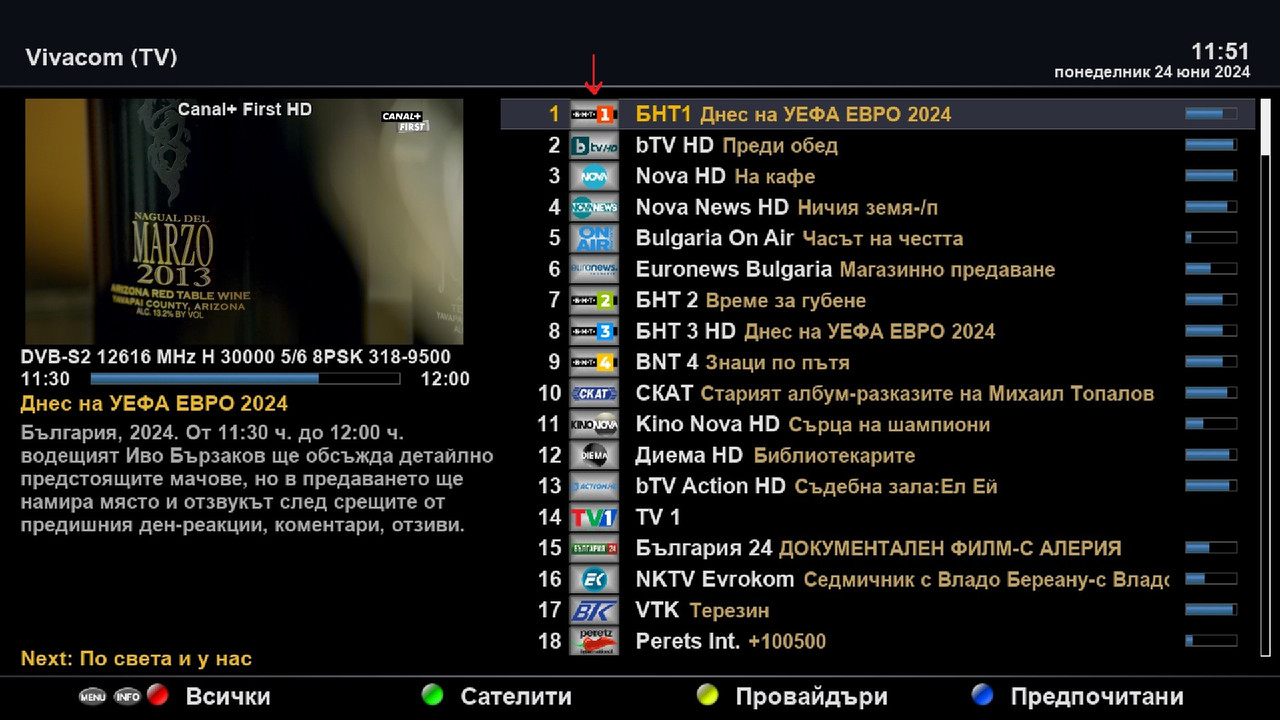

you fixed the option to select the channels with the buttons on the remote through the satellite list. However, I see that there is no option for the picons to be visible in the channel list, please add this option and release an online update. Greetin
:face screaming in fear: 
everything is in the user interface option, see the screenshots.... 
If box freezing or shutdown or restarting all these problems from hardware not software. As I told your before.
No one have any issues with recording only from your side.
And your replies proof that (Some time recording works fine. Some times you can not watching other channels and now new problem Dreambox just shutdown automatically).
You need to change your hard drive.
And if you using an image on external flash with multiboot. You need to test image on internal flash without multiboot plugins.
From my side I can not do any things. There are absolutely no problems with registration.
The image works very well.
What errors have been corrected in this update from 25/6??
I just want it to stop turning itself off
hi, it turns off if the temperature is high, I glued a heatsink on top of the processor and once it stopped turning off at 85 degrees it went to 64, I haven't turned it off for a year and it works perfectly.

Don’t have an account yet? Register yourself now and be a part of our community!



