

is it possible to successfully scan version 5.6.1 whit which tool Thanks

MAC SCAN PYTHON WINDOWS - Discussion & Support
- stamfordblue
- Thread is marked as Resolved.
There are 5,279 replies in this Thread which was already clicked 579,428 times. The last Post () by thosch1973.
-
-

is it possible to successfully scan version 5.6.1 whit which tool Thanks
What scanning tool do you mean?
FAWKES_EXPLOIT or not?
-
Does anyone have
illusion generation 2025 reup urgence 1.0.6? Thank you in advance.
-
scan mac portal.php version 5.6.1 no results found
-
scan mac portal.php version 5.6.1 no results found
I don't have this program, is it py or .exe?
-

Does anyone have
illusion generation 2025 reup urgence 1.0.6?
You're welcome.
-
/data/user/0/org.qpython.qpy3/files/bin/qpython3-android5.sh /storage/emulated/0/qpython/scripts3/FAWKES_EXPLOIT.py && exit
ipts3/FAWKES_EXPLOIT.py && exit <
Traceback (most recent call last):
File "/storage/emulated/0/qpython/scripts3/FAWKES_EXPLOIT.py", line 9, in <module>
import API_FAWKES_EXPLOIT
ModuleNotFoundError: No module named 'API_FAWKES_EXPLOIT'
1|:/ $
-
 Display More
/data/user/0/org.qpython.qpy3/files/bin/qpython3-android5.sh /storage/emulated/0/qpython/scripts3/FAWKES_EXPLOIT.py && exit
ipts3/FAWKES_EXPLOIT.py && exit <
Traceback (most recent call last):
File "/storage/emulated/0/qpython/scripts3/FAWKES_EXPLOIT.py", line 9, in <module>
import API_FAWKES_EXPLOIT
ModuleNotFoundError: No module named 'API_FAWKES_EXPLOIT'
1|:/ $
The error you're seeing:
means that the Python script
FAWKES_EXPLOIT.pyis trying to import a module namedAPI_FAWKES_EXPLOIT, but it can't find it.How to fix this:
-
Check if the module file exists:
-
Go to
/storage/emulated/0/qpython/scripts3/ -
Look for a file named
API_FAWKES_EXPLOIT.py -
If it's missing, that’s the issue. The script depends on it, and it’s not there.
-
-
If the file is missing:
-
You need to get the
API_FAWKES_EXPLOIT.pyfile. It might be part of a larger project or a dependency you forgot to copy to your QPython scripts folder.
-
-
If the file exists:
-
Make sure it is named exactly
API_FAWKES_EXPLOIT.py(case-sensitive). -
Ensure it is in the same directory as
FAWKES_EXPLOIT.py, or in a directory that’s added tosys.path.
-
-
Alternative solution:
-
You can try adding the folder to Python’s path in the script like this:
-
-
-
𝔽𝔸𝕎𝕂𝔼𝕊-𝕊𝕋𝔹𝕄𝔸ℂ-𝕍𝟚-𝔻𝕌𝕆_𝔽𝕀𝕏
𝔾ℍ𝕆𝕊𝕋 𝕄𝕌𝕃𝕋𝕀 𝕊ℂ𝔸ℕᵥ⁵
FAWKES-STBMAC-V2-DUO_FIX.zip
GhostMultiScanᵥ⁵.zip -

Does anyone have
illusion generation 2025 reup urgence 1.0.6?
You're welcome.
Thank you very much

-
-
Display More
/data/user/0/org.qpython.qpy3/files/bin/qpython3-android5.sh /storage/emulated/0/qpython/scripts3/FAWKES_EXPLOIT.py && exit
ipts3/FAWKES_EXPLOIT.py && exit <
Traceback (most recent call last):
File "/storage/emulated/0/qpython/scripts3/FAWKES_EXPLOIT.py", line 9, in <module>
import API_FAWKES_EXPLOIT
ModuleNotFoundError: No module named 'API_FAWKES_EXPLOIT'
1|:/ $
FAWKES_EXPLOIT It's Exploit50
Exploit50 test not working
But FAWKES_EXPLOIT works.
ℂ𝕆ℕ𝔽𝕀𝔾 𝔽𝔸𝕎𝕂𝔼𝕊_𝔼𝕏ℙ𝕃𝕆𝕀𝕋 & 𝔸ℙ𝕀_𝔽𝔸𝕎𝕂𝔼𝕊_𝔼𝕏ℙ𝕃𝕆𝕀𝕋 ℙ𝕐
𝐄𝐃𝐈𝐓 𝐅𝐎𝐑 𝐖𝐈𝐍𝐃𝐎𝐖𝐒 & 𝐒𝐂𝐀𝐍 𝐖𝐈𝐓𝐇 𝐋𝐈𝐍𝐊 𝐌𝟑𝐔 𝐎𝐍𝐋𝐈𝐍𝐄
🤴▂▂▂✯𝐅𝐀𝐖𝐊𝐄𝐒✯𝐄𝐗𝐏𝐋𝐎𝐈𝐓✯▂▂▂🤴
❪❪ 𝐅𝐀𝐖𝐊𝐄𝐒 ❦ 𝐄𝐗𝐏𝐋𝐎𝐈𝐓 ❫❫
✪ P ➛ http://x2caverinhas.store/c/
✪ R ➛ http://x2caverinhas.store/c/
✪ Port ➛ 8080
✪ User ➛ ale4257
✪ Pass ➛ 92524257aaa
✪ Exᴘ ➛ 06.Jul.2025
✪ Status ➛ 𝗔𝗖𝗧𝗜𝗩𝗘 💚
✪ Cᴏɴɴ ➛ ᴀᴄᴛ: 0 ⁃ ᴍᴀx: 2
✪ TZᴏɴᴇ ➛ America São Paulo Brazil 🇧🇷
✦ Gᴇᴛ-ᴘʏ👇🏼 𝗙𝗔𝗪𝗞𝗘𝗦-ᴘʏ
✪ [ ❛ https://tinyurl.com/FawkesIPTV ❟ ]
✪ ᴍɜᴜ-ᴠᴀʟɪᴅ ➛ ONLINE
▄▄︻デ𝗠𝟯𝗨🔱𝐋𝐢𝐧𝐤1═─※ http://x2caverinhas.store/get.…92524257aaa&type=m3u_plus
✪ 𝐋𝐈𝐕𝐄●𝐋𝐈𝐒𝐓 ✪
««◌»»EM DESTAQUE««◌»»POWER COUPLE 2025««◌»»GLOBO««◌»»GLOBO +««◌»»RECORD««◌»»SBT««◌»»BAND««◌»»ABERTOS««◌»»CANAIS 4K««◌»»NOTICIAS««◌»»PREMIERE««◌»»SPORTV & BAND SPORTS««◌»»ESPN««◌»»ESPORTES PPV««◌»»NSPORTS & GOAT««◌»»PRIME & PARAMOUNT+««◌»»DAZN & TNT ESPORTS««◌»»DISNEY+ & HBO MAX««◌»»COMBATE & UFC PASS««◌»»FORMULA 1««◌»»TELECINE´S««◌»»HBO ««◌»»FILMES E SÉRIES««◌»»DOCUMENTÁRIOS««◌»»VARIEDADES & MÚSICAS««◌»»INFANTIS««◌»»CINE SKY««◌»»RELIGIOSOS««◌»»PROGRAMAS 24H««◌»»DESENHOS 24H««◌»»ANIMES 24H««◌»»LATINOS««◌»»EUROPA««◌»»PORTUGAL««◌»»USA««◌»»NBA TIMES««◌»»NBA««◌»»NFL««◌»»NHL««◌»»ADULTOS««◌»»ADULTOS 24H««◌»»RÁDIOS««◌»»#𝕃𝕀𝕍𝔼
-
Display More
Display More
/data/user/0/org.qpython.qpy3/files/bin/qpython3-android5.sh /storage/emulated/0/qpython/scripts3/FAWKES_EXPLOIT.py && exit
ipts3/FAWKES_EXPLOIT.py && exit <
Traceback (most recent call last):
File "/storage/emulated/0/qpython/scripts3/FAWKES_EXPLOIT.py", line 9, in <module>
import API_FAWKES_EXPLOIT
ModuleNotFoundError: No module named 'API_FAWKES_EXPLOIT'
1|:/ $
FAWKES_EXPLOIT It's Exploit50
Exploit50 test not working
But FAWKES_EXPLOIT works.
ℂ𝕆ℕ𝔽𝕀𝔾 𝔽𝔸𝕎𝕂𝔼𝕊_𝔼𝕏ℙ𝕃𝕆𝕀𝕋 & 𝔸ℙ𝕀_𝔽𝔸𝕎𝕂𝔼𝕊_𝔼𝕏ℙ𝕃𝕆𝕀𝕋 ℙ𝕐
𝐄𝐃𝐈𝐓 𝐅𝐎𝐑 𝐖𝐈𝐍𝐃𝐎𝐖𝐒 & 𝐒𝐂𝐀𝐍 𝐖𝐈𝐓𝐇 𝐋𝐈𝐍𝐊 𝐌𝟑𝐔 𝐎𝐍𝐋𝐈𝐍𝐄
🤴▂▂▂✯𝐅𝐀𝐖𝐊𝐄𝐒✯𝐄𝐗𝐏𝐋𝐎𝐈𝐓✯▂▂▂🤴
❪❪ 𝐅𝐀𝐖𝐊𝐄𝐒 ❦ 𝐄𝐗𝐏𝐋𝐎𝐈𝐓 ❫❫
✪ P ➛ http://x2caverinhas.store/c/
✪ R ➛ http://x2caverinhas.store/c/
✪ Port ➛ 8080
✪ User ➛ ale4257
✪ Pass ➛ 92524257aaa
✪ Exᴘ ➛ 06.Jul.2025
✪ Status ➛ 𝗔𝗖𝗧𝗜𝗩𝗘 💚
✪ Cᴏɴɴ ➛ ᴀᴄᴛ: 0 ⁃ ᴍᴀx: 2
✪ TZᴏɴᴇ ➛ America São Paulo Brazil 🇧🇷
✦ Gᴇᴛ-ᴘʏ👇🏼 𝗙𝗔𝗪𝗞𝗘𝗦-ᴘʏ
✪ [ ❛ https://tinyurl.com/FawkesIPTV ❟ ]
✪ ᴍɜᴜ-ᴠᴀʟɪᴅ ➛ ONLINE
▄▄︻デ𝗠𝟯𝗨🔱𝐋𝐢𝐧𝐤1═─※ http://x2caverinhas.store/get.…92524257aaa&type=m3u_plus
✪ 𝐋𝐈𝐕𝐄●𝐋𝐈𝐒𝐓 ✪
««◌»»EM DESTAQUE««◌»»POWER COUPLE 2025««◌»»GLOBO««◌»»GLOBO +««◌»»RECORD««◌»»SBT««◌»»BAND««◌»»ABERTOS««◌»»CANAIS 4K««◌»»NOTICIAS««◌»»PREMIERE««◌»»SPORTV & BAND SPORTS««◌»»ESPN««◌»»ESPORTES PPV««◌»»NSPORTS & GOAT««◌»»PRIME & PARAMOUNT+««◌»»DAZN & TNT ESPORTS««◌»»DISNEY+ & HBO MAX««◌»»COMBATE & UFC PASS««◌»»FORMULA 1««◌»»TELECINE´S««◌»»HBO ««◌»»FILMES E SÉRIES««◌»»DOCUMENTÁRIOS««◌»»VARIEDADES & MÚSICAS««◌»»INFANTIS««◌»»CINE SKY««◌»»RELIGIOSOS««◌»»PROGRAMAS 24H««◌»»DESENHOS 24H««◌»»ANIMES 24H««◌»»LATINOS««◌»»EUROPA««◌»»PORTUGAL««◌»»USA««◌»»NBA TIMES««◌»»NBA««◌»»NFL««◌»»NHL««◌»»ADULTOS««◌»»ADULTOS 24H««◌»»RÁDIOS««◌»»#𝕃𝕀𝕍𝔼
Did you manage to get the API_FAWKES_EXPLOIT ? for FAWKES_EXPLOIT.py?
-
 Display More
Display More
Display More
Display More
Display More/data/user/0/org.qpython.qpy3/files/bin/qpython3-android5.sh /storage/emulated/0/qpython/scripts3/FAWKES_EXPLOIT.py && exit
ipts3/FAWKES_EXPLOIT.py && exit <
Traceback (most recent call last):
File "/storage/emulated/0/qpython/scripts3/FAWKES_EXPLOIT.py", line 9, in <module>
import API_FAWKES_EXPLOIT
ModuleNotFoundError: No module named 'API_FAWKES_EXPLOIT'
1|:/ $
FAWKES_EXPLOIT It's Exploit50
Exploit50 test not working
But FAWKES_EXPLOIT works.
ℂ𝕆ℕ𝔽𝕀𝔾 𝔽𝔸𝕎𝕂𝔼𝕊_𝔼𝕏ℙ𝕃𝕆𝕀𝕋 & 𝔸ℙ𝕀_𝔽𝔸𝕎𝕂𝔼𝕊_𝔼𝕏ℙ𝕃𝕆𝕀𝕋 ℙ𝕐
𝐄𝐃𝐈𝐓 𝐅𝐎𝐑 𝐖𝐈𝐍𝐃𝐎𝐖𝐒 & 𝐒𝐂𝐀𝐍 𝐖𝐈𝐓𝐇 𝐋𝐈𝐍𝐊 𝐌𝟑𝐔 𝐎𝐍𝐋𝐈𝐍𝐄
🤴▂▂▂✯𝐅𝐀𝐖𝐊𝐄𝐒✯𝐄𝐗𝐏𝐋𝐎𝐈𝐓✯▂▂▂🤴
❪❪ 𝐅𝐀𝐖𝐊𝐄𝐒 ❦ 𝐄𝐗𝐏𝐋𝐎𝐈𝐓 ❫❫
✪ P ➛ http://x2caverinhas.store/c/
✪ R ➛ http://x2caverinhas.store/c/
✪ Port ➛ 8080
✪ User ➛ ale4257
✪ Pass ➛ 92524257aaa
✪ Exᴘ ➛ 06.Jul.2025
✪ Status ➛ 𝗔𝗖𝗧𝗜𝗩𝗘 💚
✪ Cᴏɴɴ ➛ ᴀᴄᴛ: 0 ⁃ ᴍᴀx: 2
✪ TZᴏɴᴇ ➛ America São Paulo Brazil 🇧🇷
✦ Gᴇᴛ-ᴘʏ👇🏼 𝗙𝗔𝗪𝗞𝗘𝗦-ᴘʏ
✪ [ ❛ https://tinyurl.com/FawkesIPTV ❟ ]
✪ ᴍɜᴜ-ᴠᴀʟɪᴅ ➛ ONLINE
▄▄︻デ𝗠𝟯𝗨🔱𝐋𝐢𝐧𝐤1═─※ http://x2caverinhas.store/get.…92524257aaa&type=m3u_plus
✪ 𝐋𝐈𝐕𝐄●𝐋𝐈𝐒𝐓 ✪
««◌»»EM DESTAQUE««◌»»POWER COUPLE 2025««◌»»GLOBO««◌»»GLOBO +««◌»»RECORD««◌»»SBT««◌»»BAND««◌»»ABERTOS««◌»»CANAIS 4K««◌»»NOTICIAS««◌»»PREMIERE««◌»»SPORTV & BAND SPORTS««◌»»ESPN««◌»»ESPORTES PPV««◌»»NSPORTS & GOAT««◌»»PRIME & PARAMOUNT+««◌»»DAZN & TNT ESPORTS««◌»»DISNEY+ & HBO MAX««◌»»COMBATE & UFC PASS««◌»»FORMULA 1««◌»»TELECINE´S««◌»»HBO ««◌»»FILMES E SÉRIES««◌»»DOCUMENTÁRIOS««◌»»VARIEDADES & MÚSICAS««◌»»INFANTIS««◌»»CINE SKY««◌»»RELIGIOSOS««◌»»PROGRAMAS 24H««◌»»DESENHOS 24H««◌»»ANIMES 24H««◌»»LATINOS««◌»»EUROPA««◌»»PORTUGAL««◌»»USA««◌»»NBA TIMES««◌»»NBA««◌»»NFL««◌»»NHL««◌»»ADULTOS««◌»»ADULTOS 24H««◌»»RÁDIOS««◌»»#𝕃𝕀𝕍𝔼
Did you manage to get the API_FAWKES_EXPLOIT ? for FAWKES_EXPLOIT.py?
ok, friend
-
-
 Quote
QuoteYou have to re-edit it for it to work.
-
-
SHAMNA-Win-ANDROID
Tested & vworking!
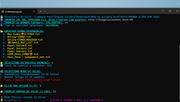
-

weerakit
HI MY FRIEND CAN YOU MAKE THIS PY FOR WINDOWS
THNX
-
SHAMNA-Win-ANDROID
Tested & vworking!
I POST WIN PC VERSION
-

SHAMNA-Win-ANDROID
Tested & vworking!
I POST WIN PC VERSION
Great, what app are you using to convert .py to .exe?
-
Your hub for IPTV & streaming support.
Get help with Android apps, Smart TV setup, m3u playlists, channel lists, and finding reliable live streaming websites. Master IPTV streaming on all devices. Find downloads, setup tutorials, and community support for apps, Smart TVs, and m3u channel lists.



