Gemini 4.2 backup image

There are 60 replies in this Thread which was already clicked 10,654 times. The last Post () by Olimpiacos.

  • The Gm3 feed is active and instructions to follow just above from mihaip have been indicated.


    But I don't really know if in the current condition of your dreambox it is possible to do so. You don't have an AIO image in flash.


    You could take a look or, perhaps, even ask for advice at the link below. Putting a non-original image into the flash of a Dreamone or Dreamtwo and then using an unsupported method to get GPT partitioning I don't think that's a good idea.


    Dreambox One rote led blinkt - Dreambox Forum
    Hallo, kann mir einer behilflich sein? Mein Kumpel hat eine DM One und Open ATV ! Da hat er ein Update gemacht und nun blinkt die Box rot! Kann man die Box…
    dreambox.de
  • My box already partitioned with openatv but still accept os Aio image in flash, I'm not sure if gutmine method still useable in my case, my the only issue now is to upgrade the BL over 106 version and all will be fine I guess

  • If your box still accepts flash AIO image, I think you can put RL 124 after installing Gutemine feeds.


    Among other things, the Rescue Loader 124 performs checks that previous versions do not do to prevent the dreambox from being damaged. It does not allow return to the 104 loader if you still have GPT partitioning. Returning to the 104 loader without first having legacy partitioning would render the box unusable.


    If you put the Rescue Loader 124, I recommend that you always have AIO image in flash 0.


    Edit:

    You can take AIO image with Gp4.2 panel from the link below if you want.


    https://i-have-a-dreambox.com/filebase/

    Edited once, last by disa51 ().

  • Thanks, i will try that today, can you please advise step by step instructions, how to add gutmain feed and what to do after that, i just want to make sure i will not do wrong step while trying


    Thx

  • I repeat again ! I'm just presenting my experience at the time ... 3 years ago !

    I'm not aware about the actual status of the servers involved ... neither

    @Gutemine's nor OpenATV !!! At the time ... for me , all was functioning !!!

  • I repeat again ! I'm just presenting my experience at the time ... 3 years ago !

    I'm not aware about the actual status of the servers involved ... neither

    @Gutemine's nor OpenATV !!! At the time ... for me , all was functioning !!!

    thanks dear for all your help.... totally understand... what works today might not work tmrw..regards

  • I can't follow you step by step, as I don't even know what the script you entered to get the 106 loader you currently have did on the Dreambox, and also because it's an unofficial loader modification. Everyone is responsible for what they do if something goes wrong.


    I can confirm that the Gutemine "Gm3" feed is active, but the Gutemine AIO feed is no longer available. You can also check this at the following links:


    Gemfury


    Gemfury


    The commands to enter to install the Gm3 feeds on dreamone or dreamtwo are those indicated by mihaip and that is:


    echo "deb [trusted=yes] https://repo.fury.io/gm3/ ./" > /etc/apt/sources.list.d/gutemine.list

    apt-get update

    apt-get install enigma2-plugin-systemplugins-gutemine


    They should be inserted via telnet/putty only after having installed the AIO image in "flash 0" and performed the initial configuration.


    Edit:

    You can also find the instructions in the Gutemine readme at the link:


    Gemfury

    Edited once, last by disa51 ().

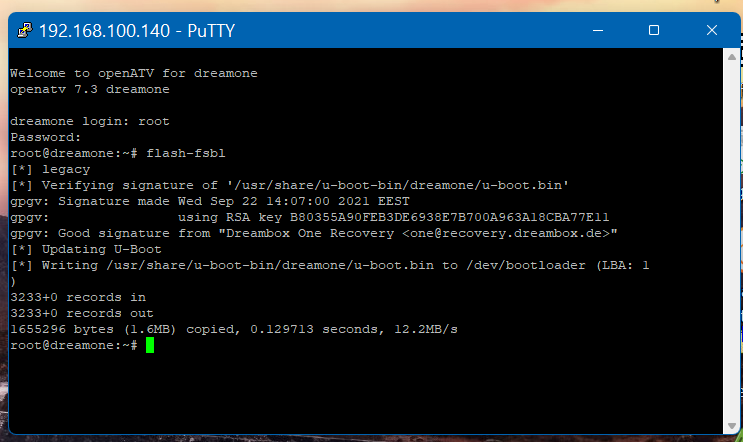
  • Code
    flash-fsbl


    2.png


    This happen at 24 sept 2023 !!! officially that command still exists !

    update the file system to GPT if needed and write the newest BL !

    something wrong with device.... I got error unknown bootloader version


  • Thanks bro, i mange to get the bootloader 124 page ( same the picture attached but for dreamone), but still did not take any action, i thought it will be good idea to make rescue and emergency sdcard first,


    With regards to the partitions, sine my flash already have 4 slot, I might go for 4 gpt option .. hope it will work.

  • Before performing the GPT partitioning, you should update the front processor and bootloader, as shown in the image you posted. I don't know if you can do this by clicking on the green text in the image.


    Is that your screenshot? If you have four partitions, as you say, you should already have GPT partitioning. I don't understand your current situation. From the screenshot, it looks like you're still in legacy mode.


    Edit: The screenshot isn't yours. It's from a DreamTwo. So you don't have the 124 loader yet. Frankly, I don't know what you can or can't do. I read that you also got an error message. I can't offer any advice. Someone who knows what was done on the DreamOne with the script you ran back then should be able to help.

    Edited once, last by disa51 ().

  • Can you briefly explain how you proceeded? It might be useful to someone else.

    offcourse>>> thats what I'm intend to do actually:


    first of all, I used openatv script to get multiboot from BL104, it work fine after all updating my BL to 106 with only 3 partitions, I want to incrase the slots to 4 at least and while trying to do that, I missed up and multiboot disappears, solts gone, whenever I want to solve the issue always get the error of (unkown bootloader version)


    what remain active in the box is only partition 0 with 4 gb approx in size which luckly accept dreamos AIO image normally.


    I flash AIO gimini 4.2, do all the setups, install gutmine feed and follow all the setps listed in boxparites fourm carefully. after all I got BL 124,


    selecting expert option on the recovery BL124 web page:

    - I update FP

    - I update BL but it show an error on the 1st attemp due to an issue in uboot, then in the 2nd time I select force to rewrite and it was successful.

    - I redo the update for FP and BL again just to make sure no issue before proceeding with GPT partitions.>>> all okay.

    - I select 5 GPT image partitions and it was successful

    - I install OS image in partition 0 as first image and do all the normal setup

    - I reboot and the box show the boot selection of slots.

    - in recovery web page showing 5 slots that can be used to install images.


    thanks to all for the help.

  • It's nice that you've solved it. I don't know if you've noticed: from the recovery mode you can flash the other partitions as well, after you've activated the affected partition. You can also use the GPT plugin you find on pirates for this purpose. I recommend you keep Gemini in flash.

Dreambox One 4K UHD 2160p H.265 Enigma2 Linux Android Dual Wifi DVB-S2X MIS Satellite Receiver

Download DreamOne Dreambox One 4K UHD Android CoreELEC, DreamOS Firmware. Team Support from DemoniSat - Dream-Elite - Gemini Project GP4 - Merlin Project - NewNigma2 - Peter Pan Neverland.

Participate now!

Don’t have an account yet? Register yourself now and be a part of our community!