

This is only a response to ECM, but DES/CSA does not work.

Help with oscam emu for PC with Windows 7
- geraldo
- Thread is marked as Resolved.
There are 48 replies in this Thread which was already clicked 2,823 times. The last Post () by cengizkartal.
-
-
Thank you to all the friends who helped me. I managed to solve the problem with the PowerVu Emu v3.8.1 plugin, because with Oscam Emu for Windows, there was no image or audio. I cleaned up the Softcam Keys, leaving only the ones that work on Gigablue, and I was able to open it on DVDDream and SmartDVB, since on Gigablue with Oscam Emu on the VTV Uruguay HD channel, it took 2 minutes to open, and then after 15 seconds it would encode again, and now on the PC it works normally. But I won't give up on Oscam Emu for Windows 7 PC. Thank you.
-
Thank you to all the friends who helped me. I managed to solve the problem with the PowerVu Emu v3.8.1 plugin, because with Oscam Emu for Windows, there was no image or audio. I cleaned up the Softcam Keys, leaving only the ones that work on Gigablue, and I was able to open it on DVDDream and SmartDVB, since on Gigablue with Oscam Emu on the VTV Uruguay HD channel, it took 2 minutes to open, and then after 15 seconds it would encode again, and now on the PC it works normally. But I won't give up on Oscam Emu for Windows 7 PC. Thank you.
Hi!
How can solve your problem same with me in osca, pc
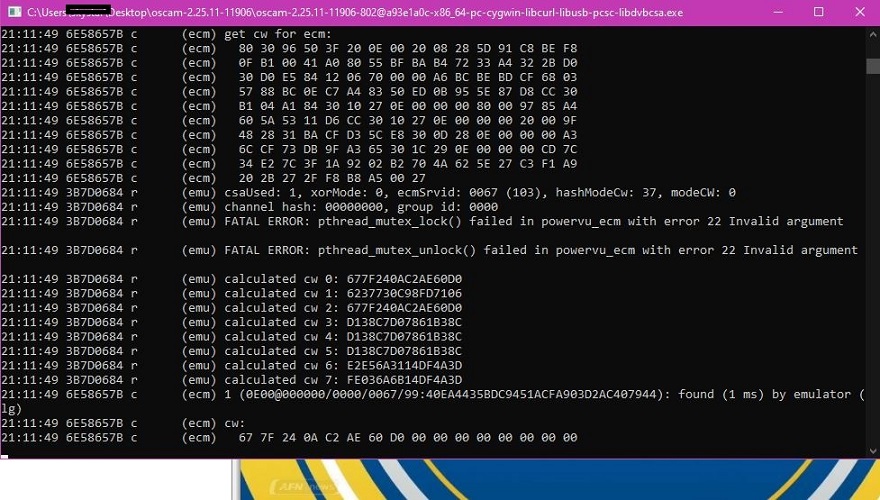
(emu) FATAL ERROR: pthread_mutex_lock() failed in powervu_ecm with error 22 Invalid argument
-
I'm getting the same error as you on Windows 11.
2026/05/30 17:32:51 1B4133A6 r (reader) SoftCam.Keys [emu] THIS WAS A SUCCESSFUL START ATTEMPT No 1 out of max allotted of 1
2026/05/30 17:32:51 1B4133A6 r (emu) FATAL ERROR: pthread_mutex_lock() failed in emu_card_info with error 22 Invalid argument
-
Good afternoon, try enabling stream relay, that error disappears, in the oscam emu cygwin on Windows. But the screen remains black, even after decoding the channel in powervu emu.
-
Good afternoon, try enabling stream relay, that error disappears, in the oscam emu cygwin on Windows. But the screen remains black, even after decoding the channel in powervu emu.
Can you explain this step-by-step, with complete illustrations?
-
Hi!
After this version Error Is Presnt in All Latest Versions in pc os 10 / 11 also see refer pictres
Also see in backround runing afn offline mode .
This Error creat in oscam Powervu ecm.key section devlpoer not solve this problem In Nex update versions
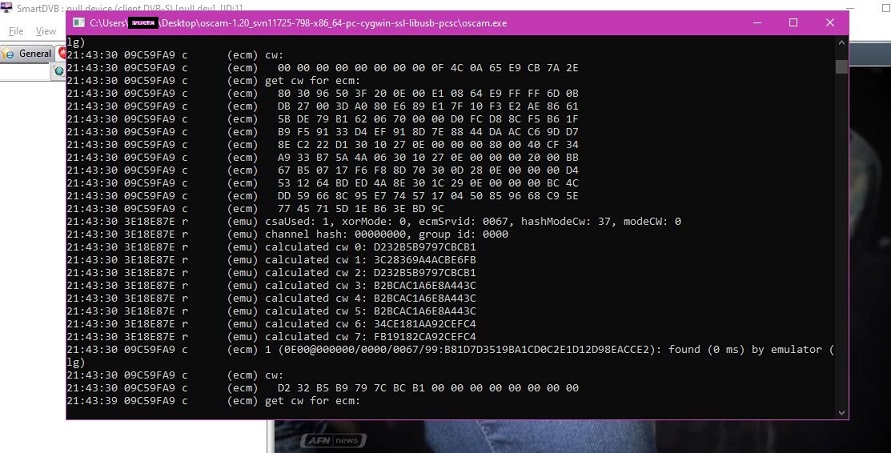
( No Error Work fine old version oscam-1.20_svn11725-798-x86_64-pc-cygwin-ssl-libusb-pcsc )
all latest versions of ocam this error :
(emu) FATAL ERROR: pthread_mutex_lock() failed in powervu_ecm with error 22 Invalid argument
Error Latest Version Oscam
No error old version Oscam
-
 Display More
MERHABA!
Bu sürümden sonra, PC OS 10/11'in tüm en yeni sürümlerinde hata mevcuttur, ayrıca resimlere de bakınız.
Ayrıca arka planda AFN'nin çevrimdışı modda çalıştığını da görebilirsiniz.
Bu hata, Oscam Powervu ecm.key bölümünde oluştu ve geliştiriciler bu sorunu sonraki güncelleme sürümlerinde çözmedi.
(Eski sürümde hata yok, sorunsuz çalışıyor: oscam-1.20_svn11725-798-x86_64-pc-cygwin-ssl-libusb-pcsc)
OCAM'ın tüm son sürümlerinde bu hata mevcut:
(emu) ÖLÜMCÜL HATA: pthread_mutex_lock() powervu_ecm'de 22 numaralı hata koduyla başarısız oldu: Geçersiz argüman
Oscam'ın Son Sürümündeki Hata
Oscam'ın eski sürümünde hata yok.
Images are not visible.
I don't use older versions of OSCam.
-
OSCam worked flawlessly on Windows 10.11. After making changes to OSCam, it started giving these errors. I've written many posts about it, but no one has responded.
-
I hope this helps you, I've attached a photo. I use oscam version 2.25.03-11878-802 x86_x64-pc-cygwin-libcurl-libus-libdvbcsa. I don't use newer versions because I'm using Windows 7 Ultimate.
-

OSCam worked flawlessly on Windows 10.11. After making changes to OSCam, it started giving these errors. I've written many posts about it, but no one has responded.
Hi!
Send oscam.conf File Here I am Solve Your Problem .
-
[global]
logfile = /dev/tty
clienttimeout = 8000
maxlogsize = 1024
waitforcards = 0
waitforcards_extra_delay = 100
preferlocalcards = 1
disablecrccws = 1
disablecrccws_only_for = 0500:020810,030830,030B00,032830,032840,032900,032920,032930,032940,032950,041A00,041900,041950,041A30,042800,042820,043330,051B00,060D00;098C:000000;09C4:000000;098D:000000;0E00:000000;1811:003311,003315,023311,003341,00331B,000007,000107;0100:003311,00006C,00006D;1817:000000,00006A;1818:000000,00006C,000007;1819:000000,00006D,000007;1863:003342,003343;1883:003311,003315,003317,003342,003343;1884:000000,000068;1709:000000;1708:000000;0604:000000;0E00:000000;1810:000000;0100:004106
cccam_cfg_enabled = 1
[dvbapi]
enabled = 1
au = 1
pmt_mode = 4
listen_port = 11500
delayer = 60
user = dvbapi
read_sdt = 2
write_sdt_prov = 1
extended_cw_api = 2
boxtype = pc-nodmx
[webif]
httpport = 8888
httpallowed = 127.0.0.1,192.168.0.0-192.168.255.255,10.0.0.0-10.255.255.255,172.16.0.0-172.31.255.255,255.255.255.255
-
Update With this Config File : oscam.config
Reply here problem solve ? -
I'm trying to solve it. I'm tired of compiling Oscam.
-
...?
-

...?
Is there an Oscam iCam patch?
-
I managed to get autoroll working with Oscam emu Cygwin, and also audio; video not yet, but I'll keep trying. Before, I didn't even have audio. I'm using dvbviewer. I tried to send a video but it gave an error.
-
I managed to get autoroll working with Oscam emu Cygwin, and also audio; video not yet, but I'll keep trying. Before, I didn't even have audio. I'm using dvbviewer. I tried to send a video but it gave an error.
send me config file .
-
When I compile with Oscam, the "Stream Relay" text doesn't appear. Why is that?
-
When I compile with Oscam, the "Stream Relay" text doesn't appear. Why is that?
[streamrelay]
stream_relay_enabled = 1
stream_relay_ctab = 09C4,098C,098D,0960,0961,0963,0E00
stream_emm_enabled = 1
stream_ecm_delay = 0
Add it to oscam.config and see if it works.
Your resource for OSCam-EMU softcam

Participate now!
Don’t have an account yet? Register yourself now and be a part of our community!


