[Tool] Auto Translation Generator for C# projects

There are 15 replies in this Thread which was already clicked 1,763 times. The last Post () by Lululla.

    • Official Post

    [Tool] Auto Translation Generator for C# projects – extract & translate GetTranslation strings into 90+ languages


    Hi everyone,


    I needed a tool that could extract all the strings to translate from the C# files and create the appropriate language files.


    I developed a small Windows tool that automatically extracts all GetTranslation("...") keys from any C# project (WinForms, WPF, etc.) and translates them into 95+ languages using Google Translate (free API). It then generates the corresponding .lng files ready to be used in your application.


    🚀 **Features**

    - Scans recursively all .cs files in the selected project folder.

    - Finds every string inside GetTranslation("...") – custom regex can be adapted.

    - Uses Google Translate (free) to translate each string into all supported languages.

    - Persistent cache: avoids re-translating the same text multiple times (saves time and bandwidth).

    - Option to choose output folder; otherwise creates a "languages" subfolder inside the project.

    - GUI with real-time log, progress bar, Start/Stop buttons.

    - Preserves existing translations in .lng files (only adds new keys).

    - Removes obsolete keys (keys no longer in the code) – optional but recommended.


    ⚙️ **How to use**

    1. Download the attached .exe (or compile from source – see GitHub link).

    2. Run the executable (no installation required).

    3. Select the root folder of your C# project (the one containing all .cs files).

    4. (Optional) Choose a custom output folder for the .lng files.

    5. Click "Start Translation".

    6. Wait – first run may take a while depending on the number of keys and languages (cache speeds up subsequent runs).

    7. Find all your .lng files in the output folder, ready to be embedded or distributed.


    📁 **Output format**

    Each language gets its own file, named according to the language (e.g. Italiano.lng, Deutsch.lng, English.lng). The format is:


    pasted-from-clipboard.png


    Changelog – Version 1.1

    English

    New Features:

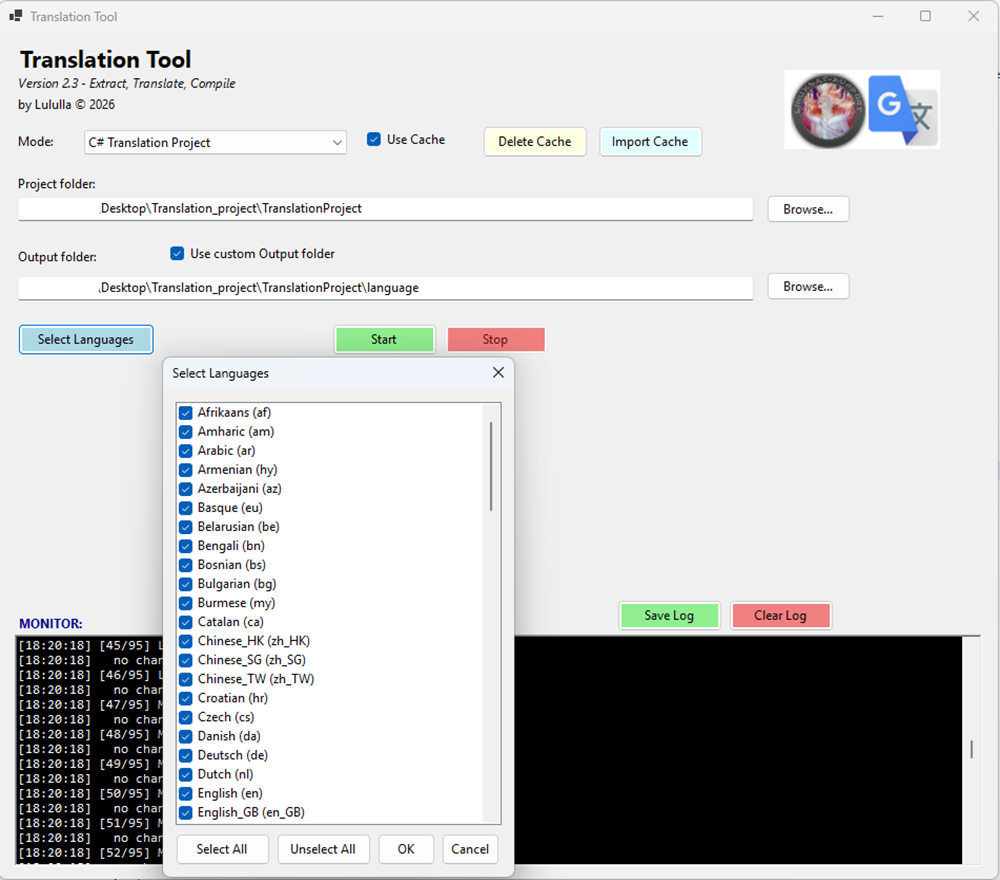
    • Language selection dialog – Choose which languages to translate instead of processing all 95+ every time.
    • "Select Languages" button – Opens a checklist with all available languages (Select All / Unselect All buttons included).
    • Performance improvement – Translation time now proportional to the number of selected languages (much faster when only a few needed).

    Changes:

    • Removed hardcoded full language list from main form; now managed via selector.
    • Improved cache handling – cache remains valid across different language selections.

    Bug fixes:

    • Fixed occasional UI freeze during long operations.
    • Better error handling for network timeouts.

    Credits: Lululla © 2026 – Support: linuxsat-support.com


    pasted-from-clipboard.png

    • Official Post

    Now...
    Enigma2...too choice if translate..

    Translation Tool v2.0

    – a Windows desktop application that makes translating Enigma2 plugins and C# projects simpler and faster than ever!


    This tool is designed to streamline the entire translation workflow for Enigma2 plugins:

    • Extract strings from .py and setup.xml files.
    • Translate missing entries automatically using Google Translate.
    • Compile the translations into .mo files ready for your Enigma2 device.
    • Dual Mode – Switch between Enigma2 Plugin Manager and C# Project mode.
    • Google Translate Integration – Auto-translates empty strings with just a click.
    • Smart Cache – Stores translations locally to avoid repeated API calls and save time.
    • Over 90 Languages – Choose from a comprehensive list of languages.
    • Progress Monitor – See real-time progress, status, and elapsed time.
    • Stop Button – Cancel any operation at any time.
    • Import Cache – Import translations from Python scripts if you already have them.
    • Save Log – Export the log for debugging or sharing.
    • Custom Output Folder – Choose where to save translated files.


    How to Use It

    1. Download the latest release from the GitHub Releases page.
    2. Extract the .zip file and run TranslationProject.exe.
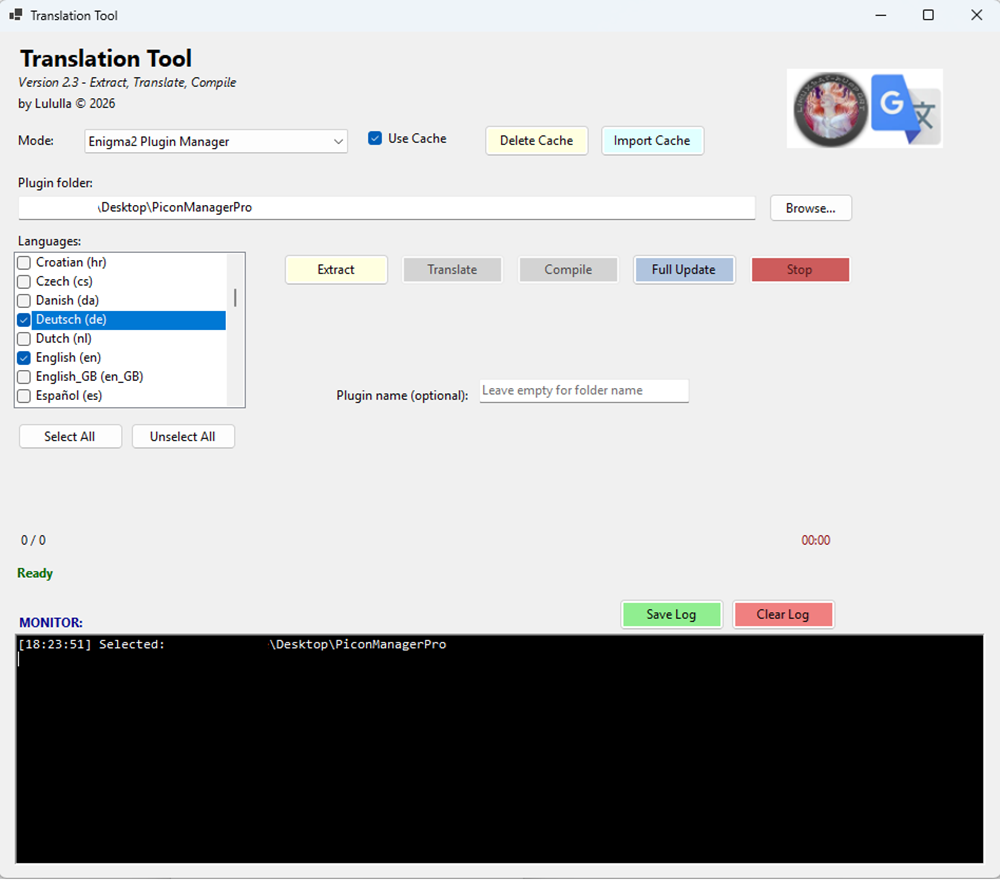
    3. Select "Enigma2 Plugin Manager" from the Mode dropdown.
    4. Browse for your plugin folder.
    5. Select the languages you want to translate.
    6. Click "Full Update" – and let the tool do the rest!


    Screen3.png


    OwnerPlugins/TranslationProject


    • Official Post

    Great job Master It would be nice if u make it video description

    Well, I think I added some help in the topic. Also read on giothub, it's linked.

    The buttons light up when they need to do something... so

    choose the project type... and then move on... nothing difficult.

    • Official Post

    try now..

    -fix escape mode


    -translate your language(single)
    -upload to box in locale/en (e.g.)
    -restart box
    If no have error it's all ok ;)
    i' tested.. it's ok now..


    Code
    ⚠️ Windows Defender may flag this tool as a false positive. It's safe — source code is public. Add the extracted folder to antivirus exclusions to use it.
    • Official Post

    ### Version 2.3 – 2026-06-20

    - **Fix:** Form now auto-expands when selecting a project or plugin folder (C# and Enigma2 modes).

    - **Fix:** Stop button now properly cancels operations in both modes.

    - **Fix:** Progress bar now updates correctly in Enigma2 mode.

    - **Fix:** Escape sequences (`\n`, `\t`, `\"`) are now preserved correctly during translation (fixes `\p`, `\i`, `\s` errors).

    - **Fix:** Syntax errors in `.po` files for languages like Arabic, Japanese, Korean, etc. (invalid control sequences, mismatched `\n`).

    - **Added:** Unified cache controls (Use Cache, Delete Cache, Import Cache) placed globally for both modes.

    - **Added:** `GetCurrentCacheFile()` helper to detect cache path automatically based on active mode.

    - **Improved:** UI layout – log area now hidden at startup and expands when needed.

    - **Improved:** Full Update now compiles `.mo` files using embedded `msgfmt.exe` (no external dependencies).


    On C#


    screen1.png


    On E2:


    screen2.png


    ## Features


    ### C# Project Mode

    - Scans `.cs` files recursively for `GetTranslation("...")` keys.

    - Translates keys into **95+ languages** using Google Translate API.

    - Generates `.lng` files ready for use in your application.

    - Preserves existing translations and removes obsolete keys.


    ### Enigma2 Plugin Mode

    - Extracts strings from `.py` files and `setup.xml`.

    - Generates/updates `.pot` and `.po` files.

    - Auto-translates empty `msgstr` entries.

    - Compiles `.mo` files ready for Enigma2 devices.


    ### General Features

    - **Dual Mode:** Switch between C# and Enigma2 modes.

    - **Language Selection:** Choose from over 90 languages.

    - **Select / Unselect All:** Quickly manage language selection.

    - **Smart Cache:** Saves translations locally to avoid repeated API calls.

    - **Import Cache:** Import translations from Python scripts.

    - **Delete Cache:** Clear the cache to force re-translation.

    - **Progress Monitor:** Real-time progress, status, and elapsed time.

    - **Stop Button:** Cancel operations at any time.

    - **Save Log:** Export the log to a text file.

    - **Custom Output Folder:** Choose where to save translated files.

    - **Logo Click:** Click the logo to open the GitHub repository.


    TranslationProject.zip


    Regards

    • Official Post

    ### Version 2.4 – 2026-07-06

    - **Added:** Pause/Resume button for translation operations.

    - **Added:** Auto-detection of `PluginLanguageDomain` from `__init__.py` or `plugin.py` – automatically pre-fills the plugin name field when selecting an Enigma2 plugin folder.

    - **Fixed:** `.lng` parser now uses `LastIndexOf(':')` to correctly handle keys containing colons (prevents `:` accumulation in translations).

    - **Fixed:** Cache system now respects `useCache` flag – starts disabled, checks only when enabled.

    - **Fixed:** Cache check triggers immediately when flag is enabled, even if folders were selected earlier.

    - **Fixed:** Removed duplicate cache check when custom output folder equals project's `languages` folder.

    - **Improved:** Cache MessageBox shows full file details (path, entries, last modified).

    - **Improved:** Custom output folder now takes priority over project folder when both are selected.


    https://github.com/OwnerPlugins/TranslationProject/raw/refs/heads/main/TranslationProject.zip

    • Official Post

    ### Version 2.5 – 2026-07-08

    - **Added:** Separate Pause/Resume buttons for C# and Enigma2 modes (each mode has its own dedicated button).

    - **Added:** Exit button to close the application (positioned after Clear Log).

    - **Added:** Protection for Python-style placeholders (`%(name)s`, `%(name)d`, `%(name)f`, etc.) during translation – they are no longer translated, preserving formatting for Enigma2 plugins.

    - **Added:** Protection for C#-style placeholders (`{0}`, `{name}`, etc.) during translation – they are now correctly preserved.

    - **Added:** Cache buttons (Import Cache, Delete Cache) are now enabled only after selecting a valid project or plugin folder.

    - **Added:** All action buttons (Extract, Translate, Compile, Full Update) are automatically disabled during any ongoing operation to prevent concurrent operations and conflicts.

    - **Improved:** Pause/Resume functionality now works correctly in both C# and Enigma2 modes.

    - **Fixed:** The Pause button was previously visible only in Enigma2 mode due to control duplication in the designer – now fixed with two separate controls.

    - **Fixed:** Translation of strings containing Python placeholders no longer corrupts the formatting tokens.


    pasted-from-clipboard.png


    pasted-from-clipboard.png


    https://github.com/OwnerPlugins/TranslationProject/raw/refs/heads/main/TranslationProject.zip

    • Official Post

    ### Version 2.6 – 2026-07-09

    - **Added:** Async Pause/Resume support – no more UI blocking.

    - **Added:** Recursive cache search in C# mode (subfolders up to 2 levels).

    - **Added:** Clearer Pause/Stop feedback messages.

    - **Fixed:** Enigma2 cache now always saved in `locale/` folder.

    - **Fixed:** Double escaping of quotes in `.po` files.

    - **Fixed:** Syntax errors in Hebrew and Arabic `.po` files – now uses NGettext.

    - **Fixed:** "Use Cache" checkbox resets when switching modes.

    - **Fixed:** Pause/Stop now respond immediately (check before and after each string).

    - **Fixed:** Cache found in subdirectories in C# mode.

    - **Removed:** `extracted_strings.txt` generation.

    - **Removed:** `TranslationService.cs` (unused and causing issues).

    - **Improved:** `.mo` compilation uses NGettext (no `msgfmt.exe` dependency).

    - **Improved:** Logging shows `[LANG]` prefix in Enigma2 translation.


    TEST excellent!


    https://github.com/OwnerPlugins/TranslationProject/raw/refs/heads/main/TranslationProject.zip

    • New
    • Official Post

    @Lululla

    No Linux to try

    yes.. :rasta:

    My code for translate all my plugins on my github


    This script is a complete translation management tool for Enigma2 plugins. It automates the entire localization workflow by extracting translatable strings, updating translation catalogs, automatically translating missing entries through Google Translate, and compiling the final language files used by Enigma2.

    1. Automatic Plugin Detection

    The script automatically detects the plugin directory and name. It first looks for the PluginLanguageDomain variable inside __init__.py; if it is not found, it falls back to using the plugin folder name. This makes the script reusable for any Enigma2 plugin without requiring manual configuration.

    2. String Extraction

    The script extracts translatable strings from two different sources:

    • Python files using xgettext, which scans all _() and pgettext() calls.
    • XML files (setup.xml), collecting values from the text, description, and title attributes.

    Duplicate or invalid strings are automatically removed before processing.

    3. POT File Generation

    All extracted strings are merged into a single .pot template file. Existing translations are preserved whenever possible, while new strings are automatically added. The resulting .pot file becomes the master translation catalog for the plugin.

    4. PO File Update

    For every supported language, the script checks whether a .po file already exists.

    • If the file exists, it is updated using msgmerge, preserving existing translations while adding new entries.
    • If the file does not exist, a new translation template is created automatically.

    The script also repairs malformed .po files before updating them.

    5. Automatic Translation

    Every empty msgstr entry is automatically translated using the public Google Translate API.

    Only untranslated strings are processed, allowing developers to generate an initial translation for every supported language with no manual work.

    6. Translation Cache

    Every translated string is stored in a local translation_cache.json file.

    Before contacting Google Translate, the script checks the cache first. This avoids translating the same text multiple times, reduces network requests, improves execution speed, and allows previously translated strings to be reused across future runs.

    7. System Language Detection

    The script automatically detects the current system language.

    On Enigma2 systems it reads the configured language from the Enigma2 configuration; otherwise it falls back to the operating system's LANG environment variable.

    8. Arabic Text Detection

    The script detects whether a string is already written in Arabic.

    If Arabic text is found, it is left unchanged to prevent incorrect or unnecessary retranslations.

    9. PO File Repair

    Before updating or compiling translation files, the script automatically fixes common formatting problems such as duplicated headers, duplicated msgid entries, and malformed .po files. This improves compatibility with GNU gettext tools.

    10. MO File Compilation

    Once every translation has been updated, the script compiles each .po file into its corresponding binary .mo file using msgfmt.

    The .mo files are the compiled catalogs that Enigma2 loads at runtime.

    Complete Workflow

    1. Detect the plugin name.
    2. Extract translatable strings from Python and XML files.
    3. Generate or update the .pot template.
    4. Create or synchronize every .po translation file.
    5. Automatically translate missing entries using Google Translate.
    6. Cache every translation locally to avoid duplicate requests.
    7. Repair translation files when necessary.
    8. Compile all .po files into .mo files ready for use by Enigma2.

    Summary

    This script provides a fully automated localization pipeline for Enigma2 plugins. It keeps translation catalogs synchronized with the source code, minimizes manual maintenance, preserves existing translations, automatically fills missing entries through Google Translate, caches translated strings for efficiency, repairs malformed translation files, and finally generates the compiled .mo files required by Enigma2.


    Limitations

    Although Google Translate provides very good results for most user interface strings, automatic translation is not perfect. Some translations may be inaccurate or unnatural because the API translates each string independently without knowing the application's context. Short words, technical terms, abbreviations, or expressions with multiple meanings are the most likely to be translated incorrectly.

    In practice, the translation quality is generally very high, but a small percentage of strings may still require manual review and correction. For this reason, the generated translations should be considered a first draft rather than a final localization, especially for complex or context-dependent text.


    Instructions (Enigma2 Local Box)

    Copy the following two files to:

    /usr/share/enigma2/python/Plugins/Extensions/name_plugins_e2/


    Then connect to your Enigma2 box via Telnet or SSH and run:

    cd /usr/share/enigma2/python/Plugins/Extensions/name_plugins_e2

    python3 update_translations.py


    The script will automatically extract all translatable strings from the plugin, update or create the .pot and .po translation files, translate any missing entries using Google Translate, and compile the final .mo files.


    When the process is complete, your plugin will contain an updated set of translation files ready to be used by Enigma2.


    :smiling face with sunglasses:

Chat about everything else!

A friendly forum for off-topic discussions, random questions, and community bonding. Your space for conversations outside our main categories. Discuss hobbies, news, games, or anything else with the wider community.