ciefp added a new file:

QuoteDisplay MoreCiefpE2editor Plugin - Description
This is my 40th plugin that I created in collaboration with artificial intelligence.
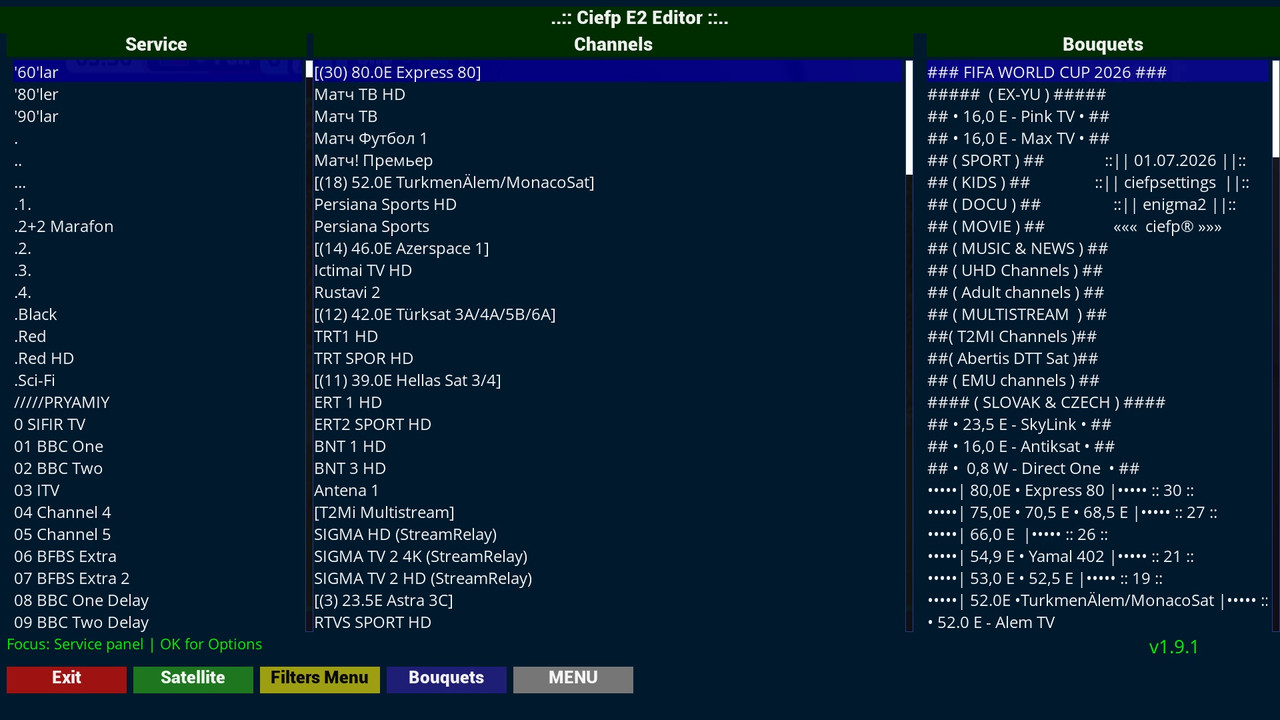
Description: CiefpE2editor is a powerful, comprehensive Enigma2 tool developed entirely in Full HD (1920x1080) resolution.
Inspired by the legendary PC software Dreamboxedit, this plugin brings advanced channel,
bouquet and transponder management directly to your receiver, eliminating the need for a computer.
The plugin combines several powerful modules within a single graphical interface,
allowing full control over the lamedb database and user lists without the need for a computer.
🚀 Main Features and Functionalities
1. Three-panel Main Editor (Main screen)
One-stop overview: The screen is divided into three functional high-resolution (FHD) panels:
Service (All channels from lamedb), Channels (Channels within the active bouquet) and Bouquets (List of your bouquets).
1. Main Editor (CiefpE2editorMain)
Triple panel view:
Left: List of all services (channels)
Middle: Channels in the active bouquet
Right: Bouquet list
Channel filters:
By satellite (all satellites, individual satellites, terrestrial)
By type (TV, Radio)
By resolution (SD, HD H.264, HD H.265, UHD)
By provider
New channels (flag X)
Channel management:
Copy channels to the active bouquet
Delete channels from the list
Save and reload settings
2. Channel Editor (CiefpChannelEditor)
Move/Delete operations on channels
Select channel groups under the marker
Move channels up/down (drag-and-drop)
Save changes to the bouquet
3. Bouquet Editor (CiefpBouquetEditor)
Manage bouquets (create, delete, move)
Open Channel Editor for the selected bouquet
4. Channel Manager (CiefpChannelManager)
Download settings from GitHub
Copy and install bouquets
Automatically download the latest lists
5. Settings Downloader (CiefpSettingsDownloaderScreen)
Download ready-made channel lists from GitHub repository
Supports more than 15 different satellite combinations:
From 1 satellite (19E) to 18 satellites
Cover all popular satellites: 42E, 39E, 28E, 23E, 19E, 16E, 13E, 9E, 0.8W, 4W, 5W, 30W, etc.
Motorized channel list range 80.0E - 34.0W
6. Satellite Selector (CiefpSelectSatellite)
Select satellites for installation
Automatic mapping of satellites to appropriate bouquet files
Copy and install selected satellites
Supports over 40 different satellite positions
7. Satellites.xml Editor (CiefpSatelliteXmlReader/Editor)
View and edit satellites.xml file
Add and delete transponders
Edit all transponder parameters:
Frequency, Symbol Rate
Polarization, FEC
DVB-S/S2 system
Modulation (QPSK, 8PSK, 16APSK, 32APSK)
Multistream (IS, PLS mod/code)
T2-MI support
8. Whitelist Streamrelay (WhitelistScreen)
Generate whitelist_streamrelay file
Automatic bouquet parsing for Streamrelay channels
Filter to exclude unwanted references
Technical Specifications
Features Details
Version 1.9.1
Screen resolution Full HD (1920x1080)
Supported files lamedb, bouquets.tv, satellites.xml, userbouquet.*.tv
GitHub integration Automatic list download
Debug Log file: /tmp/ciefp_e2editor_debug.log
Buttons and Navigation:
📂 Shortcut structure on the remote (Main screen):
🔴 Red: Exit
🟢 Green: Satellite selection (Filter)
🟡 Yellow: Advanced menu with filters (TV, Radio, SD, HD, UHD, Providers...)
🔵 Blue: Quick selection and loading of bouquets
⚙️ MENU: Open the main menu with all additional modules and editors.
..:: CiefpSettings ::..