Constant.cw can contain BISS, DCW and CCW keys ( These keys are usually dead soon after they are released )
Softcam.key can contain only Cryptoworks keys
No other keys will work at this time. So you are limited to Benkurds softcam keys only.


Constant.cw can contain BISS, DCW and CCW keys ( These keys are usually dead soon after they are released )
Softcam.key can contain only Cryptoworks keys
No other keys will work at this time. So you are limited to Benkurds softcam keys only.
Constant.cw or Constant Control Word keys is basically keys/code that you input into your receiver that will open channels.
You can add these keys on to a usb stick then insert from within the openbox menu.
Look here Latest Benkurd Openbox S9 Softcam Keys for what providers it opens.
1.0 rc1 for Android released
August 19, 2011: Total Commander for Android is now available. The Android version is freeware! It supports about the same functions as the Windows Mobile version. This is a pre-release version (release canditate 1). It will expire on 30. October 2011
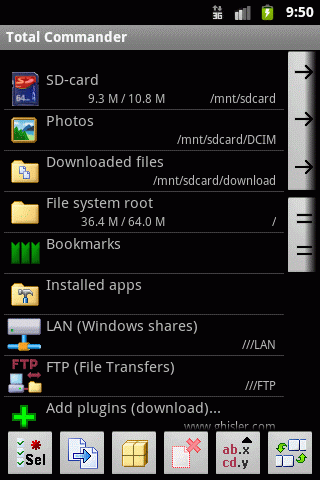
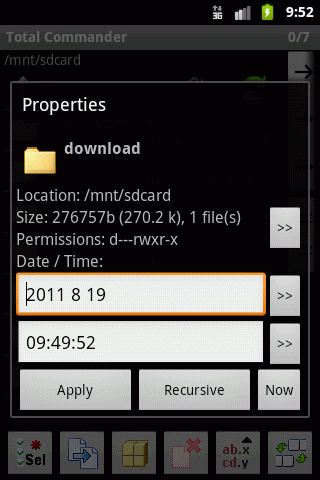
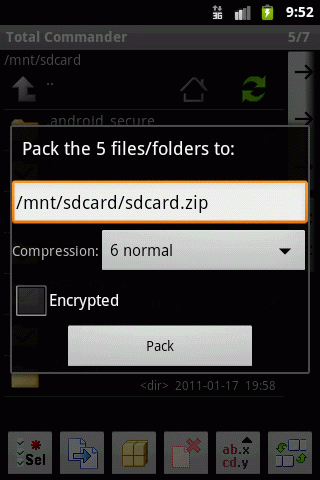
A smartphone or tablet with Android 1.5 or later (tested up to Android 3.1)
    The supported processors are: ARM, X86 (RAR unpacker only available in ARM version)
    This program does NOT work on an iOS or Windows Phone device!


    Copy, Move whole subdirs
    Inplace rename, create dirs
    Delete (no recycle bin)
    Zip and unzip, unrar
    Properties dialog, change attributes
    Built-in text editor
    Search function (also for text)
    Select/unselect groups of files
    Select by tapping on file icons
    List of installed Apps (built-in plugin)
    FTP client (plugin)
    WebDAV (Web folders) (plugin)
    LAN access (plugin)
    Root support for the main functions


    Send files via Bluetooth (OBEX)
    Thumbnails for pictures
    Two panels side by side, or virtual two panel mode
    Bookmarks as in Total Commander
    Directory history through dropdown list
    Configurable button bar for changing directories, internal commands, launching apps, and sending shell commands
    Simple help function in English, German, Russian, Ukrainian and Czech
Supported languages of the main program: English, German, Czech, Danish, Dutch, French, Greek, Hungarian, Italian, Polish, Russian, Simplified Chinese, Slovak, Slovenian, Spanish, Traditional Chinese, Ukrainian and SwedishProcessor type-ARM and X86
Android Market-Not yet available
Notes-We plan to put Total Commander for Android in the Market when the final version becomes availableIf this is your first beta, please open the "Settings" app of your Android device and go to the "Applications" page. Here you need to allow apps from "Unknown Sources". Total Commander will be available as a final version via Android Market once it's sufficiently stable.
Tthere are three ways to install Total Commander beta:
1. If you read this on your device, click on "direct download".
2. If you read this on your PC, and have a barcode scanner app installed on your Android device, double click on the following QR code, then scan it with your phone to start the download. You can get a barcode App by searching for barcode in the market. Personally I'm using the app "Barcode Scanner" by ZXing Team, it's a very simple one, which is open source, so it should be safe.
3. Finally you can of course type in the following link by hand in the web browser of your device:
ghisler.com/totalcmd.apkHi Ledra,
Have you tried updating your sat.xml file or loading a ready made channel list such as Catseye E2 Settings File
Yes the first time you do it you wonder what you're getting into, i was exactly the same. Follow this guide and you will be done in no time.
Tutorial: How to install CCcam on Debian 6
If you get stuck along the way just ask.
GSU Full ver. 3.76
- updated oscam bin to rev5894
- channel info: sat names generated from satellites.xml
- oscam info: disable selection in log
Why not just add a channel list like catseye, saves all the time of scanning.
No need to delete it, just replace whats there already and reboot.
0.91.0.01
- multi color subpicture teletext for export and simple outline, up to 14 different colors front 0.91.0.02 - audio language filter from TS files (using PMT data)
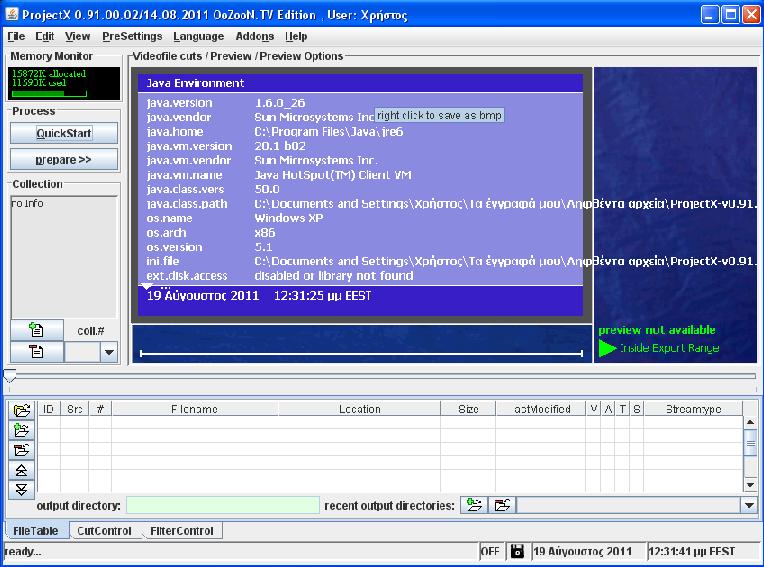
version history
0.90.4.00: - Fix: better preview of bad frames - Fix: ac3 parsenextheader - Fix: h-resolution image in wrong scale - is 698 * 176, encoded 704 * 176 - Fix: crash save with DAR (jdk122 strange problem with float / double) - Fix? array index rds decode cont.ra - Picture decode rds -> cont.ra - Fix page matrix is the end (just run) is always cleared - Padding BE packets in the TS interfere in between recognition, are now being discarded at the demux - Mpv demux, ignore data between seq.end + seq.start - Subpicture, 2nd released export format - Dvb subicture, page id 0 was not processed - Dvb subpicture, mtv adria added entry - Error code message at gop drop - Pmt with adaptation field - Scan separate components for direct access to stream adaptation - Scan rescan for manual stream allocation - Log cut bytepos or other value - Added: optional read buffer to reduce access data in small blocks -.'m Ac3 192kb added to 2 / 0 - Info from arnaud cm - Pes demux, testing pes_extension (vdr flags for some plugins wrong) - Ttx change when error in mag / row, then discard - Parity errors ttx reject line from x (For example, hardness), iniKey only, std: SubtitlePanel.maxParityErrors = 2 - Decode pcm export fade-in/out, time only inikey AudioPanel.fadeInOutMillis = 2000 - Modif. idct.dll resources for OS2 0.90.4.00b01 .. b06: - Key change loslessmpaconversion -> losslessmpaconversion - Danish translation update jazzydane - Wait for return on external process .. - Invalid packet start code # sign (pos?) - Start os-2-in exception redirect cl - Bc (disclosed) vorwärtsreferenzierte only B-frames? treat - B-frames drop? - Preview buffer corresponding bitrate automatically. select - Pes0 - pesheader precisely adapted skip + preview - Rds demolition decode index is incorrectly - Process-window-coll # / number of - Detour cli (> file) does not - Check write access error in addon? - Error + reset if subdirectory can not be created - Coll properties gui - 0x3c DataStream Ignore (TS) - Rds decode defective - Ftp subfolders optional listen - Dvbsubs except - pagecomposition - Vdr directory creation extra ini reserved saved output file (in = out) also in - - Coll properties gui - Fix dvb subpicture - wrong colors in different color tables for each region - Input from creating vobsub idx + Teletext + sup 0.90.4.00b07: - Vid by jepssen (Koscom) adaptable - Fix mpg2 layer3 demux error - Error text if html - url is missing - Spending time with RDS RT etc - Hide behind image preview options (such as memorymoni) -. Sh build expanded - to-play -. Build xml ant - to-play - Blank buttons - to-play - Create additional button koll + add all marked files - Fix: slider overflow, preview - Freeze Frame type change - split MPA Prob - Split mpa, 5.Option to double mono- - Thumbnail adjust brightness - Bitrate graph easily changed changed --cutpanel/slider - Patch panel with DAR - fix update - Preview zoom modes - Intersections displaced - Increases ts-scan 0.90.4.00b08: - Fix split mpa, 6.option split dual / mono copy to doppel-mono/jst, stereo remains - Process-actions now checkboxes 0.90.4.00b09: - Fix ac3 parse size index - Changed zoom area - Mpg2 LAY2 audio fix, recognition - Accelerated mpa crc test - Pic area background, view cut clickable index - DnD of possible FTP download links / file - Option spez.2: Without / read overhead (previously always active) 0.90.4.00.. B11: - Mpa demux about half the time - Special characters such as convertible. direct access 0.90.4.00b12: - Idct temporarily switched off, if crash-prone - Mpa crc calculation optimierg - Teletext subtitle boxed only export option, error minimization of problem - No longer TeleText static class 0.90.4.00b13: - 2 ttx sup, text horiz. center - Pre-scan display of lpcm - Pre-scan ts miserkennung - (New) Koscom read option 0.90.4.00b14: ----( Read new) Koscom option, remaining adaptable? - Focus away from start button to start process - Zoom range with shift + mouse moved - Cutimage mix mode to the intersection alignment - Fix: abort on certain errors Gops - Save memory read when pts 0.90.4.00b15: - Medion prepare option - CHANGED. Koscom read option - Filter control panel teil1 0.90.4.00b16: - Filter control panel teil2 - Gui file properties, settings per file - Dyn. Rescan with preview in file properties - Fix mpeg1 out of memory - and Others 0.90.4.00b17: - Matrix-scan, extended preview (zoom left, re over it.) - Remux is at secondary. Rejected files, secondary info. File into table in # "-" 0.90.4.00b18: - Filter-info - Changed to 4x4 matrix 0.90.4.00b19: - Fix dvb-sub crash - Opt. ac3 Bit rate approximation 0.90.4.00b20: - Post-process call changed + fixed (tots did not work), temp file access - Sync interruption issue, more tests needed 0.90.4.00b21: - Last dvb subtitle may lack 0.90.4.00b22: -! Test-mac os url problem umlauts, spaces, special characters utf 8 encoding - Integrate URLDecoder from 1.4.2 to 1.2.2 (decoder.getfile (), "UTF-8") due to os x tiger - mail - If not process stoppbar -> hard break function in the menu - "End-beep" error no longer stops process - Adaptable vdr 1.5.10ff, dvb-subs special container (this zzt only 1x sub in vdr) 0.90.4.00: - Adaptable vdr 1.5.10ff multiple, dvb-subs special container - Crash (not significant) without in mini-cut picture-matching collection window - Fixed endless loop when unknown command subpicture 0.90.4.00b24: - Videoptsfile for subsequent use as a primary relation - Preview v. GOPs without gopheader (only sequ header) - 192byte ts packet processing - Mpa renaming corrected - M2s project file renaming corrected 0.90.4.00b25: - Fix: ac3 384 is not used as a silent - Integer idct (by dukios), even without dll slightly faster - Gui-info fields implemented in main window smaller - Ac3 a / v sync problem 0.90.4.00b26: - 1:1 direct cut split 'real' copy of file segments, zzt only 1 file - Extended detection payload ts 0.90.4.00b27: - Arion avr export - Handled exception HD DVB subtitle (?) - Thumbnails - Fix: recognition of multi-area dvd subpics - Resizable preview ! Ac3-a / v demolition problem is still open 0.90.4.00b28: - Enhanced Sup-Viewer - New CLI parameter: [set-<switch/entry as used in inifile>] - To TS: Duplicate event info from source (TF5x00) to sink (TF5x00) - Optional: preview slider aligned to preview - Some fixes decoding teletext in - Save-save confirmation cuts / save chapters - Ttx - sub insertion - vers. 0.1 - Sup multicolor of DVB-subtitles 0.90.4.00b29: - Ttx - sub insertion - vers. 0.2 - Revise MPAD, decode: arrays.fill rather than new init about 20% faster - Dragdrop - eyetv Update1 +2, thx2cookie - File name to attach voice tags PMT (externally-settings) - Preview-OutOfMemory display 0.90.4.00b30: - BSID ac3 patch - Dvb st pts switch separated - Special panel: reduced optional A / V sync check 0.90.4.00b31: - Ac3, mpa a / v abortion problem, patch by HHM - Teletext character control, patch by HHM - Fix multiple-set of keys read cli - Fix, wrong pts file it with video- - Pulldown patch by VQ (separate field encoding not yet supported) - Fix: various scan detection - Fix: preview problems - Patch: comag file segments read - Ttx: multiple pages per field - Fix audio sync errors in calculation dateipos. 0.90.4.00b32: - Pulldown patch # 2 by VQ (separate field encoding not yet supported) - 1st try sub HD decoding / conversionDid you get it sorted then ?
dflash_0.99
Nihao was kind enough to make even a Dutch Sparchfile, so now is a 0.99 on the first page.
Please test, with the exception of the language file there is nothing else to 98th
by gutemine
Mgcamd is more often used to decrypt keys or update cards, not really used for sharing like CCcam. What do you want to use Mgcamd for other than other protocols ?
Found this as well;
Forgotten your PIN code?
'' A quick hack on how to read it from shell
Once you log into your DM box in telnet do this command;
i:/elitedvb/pins/enableparentallock=00000001
i:/elitedvb/pins/enablesetuplock=00000001
i:/elitedvb/pins/maxpinerrors=00000000
i:/elitedvb/pins/[COLOR='#FF0000']parentallock=00000000[/COLOR]
i:/elitedvb/pins/pinerrorblocktime=00000001
i:/elitedvb/pins/setuplock=00000000
Convert the last 4 digits in this highlighted line from hex to decimal in this case '0000' hex = '0000' decimal so the pin code is 0000
If you want to disable the pin code all together set the enableparentallock value to all zeroes.
i:/elitedvb/pins/[COLOR='#FF0000']enableparentallock[/COLOR]=00000000
i:/elitedvb/pins/enablesetuplock=00000001
i:/elitedvb/pins/maxpinerrors=00000000
i:/elitedvb/pins/parentallock=00000000
i:/elitedvb/pins/pinerrorblocktime=00000001
i:/elitedvb/pins/setuplock=00000000
''
It's possible if you can ftp to the box or if you have the tuxbox commander plugin in your image.
FTP to /var/tuxbox/config/enigma and find a file called 'config'.
Right click it and select 'view'.
Look for a line like...
parentallock=00000000
Open up your windows calculator and go to scientific mode.
Click on the HEX button.
Enter in the last 4 characters in the parental lock line in the config file.
Click the DEC button.
This is your 4 digit pin code. You can then use it to disable the parental lock or Setup lock on your image.
If you can't ftp, your only option left is if you have the tuxbox commander plugin installed in your image, in the plugins menu (Blue or yellow button). You can navigate to the config file using this plugin and edit the file here.
The configs on that image will auto update this package.
If you are worried about receiving EMM`s within oscam then Mgcamd can be useful for receiving updates.
Look in /var/keys/ for Mgcamd config files.
Is it the password or the 4 digit parental lock you need for the dreambox ?
Most basic setup you need 3 config files for oscam and those are oscam.conf, oscam.server and oscam.user.
Oscam.conf
[global]
nice = -1
WaitForCards = 1
# logging
logfile = /dev/console
pidfile = /tmp/oscam.pid
usrfile = /tmp/oscam-user.log
cwlogdir = /var/log/oscam/cw
# monitor
[monitor]
port = 988
aulow = 120
monlevel = 1
# protocols
[newcamd]
key = 000102030405060708090A0B0C0D
port = 10000@0111:000000;10001@0515:000000;10002@0999:000 000;10003@0688:000000In oscam.server you define a connection to cccam server and what caids you want to get from it:
oscam.server
[reader]
reconnecttimeout = 5
label = remote
protocol = cccam
reshare = 1
device = server-ip,server-port
account = user,pass
group = 1
caid = 0111,0515,0999,0688
cccversion = 2.1.3
cccbuild = 3165Again you replace the above with your details.
In oscam.user you define a user settings for newcamd client. Not really sure what betatunnel values should be, haven't bothered much to look into it either.
You can restrict a user to certain caids and idents buts since this is an example for local connection on the same box it is assumed you want to get everything and I left it empty.
oscam.user
[account]
user = user1
pwd = password1
monlevel = 0
uniq = 0
group = 1
hostname = 127.0.0.1
au = reader1
services = services1
betatunnel = 0300:0001:0100,0400.0005:0100
ident =
caid =Then you edit newcamd.list file of mgcamd according to configuration in oscam.conf and oscam.user:
CWS_KEEPALIVE = 300
CWS_INCOMING_PORT = 12000
CWS = 127.0.0.1 10000 user1 password1 00 01 02 03 04 05 06 07 08 09 0A 0B 0C 0D lan newcs
CWS = 127.0.0.1 10001 user1 password1 00 01 02 03 04 05 06 07 08 09 0A 0B 0C 0D lan newcs
CWS = 127.0.0.1 10002 user1 password1 00 01 02 03 04 05 06 07 08 09 0A 0B 0C 0D lan newcs
CWS = 127.0.0.1 10003 user1 password1 00 01 02 03 04 05 06 07 08 09 0A 0B 0C 0D lan newcs
You have to make sure that newcamd client is enabled in mg_cfg either
G: { 01 } for mgcamd to use only newcamd client or
G: { 33 } to use both cccam and newcamd or you can use some other combination.
That should let you open 4 defined caids from cccam over oscam to mgcamd.
Hi Pete, You asked
QuoteWhat would you do with a new box from scratch
Easy one to answer, i would read as many tutorials & support questions & answers as possible. Everything you have asked here has already been answered before, you just need to look for the info.