


It sounds like you have configured your server correctly, try updating your sat xml file then doing a rescan of the satellite.
Posts by master G
-
-
Bouquet Editor Suite v1.21
v1.21
-----------------------------------------------------------------------------
Feature: Add current channel and close stream to mobile streaming interface
Feature: Excel export (picon reference list, service details, bouquet details)
Fix: Name picon export fix (several problems)
Fix: Channelfilter deactivation now works correct (incl. export)
Fix: Now i delete picons over telnet and not ftp anymore (solved delete problems with files with spaces)
Fix: Settings could not be saved problem
Fix: Settings Upgrade from older Versions
Fix: Single picon upload works now correct
Fix: Program dont't restart on options change (Sometimes it must!)
Fix: King of Sat namespace creation
Fix: Settings cleaner now compiled with .net 2.0
Fix: Picon export date creation on other languages then german
Fix: Small other fixes -
Pick tv no longer decodes using CCcam, oscam is needed. If you want to continue using CCcam then a combo of oscam + CCcam 2.1.3 is needed.
-
Sort of looking specific info in relation to specific Sat Card used and card reader i.e smartgo etc if possible.
What you want to do is possible, if you are looking for specific info you have to give us more to go on. We are not mind readers.
-
You dont need to change anything in this Mgcamd config.
-
Version: 3.5.0.103
3.5.0.103: Codefix for Webif-dyndns
3.5.0.102: New boot logo
3.5.0.101: Local Card added assistant
3.4.0.100: Log parameters changed mg_cfg to L: {00}
3.4.0.99: Fix for language icons
3.4.0.98: Small Codefix -
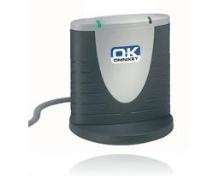
omneykey 3121 , sounds good! , ebay here we come, any better models or are they all the same?
3121 is the only model i have owned so cannot comment on others, very happy with it though paid a similar price to scoot also on fleabay.
-
NFS Manager 3.6
NFS Manager is a graphical user interface to control all built-in NFS features of Mac OS X. It can manage a whole network of Mac OS X computers to setup a distributed NFS file system via a few simple mouse clicks.
NFS (Network File System) is the industry standard for file sharing on UNIX systems like Mac OS X. Each Mac OS X system can be setup as an NFS server to offer files to the network, or as an NFS client to access files shared by other computers. Different from other file sharing protocols built into Mac OS X, NFS has no limitations in the number of users or connections concurrently active. In addition, NFS can be setup to connect to servers fully automatically (“automounting”) without any password entries being necessary.
The application is designed to use the latest technologies available in Mac OS X, like Open Directory, Bonjour, or Kerberos. If your network is setup as a Kerberos realm, secure NFS with authenticated and encrypted connections can be configured.
NFS Manager 3 is for Mac OS X Leopard or later only. Previous generations of Mac OS X use a very different implementation of NFS and therefore need a different management tool. If you like to use NFS with legacy systems, please see the pages of NFS Manager 2 for further information.
The software is distributed electronically. You can download the product and test it before you decide to purchase a license for unrestricted usag
Release 3.6
This version adds support for the operating system Mac OS X 10.7 Lion. Please read the Release Notes. Higher level components of the first releases of Mac OS X Lion might not be mature enough yet to use NFS features of the lower system levels under all circumstances. Data loss can occur.
Support for Mac OS X 10.5 Leopard has been removed. Mac OS X 10.6 is now the minimum requirement to use the application.
All components of the application now support full 64 bit operation.
The user interfaces to log in to directory services have been modified to match the design of current Mac OS X versions.
The internal architecture to communicate with Apple Open Directory Services has been redesigned in order to use the latest Mac OS X technologies.
When using Lion, the following new features of the operating system can be accessed via NFS Manager:
Support for NFS version 4 (client only).
Support for NFS over IPv6 (client only).
Configuration of callback features for NFSv4 operation.
Specific selection of TCP or UDP protocols for the different NFS sub-services.
Opportunistic fetching of attributes via ACCESS calls.
Disabling quota operations for specific mounts.
Disabling extended attributes and fork features for NFSv4 access.
Enabling Access Control Lists (“ACL permissions”) for NFSv4 access.
Replacing POSIX permissions by ACL permissions during NFSv4 access.
Using Unicode Normalization Form C for the encoding of names during NFS communication. -
Omnikey 3121 is what i use, it works great but bear in mind omnikey does not run in CCcam so you will need to be using oscam also.
I am sure the other models will be compatible also. -
oki doki !
i have searched my entire debian server and the only cccamx86 i can find is in /emu/cccam ?do i have to run a kill command before attempting to swap a x.86 file and performing chmod ?
sorry to waste evryones time being so incompitant........just when i thought i was getting the hang of things :tire: lolRik
Sorry rik /emu/cccam is the correct location i was thinking ubuntu, just replace the file chmod 755 then reboot.
to chmod using putty
-
Replace the x86 file in /usr/local/bin with the 2.1.3 x86 from the attached file, once in place chmod the new file 755 & reboot server, job done.
-
-
Sly Sports 1 and 2 are to be made available on UK DTT through the use of a CI Plus CAM (conditional access module). Top Up TV has announced it will launch the service next month.
It follows last December’s ruling from the regulator Ofcom that *** Sports 1 and *** Sports 2 – the two *** premium channels already included under Wholesale Must Offer (WMO) regulations – to be distributed through a conditional access module (CAM).
“‘Customer research tells us that Freeview customers love the idea of being able to receive *** Sports and ESPN without the need to sign a lengthy contract’ said Nick Markham, CEO of Top Up TV ‘but they do not always want the clutter of additional hardware.”
Top Up TV uses Nagravision conditional access.
-
Have you tried the card in the original sly receiver to narrow down its not a problem with the card.
-
Quote
Just change the port and CCcam version. Then configure my client with the appropriate cline
Thats basically all you need but there are many more options that can be set up for virtual reader (like max hops, etc), all can be found on oscam wiki pages.
You need to add user entries in oscam.user for your clients. Then you can send the C line that connects to your oscam/cccam server. -
This tool is to fix your sim 201 box in case it doesn´t boot.
USE ONLY SERIAL CABLE RS-232
-
Use DCC, its a great tool for ftp, telnet, backup etc. Something you might want to check is CCcam installed on the DM500 and is it active. If its on Common cam and not CCcam then your c lines will not work.
-
Check all cable and connections between your box & lnb.
-
in other words i dont know how to edit the cfg other than fully replacing by typing up in notepad, renameing cccam.cfg and ftp it to var/etc to replace existing
Ftp to the file, right click on it and choose edit.
-
P.S in the last line of the file you will see MINIMUM DOWNHOPS: 1
Disable this by putting # infront of it so it appears as below#MINIMUM DOWNHOPS: 1
The reason for this is the line you have been given will not allow reshare so your server will show 0 cards if you left it as it is.

