


Its an ipk file so should install via tmp or by using dcc, are you sure the version you are trying to install is suitable for enigma 2 ?
Posts by master G
-
-
Pr2 and Hectore are proud to provide you JaZUp 2.3.
This new version is adapted to the new Rescue Mode procedure introduced with Enigma2 v1.0
Remember that JaZUp remains the safest way to upgrade/downgrade your Azbox HD.
We provide you with 2 Megaupload download link, one is a full version that include the patch.bin to go from official firmware to rescue mode via an USB Stick using the normal Azbox upgrade process. Always think to run JaZUp on your Azbox official firmware to clean up all potential problems. (See included PDF documentation). It also include the patch.e2 to return from Enigma 2 to offical firmware upgrade screen (see included PDF documentation).
The other one is the lite version, it is exactely the same package but without the Back_to_Official and Official_to_E2 for people that don't need it.
So you don't need to download both pack, choose the one that best fits your needs.
Lite pack on Megaupload 1,55 MB
Enjoy,
Hectore and Pr2
change log:
2.3
- Adapt JaZUp for new Rescue Mode procedure
- Fix italian language
- Include Official_to_E2 (patch.bin) to use on an USB Stick from official to E2. Once your Azbox is in Rescue Mode proceed with JaZUp to flash your E2 image.
- Include Back_to_Official (patch.e2) to use via JaZUp to go from E2 to Official. Once back in upgrade screen proceed with an USB Stick containing an official firmware patch.bin file.2.2
- New GIT compiled kernel detection and full support
- Added support for ext4 only on GIT based compiled kernel
---****> please READ the attached Manual since ext4 has an impact for you <<<---
- Current 1.1.12 RTi released version is not recognised has ext4 compatible since the kernel is "old style": this is not a bug.2.1
- Allows users having used FW4USB to return to official firmware in DOM without bricking their Azbox (error: connect as...).
- More languages added: Catalan, Polish, Greek and Chinese - now support 11 languages.2.0
- Support for the new patch.e2 file format
- Multilingual user interface and messages
- patch.e2 files are now loaded from your PC, no more USB needed.
So if you are familiar with JaZUp 1.x the way of working has changed, please read the attached PDF.
- when installing to USB only the target USB Stick is needed
- When creating backup of official firmware data, file is now downloaded and you can set the name of your backup file
- No more support for patch.bin file format
- Disable Hardware Acceleration even in Rescue Mode
- Uninstall Priority Manager from official firmware to avoid conflict when upgrading
- fix E2 partitions problems on official DOM (256MB) if needed
- Automatic rename dummy patch.bin into _patch.bin to allow Azbox full reboot after upgrade -
-
Guli i have helped setup a few sly uk cards recently and all have needed the boxid/boxkey to get the premium channels like movies and sports.
-
Glad your up & running again mate.
Thread closed -
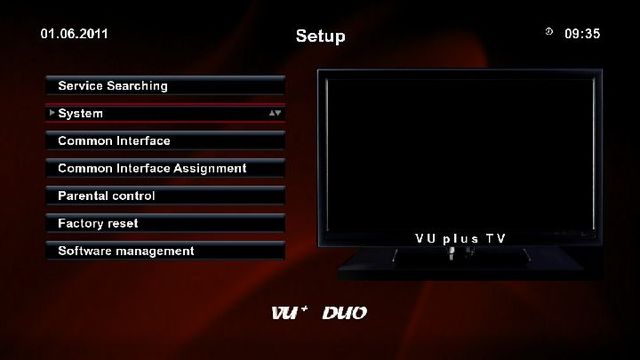
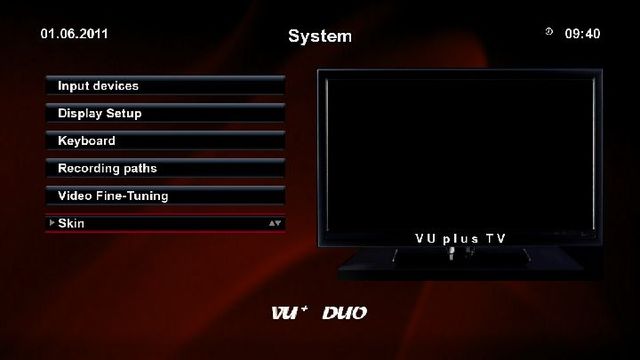
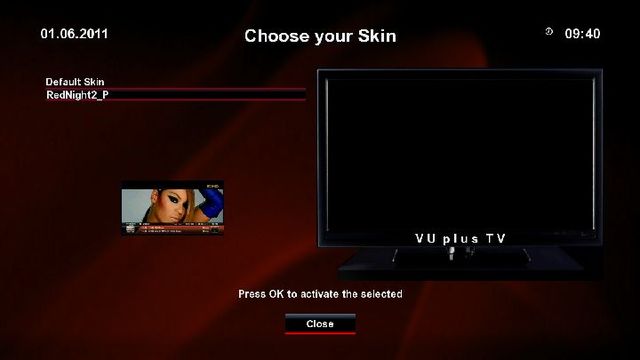
To see your available skins.
Press menu then setup then system, scroll down past network to the bottom of the next page and you will find skin.Just follow these pictures.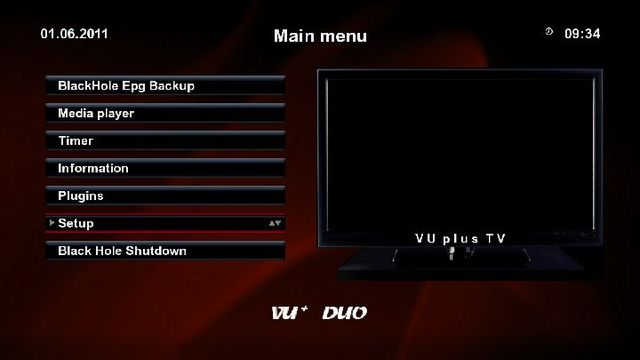
-
You have either missed a step or have put the files in the wrong location.Unzip the file to your ubuntu desktop and edit there.Once edited place the folder cccam_install_package and the file UbuntuInstall.sh in the tmp folder, click on places computer then your drive, you will see the tmp folder.
-
Did you reboot after install?
-
Fair play for taking this on glenviewjf, you have gave yourself a lot of work to do but i am sure it will pay off in the end.
Good luck with your project, go for it im sure you will make it work.And especially for those who think you are wasting your time.

-
i am useing null modem cable it's uploading the image it takes long time :(
yes mate 45mins to 1hr but it will solve the problem. -
whatever version you are using once you select flash you will then be prompted perform erase also.
-
Ok use null modem cable only and when prompted "also perform flash erase" select yes.
This should clear the errors. -
Are you in serial only mode?
What did you select when prompted "perform flash erase" ? -
Both will overwrite, but both also give the option to backup current settings before you load new.
-
-
Flyman having a static ip will make no difference here, this will not cure being online to some peers but not others. IMO the best thing you can do is change your ports & dns then send everyone fresh clines & ask for the same back.
-
Put CCcam.x86 In To Folder /Usr/Local/Bin
USE A FTP PROGRAM !!new2
Hi everyone
I am newbie for cardsharing and ,trying to set up the cccam into the ubuntu pc.
I have done half stuff ,but now i am stuck to
Put CCcam.x86 In To Folder /Usr/Local/Bin.
Please any tip how to do thatThank so much
If you you are installing manually on local pc no need for ftp at all, just move the files to their right location manually. -
Hi everyone
I am newbie for cardsharing and ,trying to set up the cccam into the ubuntu pc.
I have done half stuff ,but now i am stuck to
Put CCcam.x86 In To Folder /Usr/Local/Bin.
Please any tip how to do thatThank so much
Its as simple as downloading the files then moving them to the correct folder, you may find this guide easier. -
gift gives everything on 13, 19.2 and 28.2. they sell for around £150 with 7 months service, then £50 for each 6 months.
Sorry but i find this very hard to believe.
-
Quote
Extended images support and Firefox 4.0 fix
Thanks sat gr.



