


If you are using a motorized dish then "Tuner B" would be "equal to Tuner A". With this setup its not possible as such to switch between tuners. Tuner A will be the main tuner and Tuner B will only become active when Tuner A is recording etc.
What is your tuner Configuration joe ?
Posts by master G
-
-
Credit to B16MCC the original author
Ok guys here's a very simple guide with pictures on how to install CCcam and add a Cline to the CCcam.cfg
This tutorial is written based on the DreamElite Blackhole 1.3.3 image on a DM800 and assumes you have it connected to your router and configured for internet access.
Ensure you have no menus currently displayed, then press the green button to access the DreamElite 'Green Panel'
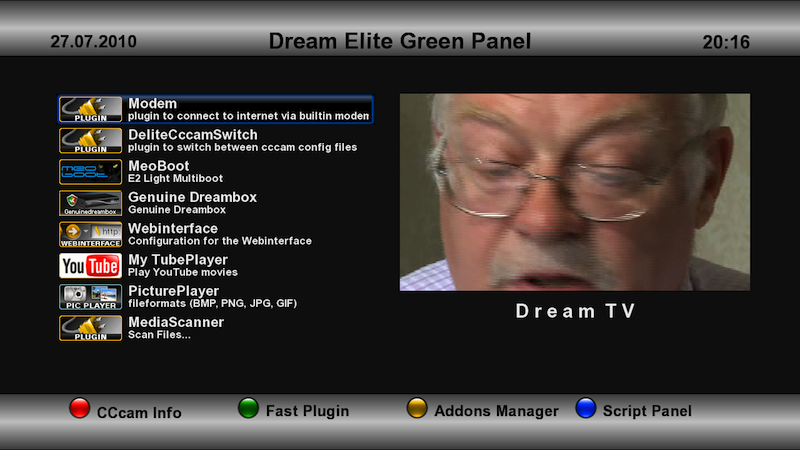
Next press the yellow button to access the 'Addons Manager'.
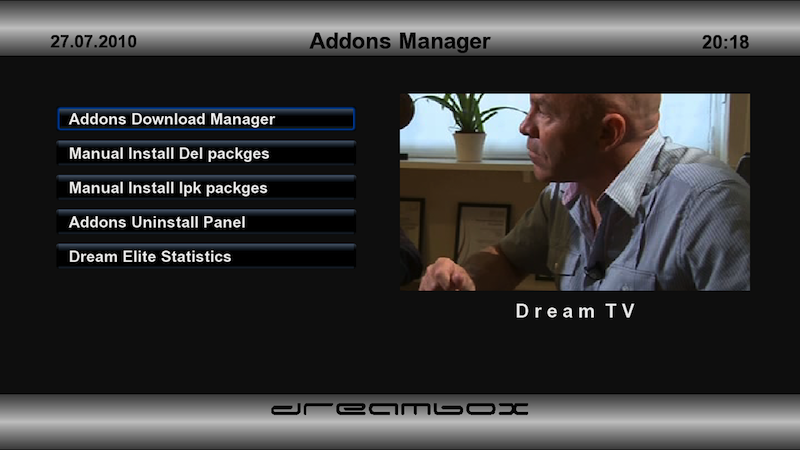
From this screen select 'Addons Download Manager'

Now select 'Dream Elite E2 Image Cams'.

Select the latest CCcam from the list, in this case v2.1.4
You can select 'Bin Only' or 'Full'
The only difference is the full gives you a dummy CCcam.cfg file that explains the parameters.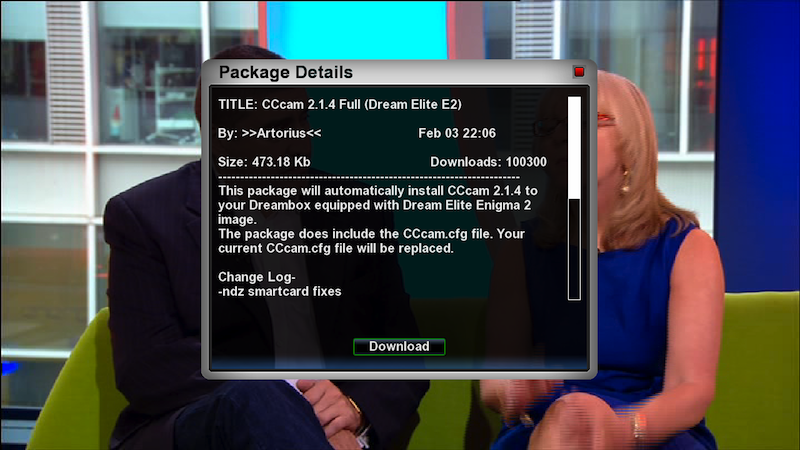
Once select press green to accept the download and select yes to install it.
Ok, now you've installed CCcam you need to configure it. This is done by FTP. Using your PC FTP software, connect to your box and navigate to the /etc folder.
If you installed the full version of CCcam you will now see a CCcam.cfg in the /etc folder.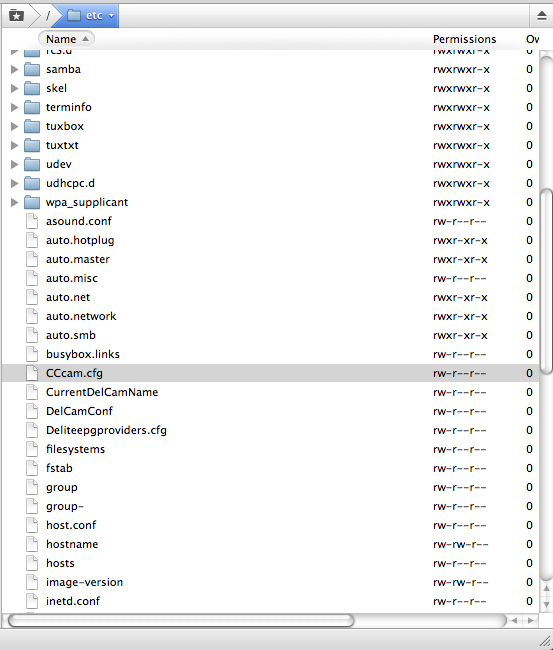
Use your FTP software to open it for editing.
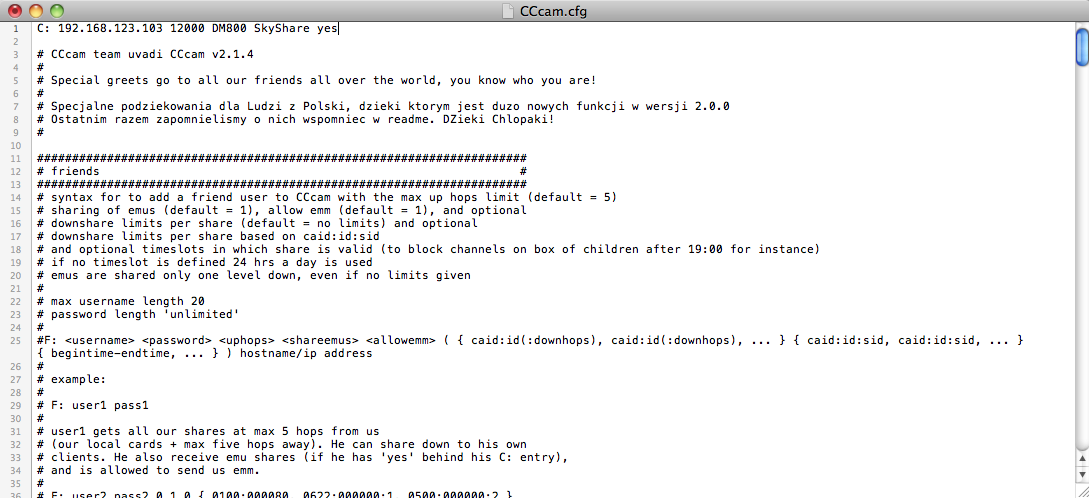
You'll see the CCcam.cfg contains a lot of information. Notice that each line begins with a #. This is very important, it means the line will be ignored by CCcam. This is known as 'Commented out'.
You need to add your line as shown, be sure that it DOES NOT start with a # , otherwise, yes you guessed it, it will be ignored. Once you've done it, save it and ensure its transferred back to the box. In this example I am showing a connection to a server inside my own lan, this could be a WAN IP address or a DNS address ofcourse.
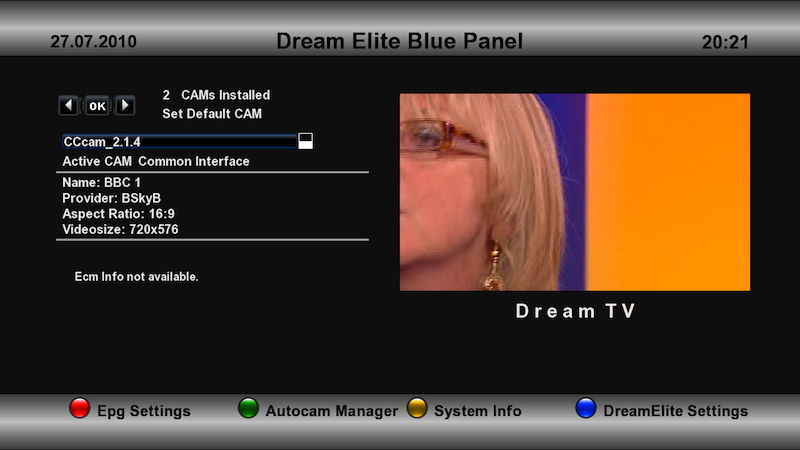
Once it's installed and configured you can go to the 'Blue Panel' by pressing blue button, use the left and right buttons to select the cam and press ok to start it.
To check the status of your connection you can use the CCcam web interface. Once CCcam is running , you can access the web interface on your browser by typing in the lan address of your Dreambox and specifying port 16001 , then click on Server, as shown below.
http://192.168.1.8:16001
Where 192.168.1.8 is the IP address of your Dreambox (or what ever is hosting the card) on your own internal LAN network.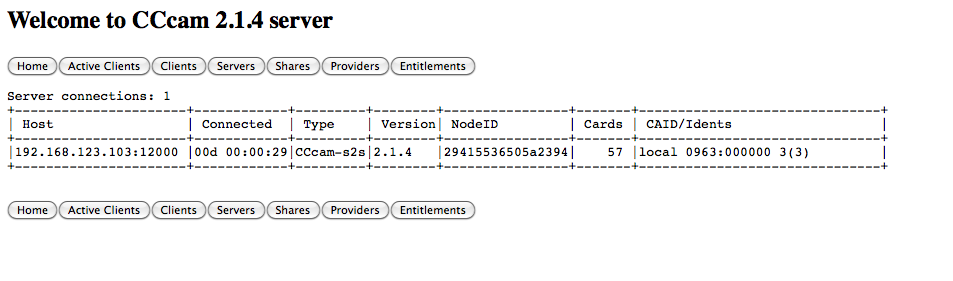
Enjoy..
-
If you have forget the pass of your dreambox here is how to reset it saving the need to reflash.
1) Install and run TuxBox Commander plugin via your images download manager
2) Choose directory to edit=var/etc/passwd
3) Remove the encrypted password.
--> ATTENTION !!!! THE PASSWD file only !!! NOT the passwd- be careful you dont choose passwd-
3.1) In the file /etc/passwd is the line:
root:b:0:0:root:/root:/bin/sh or something as !!!
root:ililililinsatshares:0:0:root:/roo t:/bin/sh3.2) the password field is the b or the encripted string ililililinsatshares
3.3) Delete the b or the string the line now is:root::0:0:root:/root:/bin/sh for the DM500
if you are using another DM keep the root as it is you must delete ONLY the string.
4) Save the file and exit
5) Telnet to your DB with root user without password
6) Create a new root password with the command : " passwd "
7) Reboot and password is sucsessfully changed.
Incase this plugin is not available through your images plugin manager i will put it in the downloads section here.To install it ftp to /tmp and manually install with your dm remote.
-
This is not my work but very helpful when you are trying to find the harder to find sats on the arc.These results were taken last month in the south east of England depending where you are results may vary.
Intelsat-12 @ 45 east 11686V 5787 Prima
Intelsat-12 @ 45 east dvb-s2 11632V 20000 Latina F
Turksat 3A @ 42 east 11804V 24444 CNN Turk
Express AM-1 @ 40 east 11676H 11935 NNTV.
Express AM-1 @ 40 east 10967V 20000 Muzika MPEG-4
Hellas Sat-2 @39 east 12606H 30000 ERT World
Eutelsat W-7 @ 36 east 12546H 2734 MediaSat
EuroBird-3 @ 33.2 east 11595V 27500 Map Tv.
Turksat 1C @ 31 east 11025V 2179 (2.2 degrees inclined)
Astra 2D @ 28.2 east 10773H 22000 BBC-1
Badr-4 @ 26 east 12523H 27500 Kuwait tv
Astra 3B @ 23.5 east 11914H 27500 TV Noord
Eutelsat W-6 @ 21.6 east dvb-s2 11560H 5000 LBC
Astra 1L @ 19.2 east 11597V 22000 BBC World
Eutel W2M @ 16 east 11282H 27500 Vizion+
Hot Bird 6 @ 13 east 11642H 27500 Bloomberg Europe.
Eutel W2A @ 10 east 11144H 2441 ANB
EuroBird 9A @ 9 east 11804V 27500 Lux
Eutel W3A @ 7 east 11282V 27500 M6 Swiss
Astra 4A @ 4.8 east 11766H 27500 KRT
EuroBird 4A @ 4 east 12540H 39060 data
Thor-5 @ 0.8 west 11862H 27500 BBC World News
Thor-5 @ 0.8 west 12341 28000 Duna 1HD MPEG-4
Intelsat 10-02 @ 1 west 12643H 27500 DDTV
Amos-2 @ 4 west 10722H 27500 1Plus1
AtlanticBird-3 @ 5 west 11096V 29950 NRJ Paris
Nilesat 101 @ 7 west 11823V 27500 Kuwait Sport
AtlanticBird-2 @ 8 west 11078H 2222 Karbala
Express AM44 @ 11 west 11559H 16562 Gold TV
AtlanticBird-1 @12.5 west 11340H 2279 Cancao Nova Int
Telstar 12 @ 15 west 12608H 19279 BBC Persian..
Intelsat 901 @ 18 west dvb-s2 11497H 1181 Sonce
NSS-7 @ 22 west 12734H 18084 Algeria
Intelsat 905 @ 24.5 west 11172V 1860 loveworld
Intelsat 907 @ 27.5 west 11665V 13020 Ch 5 regions encrypt
Hispasat 1C @ 30 west 12092V 27500 Al Jazeera Intl
Hispasat 1C @ 30 west dvb-s2 12012H 30000 Euronews
Intelsat 903 @ 34.5 west 11026V 8500 data.
Telstar 11N @ 37.6 west 11677V 18159 data
Intelsat 3R @ 43.1 west No regular transmission atm {1.0 degree inclined)
Intelsat 14 @ 45 west 11674V 1240 Canal Info News in MPEG-4
Intelsat-9 @ 58 west Feeds at times but no regular transmissions
-
Section added guys, get posting.
-
Is it normal for a clients fline to have a ip from italy and the cline he gave me shows an ip from australia
Not at all mate, you know what to do with this one. -
Ok you need to download ss76C update file from here.... DOWNLOAD
then enter flash mode as normal the follow these steps1 flash genuine image of choice
2 after image has flashed (dont hit reboot) open 2nd browser window with dm i-p address
3 flash the 76c file . reboot box and good to go dont give your box a chance to report no CA errror , just put the 76c in before you do anythin with the box
If you don't follow these steps correctly you will need get ERROR1 NO CA and you will need my other tut on how to fix....!!
---------------------------------------------------------------------------------------------------------------------
**INFO FILE**
From sim201 team
About SSL76x:
In late June 2010, we used codes with HOOK technology which had been tested for a long time by us in SSL76X.
This is not a new technology, but this is the first time to be used in DMBOX.
The following is SSL76x History:Product stage 4: 2010-09-09
Sim201-SSL76C current version
Almost supported all IMG currently, and we improve its loading supported to DE1.33D USB-tuner (tested on the AverMedia-A850).
It also supported Samsung memory-chips oldboard of DM800
(although these Samsung-chips oldboard users were not our target customer).Product stage 3: 2010-08-19
Sim201-SSL76B-beta Public beta separate version.
Strengthen the ability of supporting more team IMG-nfi files (IMG such as GEMINI2, oozoon, LT6-sp4,etc).
fixed some bug-codes and supported the OPENVPN function in DE1.33, but this version does not support DE1.33 USB-tuner loading.Product stage 2??2010 -07-13
Sim201 SSL76A- beta Public beta separate version.
Different from sim201 - SSL76A, this version has developed supported function to OPENPLI - IMG.
As the use of the wrong codes, it does not support DE1. 33 OPENVPN, etc. (not directly supported IMG such as oozoon, LT6, etc.),
though we encrypt-packed these codes.***Then a Ferrari copied our the hook-codes and some invalid bug-codes of ssl76abeta version.
( These bugs will cause the DE1.33 OPENVPN don??t work and LT6-IMG don??t work too.Of course,also Ferrari copied these bugs).Product stage 1 ?? 2010-07-09
Sim201-SSL76A are published binding in some IMG-files, but this version does not support many IMGs.
And then it is extracted from our IMG-file by other DM800 teammates in order to install it into IMG files like Satonlines V9-20100712.
----------------------------------------------------------------------------------------------------------------------
*** Our codes had been copied, we don??t want to comment anything. But, however, the team of Ferrari is an ??incredible?? team,
which has stolen our technology but said they figured it out themselves and slandered we copied their results.Of course, they are much better at commercial propaganda than we are.
For example, they have many commercials on popular forum.We try our best to avoid face-to-face conflicts with Ferrari in developing customers
and we don??t sell our simcard to regular sim1 users publicly.As we all know, SIM1 is an early product of Ferrari. It??s none of our business how they deal with their regular customers in the past.
But now, we are considering putting these customers in our service list. -
-
For those of you using dreamboxes as servers try cccam toolbox in the tools section, there is an option to view the syslog live, it lets you see exactly what is happening in your server. Get it HERE
-
The japs eye...
-
Add the following line to your ccam.cfg,
QuoteLOG WARNINGS: /tmp/warnings.txt
It creates a log of people trying to access your receiver without your consent. The log file will be found in your tmp folder. Try it your self, hopefully you wont find any illegal connections. When i tried it i found 8 differant connections :mad:
-
Whats the difference between the 2?
Jade 3 is an official release,open pli is a daily release that developers have worked on fixing minor bugs ect.Oh, and whats MaxVar?
MV has more storage space as non essential plugins are not bundled with it.I recommend this is what you use but both versions are rock solid on a dm500. -
Nabilosat Enigma1 DarkStar II - DM500
The image has been completely recoded based on the latest CVS
Updated Skin by porto
New DarkStar II skin customized by porto
Enigma 1 Integrated 8 Days Sky IT EPG
Download 8 days Sky IT EPG, and have it integrated to Enigma1
EPG Event Search
Select a single channel EPG, press 0, enter a keyword and search for your preferred events
EPG Channels Selection
Customize the list of EPG channels to download. We reccomend to restart Enigma upon completing the selection
EPG Channels Update List
Update the EPG channels list when there are changes
Standby after reboot
Your DM will automatically standby after an accidental reboot, such as after a powercut
Scheduled Reboot
Schedule an automatic daily reboot
Main Function Keys
Button 1xOK = Light Info OSD
Button 2xOK = Extra Info OSD
Button Blue = Nabilo Blue Panel
Button 2xBlue = Nabilo Extra Settings
Button Yellow = Nabilo Yellow Panel - Plugins List
Button 2xYellow = Nabilo Yellow Panel - Addons Manager
Button Red = Current Channel EPG
Button 2xRed = Select Channel EPG or MultiEPG
Features
Addons
Dedicated Addons Server
Download and install additional packages from Nabilosat server
Infobar/OSD
Enigma1 Analogic Clock
Channel Orbital Position
Advanced Tuner Info: Sr Freq Pol Fec
Signal SNR, AGC, BER
Infobar Picons
Advanced EMU information
Nabilo Panels features1) Blue Panel
Extra SettingsInadyn
Nabilo EPG Settings
Nabilo OSD Preferences
Nabilo Scheduler
----------------------
Mount Points
System Info
Dreambox
Mount Points Info
Process Info
Memory Info
----------------------
Enigma Setup
Bitstream
Save
Select/Start/Restart EMU
2) Yellow Panel
Forums
Shoutbox
Addons
Scripts
Addons Download Manager
Manual Install Panel
Addons Uninstall Panel
Images Uninstall Panel -
1-the new in this image
*Changed the original A new skins spectrum1+2+3+4
*add turkish Language
*delete old skins
*new bootlogo
*delete other longage
*add Nagrab and text
*add option DVR with help bottonnew bootlogo
what new in backup nabilosat_v0.8_maxvar_backup_blue
-option DVR ok with botton help
-font size add
-add Cccam2.1.1 ok
-change logo of demarage
-add new list channel (update)
-add Cccam speed
*new plugins add About twenty
*cccaminfo
*dreamnetcaste of radio net
*hacksat v9a for update
*pip
*mosaic
*tuxbox commander
*kalender2009
*satfinder
*cryptoinfo
*time dat
*rss tv guides
*new wither
And more plugins -
New fantastic modefecation of Nemesis 4.4 wit CCcam 2.1.4 emu
New modification of Nemesis 4.4 image with speectrum ii skin and CCcam 2.1.4 emu
-------------------
The new modifications
Emu CCcam 2.1.4 inside image
addig CCcam info plugin
adding ngrab plugin
extra url has been added
speectrum II skin has been added
Some modefecations have been made on Skin
Changing boot logo , radio , search and mp3 logos
New Super driver that make image nery fast
arabic translation wiil work automatically
French . arabic and english languages has been added
you can change the form of channells by help button
direct recording has been added by help button
New satellites.xml has been added
deleting non used things from image
you wiil note big varin this image
only send CCcam.cfg to var/etc directory
send image by dream up or flash******
New boot logo
arabic,french and english languages
speectrum II skin
-
Probably the best version of cccam info around at the moment with loads of extras inc editing tools.
Click the icon that looks like a spanner in the top left corner,, just enter the ip address, port 16001, username and password for the dreambox and click add.
Close cs studio down and restart it, click on the ip address in the top right and click update.. -
Yes but have not tested myself so cannot comment on how good/bad it is.
-
Released Commando-12-DM500S Neutrino
At last a Commando Image for the DM500s
Commando 12 neutrino for the Dreambox 500s
compiled from the UKCVS.org svn which includes fixes to the following
Scan Defaults to 28.2e, if you select another Sat it will save that as the last sat
This image does not include any Cable support as UK cable is dead, but does fully support most of the normal Satellite requirements, including CCCam
as usual NO CAMS, KEYS, ROMS included by default
pop CCcam into /var/bim/emu. select blue > extras menu > softcam menu, from there you can start the cam
( needs to be named "CCcam" )
THE PASSWORD is commando
This image is by default aimed at UK users, but a simple addition of other languages locals files will enable other languages
yWeb and Tuxbox Commander are included, as is AutoFS (CIFS mount tested) and Streaming. And some Games, for fun. Despite all that lot in r/o SquashFS root, the writeable JFFS2 /var parition is an eye-watering 4.125mb in size, giving an initial Free Space of around 3.8mb!!
-
-
First download attached dreamup
Make sure to switch off and unplug your dreambox from the mains before connecting or disconnecting any cables, Null Modem, LNB, LAN, scart lead etc, otherwise this may cause internal damage to the box.
1. Unplug your dreambox from the mains.
2. Disconnect all cables except the Power Cable & a Null Modem Cable connected between your Eagle and PC com port.
3. On your PC install and start DreamUp
4. Select your correct PC Serial Port.
5. Untick "Use Network"
6. Click Connect.
7. When you see the on screen message "Connection Prepared, now switch on the dreambox!" now plug in your dreambox.
8. Click Flash and navigate to the image file on your PC.
9. After installation is complete, exit DreamUp.
10. Unplug your dreambox from the mains and wait at least 1 min.
11. Disconnect Null Modem Cable, Connect LNB, LAN & Scart Cable.
12. Plug in your dreambox and wait for it to boot into setup mode.
13. Perform Setup and scan satellites.
14. Save all new settings by rebooting the receiver. (Menu\Shutdown\Reboot Now)

