Posts by Banny
-
-
-
-
Yeah ive also seen the price people try to charge for clones and such on ebay.
-
There are already a lot of similar pieces of equipment out there, and I don't think they will given the Pi are sold for non profit so it wouldn't be feasible for them to do so.
-
People still use em, demands and needs, if they were dead there would not be a market for them, and whilst I agree the Pi will prolly kill them off, there is still a massive waiting list for the Pi now.
-
Not really look at dm500s still going strong... so you don't get a negligible update, still does same job.
-
Ive still got the VU, but I also own a 800se
-
I'd try a different PSU.
Thanks for the advice, I don't have one so ill have to order one anyway.
-
My 800 is in other room, it has, Tenda wifi device, internal hard drive and usb installed and I was running them all from the dreambox, this morning I noticed, that it wasn't connected, so I took the wifi device to my pc to configure it again.
When I tried to power on the dreambox it couldn't power the sat wifi device, and got stuck in a sort of boot loop, the tenda is now plugged in and ive reflashed the dreambox, but it still seems sluggish, which I think is down to a it running low on memory, but I still don't understand why all f a sudden it couldn't power the tenda. What do people think
1. im being paranoid?
2. power supply?
3. motherboard? -
The above example doesn't have a CWS Connecter, ive copied and pasted an example of one below for you -
<csp-connector name="friend" enabled="true" debug="true" metric="1">
<url>http://friends.dyndns.net :8082</url>
<user>user</user>
<p***word>p***word</p***word>
<request-cache-updates>true</request-cache-updates>
</csp-connector> -
On TSPannel there is a version specifically for VIX 2.4
-
They have been messing a lot in these parts in the last two weeks, they completely reset my settings, and when they changed the fw I lost the internet for some time.
-
<cardserv-proxy ver="0.9.0">
<ca-profiles>
<default-des-key>01 02 03 04 05 06 07 08 09 10 11 12 13 14</default-des-key><extended-newcamd listen-port="40000"/>
<!-- profile allowing for 2 locals on the same caid and network-id -->
<profile name="0100-SECA" ca-id="0100" network-id="0035" enabled="true" debug="true">
<newcamd listen-port="11005">
<card-data type="config" ca-id="0100">
<providers>00 00 00, 00 00 6a, 00 00 6c</providers>
</card-data>
</newcamd>
<max-cw-wait>12</max-cw-wait>
<filter-cards>provider</filter-cards>
<filter-block>false</filter-block>
<load-balance>false</load-balance>
<services-file>etc/services</services-file>
</profile></ca-profiles>
<!-- ============================ -->
<logging log-ecm="true" log-emm="true" log-zapping="false" hide-ip-addresses="false">
<log-file rotate-count="3" rotate-max-size="1024">log/cardserv.log</log-file>
<log-level>INFO</log-level>
<silent>true</silent>
<debug>false</debug>
</logging><rmi>
<display-name>Csproxy1</display-name>
<status-web>
<listen-port>8082</listen-port>
<ssl enabled="false">
<keystore password="secret">etc/csp_keystore</keystore>
</ssl>
<war-file>lib/cs-status.war</war-file>
<super-users>admin</super-users>
</status-web>
</rmi><user-manager class="com.bowman.cardserv.SimpleUserManager">
<auth-config>
<user name="admin" password="secret" max-connections="3" admin="true"/>
<user name="mgcamd" password="mgcamd" max-connections="1" enabled="true" debug="true"/>
</auth-config>
</user-manager><connection-manager>
<reconnect-interval>10</reconnect-interval>
<default-des-key>01 02 03 04 05 06 07 08 09 10 11 12 13 14</default-des-key>
<default-keepalive-interval>55</default-keepalive-interval><service-map>
<mapper>
<auto-reset-threshold>20</auto-reset-threshold>
</mapper>
<mapper profile="0100-SECA">
<reset-services></reset-services>
<block-services></block-services>
</mapper>
</service-map><cws-connectors>
<csp-connector name="test0" enabled="false">
<url>https://otherproxy.host.com:8443</url>
<user>user</user>
<password>password</password>
<request-cache-updates>false</request-cache-updates>
</csp-connector><newcamd-connector name="test1" profile="test1" enabled="false">
<host>192.168.0.3</host>
<port>10001</port>
<user>proxyuser</user>
<password>password</password>
<asynchronous>true</asynchronous>
</newcamd-connector><!-- 1st connector for TV Vlaanderen local -->
<newcamd-connector name="tvv" profile="0100-SECA" provider-idents="00 00 00, 00 00 6c" enabled="true" metric="2">
<host>192.168.1.248</host>
<port>10005</port>
<user>name</user>
<password>userpassword</password>
<asynchronous>true</asynchronous>
</newcamd-connector><!-- 2nd connector for C+ NL local -->
<newcamd-connector name="c+nl" profile="0100-SECA" provider-idents="00 00 00, 00 00 6a" enabled="true" metric="2">
<host>xxxxx.homeip.net</host>
<port>11006</port>
<user>name</user>
<password>userpassword</password>
</newcamd-connector><!-- 3rd connector for C+ NL local -->
<newcamd-connector name="c+nl2" profile="0100-SECA" provider-idents="00 00 00, 00 00 6a" enabled="true" metric="2">
<host>xxxxx.homeip.net</host>
<port>11006</port>
<user>name</user>
<password>userpassword</password>
</newcamd-connector> -
Sample CSP xml ( config file )
Also a tip, as you can see the setup looks quite complex to simplfy it a bit for yourself, use proper program code indentation
<cardserv-proxy ver="0.9.0">
<ca-profiles>
<default-des-key>01 02 03 04 05 06 07 08 09 10 11 12 13 14</default-des-key><extended-newcamd listen-port="nnnnn"/>
<profile name="0963-***UK" ca-id="0963" network-id="0002" provider-idents="00 00 00" enabled="true" debug="true">
<newcamd listen-port="nnnnn">
<card-data type="config" ca-id="0963">
<providers>00 00 00</providers></card-data></newcamd><max-cw-wait>9</max-cw-wait>
<filter-cards>provider</filter-cards>
<services-file format="cccam" ca-id="0963" filter="000000">/var/etc/CCcam.channelinfo</services-file>
</profile><profile name="1702-***DE" ca-id="1702" network-id="0085" enabled="true" debug="true">
<newcamd listen-port="nnnnnn">
<card-data type="config" ca-id="1702">
<providers>00 00 00, 00 00 01, 00 00 02, 00 00 03</providers></card-data></newcamd><max-cw-wait>7</max-cw-wait>
<filter-cards>provider</filter-cards>
<services-file format="cccam" ca-id="1702" filter="000000">/var/etc/CCcam.channelinfo</services-file>
</profile></ca-profiles>
<logging log-ecm="true" log-emm="true" log-zapping="false" hide-ip-addresses="false">
<log-file rotate-count="3" rotate-max-size="1024">log/cardserv.log</log-file>
<log-level>INFO</log-level>
<silent>true</silent>
<debug>false</debug>
</logging><rmi>
<display-name>Csproxy1</display-name>
<status-web>
<listen-port>8082</listen-port>
<ssl enabled="false">
<keystore password="secret">etc/csp_keystore</keystore>
</ssl>
<war-file>lib/cs-status.war</war-file>
<super-users>admin</super-users>
</status-web>
</rmi><user-manager class="com.bowman.cardserv.SimpleUserManager">
<auth-config>
<user name="user" password="password" max-connections="3" admin="true"/>
<user name="user1" password="secret1" profiles="myprofile"/>
<user name="a" password="b"/><!--you want to see all lines so do not add profiles-->
</auth-config></user-manager>
<connection-manager>
<reconnect-interval>60</reconnect-interval>
<default-des-key>01 02 03 04 05 06 07 08 09 10 11 12 13 14</default-des-key>
<default-keepalive-interval>55</default-keepalive-interval><service-map>
<mapper><cache-dir>/cache</cache-dir>
<cache-save-age>300</cache-save-age>
<auto-map-services>true</auto-map-services>
<auto-reset-threshold>20</auto-reset-threshold>
</mapper>
<mapper profile="myprofile">
<reset-services></reset-services>
<block-services></block-services>
</mapper>
</service-map><cws-connectors>
<newcamd-connector name="mylocal-***" profile="0963-***UK" provider-idents="00 00 00" enabled="true" metric="1">
<host>127.0.0.1</host>
<port>nnnnn</port>
<user>user</user>
<password>password</password>
<asynchronous>true</asynchronous>
</newcamd-connector>
</cws-connectors></connection-manager>
<proxy-plugins>
<plugin class="com.bowman.cardserv.LoggingPlugin" enabled="false">
<plugin-config>
<log-dir>log/traffic</log-dir>
<log-level>ALL</log-level>
<ip-filter>*</ip-filter>
</plugin-config>
</plugin>
<plugin class="com.bowman.cardserv.DcwFilterPlugin" enabled="true" jar-file="dcwfilterplugin.jar"/>
<plugin class="com.bowman.cardserv.ProviderIdentPlugin" enabled="true" jar-file="provideridentplugin.jar"/>
<plugin class="com.bowman.cardserv.$$$$$$Plugin" enabled="true" jar-file="$$$$$$plugin.jar"/>
</proxy-plugins><cache-handler class="com.bowman.cardserv.ClusteredCache">
<cache-config>
<cw-max-age>11</cw-max-age>
<max-cache-wait>350ms</max-cache-wait>
<local-host>http://example.linux.net</local-host>
<local-port>nnnnn</local-port>
<tracker-url>file:///usr/local/csp/cache/cluster</tracker-url>
<tracker-update>1</tracker-update>
<sync-period>5</sync-period>
</cache-config>
</cache-handler></cardserv-proxy>
Unfortunately, it hasn't displayed as id hoped, but my intention was to indent the code inside each set of container tags, so its easier to see, what the code is doing and is useful for spotting errors in code and logic, maybe not so much in this, but is useful when writing all forms of program code.
-
the numbers match until the movies and then are one off and then by the kids section are two off or is it me
Best way for an easy check is against
-
Adennin's Satfinder 0.6. gives very visible indication of availability of satellite signal by changing the colour of SNR indicator bar to Green.This plugin also has an audible option to set dish for availability of maximum signals.
How to install- Extract and copy "satfinder.cfg" and "satfinder.so" files to /var/tuxbox/plugins with Dreambox Control Centre (DCC).
- Change attributes to 755.
- Press Yellow button on remote to run it.
A picture paints a thousand words, -
No Signal Indication
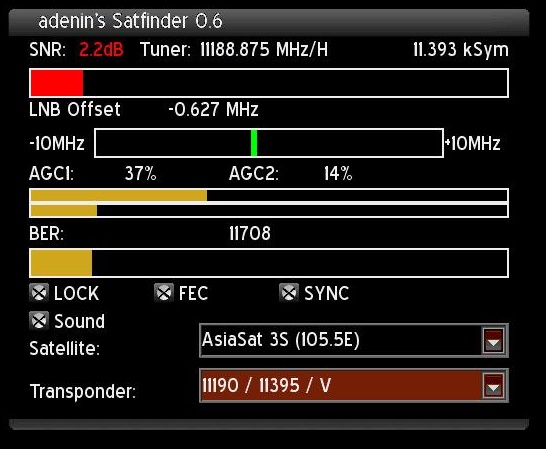
Weak Signal Indication

Strong Signal Indication
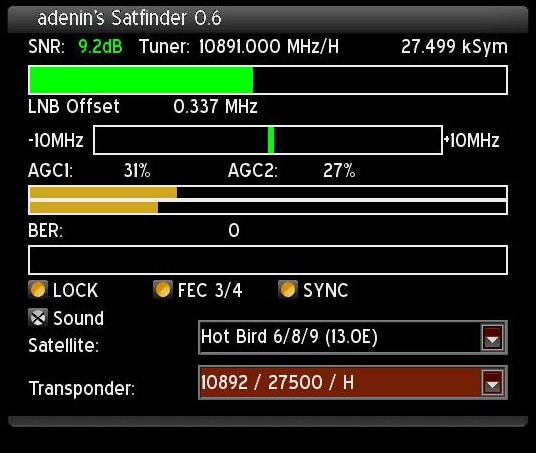
Credit to the original author, I have merely cropped the images and reworded the original post. Shame this plugin is for Enigma1 and not two but thought some people may find it useful.
-
Then again Master G is way better at these things than I am...
-
The best advice I would give you is backup your configs, try to remember which addons you had installed, and find another image you like the look of, your looking for a needle in a haystack, as sometimes, people will upload teams images with some of their own amendments. IT may not have been edited by anyone, have id have a look around see if you can see which image it was, but I wouldn't waste too much time looking around for it.
-
Hi Cobby, thanks for the PM and Friend Request, but the forum is the section for questions and support, means other users can read the the resolution if they find theirself in the same situation.