


I dont know what you are trying to do
Posts by KiddaC
-
-
XStreamity v3.94
New files on post 1
Just changing the way I close url connections once a file is downloaded.
Might help with the issue people are having with downloading large EPGs from flakey servers.
Probably wont though. You cant polish a turd.

-
wow. it must be about 3 or 4 years since I looked at that jedi catchup code.
To be honest I have absolutely no idea what any of that code is doing
And that line that has the double plus. Isn't even doing anything as far as I can see.
I have said this before many times. I have no idea what I was smoking when I wrote this plugin.
It's a mystery any of it works at all.
-
kari you will have to manual fix yourself until next update. As my plugin is not a releasable state today.
upload this file to
/usr/lib/enigma2/python/Plugins/Extensions/JediMakerXtream -
I know why, I re did some code to be better picked up for the translations.
I messed some code up while doing it.
Don't know where that catchup.py one came from though. That's probably been in there for ever. -
er... never seen that error before.
Mr google tells me its because I am trying to str1 + + str2
So I might have a double plus going on somewhere
hmmm
🤷 -
 Display More
i noticed that if i install
Jedi Maker Xtream (IPTV Bouquet Creator) conflicts with
XCplugin
modification of the entries in the configurations...they look like two plugins that use a bulletin board configuration....installing Jedi Maker changes the internal bulletin boards of the XCplugin plugin even uninstalling Jedi it no longer works correctly for me XCplugin...corrupts the plugin without being able to restore XCplugin even by reinstalling it,
I had to restore all the soft ... tested on OpenPli 8.1.xxx ... also tested on another decoder of a friend dream 920 I had to redo new soft.
There should be zero conflicts with XCplugin. They are 2 separate plugins that have their own folders and no shared components.
If XC plugin is now also a bouquet maker too (its been a while since I looked at it). Then obviously it is best to just use one and one only. Whether that be jedi, xcplugin, E2m3u2bouquet, aj panel or whatever. At the end of the day these plugins are adding to the main bouquet.tv file. So is AutoBouquetMaker. So that could cause issues if you are trying to run multiple bouquet makers at the same time.
I presume Lululla isn't accidently linking to any of my files. And I am not referencing any of his.
And this has translated badly. "they look like two plugins that use a bulletin board configuration."
I don't know what that means. -

Hi KiddaC, I carried your instructions, uninstalled Jedi, then loaded your ipk file and yes it worked. I now have all epg's showing against channels. Thanks very much for your help.

Good to hear.
-

i have a question. I have created bouquets from my iptv provider with jedi maker. I imported then his bouquets with dreamboxedit program and organized it, removed some channels then loaded again. Does it create problem for jedimaker in updating bouquets ,epg etc.
If you are reordering bouquets yourself you have to disable updates. Which means your channel list can get stale.
It would be too difficult a task for me to trying to match an existing user order of bouquets. So every update, we clear the bouquets and create new ones.
Like what urie says. For the small fee of about £10 a year, use something like iptveditor.com It does all the work for you, and is compatible with both my jedi and xstreamity plugins. -
And I just went through the motions of this again and ran into a little error.
Sometimes it does this and I don't know why.
I cannot delete any files in my home folder. i.e home/kiddacIf this happens to you. Just use another folder. i.e root/Debian/tmp
or this command might work to give ownership
sudo chown $USER:$USER ./xstreamity
xstreamity being the folder in your home folder you want to own. -
Uninstall jedi.
menu > plugins > remove > extensions > jedimakerxtream
Then try the ipk file on first post of this thread
-
Lululla Here you go pal. This is how I do it.
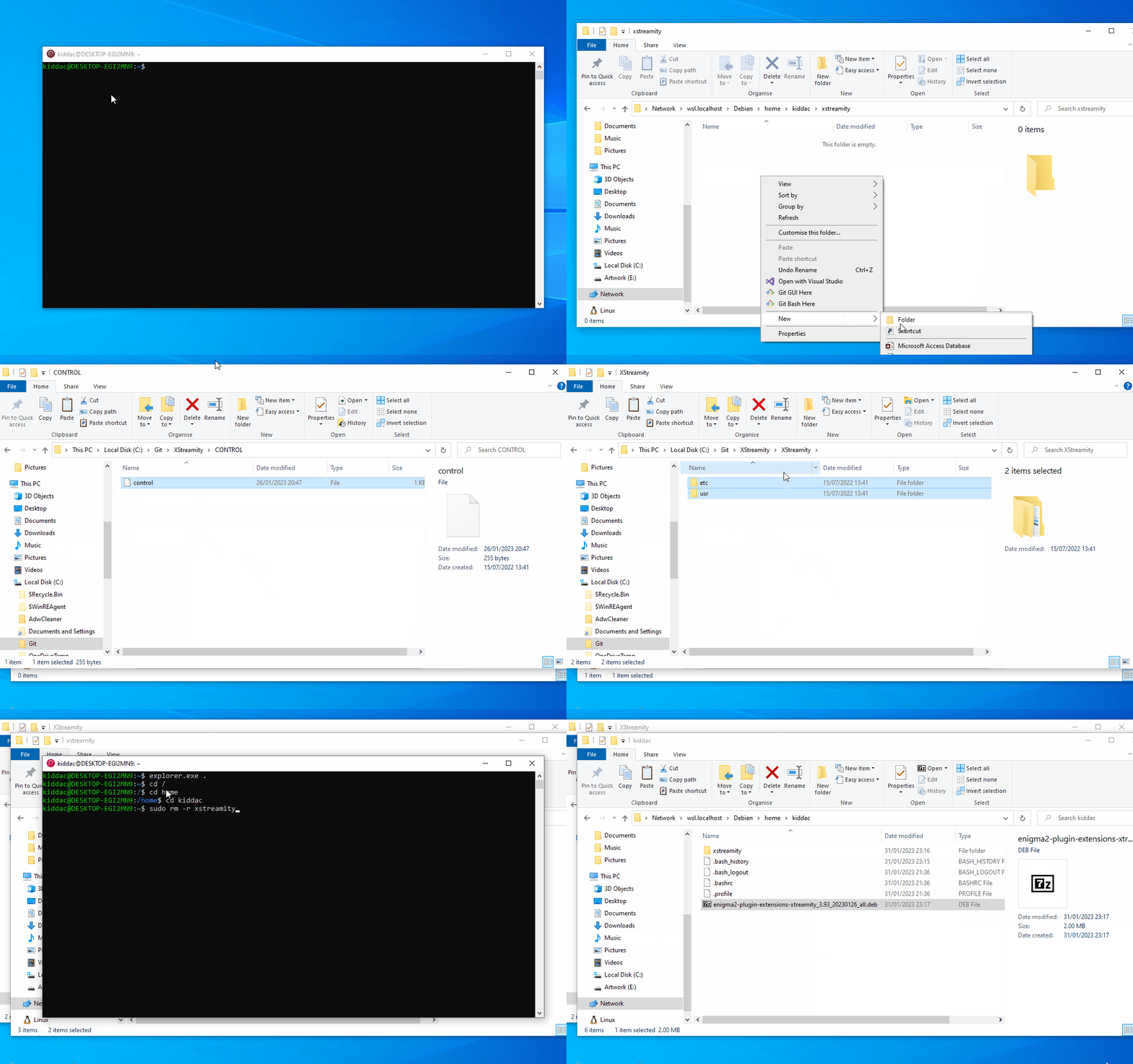 never noticed before. But how strange my random desktop pc name is pretty much an anagram of enigma2. EGI2MN9
 -
Debian on Windows
A couple of people have asked me this. So I thought I would write a little guide of how I create .deb files from my Windows PC files. (or from an extracted .ipk)
As I already have this setup and don't want to delete it for the sake of this guide. These instructions might need tweaking later.Enable / Install WSL2
Windows 11
Already pre-installed.
Windows 10.
Start Menu, search "Turn Windows features on or off"
Make sure "Virtual Machine Platform" and "Windows Subsytem for Linux" are checked.
pasted-from-clipboard.png
Restart your PC if you have had to turn any of them on.
----------------------------------------------------------------------------
or
Start menu, search "Windows PowerShell"
Right click and run as administrator
enter these commands
wsl --install
restart your PC
-----------------------------------------------------------------------------
Install debian GUI package from Microsoft store
Open Microsoft Store
Search for debian
Install
pasted-from-clipboard.png
-----------------------------------------------------------------------------
Download a linux distrubution
Start menu, search "Windows PowerShell"
Right click and run as administrator
enter these commands
wsl --update
wsl --install -d Debian
After a few minutes
enter a username
enter a passwordpasted-from-clipboard.png
You now have a linux operating system on windows.
------------------------------------------------------------------------
To view file explorer in debian app
explorer.exe .
other quick commands
ls - list files
cd [folder]
cd .. - parent directory
cd / root directory
------------------------------------------------------------------------
In your home folder. In my case home/kiddac
Create a new folder for your plugin. i.e xstreamityInside that home/kiddac/xstreamity folder create a DEBIAN folder
Your control file goes inside that DEBIAN folder
pasted-from-clipboard.png
Your root files also go inside this plugin folder. i.e usr, etc
The folders must be the same as your enigma2 box.i.e
/usr/lib/enigma2/python/Plugins/Extensions/XStreamity
---------------------------------------------------------------------------------
So if I was to now create a new .deb file.
I would copy my contol file into DEBIAN folder. Overriding the existing file.
I would delete any existing folders for usr, etc and then copy a fresh copy of the usr, etc folders into my plugin folder.
pasted-from-clipboard.png
Then back in your Debian console
make sure you are in the correct home foldercd /
cd home
cd kiddac (for example)
# dpkg-deb -b <dir/DEBIAN> <new-package.deb>
dpkg-deb -b /home/kiddac/xstreamity enigma2-plugin-extensions-xtreamity_3.93_20230126_all.deb
pasted-from-clipboard.png
this will then produce the .deb file in my home folder.
pasted-from-clipboard.png
------------------------------------------------------------
And the next time you use Debian app, all your previous commands will be saved. So you can just up cursor, to quickly load a previous command.
In which case, I just change the version number each time -
Just click on playlists. And build your bouquets again.
Jedi is currently being updated so files are moving around, settings are being reset etc.Go through your settings.
Click playlists
Rebuild your bouquets.
-
On the first post of this thread is a link to the user guide for jedi (PDF)
Have a read of that first, and see if you are using jedi correctly.
If you are still struggling, then give me a shout. -
I am still plodding along with this in the background.
Just now at a complicated part, where I am restructuring the main menu, which effects quite a few files and functionality.
So don't worry. I haven't given up again :)
-
Well it needs more testing then

Funny how most of us old schoolers are still sticking with openatv 6.4 as our stable build
-
Dont mean to be rude, but I got no time for beta release issues and debugging at the moment. I am far too busy with other stuff for stable releases.
Its working fine for me on openatv 7.1 -
openatv 7.2 is beta. There will be bugs.
I just checked on my openatv 7.1 and no problem on that.
-
Sorry, just catching up.
Why are jedi and xstreamity using different service refs.
They are 2 completely standalone plugins.
A service reference has to be unique to be able to create an epg import file reference.
So both create their own unique reference.
These unique references have to also be different than any other bouquet maker plugin, so we try and create our own unique formulas.
Both have slightly different formulas
XStreamity1:0:1:0003:7095:000003e7:0:0:0:0:http%3a//example.m3u8
green is a 4 hex number based on stream id but if greater than 65535 then red gets + 1 added to it for each 65535
blue is an 8 hex number of 999 + index number of playlistJedi Maker
er...1:0:1:029b:f6d8:0:0:0:0:0:http%3a//example.m3u8</channel>
red is a 4 hex value of 333
green starts at zero, and for every stream in your playlists it adds 1. If this number is bigger than 65535, it gets reset to zero.
This is actually quite a poor unique service ref and probably doesn't work that well nowadays as people have multiple iptvs they find online, plus these providers now have 100,000s of channels. This was originally designed for just one or two smaller playlists.It would take a lot of thought and hardwork for both to use the same formula and be indentical in both plugins.
So many factors to take into consideration.


