


Yes there is , look in the HOW TO section and you will see how to as it has been asked and answered many times before...
Posts by cazuela
-
-
You could try installing the same way you installed on BH
when you try installing ,if there are any dependencies missing the titles will show up on installation..
whichever you need are all here : Dependencies needed to fix the "Cannot satisfy the following dependencies error". -
UPDATED 03.05.2014
enigma2-plugin-extensions-iptvlistupdater_1.60.+git791+a53879a-r23_mips32el.ipk
-
Basically the idea is that no matter which sat, the programme/film/doc,etc was made originally in English language(Hollywood,etc) then it will also have English audio.
NOt necessarily subtitles but audio nonetheless.
btw axn is not FTA but ppv.. -
I would start checking from the tuner cable to the dish/motor...
Also check the tuner configuration , it could be software or hardware
have you got another stb to connect ot the same dish to test signal?? -
is it on any particular channel or platform or sat ??
Have you got an up-to-date sat.xml ??
I notice in other posts you had issues with autobouquets...
Have never experienced this unless channel is not active...
Hopèfully there will be other helpful users to give some other possibilities.. -
could be your channel settings ,your tuner configuration...could be various things or one...
what have you done and tried so far ??
fill in your signature with STB ,image ,emu ,channel settings,,,,and then it might become a little clearer to help`you.. -
unplug the usb stick and reformat it on your pc..
then upload the image again and try to install.. ( make sure that only the vuplus folder containing the image is on the stick)
make sure no other usb ports /hdd connections are no connected.. -
I havent tried out transcoding but I would try update codecs on the pc ..although VLC doesn´t need it..
-
The option has always been there for NEW POST FIRST..........
in MY SETTINGS :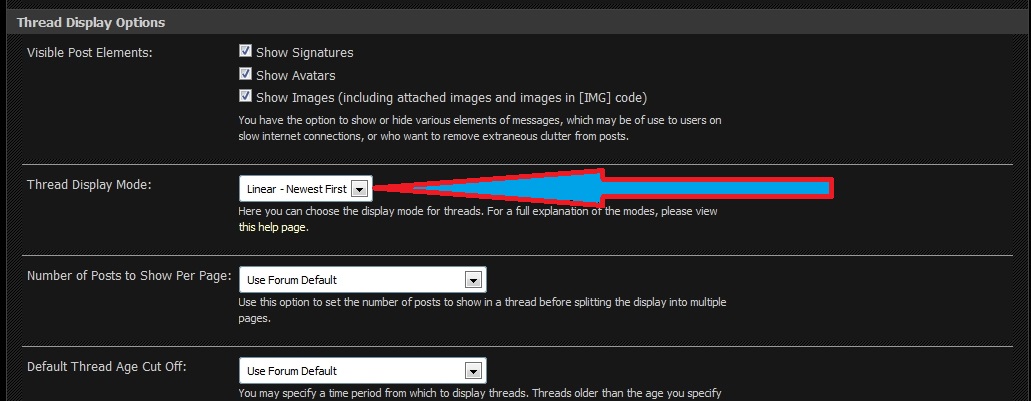
-
Never did get this to work on BBC & ITV unfortunately. Have had to do a reflash of the box now due to other problems so I'll give it a new go when I have some time over.
Maybe by the time you come back it will be sorted..
For the moment only seems that open images have it working... -
reading is the path to success !!!!
Basic newbie setup procedure for VU+ Duo for DummiesHow to install CCcam on BlackHole images
Both these were found in VU+ how to
Depending on which card you want to use there are different emulators/protocols..
Start reading and you will soon realise all the info and support you need is here ;) -
newnigma2-snapshot-dm800hd latest
A good idea is to have your box , image ,etc in your signature so everyone can see at a glance to help you in the future -
If you have TS panel on and working then go to linuxsat_support_Addons > plugins and you will see the addons plugin there..
it will download and install from there for you.. full reboot after and you should see it in your plugins folder -
enigma2-plugin-extensions-linuxsat-support-addons_1.0_mips32el.ipk
¿ Is this the one you have tried ?
This should install for you no problems repeating the same steps you took to install ts panel... -
Everything I download says damaged or unknown format ?
It lets me download but wont open the file
You say everything ...
but you need to be more specific : which panel ? which addons? which section ? which plugin or settings ,etc ????
The more info you provide the better we can help... -
glad to hear it bud ,,remember we have our own plugin too !!
LSS ADDONS -
Cant seem to open these attactments guys ?
you might have reached your download limit for hte day..
try directly from the page itself : http://linuxsat-support.com/showthread.php?t=4286 -
Is the Hotbird Picons Complete?
There is only one way to find this out buddy....
If you check the date of the post you can see 10-09-2013,,,,,
there have been a lot of changes to freqs,etc since then so I would suggest trying out some other more recent ones.. -
The image is python 2.7.2 so try this one :
enigma2-plugin-extensions-tspanel_7.3_mips32el.ipk


