


well theres your problem possibly ;)
try downloads or anything else during the night when not within "normal viewing hours" ,,,,ie: 2am-6am
apart from that, not knowing how many peers,etc ,,we can´t guide you anymore on this..
Posts by cazuela
-
-
it depends on how how much you have contracted,a minimum of 3mbs connection is usually advised but users with less have managed to have a hassle-free 24/7 connection.
Check see what else could be taking your speed, other PCs,videoconsoles,etc,,,but this wouldnt give you picture freeze...
picturefreeze is either dish/lnb setup not 100% or recieving bad /high ecms from other peer..
All this has been mentioned before!! -
DODGY= not 100%
TUNER= module to "tune in" search frequencies.
Another thing which has occured to me is your geographical position,,it depends where you are to be able to recieve ALL 28,2º channels.
After checking your IP location this is not your problem so if I were you I would get up the ladder to reposition the dish/lnb alignment.
try this :http://linuxsat-support.com/ch…ide-how-use-dreamset.html and add the latest settings.
let us know how you get on ;) -
QuoteDisplay More
HOW TO UPGRADE DUO CARD
Update using a pendrive:
1) rename the DuoAPPv18.duo file to duoAPP.duo
2) copy the duoAPP.Duo file into a pendrive on root directory.
3) insert the pendrive in the receiver
4) on the receiver, select update DUO Card and waityour card is already updated!
Update using a PC and a phoenix interface:1- copy the DUOAPPv18 and the DuoAppLoader files in your PC.
2- Select the apropiate com port for you PHOENIX adapter.
3- Select the apropiate firmware
4- push "connect"
HOW TO UPGRADE FIRMWARETo do the upgrade, turn off the STB and connect the STB to the PC using a null
modem cable (2-3 3-2 5-5), then start the program in the PC, select the new
firmware to load and start the upgrade procedure, then turn the STB on and the
upgrade process will begin. Follow the screen instructions.
EMU MODEWhen Emumodule is active, you can access to special menus
- MENU - TOOLS - KEY EDITOR - to edit the keys that change periodically
- INFO - INFO (two times INFO key) - to display information about emulation------------------------------------------------------------------------------
|********This information does not affect SRX series******** |
------------------------------------------------------------------------------By default, the module is deactivated, to activate it do the following
process1.- Go to main menu (press menu in RCU)
2.- Press 2 0 2 0 in the RCU
3.- A popup message will appear CAS SYSTEM ENABLED
4.- Emu module is now workingTo disable the module repeat the above procedure, the popup will change
to 'CAS SYSTEM DISABLED'AUTOUPDATE CONTROL
By default, autoupdate in D+ and TV Cabo is activated.
to deacativate it, go to Main Menu (press menu key in your RCU), and press
2121
Any information provided on this site is not guaranteed in any way. Some articles may discuss topics that are illegal, so this information is provided for educational purposes only, your use of the content, downloads and files, or any part thereof, is made solely at your own risk and responsibility. Viewing Pay TV without a valid subscription is illegal. !! Linuxsat-Support.com cannot be held responsible for the content of any information stored or posted on this forum. -
it could be the internal configs ¿have you copied everything over exactly as you had it in the 4863 ????
-
the vu duo IP .. in your browser write the IP of the duo for example . 192.168.x.xx:8888 ( the x= whatever IP is the duo) and it should bring you to oscam ..
-
you could do a factory reset but that will only clear certain things..if you follow the steps in my post #10 then you can´t go wrong!!and as mutz added make sure you make a backup when everything is installed and working.
-
ok karim----
kernel is in the new bh 1.7.0. image
first step : this is how to update bootloaderhttp://linuxsat-support.com/vu…er-upgrade.html#post38183
reboot
second step: :download: which is from here: http://linuxsat-support.com/vu…ultiboot-full-backup.html
reboot
third step, you need to reinstall whatever configuration you were using before, for example CCcam or oscam or ........
reboot
fourth step : add your own personal .cfg to whatever emu you use.
reboot
fifth step : then enjoy ;)
there is no more to it than that!!
an alternative to all of this is to flash a backup image such as : http://linuxsat-support.com/vu…ckhole-1-7-0-vu-solo.html
there is nothing more we can help you with until you have tried all these steps. -
karim try this image: :download:
it is a clean image ,after setting up you need to add and adjust all your previous settings. -
you need to give us more information about your setup,what emulator you are using, etc....otherwise we cannot help you..
¿ have you upgraded the bootloader? you need to do this before flashing a new image..
in your next post ,`please give as much information as pòssible about what you have done / tried ,etc...
and passing by introductions would be nice also ;) -
as simple as changing image pred ;)
the only way near audio I could find in a 500+s was this,,maybe for you to compare??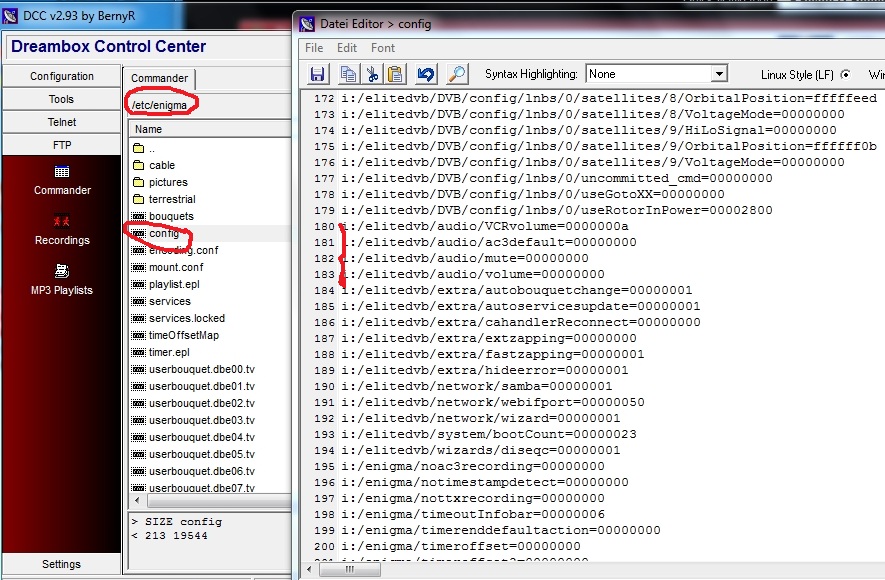
lets know if and how you solve(d) it for the benefit of others,please
-
welcome karim720 to the community (although you are registerd since oct 2011).
You haven´t given enough info on your problem but....If I understand you right ,you have just flashed from bh 1.6.6 to bh 1.7.0. ??
first thing you need to do is this : http://linuxsat-support.com/vu…er-upgrade.html#post38183
the backup from version 1.6.6 cannot be used in version 1.7.0. because of change of kernel and file format.
so you need to reinstall everything again including whichever emu you were using before, CCcam,oscam, etc..
and whatever plugins you had before.. if you like ,after upgrading the bootloader,
you could try out one of the backup images for solo with everything already loaded ,I imagine you would be just missing the usbstick to be mounted.. -
-
not sure if you mean how to setup motor¿? or to tweak??
unfortunately my motor decided to call it a day over the Christmas so can´t show you more than this :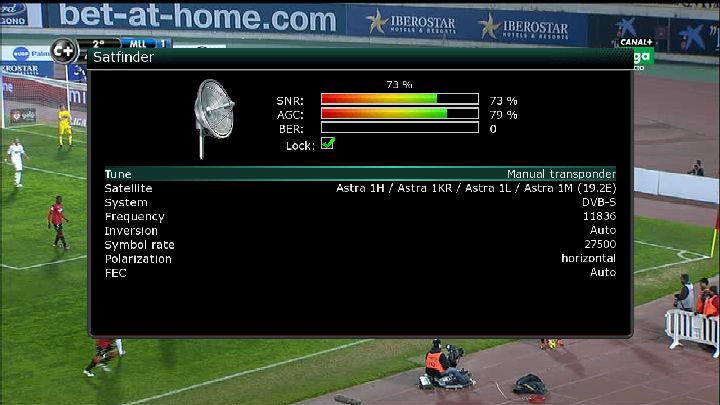
or you mean while out at the dish??:
she whistles loud enough for me to hear when spot on ;) -
the VU boxes are second to none,, but htere have been known issues with slyHD channels in the past,,,the reasons were either bad card setup/communication or dish/lnb alignment.. the latter is the most obvious..
-
this title is very misleading : adding d line to openbox s9 as Dlines are for Gbox and some earlier versions of Mbox,,
and is of a very different format than CCcam or any other emu... -
sounds like you need to find more peers with same card for backup!!
if certain channels are breaking up it usually means that the card is overloading/saturated with requests for the same channel ,etc,,or you are recieving too far down the hops OR your dish/lnb alignment are out. revise all your connections,etc..
Any information provided on this site is not guaranteed in any way. Some articles may discuss topics that are illegal, so this information is provided for educational purposes only, your use of the content, downloads and files, or any part thereof, is made solely at your own risk and responsibility. Viewing Pay TV without a valid subscription is illegal. !! Linuxsat-Support.com cannot be held responsible for the content of any information stored or posted on this forum. -
N: 03x6x.xiosxx.dyndns.org 34000 sxx axa 01 02 03 04 05 06 07 08 09 10 11 12 13 14
this would be an Nline. if you are client only then your peer needs to make this line for you ,not you!!
you do not need to open any ports if you are going to be client only ( which is not sharing )
you were told that your CCcam was working so no need to change except to add the nline.
Why don´t you ask your peer to pass you a Cline which is the norm and not an Nline.
Closing this thread because you have already been given all neccessary info in previous posts. -
so you are trying to access a payserver with an nline ?'
btw.. 14 hours is nothing compared to what us hobbyists spend ;) -
start reading the stickies here: Forum Gateway - Powered by DnP Firewall



