use 1.69 .. heheeh
The box was very slow, I got a lot of messages about it.
If you want to continue, update, otherwise keep your version.
Best regards


use 1.69 .. heheeh
The box was very slow, I got a lot of messages about it.
If you want to continue, update, otherwise keep your version.
Best regards

NOTE THE RULER AND GUIDELINES FOLLOWING THE MOUSE (RED DASHED)
- ADDED BUTTON TO ENABLE/DISABLE GUIDELINES
this : increase timeout 90 to call and 300 i to config (default 120)
try.. but .. not resolve..
change server vpn.. is slow for vavoo

DNS box and DNS out must be the same ( 1.1.1.1 ). Check again your network settings in image. If you use , untick IPv6 .
What is this DNS box address ?
[2026-05-09 13:29:18] [INFO] [VUTILS] ===== Vavoo session start =====
[2026-05-09 13:29:18] [INFO] [VUTILS] Vavoo Version: 1.71
[2026-05-09 13:29:18] [INFO] [VUTILS] DNS box: fdc3:5b9f:fe5:0:9a9b:cbff:fe13:a361
[2026-05-09 13:29:18] [INFO] [VUTILS] DNS out: 1.1.1.1
[2026-05-09 13:29:18] [INFO] [VUTILS] [INFO] Initial aspect ratio: 2
[2026-05-09 13:29:18] [INFO] [PROXY] Python 3 detected
[2026-05-09 13:29:18] [INFO] [PROXY] Token monitor started
Increase timeout ..
BEFORE
The user is experiencing a problem with the Vavoo plugin. When a VPN connection is active, it hangs on "checking proxy..." and then restarts Enigma2. Analyzing the logs he sent, it appears that the local proxy (http://127.0.0.1:4323) isn't responding immediately because it's still loading the channel catalog (over 9,500 channels), and the VPN is further slowing down requests to the Vavoo servers (vavoo.to, lokke.app).
After 60 seconds, the plugin's watchdog thinks the proxy is dead and attempts to restart, but the proxy is actually still working. This causes conflicts, and Enigma2 eventually crashes or restarts.
NOW
Please read carefully what I wrote in the release release; you should use the plugin menu and increase the timeout.
In the log, the user set proxy_startup_timeout to 30 seconds (it says "waiting up to 30 seconds..."), but loading the catalog takes longer than 60 seconds. Therefore, the value should be increased to 120 seconds or more.
The problem you're experiencing—the plugin gets stuck on "checking proxy..." and then restarts Enigma2—is because the VPN connection significantly slows down the HTTP requests the internal proxy (http://127.0.0.1:4323) must make to the Vavoo servers (vavoo.to, lokke.app) to download the channel catalog (over 9,500 channels). The proxy needs more time to complete this operation, but the plugin's internal timers (watchdog, waiting for response) start running first and assume the proxy is dead, attempting a restart that ultimately crashes Enigma2.
What has already been improved in version 1.71
A configurable Proxy startup timeout (seconds) option has been added (default 30, max 120) that controls how long the plugin waits for the proxy to become operational before declaring failure.
The watchdog (which checks every 60 seconds to see if the proxy is alive) now also checks for the presence of the /tmp/vavoo_proxy_booting file and doesn't attempt a restart if the proxy is still booting.
Why isn't it still working for you?
Analyzing your log, I see that:
The proxy starts at 1:30:50 PM and begins loading the catalog (fetching page 1...).
After 60 seconds (1:31:50 PM), the main plugin still loads the country list from the original source (fallback), and the watchdog fires (1:31:51 PM) because the proxy is still not responding.
The proxy had just finished the first page (1:31:51 PM), but obviously it's not ready yet.
A restart is attempted, but the proxy responds "Another proxy is booting," and the situation gets complicated.
The critical point: loading the full catalog takes more than 60 seconds (perhaps even 2-3 minutes) on your VPN connection.
The watchdog goes off too early.
EXCEPT...
don't use vpn ..
try and feedback.. but i don't have solution for your problem
-I don't have line iptv
-i don't have vpn
-i don't have nothing, I can only use the little time I have left to read you
in this release
Install the new version 1.71 of the plugin with these changes.
Go to the Vavoo configuration menu and increase the Proxy startup timeout (e.g., to 60 or 90 seconds).
Restart Enigma2 or reopen the plugin.
 Display More
I have done the following :
1. I reboot my box
2. I do not open the plugin
3. I open a putty session, result is in the attachment ( there is no port 4323 open )
4. I open firefox on pc and digit 192.168.0.204:4323/status , result is in the attachment
vavoo.log : the same as in post 45
use plugin ;)
Please.. read this post and try suggestions first of other reply ;)
Display MoreHi Lululla,
thanks for your replay.
Your suggestion does'nt work.
I think, because the proxy is not running.
There are no new entries in the logfile.
Best regardsvavoo-status2.jpg
But what are you supposed to do?
I've shown you it works.
Open the plugin and enjoy life.
NOTE THE RULER AND GUIDELINES FOLLOWING THE MOUSE (RED DASHED)
- ADDED BUTTON TO ENABLE/DISABLE GUIDELINES
i s wrong..
this it's ok
wget -qO- http://127.0.0.1:4323/status

{"initialized": true, "channels_count": 9568, "addon_sig_valid": true, "addon_sig_age": 45, "local_ip": "127.0.0.1", "port": 4323} wget -qO- http://127.0.0.1:4323/countries
["Albania", "Arabia", "Balkans", "Bulgaria", "Croatia", "France", "France Sport", "Germany", "Italy", "Netherlands", "Poland", "Portugal", "Romania", "Russia", "Spain", "Turkey", "United Kingdom"]wget -qO- http://127.0.0.1:4323/refresh_token
{"status": "success", "message": "Token refreshed"}ALL COMMANDS
"""
====================================================================
VAVOO PROXY API HELP
====================================================================

Proxy Base URL:
    http://127.0.0.1:4323

All endpoints are accessible locally from:
    - Enigma2
    - wget
    - curl
    - VLC
    - ffplay
    - IPTV players

====================================================================
1. /status - Proxy Status
====================================================================

URL:
    http://127.0.0.1:4323/status

Description:
    Returns current proxy runtime status.

Includes:
    - proxy initialization state
    - loaded channels count
    - addonSig validity
    - addonSig age
    - local IP address
    - listening port

Example:
    wget -qO- http://127.0.0.1:4323/status

Example Response:
{
    "initialized": true,
    "channels_count": 1250,
    "addon_sig_valid": true,
    "addon_sig_age": 42,
    "local_ip": "192.168.1.10",
    "port": 4323
}


====================================================================
2. /health - Health Check
====================================================================

URL:
    http://127.0.0.1:4323/health

Description:
    Returns detailed health and monitoring information.

Includes:
    - overall health status
    - token validity
    - token TTL
    - uptime
    - heartbeat age
    - local IP
    - listening port

Important:
    This endpoint is READ-ONLY.
    It does NOT restart or refresh the proxy.

Example:
    wget -qO- http://127.0.0.1:4323/health


====================================================================
3. /countries - Available Countries
====================================================================

URL:
    http://127.0.0.1:4323/countries

Description:
    Returns all unique countries available in the catalog.

Excluded:
    - empty country names
    - "default"

Example:
    wget -qO- http://127.0.0.1:4323/countries

Example Response:
[
    "France",
    "Germany",
    "Italy",
    "Spain"
]


====================================================================
4. /channels?country=CountryName - Channels By Country
====================================================================

URL:
    http://127.0.0.1:4323/channels?country=Italy

Description:
    Returns all channels matching the specified country.

Each channel contains:
    - id
    - name
    - logo
    - country
    - local playback URL

Notes:
    - country matching is case-insensitive
    - country names should be URL encoded

Example:
    wget -qO- "http://127.0.0.1:4323/channels?country=Italy"

Example Response:
[
    {
        "id": "abc123",
        "name": "RAI 1",
        "url": "http://192.168.1.10:4323/vavoo?channel=abc123",
        "logo": "https://logo.png",
        "country": "Italy"
    }
]


====================================================================
5. /catalog - Full Catalog
====================================================================

URL:
    http://127.0.0.1:4323/catalog

Description:
    Returns the complete filtered catalog currently loaded
    in memory.

Contains:
    - all channels
    - metadata
    - original stream information

Example:
    wget -qO- http://127.0.0.1:4323/catalog


====================================================================
6. /vavoo?channel=ChannelID - Stream Redirect
====================================================================

URL:
    http://127.0.0.1:4323/vavoo?channel=abc123

Description:
    Resolves the upstream stream URL and immediately returns
    a HTTP 302 redirect.

Optimized for:
    - Enigma2 IPTV bouquets
    - VLC
    - ffplay
    - gstplayer
    - exteplayer3
    - serviceapp

Behavior:
    Client receives direct upstream stream URL.

Example:
    wget -S -O /dev/null "http://127.0.0.1:4323/vavoo?channel=abc123"

Expected Response:
    HTTP/1.1 302 Found


====================================================================
7. /stream?ref=ServiceReference - Direct Stream Proxy
====================================================================

URL:
    http://127.0.0.1:4323/stream?ref=1%3A0%3A1%3A...

Description:
    Streams MPEG-TS content directly through the proxy
    instead of redirecting the client.

Features:
    - upstream buffering
    - keep-alive
    - timeout monitoring
    - chunked streaming
    - disabled caching

Workflow:
    1. Decode service reference
    2. Map reference to channel ID
    3. Resolve upstream stream
    4. Proxy TS stream to client

Recommended for:
    - Enigma2 service references
    - local TS proxying
    - IPTV middleware
    - transcoding pipelines

Example:
    ffplay "http://127.0.0.1:4323/stream?ref=1%3A0%3A1%3A..."


====================================================================
8. /refresh_token - Refresh addonSig
====================================================================

URL:
    http://127.0.0.1:4323/refresh_token

Description:
    Forces addonSig token refresh.

Returns:
    - success
    - error

Example:
    wget -qO- http://127.0.0.1:4323/refresh_token

Example Response:
{
    "status": "success",
    "message": "Token refreshed"
}


====================================================================
9. /epg/<country>.xml - EPG Redirect
====================================================================

URL:
    http://127.0.0.1:4323/epg/it.xml

Description:
    Redirects to XMLTV EPG file hosted on GitHub.

Examples:
    /epg/it.xml
    /epg/fr.xml
    /epg/de.xml

Response:
    HTTP 302 Redirect

Example:
    wget -O epg.xml "http://127.0.0.1:4323/epg/it.xml"


====================================================================
10. /shutdown - Graceful Shutdown
====================================================================

URL:
    http://127.0.0.1:4323/shutdown

Description:
    Gracefully shuts down the proxy server.

Behavior:
    - stops HTTP server
    - closes sockets
    - stops proxy threads
    - sets global stop event

Example:
    wget -qO- http://127.0.0.1:4323/shutdown


====================================================================
USEFUL ENIGMA2 TEST COMMANDS
====================================================================

Check proxy status:
    wget -qO- http://127.0.0.1:4323/status

Check health:
    wget -qO- http://127.0.0.1:4323/health

List countries:
    wget -qO- http://127.0.0.1:4323/countries

Get Italy channels:
    wget -qO- "http://127.0.0.1:4323/channels?country=Italy"

Check redirect:
    wget -S -O /dev/null "http://127.0.0.1:4323/vavoo?channel=abc123"

Check listening port:
    netstat -lntp | grep 4323

or:
    ss -lntp | grep 4323
====================================================================
"""Next version too..
pasted-from-clipboard.png
MoveUp - MoveDown - SortScreen
Tested..
if want try..
Ps.. in next version
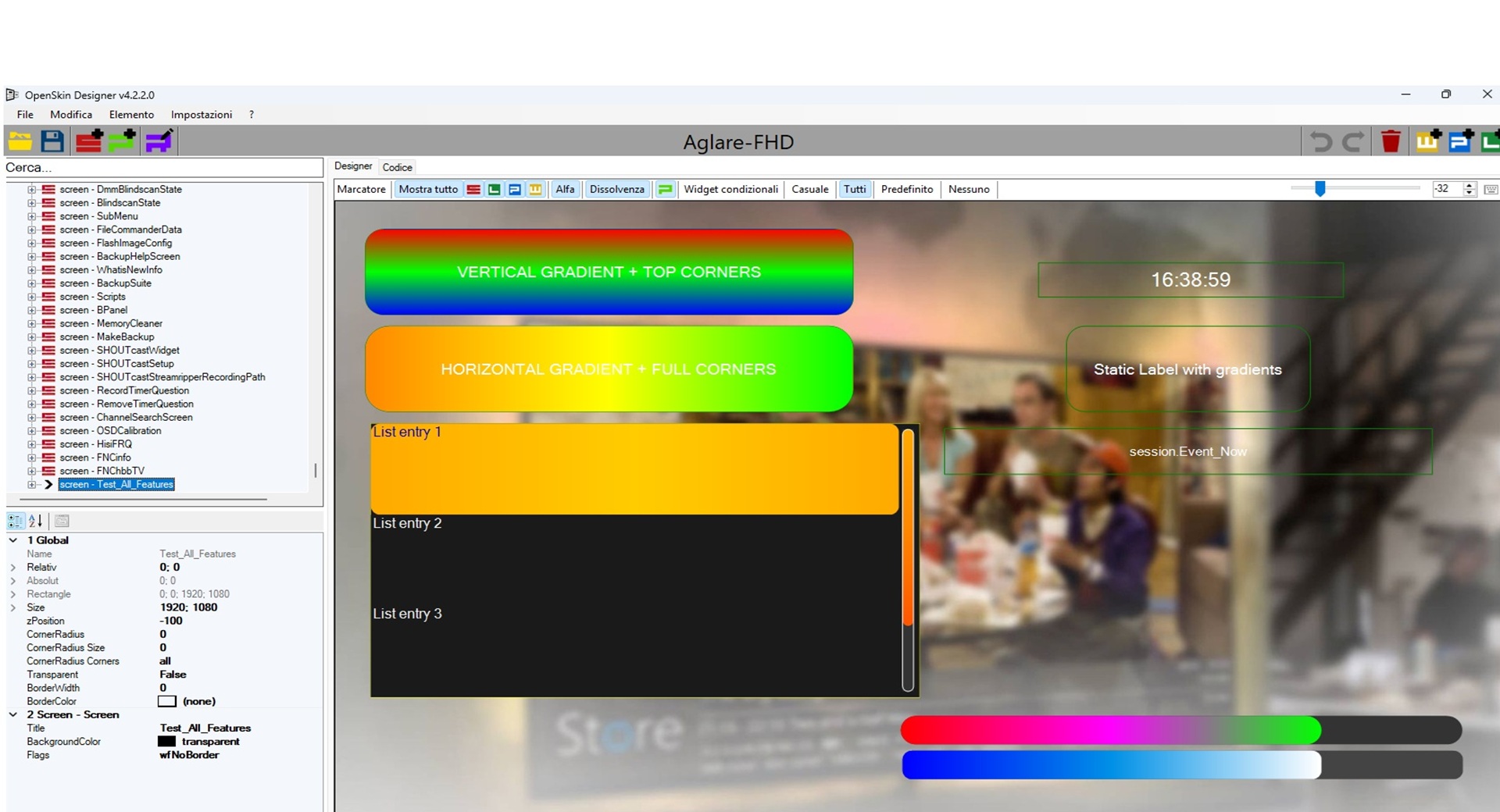
New test today v.4.2.3.0
| Feature | Status | Location |
|---|---|---|
selectionZoom for listbox | ✅ Done | sGraphicListbox.cs – selected item zoom |
New eSlider widget | ✅ Done | sAttributeSlider.cs + sGraphicSlider.cs + integration in sAttributeWidget and sGraphicWidget |
scrollbarBackgroundGradient | ✅ Done | sAttributeListbox.cs (property) + rendering in sGraphicListbox |
| Gradients for any widget | ✅ Done | Base sAttribute with BackgroundGradient, ForegroundGradient, helper |
Extended ClockToText | ✅ Done | strftime.ToString + ClockToText.getText with %l, %I, %e, %p, %P, lowerAmpm |
Extended ServiceName | ✅ Done | Added ChannelNumber, ChannelNumberAndName, PiconName, ReferenceName |
Example:
<skin>
<screen name="TestListboxZoom" position="0,0" size="1920,1080" backgroundColor="transparent" flags="wfNoBorder">
<widget render="Listbox" position="100,100" size="800,600" font="Regular; 28" selectionZoom="20" selection="2" itemHeight="50" backgroundColor="black" foregroundColor="white"/>
</screen>
<screen name="TestListboxZoomAdvanced" position="0,0" size="1920,1080" backgroundColor="transparent" flags="wfNoBorder">
<widget render="Listbox" position="100,100" size="800,600" font="Regular; 34" selectionZoom="30" selection="1" itemHeight="60" itemCornerRadius="10" backgroundColor="#1a1a1a" foregroundColor="#eeeeee" backgroundColorSelected="#333333" foregroundColorSelected="#ffcc00" itemGradient="#222222,#444444,#222222,vertical" itemGradientSelected="#ffaa00,#ffcc00,#ffaa00,horizontal" scrollbarMode="showAlways" scrollbarWidth="15" scrollbarOffset="5" scrollbarRadius="8" scrollbarForegroundGradient="#ffaa00,#ff8800,#ff5500,vertical"/>
</screen>
<screen name="TestListboxFeatures" position="0,0" size="1920,1080" backgroundColor="transparent" flags="wfNoBorder">
<!-- Test listbox with selectionZoom and scrollbarBackgroundGradient -->
<widget render="Listbox" position="100,100" size="800,500" font="Regular; 26" itemHeight="60" selection="2" selectionZoom="30" scrollbarMode="showAlways" scrollbarWidth="16" scrollbarOffset="8" scrollbarRadius="8" scrollbarBackgroundGradient="#333333,#555555,#333333,vertical" scrollbarSliderForegroundColor="gold" scrollbarSliderBackgroundColor="#222222" scrollbarSliderBorderColor="white" scrollbarSliderBorderWidth="2" foregroundColor="#eeeeee" backgroundColor="#1a1a1a" foregroundColorSelected="#ffcc00" backgroundColorSelected="#333333"/>
<!-- Explanatory label -->
<eLabel position="100,620" size="800,60" text="Select an item with the mouse. The selected item (index 2) should be enlarged by 30%." font="Regular; 20" foregroundColor="white" backgroundColor="transparent" halign="center"/>
</screen>
<screen name="TestSlider" position="0,0" size="1920,1080" backgroundColor="transparent" flags="wfNoBorder">
<widget render="Slider" position="100,100" size="800,40" min="0" max="100" value="35" step="5" orientation="horizontal" backgroundColor="#333333" foregroundColor="#ffcc00" borderWidth="1" borderColor="white" cornerRadius="10"/>
<widget render="Slider" position="100,200" size="40,400" min="0" max="100" value="75" orientation="vertical" backgroundColor="#333333" foregroundGradient="red,yellow,green,vertical" borderWidth="1" borderColor="white"/>
</screen>
<screen name="TestSliderWidget" position="0,0" size="1920,1080" backgroundColor="transparent" flags="wfNoBorder">
<!-- Simple horizontal slider -->
<widget render="Slider" position="100,100" size="800,40" min="0" max="100" value="35" step="5" orientation="horizontal" backgroundColor="#333333" foregroundColor="#ffcc00" borderWidth="2" borderColor="white" cornerRadius="10" zPosition="1"/>
<!-- Horizontal slider with background and foreground gradient -->
<widget render="Slider" position="100,200" size="800,40" min="0" max="100" value="65" orientation="horizontal" backgroundGradient="#222222,#444444,#222222,horizontal" foregroundGradient="red,yellow,green,horizontal" borderWidth="1" borderColor="silver" cornerRadius="20" zPosition="1"/>
<!-- Vertical slider with vertical gradient -->
<widget render="Slider" position="100,300" size="40,400" min="0" max="100" value="75" orientation="vertical" backgroundColor="#555555" foregroundColor="cyan" borderWidth="2" borderColor="black" cornerRadius="15" zPosition="1"/>
<!-- Vertical slider with images (pixmap) – if the file exists, otherwise use color/gradient -->
<widget render="Slider" position="200,300" size="60,400" min="0" max="100" value="50" orientation="vertical" pixmap="slider_thumb.png" scale="1" alphatest="blend" backgroundColor="#111111" foregroundGradient="blue,cyan,white,vertical" borderWidth="1" borderColor="gray" cornerRadius="8" zPosition="1"/>
<!-- Informational label -->
<eLabel position="100,750" size="1000,60" text="eSlider test: move the cursor with the mouse (preview only) or change the values from the property grid." font="Regular; 20" foregroundColor="white" backgroundColor="transparent" halign="center"/>
</screen>
<screen name="ClockTestScreen" position="0,0" size="1920,1080" title="Test new clock formats" backgroundColor="3-Buttonshadowfarbe">
<!-- Widget 1: standard 24-hour format -->
<widget name="clock_24h" position="100,50" size="400,60" font="Regular;28" halign="left" valign="center" foregroundColor="1-SenderInfobar" backgroundColor="3-Buttonshadowfarbe">
<convert type="ClockToText">Format%H:%M:%S</convert>
<label>24-hour with seconds: </label>
</widget>
<!-- Widget 2: 12-hour format with leading zero and uppercase AM/PM -->
<widget name="clock_12h_zero" position="100,120" size="400,60" font="Regular;28" halign="left" valign="center" foregroundColor="#ffff00" backgroundColor="3-Buttonshadowfarbe">
<convert type="ClockToText">Format%I:%M:%S %p</convert>
<label>12-hour (leading zero) - uppercase AM/PM: </label>
</widget>
<!-- Widget 3: 12-hour format without leading zero and lowercase am/pm -->
<widget name="clock_12h_nozero" position="100,190" size="450,60" font="Regular;28" halign="left" valign="center" foregroundColor="5-Scrollbar_gradient_3" backgroundColor="3-Buttonshadowfarbe">
<convert type="ClockToText">Format%l:%M:%S %P</convert>
<label>12-hour (no leading zero) - lowercase am/pm: </label>
</widget>
<!-- Widget 4: hour only without seconds using %P -->
<widget name="clock_hour_min" position="100,260" size="400,60" font="Regular;28" halign="left" valign="center" foregroundColor="#ffaa00" backgroundColor="3-Buttonshadowfarbe">
<convert type="ClockToText">Format%l:%M %P</convert>
<label>Hour and minutes (12h): </label>
</widget>
<!-- Widget 5: date with day of month without leading zero -->
<widget name="date_day_nozero" position="100,330" size="600,60" font="Regular;28" halign="left" valign="center" foregroundColor="#ff00ff" backgroundColor="3-Buttonshadowfarbe">
<convert type="ClockToText">Format%A %e %B %Y</convert>
<label>Date with day without leading zero: </label>
</widget>
<!-- Widget 6: abbreviated date -->
<widget name="date_short" position="100,400" size="500,60" font="Regular;28" halign="left" valign="center" foregroundColor="cyan" backgroundColor="3-Buttonshadowfarbe">
<convert type="ClockToText">Format%a %d/%m/%y</convert>
<label>Abbreviated date: </label>
</widget>
<!-- Widget 7: combination of 12-hour time and date -->
<widget name="datetime_mixed" position="100,470" size="700,60" font="Regular;28" halign="left" valign="center" foregroundColor="1-SenderInfobar" backgroundColor="3-Buttonshadowfarbe">
<convert type="ClockToText">Format%l:%M %P, %A %e %B</convert>
<label>Date and time: </label>
</widget>
</screen>
<screen name="TestAllConverters" position="0,0" size="1920,1080" title="Converter Test: ClockToText + ServiceName" backgroundColor="3-Buttonshadowfarbe">
<widget name="Title" position="0,0" size="1920,60" font="Regular;30" foregroundColor="#ffff00" halign="center" valign="center" backgroundColor="3-Buttonshadowfarbe" zPosition="1">
<label>Converter Test - ClockToText & ServiceName (new options)</label>
</widget>
<!-- ========== CLOCK TOTEXT SECTION ========== -->
<widget source="global.CurrentTime" name="clock_24h" position="100,100" size="600,40" font="Regular;24" foregroundColor="1-SenderInfobar" halign="left" valign="center" backgroundColor="3-Buttonshadowfarbe">
<convert type="ClockToText">Format%H:%M:%S</convert>
<label>▶ 24-hour with seconds: </label>
</widget>
<widget source="global.CurrentTime" name="clock_12h_zero" position="100,150" size="650,40" font="Regular;24" foregroundColor="1-SenderInfobar" halign="left" valign="center" backgroundColor="3-Buttonshadowfarbe">
<convert type="ClockToText">Format%I:%M:%S %p</convert>
<label>▶ 12-hour (leading zero) - uppercase AM/PM: </label>
</widget>
<widget source="global.CurrentTime" name="clock_12h_nozero" position="100,200" size="650,40" font="Regular;24" foregroundColor="1-SenderInfobar" halign="left" valign="center" backgroundColor="3-Buttonshadowfarbe">
<convert type="ClockToText">Format%l:%M:%S %P</convert>
<label>▶ 12-hour (no leading zero) - lowercase am/pm: </label>
</widget>
<widget source="global.CurrentTime" name="clock_hour_min" position="100,250" size="600,40" font="Regular;24" foregroundColor="1-SenderInfobar" halign="left" valign="center" backgroundColor="3-Buttonshadowfarbe">
<convert type="ClockToText">Format%l:%M %P</convert>
<label>▶ Hour and minutes (12h): </label>
</widget>
<widget source="global.CurrentTime" name="date_day_nozero" position="100,300" size="750,40" font="Regular;24" foregroundColor="1-SenderInfobar" halign="left" valign="center" backgroundColor="3-Buttonshadowfarbe">
<convert type="ClockToText">Format%A %e %B %Y</convert>
<label>▶ Date with day without leading zero: </label>
</widget>
<widget source="global.CurrentTime" name="date_short" position="100,350" size="650,40" font="Regular;24" foregroundColor="1-SenderInfobar" halign="left" valign="center" backgroundColor="3-Buttonshadowfarbe">
<convert type="ClockToText">Format%a %d/%m/%y</convert>
<label>▶ Abbreviated date: </label>
</widget>
<widget source="global.CurrentTime" name="datetime_mixed" position="100,400" size="900,40" font="Regular;24" foregroundColor="1-SenderInfobar" halign="left" valign="center" backgroundColor="3-Buttonshadowfarbe">
<convert type="ClockToText">Format%l:%M %P, %A %e %B</convert>
<label>▶ Date and time combo: </label>
</widget>
<!-- ========== SERVICE NAME SECTION (new modes) ========== -->
<widget name="sep_service" position="100,480" size="800,30" font="Regular;26" foregroundColor="#88ff88" halign="left" valign="center">
<label>═══════ SERVICE NAME (new options) ═══════</label>
</widget>
<!-- ServiceName: classic Name (should get #channelName# = "Das Erste HD") -->
<widget source="Service" name="serv_name" position="100,530" size="700,40" font="Regular;24" foregroundColor="1-SenderInfobar" halign="left" valign="center">
<convert type="ServiceName">Name</convert>
<label>📺 Service name (Name): </label>
</widget>
<!-- ServiceName: Provider (if mapped in converterSimple, otherwise from converter.xml) -->
<widget source="Service" name="serv_provider" position="100,580" size="700,40" font="Regular;24" foregroundColor="1-SenderInfobar" halign="left" valign="center">
<convert type="ServiceName">Provider</convert>
<label>🏢 Provider: </label>
</widget>
<!-- ServiceName: Reference -->
<widget source="Service" name="serv_reference" position="100,630" size="1000,40" font="Regular;20" foregroundColor="1-SenderInfobar" halign="left" valign="center">
<convert type="ServiceName">Reference</convert>
<label>🔗 Reference: </label>
</widget>
<!-- ServiceName: ChannelNumber (NEW) -->
<widget source="Service" name="serv_channel_num" position="100,680" size="600,40" font="Regular;24" foregroundColor="#ffff00" halign="left" valign="center">
<convert type="ServiceName">ChannelNumber</convert>
<label>🔢 Channel number: </label>
</widget>
<!-- ServiceName: ChannelNumberAndName (NEW) -->
<widget source="Service" name="serv_channel_num_name" position="100,730" size="800,40" font="Regular;24" foregroundColor="#ffff00" halign="left" valign="center">
<convert type="ServiceName">ChannelNumberAndName</convert>
<label>📡 Channel and number: </label>
</widget>
<!-- ServiceName: PiconName (NEW) -->
<widget source="Service" name="serv_picon_name" position="100,780" size="700,40" font="Regular;24" foregroundColor="#ffff00" halign="left" valign="center">
<convert type="ServiceName">PiconName</convert>
<label>🖼️ Picon name: </label>
</widget>
<!-- ServiceName: ReferenceName (NEW) -->
<widget source="Service" name="serv_refname" position="100,830" size="800,40" font="Regular;24" foregroundColor="#ffff00" halign="left" valign="center">
<convert type="ServiceName">ReferenceName</convert>
<label>📌 Last part of reference: </label>
</widget>
<!-- Optional: use parent.Service to verify that it also works with alternative source -->
<widget source="parent.Service" name="serv_parent_channel" position="100,900" size="800,40" font="Regular;22" foregroundColor="#aaaaaa" halign="left" valign="center">
<convert type="ServiceName">ChannelNumberAndName</convert>
<label>⚙️ parent.Service -> Channel and number: </label>
</widget>
</screen>
</skin>On github
"- Added 2560x1440 and 3840x2160 options in fResolution (selection available, automatic scaling not implemented)"
"- **Known Limitations"
"- Resolution changes in `fResolution` correctly update the `output` attribute in the `skin.xml` file,"
"- but they do not automatically resize coordinates, dimensions, and fonts of the elements."
"- To convert an existing skin from one resolution to another, it is recommended to use the external tool **Enigma2 Skin Converter** (by @KiddaC)."
-please update first post of topic with new version
I compared the 2 readme.. and there are some things that can be updated in both projects to unify them if you want
Features (from the README)
CodeDisplay MoreUnify gradients into single properties ✅ Yes ❌ Probably not (still uses ...1/2/3) Source, Render properties for labels ✅ Yes ❌ Not mentioned Text, Valign, Halign, noWrap properties in widgets ✅ Yes ❌ Not mentioned ProgressColor property in widgets ✅ Yes ❌ Not mentioned ForegroundColor → gradient fallback ✅ Yes ❌ Not mentioned Cleanup (remove duplicates, useless variables) ✅ Yes ❌ Probably not Numeric cornerRadius support ✅ Yes ✅ Yes (but it also supports masks) Mask cornerRadius support ❌ No ✅ Yes Property-grid editor for gradients (visual) ❌ No ✅ Yes Slider widget support ❌ No ✅ Yes (maybe) Grid orientation for listboxes ❌ No ✅ Yes (maybe)
In the meantime that oldem2014 finishes all the new features, let's see how this test behaves?
removed all old error on root structure.
Release v4.2.1.0 MOD by Lululla · OwnerPlugins/OpenSkin-Designer
and added
Release v4.2.2.0 MOD by Lululla · OwnerPlugins/OpenSkin-Designer
I compared the 2 readme.. and there are some things that can be updated in both projects to unify them if you want
Features (from the README)
Unify gradients into single properties             ✅ Yes               ❌ Probably not (still uses ...1/2/3)
Source, Render properties for labels               ✅ Yes               ❌ Not mentioned
Text, Valign, Halign, noWrap properties in widgets ✅ Yes               ❌ Not mentioned
ProgressColor property in widgets                  ✅ Yes               ❌ Not mentioned
ForegroundColor → gradient fallback                ✅ Yes               ❌ Not mentioned
Cleanup (remove duplicates, useless variables)     ✅ Yes               ❌ Probably not
Numeric cornerRadius support                       ✅ Yes               ✅ Yes (but it also supports masks)
Mask cornerRadius support                          ❌ No                ✅ Yes
Property-grid editor for gradients (visual)        ❌ No                ✅ Yes
Slider widget support                              ❌ No                ✅ Yes (maybe)
Grid orientation for listboxes ❌ No ✅ Yes (maybe)We'll find a shared solution, I'm sure of it. :)
The fault always lies with whoever updates skin.py :)
please install epgimport
config on blue button source of vavvo(your cowntry)
- this version have fixed, It's much better than 1.61 believe me, all the timers and looping issues have been eliminated.

