


if i spent x amount on a tring card purely for watching 3pm football and it didn't show the footy most people would be annoyed
Posts by phonix
-
-
Cant see why any one would buy a tring card nothing but trouble joint10
plus the pic quality is terrible like watching a badly streamed youtube video
-
Merlin2-Excalibur Images 25-09-2011-ramiMAHER #ssl84
new Secondstageloader 84 sim2drivers 2-9-2011 Original
On the feeds are ready to update.Enigma2 Stand: 20,110,913
Enigma2-plugin: 20,110,926
Enigma2-skins: 20,110,926See also: -> Enigma2/Plugins and OE and enigma2-plugins on gravity
Merlin2:
- Set default resolution from skin-value (that fixes the broken-spinner display while enigma2-starting for resolutions <> 720x576)
- Show only available services in channel selection
- Close MoviePlayer when entering standby modeMultiupload.com - upload your files to multiple file hosting sites!
Multiupload.com - upload your files to multiple file hosting sites!
by ramiMAHER
-
Ferrari-SSL82F-Nemesis2.3-dm800se-e2-OE(1.6)-SVN(093)

- Webinterface
- Mediaplayer + Timeshift
- VLC
- Wlan
- DTS Surround
- CrossEPG
- Mgcamd/NewCS
- Extra.url
- Ferrari AddOns ManagerTimeline 093r0
-Move to python 2.6.7 for all Machine
-Add support for 32bpp png (rgba)
-Fix Wirless Lan Plugin (Thanks Bobsilvio)
-Update v4l-dvb-modules for all Machine
-Update Crosspeg (mpepg.conf) for Mediaset (Thanks pappa)
-Fix some italian translation
-Update enigma2-pluginsMore languages
Blue - Blue - Packet Management - enigma2-locale-xxMultiupload.com - upload your files to multiple file hosting sites!
-
crack all dreambox password
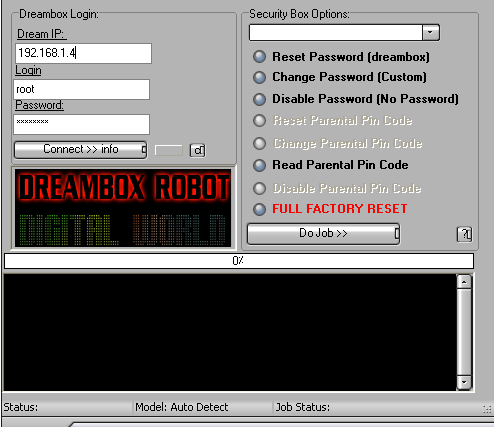
the tool that crack all dreambox password easy to use in case you forgot your pass
Correct file now added the OP has removed a element that contains routines that are identified as a virus
-
It is upgraded from Openbox S10, with the same chipset and function as S10, and the differrence is:
1. S11 with ***box logo, without openbox logo.
2. S11 is added Scart output on rear panel.
3. S11 AV output is 3-in-1.
4. S11 Support Wifi Bridge Connection
5. S11 NEW CAMD server
6. S11 newly added 15 different menu language -
Openbox S10 *** EPG by j1mjam
Hi this is a complete Channel Listing for the S10/S9
it is is almost in *** order.
1. Entertainment
2. Movies
3. Sports / News
4. Music
5. Lifestyle & Culture
6. Documentaries
7. Kids
8. HD Channels
9. Red Button / Interactive
10. Shopping
11. AdultBIG THANKS TO j1mjam ON DK
-
im testing out a keysonic 540RF keyboard on Vix beta 2.3 working great so far
sorry i cant help you out on the BH image perhaps your model of keyboard is not supported
-
Watch out for the next Vix image release
-
Openbox s10 from ebay £59.99 with V5 remote
Item number: 330614010770
-
Just found this on a German retailers site
On sale from: 15.10.2011 (Vorbestellung möglich)
VU+ Ultimo Triple Linux HDTV Receiver mit Wechseltuner DVB-S2 / DVB-C / DVB-T Unser Preis: 599,00 €
Welcher Tuner ?
1x DVB-S2 (Satellit)
2x DVB-S2 » + 49,90 €
3x DVB-S2 » + 99,80 €
1x DVB-S2 + 1x DVB-C/T Hybrid-Tuner (Kabel/DVB-T) » + 49,90 €
1x DVB-S2 + 2x DVB-C/T » + 99,80 €
2x DVB-S2 + 1x DVB-C/T » + 99,80 €prices look very steep if you only get one sat tuner with the box
-
Vix will be supporting the box price could be near the £600 mark and im not sure if you will get 3 sat tuners at that price
-
Enigma Signal Meter – Krkadoni Edition
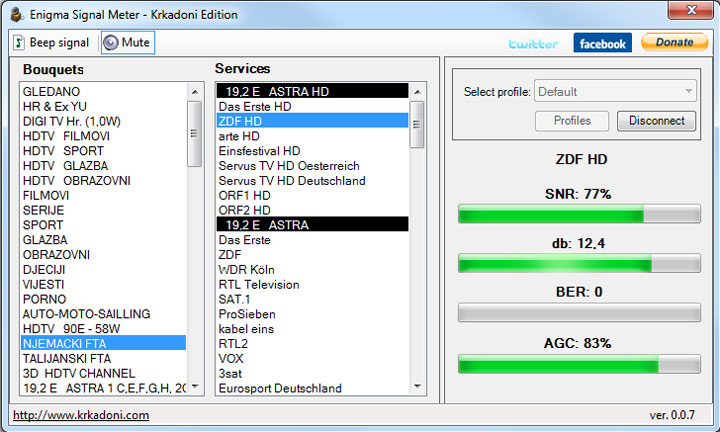
First release of Enigma Signal Meter was quite popular, but it was buggy, lacked support for many different Enigma 1 and Enigma 2 flavors, had no support for multitasking, had confusing and different interface for E1 & E2 receivers. That’s why new Enigma Signal Meter – Krkadoni Edition was born.
Description:
Fast, small, portable, simple and free application for Enigma 1 / Enigma 2 satellite receivers, build to help you align you satellite dish to perfection.
Features:
SUPPORTS ALL currently existing Enigma1 and Enigma2 receivers and images
same simple interface used for Enigma1 and Enigma2 boxes (originally they are quite different)
full background processing (running tasks will not hang application)
small & portable (doesn’t require installation and can be run from USB stick)
autoupdate (offers to update when new version is available)
voice reading of signal levels (uses default Windows voice)
signal beeping (beeps signal with frequency depending on signal level)
works remotely (just forward web port and you can connect from anywhere)Requirements:
Enigma 1 or Enigma 2 based satellite receivers with running Web interface (WebIf)
Network connection between receiver and computer
Windows XP or higher
.NET Framework 3.5
1 MB of free disk spaceList of receivers it was tested and working on:
- DM500
- DM500HD
- DM600
- DM7000
- DM7020
- DM7025
- DM800
- DM800SE
- DM8000
- VU+ Uno
- VU+ Duo
- AzBox Premium
- AzBox HD Elite
- AzBox Ultra HD
- Kathrein UFS 910
- IPBox 9000
- Amiko Alien
- Topfield TF 7700HD PVR
- Gigablue solo
- ClarkeTech ET9000Thanks to all people on Satelitski forum who tested.
For best results when searching (faster response time):
- don’t search while zapped on HD channels
- don’t search while recording
- don’t search while receiver’s web interface is open in web browser
- don’t search if you have other plugins running
- generally avoid anything that slows down your receiver -
*** Sports are giving non-*** Sports customers free world-class sport
Watch all the *** Sports channels for free on the weekend of September 24-25.
With the free weekend pass, *** Sports are giving non-*** Sports customers a whole weekend of world-class sport for free.
From 6am on Saturday September 24 to 6am on Monday 26, even if you don't have a *** Sports subscription you can watch all the sporting action on all five *** Sports channels including *** Sports News.
And for those of you who have the HD box and an HD package with *** or Virgin Media, you can feast your eyes on all the weekend's action in stunning HD on *** Sports HD1, HD2, HD3 & HD4 as well as *** Sports News HD *
So how will it work?If you are a ***, Virgin Media, TalkTalk or Small World customer, all you have to do is simply turn to the *** Sports Channel of your choice and enjoy!
*** Sports HD1/1So to catch the US PGA Tour Golf on Saturday night, just tune in to *** Sports HD 1 (*** Channel 401) or *** Sports 1 (*** Channel 408) between 7 and 10pm and with the press of a button you'll be taken to the lush greens of Atlanta.
Other great events on *** Sports 1 and HD 1 include Solheim Cup golf (7am-7pm), the live npower Football League match Cardiff City v Leicester City(1.30pm-3.30pm); the Barclays Premier League clash QPR v Aston Villa (3.30pm-6pm) and not forgetting an evening of live International T20 Cricket with England v West Indies (6pm- 11pm).
*** Sports HD2/2On *** Sports HD 2 (*** Channel 402) and *** Sports 2 (*** Channel 409) there's more world class Barclays Premier League football with Manchester City v Everton (12.30pm-3.30pm), Live engage Super League (5pm-7.30pm) followed by a super Sunday of golf with another trip to the emerald greens of Ireland for the Solheim Cup (9.30am-5pm) and more from the US PGA Tour (5pm-11pm).
*** Sports HD3/3There's even more on *** Sports HD 3 (*** Channel 403) and *** Sports 3 (*** Channel 418). Why not catch Saturday rugby union action with the live Currie Cup match Lions v Blue Bulls (2pm-4pm) followed by live Championship rugby with the Cornish Pirates v Leeds (4pm-6.30pm)?
Then enjoy an evening at ringside with Fight Night Live (8.30pm-10.30pm). Sunday sees Exeter play Wasps in the Aviva Premiership (2.30pm-5pm) then it's off to Spain to watch live La Liga football (6pm-10.30pm)
*** Sports HD4/4On *** Sports HD 4 (*** Channel 404) and *** Sports 4 (*** Channel 454) let Saturday kick off with some live Scottish football with Dunfermline v Rangers from the Clydesdale Bank Premier League (12.30pm-3.30pm), changing gear for live Grand Prix Speedway (6pm-9pm). At 9pm jet off for a Saturday evening of more live sun-soaked La Liga football fixtures from Spain (9pm-11pm). Then on Sunday, touch down in the USA for awesome American football from the NFL.
*** GoDon't worry if you've already made plans for that weekend; there's no need to pass up this opportunity.
All *** TV customers can get the free *** Go app and make this sporting feast truly moveable. Just download the app to your iPhone or iPad, sign in with your *** ID and you can enjoy all of the *** Sports Channels and *** Sports News wherever you like. Now that's sporting!
* *** Sports on *** includes *** Sports HD1, HD2, HD3, HD4 and *** Sports News HD. *** Sports on Virgin Media only includes *** Sports HD1 and HD2
Available to *** TV customers. Other platforms contact your provider.
Free *** Sports on *** Go for *** TV customers with an entertainment package on 24-25 September. UK/ROI only. Compatible device, Wi-Fi or 3G and registration required.
-
Not tested by me but worth a try
Big thanks to p@trobber
7 day epg menu tip
For people that dont know
if you go to menu ,then time setting
make sure you pick daily in menu list
then set your wake up time just before you get up or want to use use box
then pick channel a box will come up go to all satllite and find the 7 day epg download hit ok and it will store that channel
then set your box off time to what ever suits you hit exit save yes and when you go to use your box the 7 day epg will be there for you all updated
-
It has all popular satellites from 45E to 45W that I can receive from my location in the North West of England.
The "FREESAT UK" FAV is very family friendly with sections for "FILMS" & "KIDS", "NEWS", "MUSIC", "INTERESTS" & "SHOPPING" for those who's families use the Spiderbox
Also seperate satellites from 58E to 61W for any feed, temporary and work in progress channels - Use these satellites for any experimenting you want to do before adding to your main satellites.All Satellites, Transponders and Channels are in chronological order except for 28.2E.
28.2E has all its channels in gendre blocks.
You can easily move the blocks into the order that you prefer in the Channel Editor.All "FAV"s are populated with clearing channels including Service+, NuevoXstream, UCAS, Patched Via3 and past opening channels in case they return.
My NuevoXstream expired in April so I can not check. This will be my last list with NuevoXstream channels.
You can easily delete those you do not want/can not receive or add any of your own channels.The "read me" in the archive gives information of all the extras that this channel list has and how to easily adapt the list to your needs.
Please read it as it has a lot of information on editing the list.This is a full channel list - just remove the satellite/channels that you do not want.
Channels: 7795 of a maximum 9800
TPs: 1322 of a maximum 3500
FAVs: All 8 used - FREESAT UK, SPORTS, FILMS, KIDS/MUSIC, NEWS/FACTUAL, GENERAL, ENGLISH PL, ADULT,The Channel List is for either USALS or DiSEqC setups - I use this list for both without any issues.
If using USALS make sure you check/input your Latitude & Longitude after loading.
If using Diseqc switch to "Motor (DiSEqC 1.2)" in Motor Setup - Motor Type and if using one of my lists for the first time you will need to manually locate each satellite and then store in a unique position.
I have a stickie in "Spiderbox HD Information & Stickies" showing how to use the list for the first time for DiSEqC users.
The List has Satellites from 45E DiSEqC "SAT Position (POS=1)" through to 45W DiSEqC "SAT Position (POS=35)"
Any future channel lists of mine will have the same SAT Position numbers so DiSEqC users will not need to locate and store each sat position again.The main updates from the last list are:
28.2E Red Button Channels added
11.0W satellite added
"ENGLISH PL" FAV replaces the "HD/3D" FAV. It contains any channels that show Premier League.
Most will never open with the standard Spiderbox but you may have other means to.
Lots of changes to channels/TPs on all other satellitesMassive thanks to BillyBits
-
HD800S2/500HD/Openbox S9-S10 - 10 September 2011 28.2 E Channel List
A full functioning 28.2E channel list with both Scotland & England regions (*Asian channels Added)
Fav Group 1 - Entertainment
Fav Group 2 - Movies
Fav Group 3 - Sport
Fav Group 4 - Music
Fav Group 5 - Documentaries
Fav Group 6 - Kids
Fav Group 7 - Lifestyle
Fav Group 8 - News
Fav Group 9 - Box Office
Fav group 10 - Shopping
Fav group 11 - Adult
Fav Group 12 - Asian*Big thanks to AlanDogg
-
BMP to Logo Tool
How to use:
Step1: check have following files
=======================================
|- bmp to logo.exe ; application
|- PAL.par ; PAL parameter file
|- NTSC.par ; NTSC parameter file
|- README.TXT ;Step 2. generate new logo
=======================================
1: Put this tool in one fold, for example: D:\BMPtoLOGO\*.*
2. prepare logo file, it should be 24 bit BMP format, and the size of input BMP file must be720*480(NTSC) or 720*576(PAL), and put this file on the same fold of the tool, for example: D:\BMPtoLOGO\*.bmp
3. Run "bmp to logo.exe"
Step1: Select "Open" to open D:\logo.bmp
Step2: enter size of logo in "Size", please do not input "bitrate" (the size is more bigger, the convert picture will be more clear)
Step3: select "Convert" button to generate object file, for example "D:\BMPtoLOGO\back_logo.m2v"
4.Use USB or LAN Tool Upgrade this logo file to your HD Receiver.
5.restart the HD Receiver, it is changed the Back logo. -
These images only work on a clone DM 800se with the Ferrari sim card fitted
-
Posted a newer version peterpan-neverland-lightning-2-3

