Posts by mutz nutz


    Seems like a decent price.


    yes you can get mini bluetooth keyboards for £10ish, however this has dedicated iOS buttons etc...
    It has a detachable stand also for the iPad (1 and 2) and I also believe it is compatible with Android devices.


    Xenta Wireless Bluetooth Keyboard and ipad Stand Combo | Ebuyer.com


    Product Description


    Xenta Black Wireless Bluetooth Keyboard with attachable ipad/ipad2 Stand Combination pack. A great way to be able to directly type into ipad progams and apps without using the on screen ipad keyboard.


    Features:


    Black wireless bluetooth keyboard - UK layout
    Wireless bluetooth range up to 10 Metres
    Keyboard has IOS shortcut keys for ipad including brightness control and media keys, with arrow keys and IOS command button
    Keyboard has integrated Lithium Ion battery for long wireless battery life
    Keyboard is rechargable via the supplied USB cable
    Included ipad stand is compatible with both ipad 1 and ipad 2 versions. the keyboard will also work with the iphone and some android smartphones/tablets (where bluetooth device support is present)
    The stand attaches securely to the keyboard but can be removed so the keyboard can be used on its own.
    The stand includes a fold out bracket to ensure your ipad is securely held upright and will not fall over.
    On/off button on the rear of the keyboard to lengthen battery life
    Keyboard includes bluetooth signal indicator and low battery indicator

    you can use 1 of yer dreamboxes as your server for the other 3 or you can set up a old pc or laptop and use debian or ubuntu.


    Mutz

    Do you want to view, copy and/or delete music files (songs) directly from your iPhone without connecting to your PC or iTunes?


    With a small app (Tweek) called ?myTunes? you can access iTunes media files stored on your device through the ?Media/myTunes? folder accessible via SCP, iPhoneBrowser or iFile internal server.


    The app gives you the access to the songs and videos stored on your iPhone/iPod Touch through its folder at the path ?private/var/mobile/media/myTunes?. You can access these paths via ssh into iPhone/iPod touch or iPhonebrowser on your PC and even through iFile from your iPhone itself.


    If you want to use SSH method to get to your music but don?t know what SSH is or how to install it, then you can follow this tutorial to learn more about SSH.


    In this article I will be covering the most convenient way to get to your iPhone/iPod music files, which is via ?iFile?


    NOTE: You must have a Jailbroken iPhone in order to use this feature?


    First thing you need to do is open Cydia and install a package/app called iFile (NOTE: iFile is a paid Application but in this article for ?Testing Purposes? I will show you how to get this App for free.)
    iFile Installation

    1. Open Cyida
    2. Tap on Manage Tab at the bottom of the screen, then tap on Sources, Now add the sinfuliphone.com REPO
    3. While in Cydia, tap on Manage Tab, then tap on Sources, Then tap on SinfuliPhone Source and find the iFile Package.
    4. Install ?iFile″ and Reboot your device. NOW you have a full version of the iFile on your device.


    Second thing you need to do is open Cydia and install a package/app called myTunes


    myTunes Installation


    1. Open Cyida
    2. Tap on Search Tab at the bottom of the screen, and search for myTunes
    3. Install ?myTunes″ and Reboot your device.


    NOTE: This program runs in the background and does not create an icon on your home screen.
    After installation, browse ?/private/var/mobile/Media/myTunes? for you tracks.


    Now open iFile application on your iPhone and then navigate to /var/mobile/Media/myTunes NOTE: Hit the top left button to see other directories, keep hitting it until you see Var, then tap on it, hit mobile, then Media, and finally myTunes.


    Find any song you no longer wish to have on your iPhone and then swipe your finger over the title of the song from Left to Right. You will then see the ?DELETE? button?
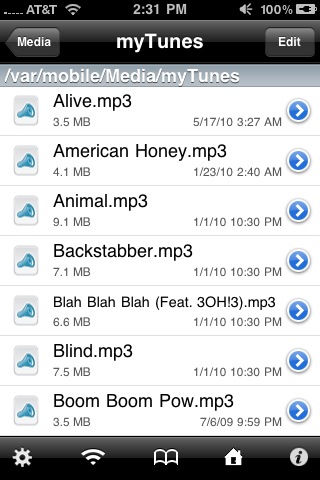
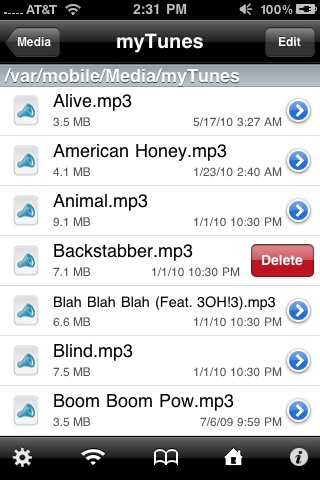


    This app lets you get the original MP3 files of your music collection from your iPod touch or iPhone with their original track names.


    Normally if you access the iPod folder on the iPhone and look for songs (at itunes _control/music/f01/fder.mp3) you will find weird names for the song file & folders like ?TGKP.mp3? thus making it virtually impossible to locate a particular file on the iPhone.


    Now with myTunes you can actually recover your entire library using the iPhonebrowser incase you end up with a corrupted playlist on your local desktop / mac or if your system crashes.


    This would also make it easy for you to transfer files via bluetooth (using iBluetooh).

    Some Microsoft engineer was definitely having some fun with this one: Last week, Microsoft quietly a released a desktop gadget to remind customers and businesses of one important fact: Windows XP falls out of support in 2014, and would you please consider purchasing an updated OS?


    Getting it is pretty simple: after validating your copy of Windows, you can download and install the gadget from Microsoft?s website. After installation, there will be a blue box on your desktop, quietly counting down the days until Windows XP stops being patched.


    The End of Support gadget


    The gadget, expanded


    I understand that Microsoft is eager to get its users to stop using Windows XP (and they?re still moving away pretty quickly, with over 350 million licenses sold since the OS went on sale in October 2009), but this seems like a bit much even if the countdown does still have almost three years to go.


    Still, I suppose for slow-moving businesses and other IT shops, it?s a useful reminder of the fact that XP support isn?t guaranteed forever, even though it seemed like it would be for most of the last decade. If you haven?t started thinking about your Windows 7 strategy yet, it?s definitely time to start! Test your programs. Test your methods for loading and securing your computers. It?s time to start moving.


    And consumers! Continue buying Windows 7, and if you?re still on Windows XP, consider moving away. Don?t be swayed by those spammers you see in the comments sections of most Windows sites, linking to those Wikipedia pages full of ?removed features? in Windows Vista and Windows 7 ? XP is an outdated OS that is increasingly difficult to recommend to home and corporate users alike, and within a couple of years Internet Explorer 9 won?t be the only program you can?t use anymore.


    Like the fuker aint got enough money tut tut tut!!!!!!

    Image nemesis version 2.2 svn78 patched boot sim201 ssl82 with the following characteristics:


    - Patched to boot sim201 ssl82 not need to enter boot after installation
    - Patched drivers for tuner clone (thanks to lonas)
    - Patched to clone web interface works perfectly.
    - Added patched vcl working perfectly.
    - Added updated channel list astra April.
    - Added emu sbox
    - Added Mbox + newcs
    - Added cccam 2.2.1
    - Added Spanish language
    - Changed bootlogo.mvi
    - Added extra.url for download emus
    - Added flashing-backup
    - Pass dcc and telnet : lonas


    nemesis_2.2_svn78_mod_lucifer_ssl82.nfi.ra

    Back-up OpenPLİ 2.0 Image for vuo+duo in USB format


    Channel Settings


    Advanced


    Turksat A
    Hotbırt B
    A positioner (Full satellite positioner


    Was chosen as the opening TRTHD


    Telnet and FTP password
    There is no root user name & password


    (Emulator)
    CCcam 2.2.1 established (cccam cfg file and send the appropriate place
    Ok forget my brothers B***** emucu Patched Mgcamd_1.35a established. K ? ys update folder.


    Language settings (İngilizce - T?rkce) removed the language settings of the external


    vuplus.zip

    like many users of this receiver, there seems to be varying differences with results but this is my path to securing recordings:-


    'Menu/System Setup/Timer setting/


    then:-


    '1 Off'..... press OK and switch 'Timer Mode' to 'Once'
    Scoll down to 'Timer Service' and set to 'Record'
    Scroll down and alter the various fields with the settings you personally require


    Press 'Save' and exit out.


    The majority of users problems stem from:-


    Not having the correct system time set and/or
    Not having the 'Timer Service' field set to 'Record'


    At the end of the recording period and by default the receiver will go into standby mode.


    You can if need, press the 'EPG' button on the remote control, locate the channel+prog you wish to record and press the green ('Timer') button and alter the fields to meet your preferentials. Obviously this is limited by the EPG info limitations.


    Hope you achieve success with this theme...please let us here know your findings