


You should re-format the usb stick before every reflash bud... yep just run the tool, you may have to right click on it and runs it as administrator for it to start....
Posts by mckee25
-
-
We need to know more about your setup to help you bud....
How do you normally access the other channels? is it through a share or are you running a server etc? what cam are you using on the duo?
-
ViX 3.0 is no longer supported buddy, so this is why you can no longer update it through the image....
Where you trying to update your box to ViX Apollo 012 ??? I have attached a program for you to format the usb stick you are using... use it to format the stick to fat32 then copy over the new image file to be flashed to it. If you can try another make of usb stick as Vu boxes can be quite picky at times...
-
Please read the sticky thread for this section buddy here: Please Read this before posting in this section
It's important that your post complies with what is requested in the sticky otherwise we will have to delete this thread..... sorry.
-
I have never seen the option to be able to have picons on the channel listings with Blackhole, if your using coolman tv guide for your epg they will show with it.....
With ViX I know that you can have the picons showing in your channel list, there is an option in the settings menu that you change to yes to do this. (press the down button on your remote to open the listings, then press menu then settings)
Oscam piocns are available here: Oscam webinfo Picons
-
Is it ts panel or ts media you want bud????
They are two different plugins.... the title of your thread is for ts media, but your post asks for ts panel...
-
Have a read of this thread Banny, should help you out bud: AB- Update on they way?
-
I have attached the HP format Tool for you.... even with using this a Vu box can be very picky regards the make of usb stick used to flash it...
Can you just confirm it is a Vu Duo 2 you have not the Duo??? this is what you have said your using in your last post, it's just it can be fatal for your box if you flash the wrong image...
master G hast the FTP password set as linuxsat and the username should be root, but if you have already tried that and it's not working then try the password as vuplus.... using the same username.
-
An N Line and your provider...... it's not sounding very good here buddy. Please if you haven't done so already read the forum rules here: Forum Rules
We do not offer support to people who use payservers.... never have & never will.
-
If you mean it is downloading as a php file buddy the fix is here: All Attachment Downloads Are .php Files [Fix]
-
Do you mean that the picon for the two Irish Channels is not showing??? if so you just change the name of the picon itself to match the service reference for the channel that the picon is missing for....
-
Where did you have the picon folder before you moved it bud? can you check what the permissions are for the folder. Right click on it and goto permissions...
-
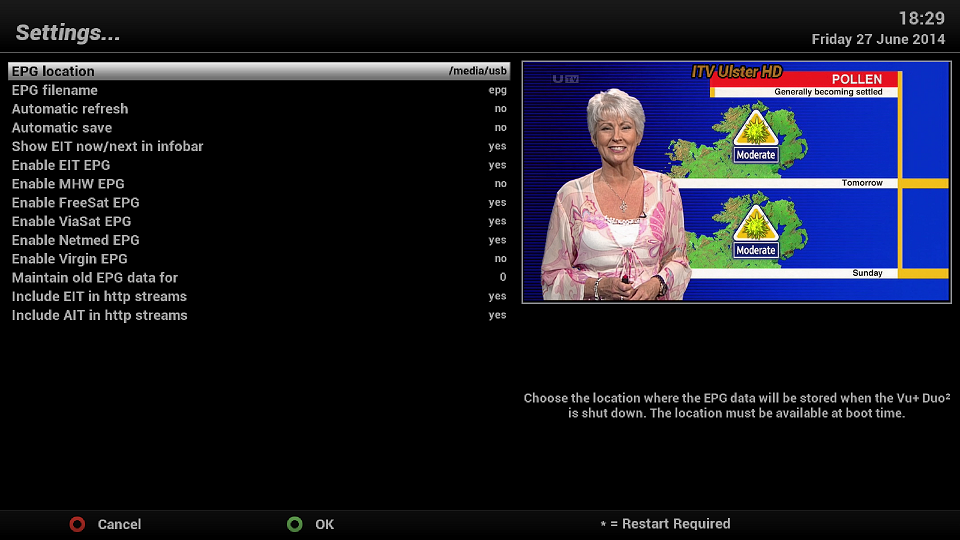
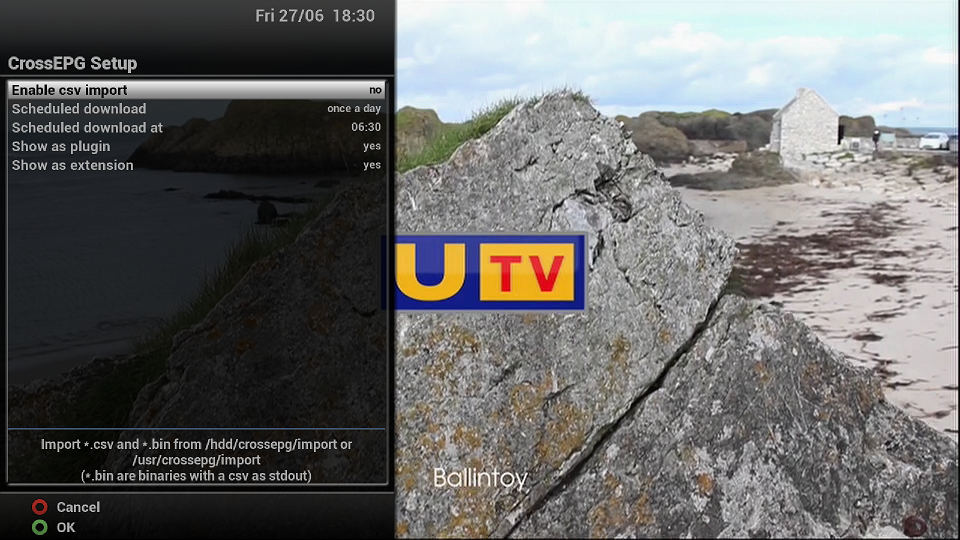
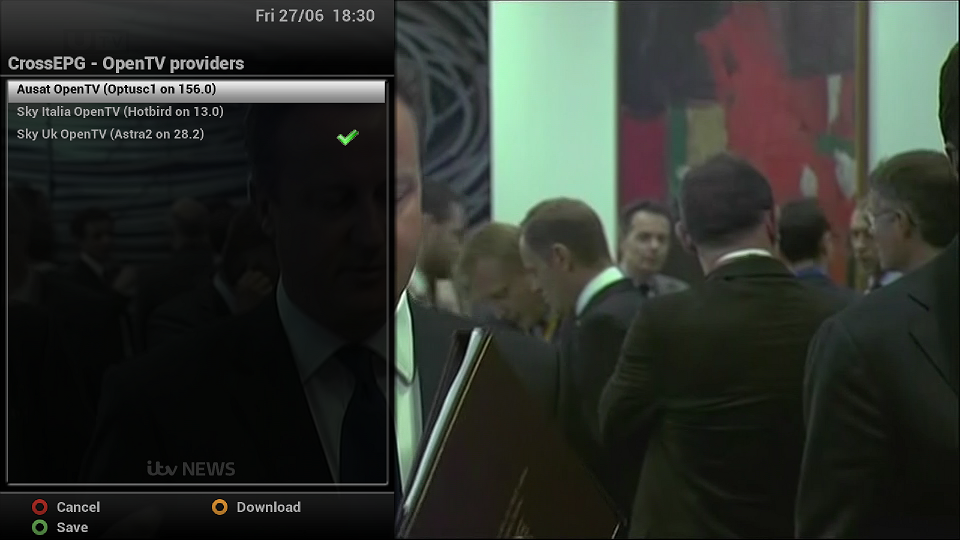
Ok here is the way my own settings are:
menu/setup/system/epg/settings
menu/setup/system/epg/crossepg/configure
menu/setup/system/epg/crossepg/opentv providers
-
Vix Apollo 012 available here bud: OpenViX Apollo Updates and Changelogs
Would it be possible to post what way you have your epg setup? starting with where you are saving the epg data to and then what providers you are using.... crossepg etc etc
If you are not able to download the data is the box connected to the internet ok? check in network.....
-
Which receiver have you got and what version of ViX buddy?
-
ViX is now on build 012 now bud, but don't worry if you flash 008 back on you can upgrade to the new version through the image...
Ok crossepg, menu/setup/system/EPG/CrossEPG/configure..... when you highlight scheduled download, press the left o right arrow on your remote to change the options....
-
Have you read the tutorial's here buddy: Tuner Support
I take it you want to make use of all three tuners???
-
Could you just clarify if this is AutoBouquetsmaker or AutoBouquets by Lraizer please? ta
Also what image are you using?
-
Hello buddy, please don't take this the wrong way but you must be one of the few people left on the planet who doesn't know by now what sly are doing regards new anti card-sharing measures for the HD channels......
Read this thread from start to finish and you will be up to speed: SlyUK Anti-CS measures switching off HD Channels
-
You need to change the area selection from HD to SD for where you are.... and also if there is a option for "swap channels" you should set this to no to stop it from replacing SD channels with their HD version.



