


..:: CiefpVibes v1.0 ::..
- Enigma2 Music Jukebox Plugin
### Description:
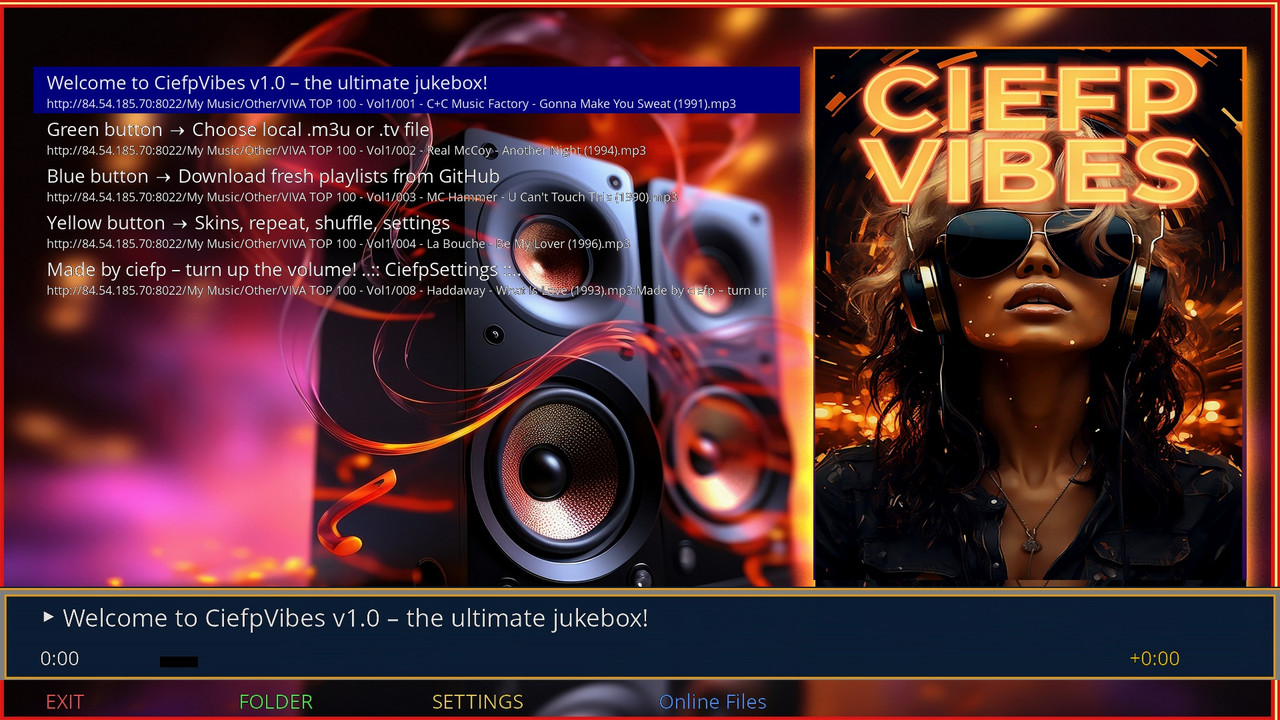
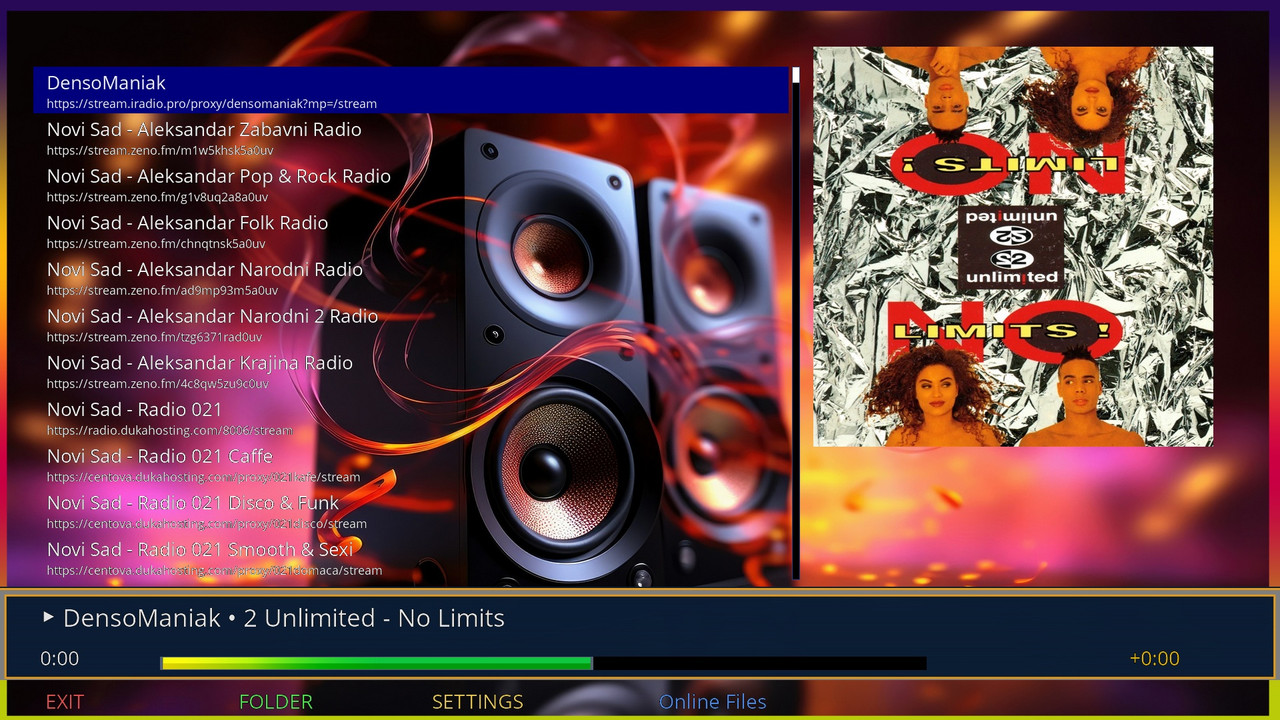
CiefpVibes is a cool music player plugin for Enigma2 boxes.
Play local or online playlists (.m3u/.tv) with repeat, shuffle, custom backgrounds,
and GitHub integration for fresh tracks.
Supported formats are mp3 and flac.
Perfect for non-stop vibes!
### Usage:
Launch from Plugins menu.
Green: Load local file.
Blue: Online from GitHub.
Yellow: Settings.
Red: Exit.
Navigate playlist, OK to play.
Auto-saves last session.
Feel the good vibes with the CiefpVibes enigma2 plugin
..:: CiefpSettings ::..


-
Version 2.3
- ciefp
- 46.16 kB
- 14 Downloads
..:: CiefpVibes v2.3 ::..
What's new in version 2.3
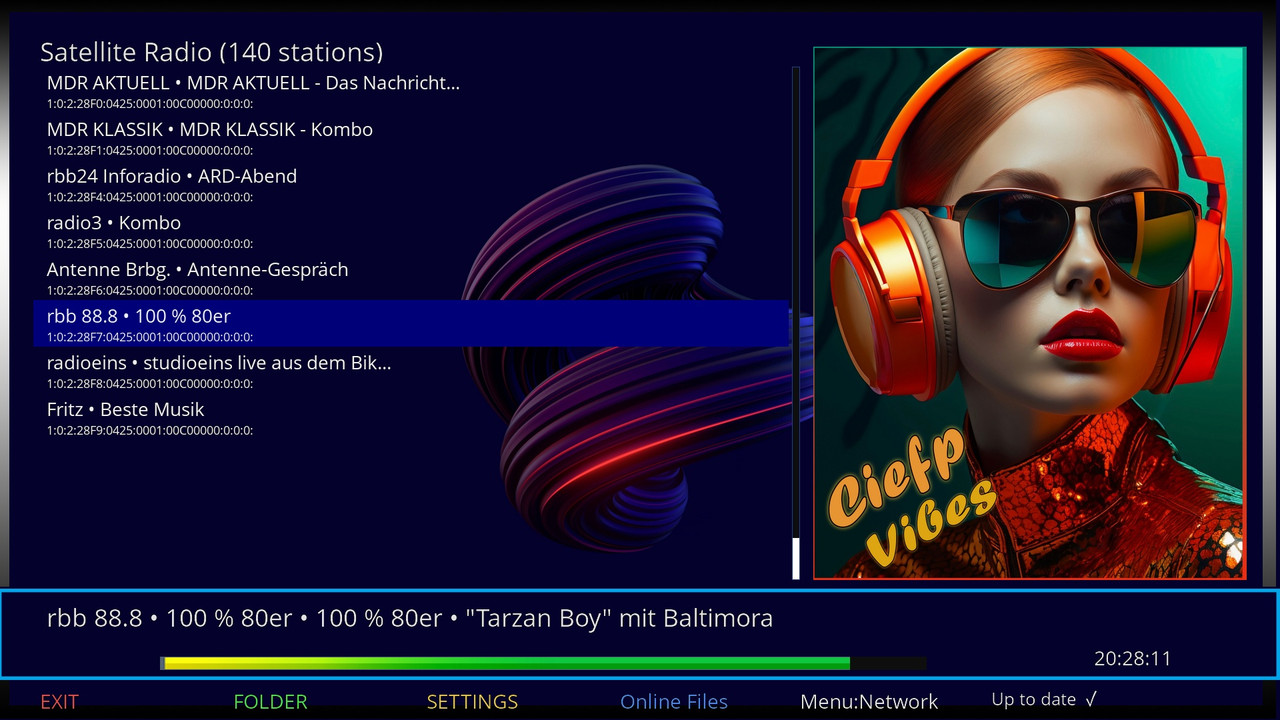
🛰️ Satellite Radio (lamedb)
Direct reading of radio stations from /etc/enigma2/lamedb database
Supported types: 2 (Radio), A (10 - extended codec)
Exact satellite positions from satellites.xml
Satellite sorting: East → West
Display of number of stations per satellite
📡 EPG (Electronic Program Guide)
EPG in list - next to the station name the current program is displayed
EPG on infobar - current program with station name
Automatic EPG refresh every 2 seconds
📻 RDS (Radio Data System)
Display of RDS text on infobar (current song/show)
Automatic RDS update
Support for rdsDecoder (OpenATV 7.x and higher)
🎨 UI Improvements
Enlarged screen for satellite radio (1300x900)
Added image on the right side
Better satellite and station list display
Full plugin features:
Function Description
🎵 Local MP3/FLAC/M4A Direct playback of audio files
🌐 Online streams HTTP/HTTPS streams
📡 Satellite radio (DVB) Reading from lamedb + EPG + RDS
🖥️ Network (SMB/NFS) Network shared drives
📱 FTP (Android/Phone) Connecting to FTP server
📂 OpenDirectory OpenDirectory browser
🖼️ Album covers Automatic cover retrieval
📻 RDS display Radio Data System
📺 EPG display Electronic program guide
🎨 10 backgrounds Different backgrounds
🖼️ 10 posters Different poster placeholders
📊 10 infobars Different infobars
How to use satellite radio:
Start CiefpVibes
Press FOLDER (green button)
Select "📻 Satellite Radio (lamedb)"
Select satellite
Select radio station
Enjoy! CiefpVibes 🎶
-
Version 2.2
- ciefp
- 42.87 kB
- 13 Downloads
CiefpVibes v2.2 Release Notes
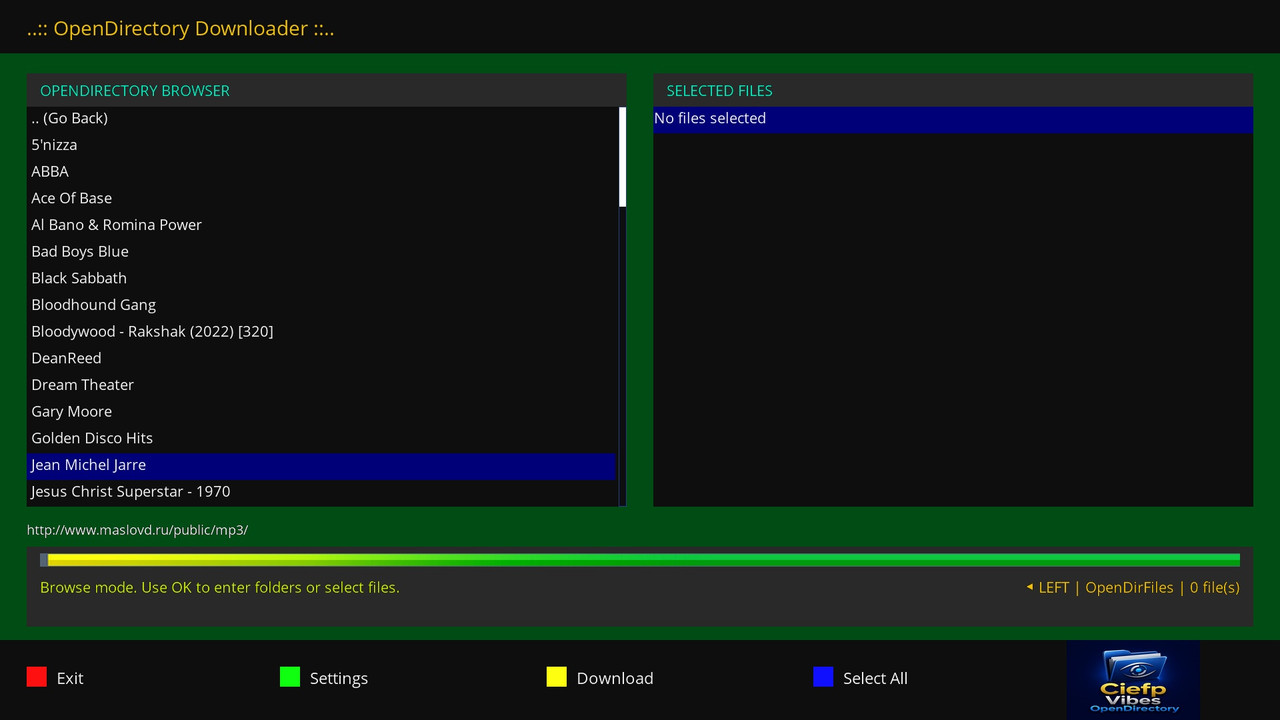
New module: OpenDirectory Downloader
A brand new module for downloading music from OpenDirectory servers has been added!
What is OpenDirectory?
Public servers that share music files (MP3, FLAC, M4A, etc.)
Easy browsing and downloading without complicated APIs
Features:
🌐 OpenDirectory server browsing - load URLs from opendir.txt file
📁 Folder navigation - navigate through directories easily
🎵 File selection - add individual songs or an entire folder at once
⬇️ Download manager - downloads MP3, FLAC, M4A, AAC, WAV, OGG files
📊 Progress bar - visual display of download progress
💾 Customizable path - choose where downloaded files will be saved
How to use:
Add OpenDirectory URLs to the file:
/usr/lib/enigma2/python/Plugins/Extensions/CiefpVibes/opendir.txt
Run CiefpVibes → Online Files → OpenDirectory Downloader
Navigation:
OK - enter folder / add file
Blue button - Select All (adds all files from folder)
Yellow button - Download (downloads selected files)
Green button - Settings (set path)
Improvements:
Automatically clean up file names (removes underscores, duplicate extensions)
Smart naming (e.g. A-Ha_-_Take_On_Me.mp3 → A-Ha - Take On Me.mp3)
Logging all download activities
Quick selection of all files from a folder (without recursive scanning)
Requirements:
Python 3
beautifulsoup4 (optional, for better parsing)
Installation:
opkg install python3-beautifulsoup4
In short:
now you can directly download music from public OpenDirectory servers directly to your Enigma2 device! 🎵
..:: CiefpVibes - Feel the vibes ::..
-
Version 2.0
- ciefp
- 37.82 kB
- 14 Downloads
🎉 CiefpVibes v2.0 - Release Notes 🎉
📦 What's New in v2.0
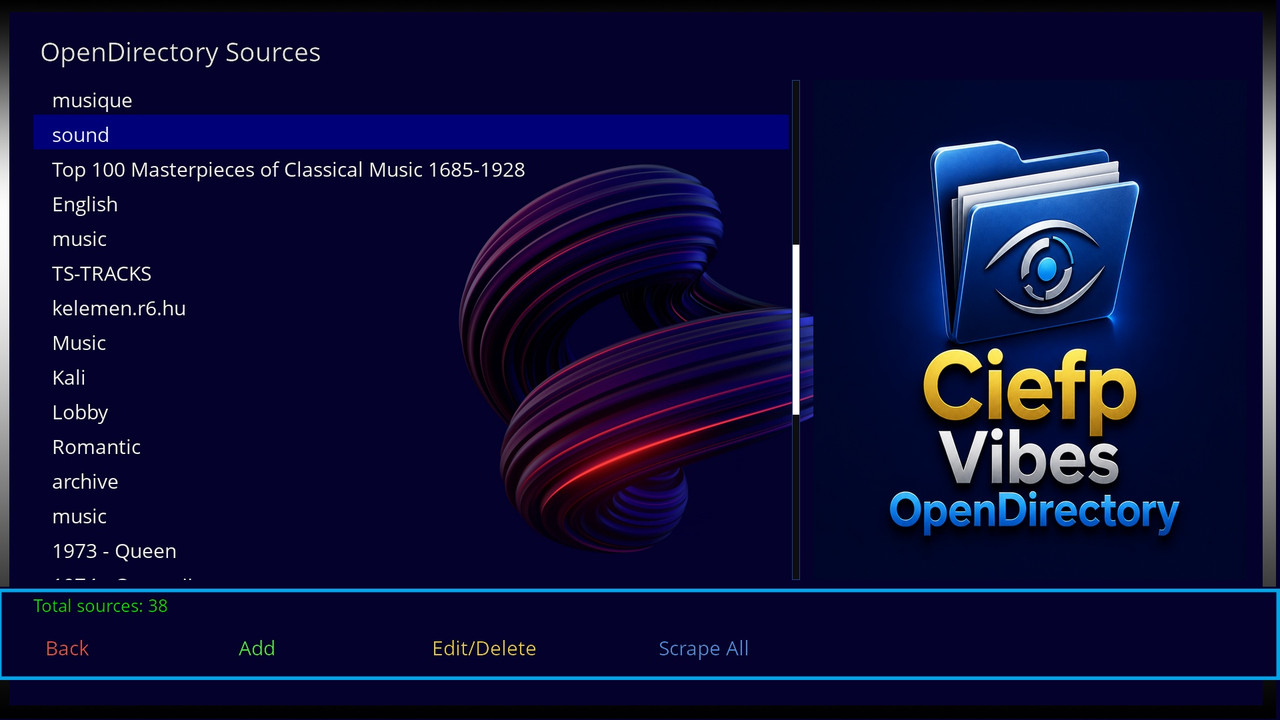
🌐 OpenDirectory Browser (Major New Feature)
Browse online directories - Access and scrape music from public HTTP directories
Save playlists to USB/HDD - Playlists persist after reboot
Smart scraping - Only scans folders with audio content (MP3, FLAC, M4A, AAC, WAV, OGG)
Partial scan saving - Cancel scan and save already discovered files
Real-time progress - Shows percentage, folders scanned, files found
Multiple scraping modes:
Scrape All - Full source scan (can take time)
Scrape Folder - Scan selected folder and subfolders
Load Folder - Quick load of current folder only
Play Selected - Create playlist from manually selected files
📁 Playlist Management
Persistent storage - Playlists saved to USB/HDD in CiefpVibes_M3U/ folder
Smart naming - Files named by source/folder name + date
No duplicates - Checks existing files before overwriting
🎵 Audio Format Support
Added M4A support (proper parsing without trailing /)
Maintains all existing formats (MP3, FLAC, AAC, WAV, OGG)
🎨 UI Improvements
FHD ready - Full 1920x1080 support
New icons - OpenDirectory browser icon integrated
Better navigation - Intuitive button mapping for all functions
🎮 Button Mapping
Ekran Dugme Funkcija
Main Screen MENU OpenDirectory Browser
Online Files BLUE OpenDirectory (option 5)
OpenDirectory Sources GREEN Add new source
YELLOW Edit/Delete source
BLUE Scrape All selected source
OK/BLUE Browse source
Content Screen OK Toggle file selection
GREEN Play selected files
YELLOW Load current folder
BLUE Scrape selected folder
RED Back
Scrape Screen RED/CANCEL Stop and save partial results
📋 What works
✅ Local music playback (MP3, FLAC, M4A, AAC, WAV, OGG)
✅ Online stream playback
✅ FTP / SMB / NFS network shares
✅ GitHub playlist browser
✅ Album cover search (iTunes API)
✅ 10 backgrounds / infobars / posters
✅ Repeat / Shuffle modes
✅ OpenDirectory browser with scraping
✅ Persistent playlist storage on USB/HDD
✅ FHD skin (1920x1080)
📁 New Files
text
CiefpVibes/
├── OpenDir.py # OpenDirectory module
├── opendir.txt # User's open directory sources
└── opendir.png # Optional icon image
Default opendir.txt location: plugin folder
All existing functionality preserved
OpenDirectory is an optional module - plugin works without it
🐛 Fixed
M4A files no longer have trailing / in URLs
Scraper doesn't loop through empty folders
Progress percentage now accurate (0-100%)
Cancel saves partial results instead of discarding everything
Source names displayed without %20 encoding
📊 Tested Scenarios
Scenario Result
Scrape 1000+ files ✅ Success
M4A playback ✅ Working
USB playlist storage ✅ Persistent
Cancel during scan ✅ Saves partial
Load folder ✅ Instant
Play selected ✅ Creates playlist
🙏 Credits
CiefpVibes v1.9 original code (4000+ lines, stable)
OpenDirectory parser adapted from CiefpOpenDirectories plugin
📝 Version Info
python 3
PLUGIN_VERSION = "2.0"
-
Version 1.9
- ciefp
- 31.08 kB
- 8 Downloads
[RELEASE] CiefpVibes v1.9
--- Android FTP & Network Update ---
After intensive work, I am pleased to present you version 1.9 of my plugin.
The focus of this version was on expanding the network capabilities and enabling easier communication between your mobile devices and the receiver.
What's new in version 1.9?
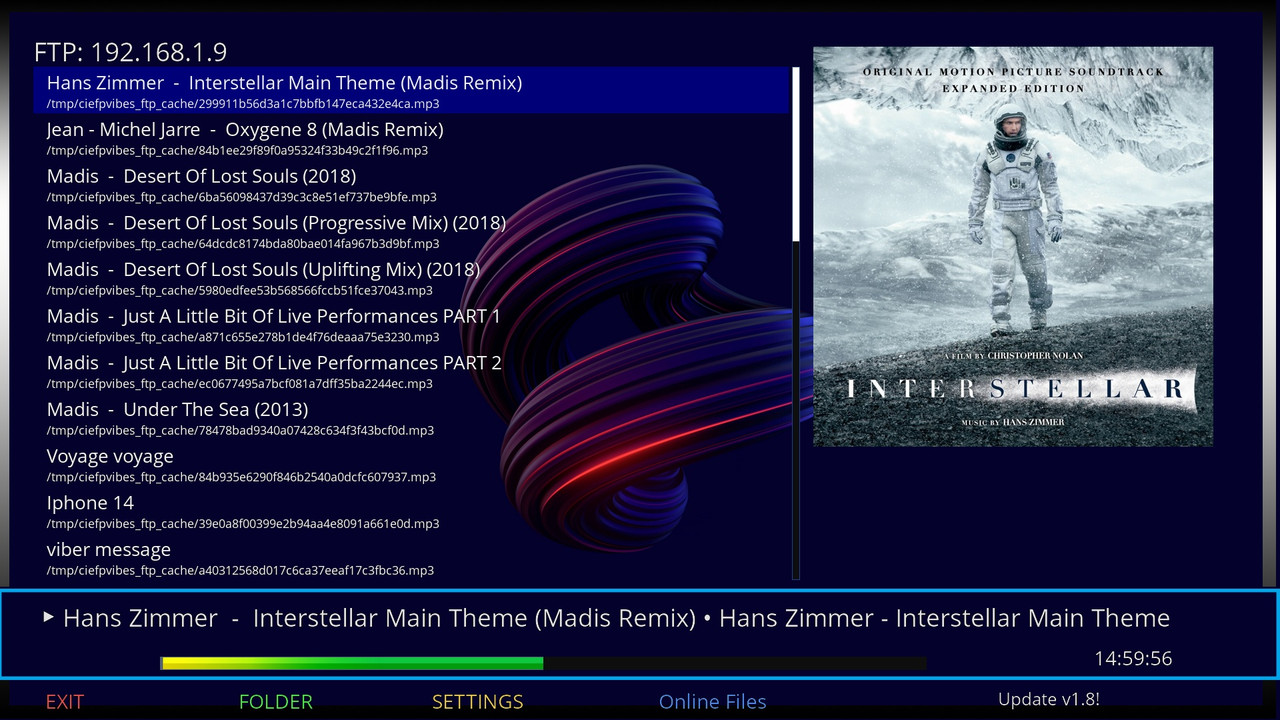
📱 Android & Phone Sync (FTP Support): Added the option to FTP connect to Android phones.
Now you can directly stream audio files from your phone without having to switch to USB.
🧹 Smart Cache Management (TMP Folder): In order for the system to work stably,
a system for managing temporary files in the /tmp folder has been added.
The plugin automatically clears the cache when a certain limit is reached to avoid congestion in the receiver's memory.
⚙️Key features:
Playback of all popular audio and video formats.
Network menu for managing connections in one place.
Simple File Browser with support for local and network paths.
Note: For best results when connecting to a phone,
it is recommended to use a stable FTP server on your Android device (e.g. port 2121).
When connecting via ftp to an Android phone, the plugin scans the folder contents
and temporarily saves the found audio files in the TMP/FTP cache folder for further playback.
In case you have a lot of audio files, this can take up additional memory on the receiver in the tmp folder.
The Settings menu has options for clearing the cache and TMP/FTP cache.
How to use:
Settings on the phone:
- start File Manager (I use the system one)
Settings in the file manager:
- set the port to 2121
- set the login user:root passw:user1 (put your own password)
Starting FTP
FTP - Start
The ftp address is displayed on the screen, for example:
192:168:1:10:2121
On the receiver, open the plugin
Menu button Network, select the option:
Connect to Phone (Android FTP)
The virtual keyboard starts (I recommend the NewVirtualKeybord plugin)
The order of entry is as follows:
ip address - enter the ip address without the port, click on green to continue
port - here enter only the port 2121 green to continue
username - enter the username you entered in the file manager green to continue
password - enter the password you entered in the file manager green to confirm
if the connection is successful, the files from the phone are displayed
Update online, for new installations via wget link.
...:: CiefpSettings ::...
-
Version 1.8
- ciefp
- 26.26 kB
- 32 Downloads
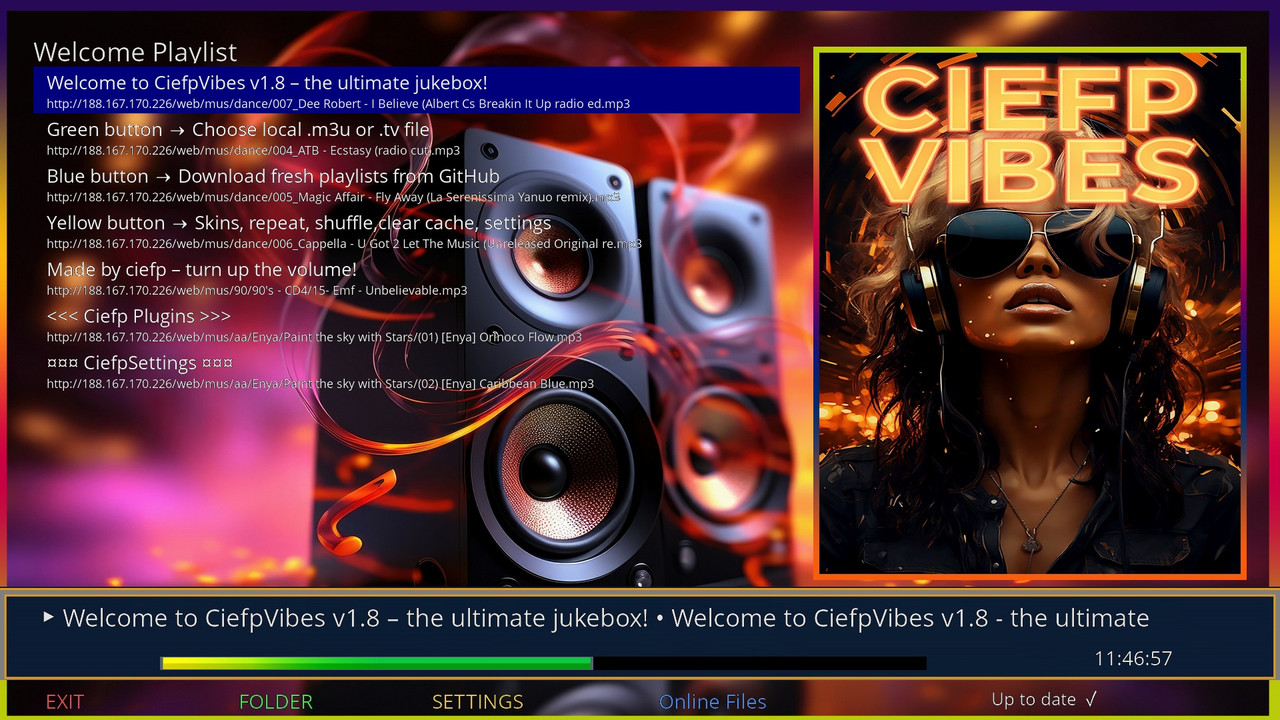
🇬🇧 CiefpVibes v1.8 – Release Notes
## 06.02.2026 ##
## ✔ Fixes
- Stabilized album cover (poster) display when changing tracks.
- Fixed issue where poster reverted to placeholder after a few seconds.
- Prevented default poster from overwriting an already displayed valid cover.
## 🚀 Improvements
- Added cache retry mechanism – if a cover is not found immediately,
plugin retries loading it from cache.
- Improved handling of online radio metadata
(incomplete or duplicate ICY updates no longer trigger wrong poster changes).
## 🖥️ Interface / Usability
- Added top status bar showing currently selected playlist or file name.
- Name updates instantly on selection (local and online sources).
- Long names are automatically shortened with ... for better readability.
..:: CiefpSettings ::..
-
Version 1.4
- ciefp
- 3.09 kB
- 48 Downloads
CiefpVibes v1.4 - Update Log
Release Date: December 13, 2025
Key Improvements:
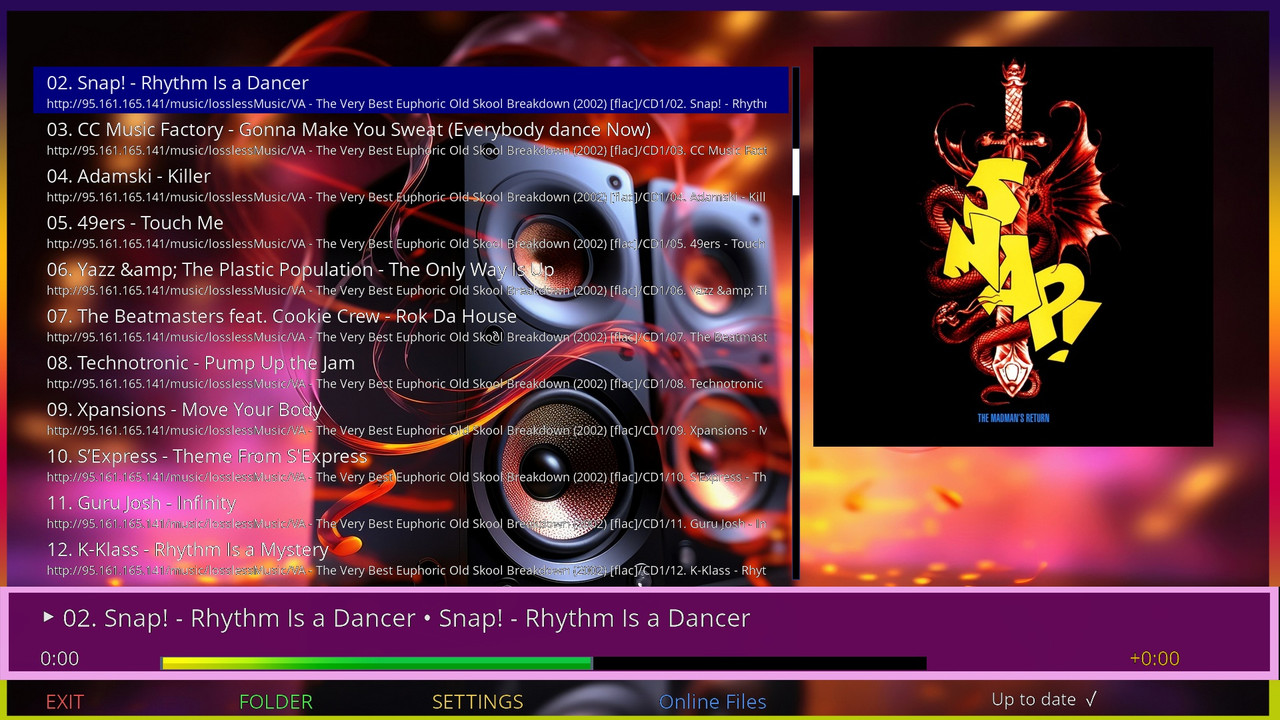
Automatic Update System: Added version check via version.txt on GitHub.
Plugin now automatically detects new versions, displays status on screen (e.g., "Up to date ✓" or "Update v1.5!"),
and prompts for installation with a MessageBox. Includes backup/restore of config files for smooth upgrades.
Enhanced Poster Display: Improved parsing of song titles from filenames
(ignores track numbers like "01 - ", years like "(1993)", remixes).
Better iTunes API fallback for artist-only searches when no title match.
Fixed throttling to allow immediate display of downloaded covers, reducing default poster time.
Cache matching is more accurate, with no flickering during playback.
Other Fixes:
Better handling of online .tv playlists and local MP3 files.
Debug logs for easier troubleshooting.
Network mount improvements for laptop connections.
How to Update: Run the plugin – it will check and prompt automatically if a new version is available on GitHub.
Thanks to everyone who uses and tests CiefpVibes – enjoy the music! 🎶🖼️
..:: CiefpSettings ::..
-
Version 1.3
- ciefp
- 7.46 kB
- 17 Downloads
..:: CiefpVibes ::..
📋 MAIN DIFFERENCES BETWEEN VERSIONS 1.1 and 1.3
✅ NEW FUNCTIONALITIES IN VERSION 1.3:
COMPLETE NETWORK SUPPORT - Connecting to laptops and shared folders
DIRECT PLAYBACK OF AUDIO FILES - MP3, FLAC, M4A, AAC (no need for .m3u)
HIERARCHICAL FOLDER LOADING - Loads entire folders with music
SMARTER FILE BROWSER - More options and better organization
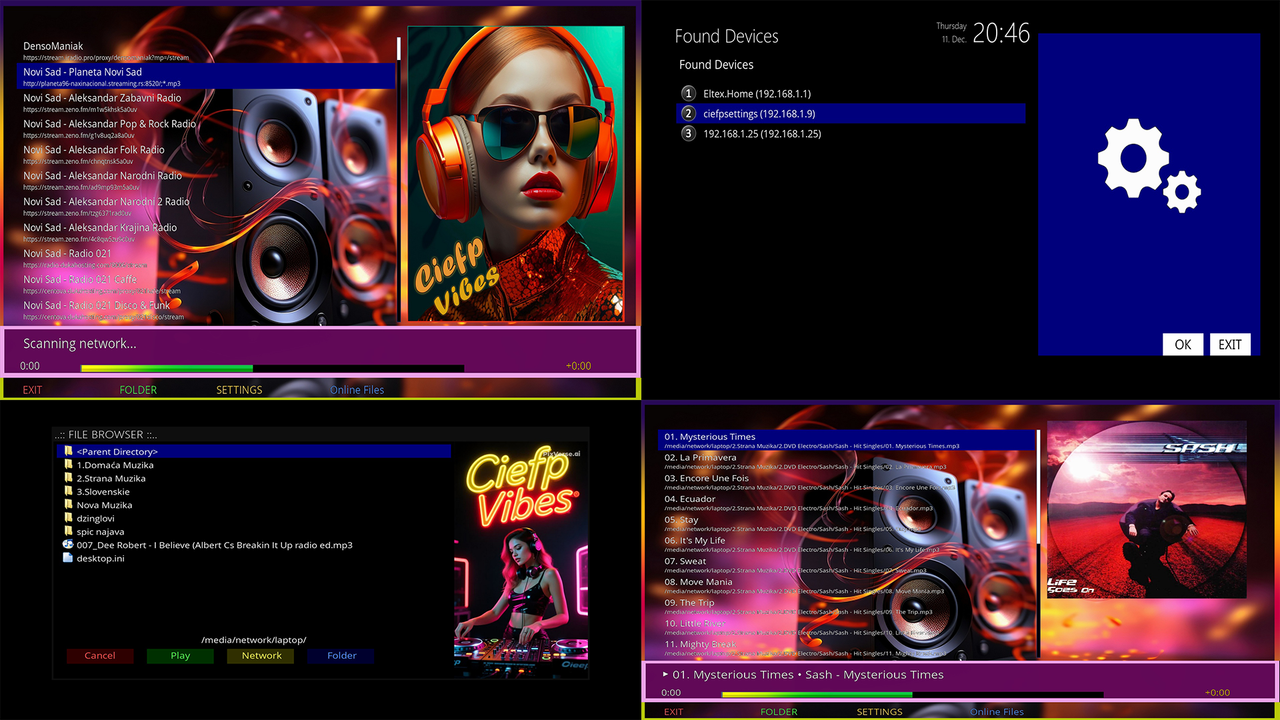
AUTOSCAN NETWORKS - Automatic detection of SMB devices
NOTE IN MENU - New "Menu" button for network options
🔧 TECHNICAL DIFFERENCES:
Version 1.1 Version 1.3
Only .tv/.radio/.m3u + MP3/FLAC/M4A/AAC directly
No network support Full SMB/NFS network support
Simple file browser Advanced file browser with folder option
Only online playlists + Local and network files
Version: 1.2 Version: 1.3
📁 NEW CLASSES IN 1.3:
Complete network methods (mountSMBShare, mountNFSShare, autoScanNetwork)
Improved file browser with folder option
System for reading ID3/FLAC/MP4 tags
🔗 INSTRUCTIONS FOR ESTABLISHING A NETWORK CONNECTION
1. WHAT NEEDS TO BE DONE ON THE LAPTOP/COMPUTER:
For Windows:
bash
1. Right click on the folder → "Properties"
2. "Sharing" tab → "Advanced Sharing"
3. ✅ Share this folder
4. "Permissions" → Add "Everyone" → Full Control
5. Remove all password requests
6. Network and Sharing Center → Turn off password protected sharing
For Linux/Mac:
bash
# Install Samba if it is not installed
sudo apt install samba
sudo nano /etc/samba/smb.conf
# Add to the end:
[Music]
path = /path/to/folder
browseable = yes
read only = yes
guest ok = yes
force user = nobody
# Restart Samba
sudo systemctl restart smbd
2. CONNECTION PROBLEMS AND SOLUTIONS:
Problem Solution
"Access denied" Remove password protected sharing
"Network path not found" Check firewall and IP address
"Mount error" Uses the guest option instead of user/pass
Slow connection Reduce timeout in plugin settings
3. THE MOST FREQUENTLY USED PATH:
bash
//192.168.1.100/Music # Windows without authentication
//192.168.1.100/ # Root share
//namelaptopa/Public # Public folder
4. PLUGIN SETTINGS FOR THE NETWORK:
Menu button → Network Options
Auto-scan → finds devices automatically
SMB Guest mode → use guest without password
🎯 BRIEF DESCRIPTION OF VERSION 1.3:
"CiefpVibes 1.3" is a complete audio playlist that supports:
✅ Direct playback of MP3, FLAC, M4A, AAC files
✅ Connection to network folders (SMB/NFS without password)
✅ Automatic album cover download
✅ Reading ID3/FLAC/MP4 tags
✅ Offline detection of streams
✅ 10 wallpapers, 10 infobars, 10 posters
✅ Online playlists from GitHub
Main advantage over 1.1: No more .m3u file needed! You can directly open any audio file or entire folder with music.
🚀 STEPS TO CONNECT TO A LAPTOP:
On a laptop: Remove password protected sharing
On E2 box: Open CiefpVibes → Menu button → "Connect to Laptop"
Enter the IP address (eg 192.168.1.100)
Enter share name (or blank for default)
Access the music folder
Pro type:
Use Auto-scan so that the plugin finds all available devices on the network!
⚠️ IMPORTANT NOTE:
Version 1.3 is backwards compatible - everything that works in 1.1 works in 1.3, plus you have all the new functions.
If you have problems with network connection, you can always go back to "Online Files" or local .m3u playlists like in the old version.
..:: CiefpSettings ::..
-
Version 1.1
- ciefp
- 8.43 kB
- 31 Downloads
# CiefpVibes v1.1
Enigma2 Music Jukebox Plugin
### 🆕 New functions in version 1.1:
Online radio - support for online radio stations, the possibility of downloading ready-made playlists from github
Single cache directory - All temporary files (lists and posters) are now stored in /tmp/ciefvibes_cache
Clear cache - New option in settings to clear all cached files
View cache size - See how much space the cache takes up before deleting
Optimized file management - Individual structure for easier maintenance
### 🎯 How to use:
Basic functions:
🟢 GREEN - View files (local)
🔵 BLUE - Online lists (M3U, TV, RADIO)
🟡 YELLOW - Settings
🔴 RED - Exit the application
### New option - RADIO
Press 🔵 BLUE - Online lists
Choose RADIO, the possibility of choosing various playlists
Added GITHUB_RADIO_URL and support for .radio files (in parsing, file browser and GitHub download).
Improved parsing of .tv/.radio files: Extended detection of audio streams
(indicators like .mp3, .flac, /stream, rtmp://), with exceptions for video formats (.ts, .mp4, etc.).
Better metadata parsing: parseArtistTitle() to split "artist - title" format,
support for ICY metadata, automatic updating of nowplaying text and posters.
### New option - Clear cache:
Press 🟡 YELLOW (Settings)
Select "🧹 Clear cache"
Confirm the deletion in the dialog
Cache will be cleared (posters + lists)
### Visual and Playback Improvements:
- Added dynamic poster display (showPoster(), showDefaultPoster())
with automatic download of the album cover from the iTunes API (fetchAlbumCover()).
- Two progress bars: "progress_real" (exact progress) and "progress_vibe" (pulsating green bar for "vibe" effect).
- Offline detection: Label for "offline_status" (eg "Stream Offline"),
timer for checking the stream (checkStreamStatus()), reset status when playing.
- More skin options: Up to 10 backgrounds, posters and infobars (in 1.0 only up to 5).
- Automatic playback of the first song in the welcome playlist.
### Other options in settings:
▶ Playback - Repeat, random order
🌐 Network - Timeouts, URL loading
🎨 Wallpaper - 10 wallpapers
🖼️ Poster - 10 posters
📊 Infobar - 10 infobars
💾 Save & Load - Save settings
### 💾 What is stored:
Posters - Album covers (cached)
Lists - Download .m3u/.tv/.radio files
Settings - Configuration in /etc/enigma2/ciefvibes.cfg
Last list - In /etc/enigma2/ciefvibes_last.txt
### ⚡ Advantages of the new version:
✅ Cleaner system - One directory instead of two
✅ Better memory management - You can see and clear the cache
✅ Professional display - Progress bar with pulsating animation
✅ More stable - Detection of offline status for streams
### 🎵 Supported formats:
.m3u / .m3u8 - Standard playlists
.tv - IPTV bouquets (Enigma2)
.radio - Radio lists (Enigma2)
URL - Direct loading from the Internet
### 🔍 Automatic functions:
Automatic loading of the last list at startup
Metadata Detection (Artist - Title)
Automatic download of album covers
Offline indication for streams
The plugin is ideal for listening to music from local files and internet radio streams! 🎧
Feel the good vibes with CiefpVibes Jukebox
..:: CiefpSettings ::..
-
Version 1.0
- ciefp
- 1.73 kB
- 39 Downloads

