

Total Control of iPhone/iPad File System (i-funbox)

There are 2 replies in this Thread which was already clicked 1,874 times. The last Post () by shatanar.

  • Total Control of iPhone/iPad File System
    Manage files on your iPhone or iPad in a way just like Windows File Explorer but more robust and friendly. Easily transmit files and folders to your computer with the optimized file transfer and browsing. iOS 4.0 is now fully supported.


    1- First Download ifun-box
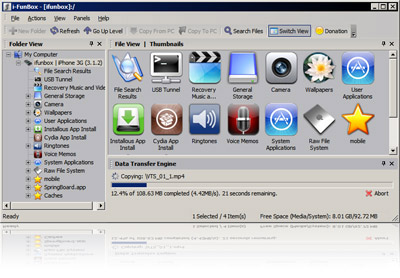


    2- Run ifun-box
    2- Then go to Installous App Install
    4- Drag the your.ipa file to Installous App Install window.
    5- On your Iphone open Installous & install your IPA file.


    NB: Installous installed on jailbreak iphones only.

  • Hi carmine , this version (the latest) is a user friendly and too simple.

Chat about everything else!

A friendly forum for off-topic discussions, random questions, and community bonding. Your space for conversations outside our main categories. Discuss hobbies, news, games, or anything else with the wider community.

Participate now!

Don’t have an account yet? Register yourself now and be a part of our community!