

Debain 6 Oscam+cccam Omnikey

There are 26 replies in this Thread which was already clicked 4,773 times. The last Post () by master G.

  • Right on my spare pc I thought I would experiment with the above setup.


    I have installed Debain 6 and oscam+cccam.


    I have followed the guide on how to install omnikey readers on Linux pc.


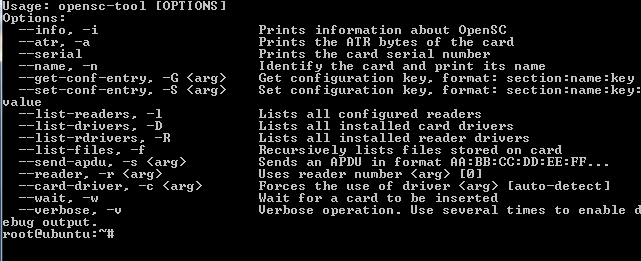
    All goes well before and after the bit where I type opensc-tool ?list-readers. I do not get the


    Readers known about:
    Nr. Driver Name
    0 pcsc Omnikey 1020


    as shown in the tut


    all I get is the options commands list


    any advice?
  • Hi im having problems with my card not clearing. I am getting rejected user ident (120 ms) (0 of 0) (no card support 0963:000000) continuously. What have I missed out?


    [global]
    nice = -1
    logfile = /dev/null
    clienttimeout = 5000
    fallbacktimeout = 2500
    clientmaxidle = 120
    cachedelay = 120
    bindwait = 120
    resolvedelay = 30
    serialreadertimeout = 1500
    maxlogsize = 10
    waitforcards = 1
    preferlocalcards = 1
    saveinithistory = 1
    keepalive = 1


    [webif]
    httpport = 8888
    httpuser = admin
    httppwd = admin
    httprefresh = 5
    httphideidleclients = 0
    httpallowed = 192.168.0.0 - 255.255.255.255
    debug = 255


    [newcamd]
    key = 0102030405060708091011121314
    port = 10002@0963:000000


    [reader]
    label = whitecard
    protocol = pcsc
    device = 0
    blockemm-u = 0
    blockemm-s = 0
    blockemm-g = 1
    blockemm-unknown = 1
    emmcache = 1,3,2
    group = 1
    caid = 0963
    ecmwhitelist = 0963@000000:3E,42,44,45,47,4E,53,54,61,62,68,69,6A,6B,6D,6F,71,72,73,77,78,79,7A,7C,7D,7E,80,8B


    [account]


    user = linuxsat
    pwd = support
    monlevel = 0
    uniq = 0
    group = 1
    au = whitecard
    caid = 0963


    in cccam interface im getting nameofchannel(nok)


    I also have a cline from a friend and with no card in reader I still get the (nok)


    Thanks in advance.

  • also if your client box is connecting to CCcam then don't forget to allow it to recieve a share from beyond your CCcam


    F: user pass 3 0 0 { 0: 0: 2 }

  • Try removing the ecmwhitelist line then restarting oscam, i would also block shared emm as unique is all thats needed to keep your card updated.


    Code
    blockemm-s = 1


    Thanks for the reply tried all that and card still wont clear.

  • also if your client box is connecting to CCcam then don't forget to allow it to recieve a share from beyond your CCcam


    F: user pass 3 0 0 { 0: 0: 2 }


    BIG THANKS that seems to have done the trick and the channel I was after from him now clears, now to try and work out why the card I have temp access too wont clear.

  • glad you got sorted


    is this other card showing in server and shares in your CCcam.info ?


    Yes it is mate. One thing that puzzles me is that my friends c line shows Uphops/Downhops etc 1 and 1, for my card it shows 0 and 7 could this be the problem? Im assuming the 0 means no reshare?!?

  • 0 means it's a local card, 7 means you can share down 7 more hops
    1 & 1 means you friends card is local and you have 1 re-share


    I suspect your friend is faking his local card, try his line directly in a box, if it dont clear ask him why
    fakers will give you plenty excuses why and tell you its your fault all the while using your card
    give him 0 0 0 { 0: 0: 0 } untill his card starts to clear channels, but watch this 'friend' closely ;)

  • 0 means it's a local card, 7 means you can share down 7 more hops
    1 & 1 means you friends card is local and you have 1 re-share


    I suspect your friend is faking his local card, try his line directly in a box, if it dont clear ask him why
    fakers will give you plenty excuses why and tell you its your fault all the while using your card
    give him 0 0 0 { 0: 0: 0 } untill his card starts to clear channels, but watch this 'friend' closely ;)


    Thanks for advice regarding the "friend". I will keep an eye on things and see what develops. Still cant get this omnikey to work. Any other suggestions that I could try, I have tried everything to my knowledge.

  • I to have a problem with omnikey on debian 6 if i run lsusb i get


    Bus 007 Device 001: ID 1d6b:0001 Linux Foundation 1.1 root hub
    Bus 006 Device 001: ID 1d6b:0001 Linux Foundation 1.1 root hub
    Bus 005 Device 002: ID 076b:3021 OmniKey AG CardMan 3121
    Bus 005 Device 001: ID 1d6b:0001 Linux Foundation 1.1 root hub
    Bus 004 Device 001: ID 1d6b:0001 Linux Foundation 1.1 root hub
    Bus 003 Device 001: ID 1d6b:0002 Linux Foundation 2.0 root hub
    Bus 002 Device 001: ID 1d6b:0001 Linux Foundation 1.1 root hub
    Bus 001 Device 001: ID 1d6b:0002 Linux Foundation 2.0 root hub
    then i run command
    opensc-tool -l
    and i get
    [opensc-tool] reader-pcsc.c:896:pcsc_detect_readers: SCardListReaders failed: 0x 8010002e
    [opensc-tool] reader-pcsc.c:1015:pcsc_detect_readers: returning with: No readers found


    has anybody any ideas why i cannot find the card reader i have tried everything i know but no luck


    Thanks


  • Did you follow the tut How to install Omnikey readers on Linux PC in the tutorial section by master g? If not try that.

  • Did you follow the tut How to install Omnikey readers on Linux PC in the tutorial section by master g? If not try that.


    yes i have tried that it must be in that opensc config somewhere but i cant find the problem does anybody have a copy of a working opensc config file or how to do reinstall of opensc pcscd libccid on debian


    Thanks

    • Official Post

    Here you go mate, it goes to /etc/opensc/ correct permissions are 0644, make sure you do the last part of the guide if you havent already.


    How to disable pcscd never ending loggin to /var/log/messages what can write your /var partion full after some time.
    Please enter next commands under putty or over terminal command line as root:
    nano /etc/init.d/pcscd


    There look next lines:
    # if you need to pass arguments to pcscd you should edit the file
    # /etc/default/pcscd and add a line
    # DAEMON_ARGS=??your-option?


    And please change it to:
    # if you need to pass arguments to pcscd edit to:
    # /etc/default/pcscd and add a line
    DAEMON_ARGS="-e"
    And hit from the keyboard ctrl+o and enter to save the changes and ctrl+x to exit


    Now Reboot server and this command on restart


    Code
    opensc-tool -l


  • Thanks Ten but still no luck i copied your file in opensc also added in DAEMON_ARGS="-e"
    still getting
    [opensc-tool] reader-pcsc.c:1015:pcsc_detect_readers: returning with: No readers found
    No smart card readers found.
    root@cccam:~#
    and can still see it connected on lsusb Bus 005 Device 003: ID 076b:3021 OmniKey AG CardMan 3121


    i have moved the reader around different usb ports and can detect it in each port
    i reboot machine each time do i need the card in for pcsc to detect the reader
    cheers

  • root@cccam:~# opensc-tool -R
    [opensc-tool] reader-pcsc.c:1015:pcsc_detect_readers: returning with: No readers found
    Configured reader drivers:
    pcsc PC/SC reader
    ctapi CT-API module
    root@cccam:~#


    hope this helps cheers

Your resource for Linux TV servers and smart card readers.

Find software downloads, drivers, and support for server setup and card-sharing configurations. Set up a Linux-based TV server. Access downloads and support for server software and USB card readers for advanced TV reception and management

Participate now!

Don’t have an account yet? Register yourself now and be a part of our community!
