

Well thanks, in part, to the fabulous TS panel which made it a piece of cake to upgrade my CCcam 2.1.1 to 2.1.3, the DM800 started receiving many more channels automatically.
But not all, and in particular,not the HD channels. I do subscribe to the HD and full package.
So I am not ashamed to ask what might be my next move ?
In the meantime I shall continue to browse the posts.
Good Vibrations.

No OSCam Entitlements for Sky UK HD Channels
-
- Videoguard2 Cards OSCam
- el tel
- Thread is marked as Resolved.
-
-
I think for the HD and premium channels u need to enter the boxkey in the config. file. when using just cccam. if u use oscam to read the card not necessary
-
OK Kemestri. In the blue panel I have selected CCcam2.1.3/OSCam 1.00 I have no idea how to start up OSCam. I would be very grateful if you could point me in the right direction. It sounds as though I am only a few clicks away.
Espero tu ayuda.
El Tel -
ok, what i would do is go to the ts panel again.
-addons
-linuxsat support addons
download the appropriate cccam/oscam config for your image (i use Black hole). and for the card u are using s*y
-installthen press the blue button and select the cam you have just installed and then click on the cam and it will restart.
i usually then select pick tv to see if oscam is working.
salu2 -
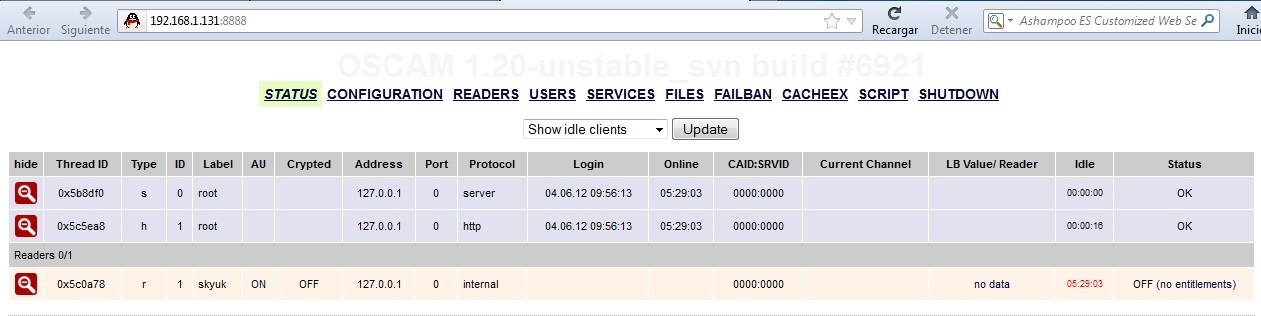
in your browser type the IP of server 192......:8888 , ROOT: admin PASS: admin (by default)
and you should see something similar to this:
When you are there to see entitlements :
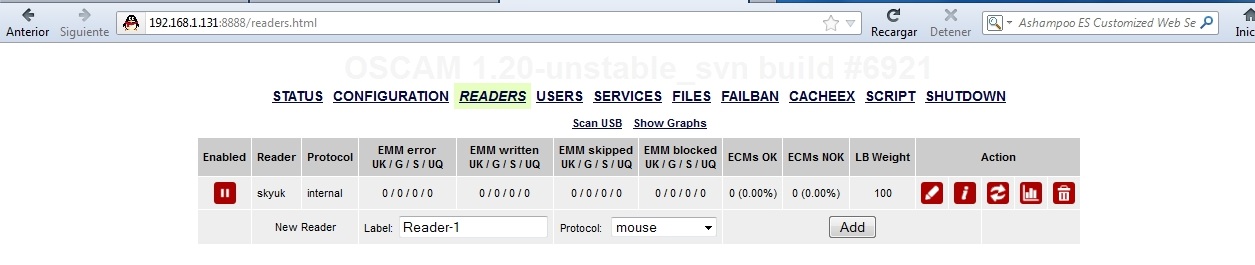
These are samples so you get the idea ;)
-
Hombre
Estoy Luchando
I can type the ip and access webcontrol, but if I add :8888 I am blocked. I am trying different browsers and alternating between Winxp and Ubuntu
Soy Torpe
El Tel -
Edit /var/tuxbox/config/oscam.conf
And add web info username & password as shown here
How To See Your Card Entitlements When Using Oscam
You will need to restart oscam or reboot for the changes to take effect.
-
Greetings Ten Below.
I have just gone through the file explorer and I have NO oscam.conf
The path you suggested leads me to Enigma2....and no oscam inside
The nearest that I can find is scam (1 long string )
Any ideas ??
El Tel -
Apologies look in /etc/tuxbox/config/
-
Another idea that occurs to me.
Perhaps it would be good to update my image.
Current image = 7.21.2010
Cheers -
-
Now I am beginning to feel like a pest.
I hope you enjoy doing this. Your path once again takes me to Enigma2
NO oscam.conf -
I am thinking the cam you have downloaded may be the bin only version, get the configs for your card here & send them to /etc/tuxbox/config
-
Dear Ten, I am still struggling but am happy with my progress today. I will be back tomorrow morning with new energy. I don't know how you do it.
Many,many thanx.
Hasta Manana
El Tel -
its hard to get things right 1st time when your starting out EL TEL - Stick with it and you'll find the pieces will fall into place and the penny will drop as they say !
Rik
-
as they say in certain parts :" disfruta del aprendizaje,algun dia volveras para enseñar a otros"
"enjoy the moment ,one day you´ll be back to show others" ;)
salu2 -
Thanx Rik
I am further ahead than I was this morning,PLUS I have learned quite a bit in the process. -
Well I have tried and tried. I went back to factory settings and am now where I was last night.I have adjusted anything that moves and then put it back as it was.
So I have a couple of HD channels and the non-premium SD channels.
I am on CCcam2.3.0/Oscam1.20. I believe that my version of Gemini is 5.1
Quite content,and waiting to thank somebody,this may require a Chess champion.
El TelPS: Just to recap, if I type the dreambox ip (192.168.1.69) I go through to Webcontrol, but if I add :8888 I go nowhere.
-
Well I have tried and tried. I went back to factory settings and am now where I was last night.I have adjusted anything that moves and then put it back as it was.
So I have a couple of HD channels and the non-premium SD channels.
I am on CCcam2.3.0/Oscam1.20. I believe that my version of Gemini is 5.1
Quite content,and waiting to thank somebody,this may require a Chess champion.
El TelPS: Just to recap, if I type the dreambox ip (192.168.1.69) I go through to Webcontrol, but if I add :8888 I go nowhere.
I have made this campack for you, it has Oscam 7014, CCcam 2.13, Gemini script & sly UK configs, uninstall your current cams, reboot then install this.
-
Dear Ten
I am honestly dying of embarrassment. My stupidity and ignorance are preventing me from enjoying all of this. I am going to rename my Dreambox......the Nightmarebox.
I uninstalled all cams,as you suggested,leaving me with just the common interface and then I uploaded your special file via Dreambox Control Centre ftp/ipk.
That was the last I saw of it.It has been swallowed up and I am in the same position as I was this morning.
But I'm still game and determined to get there in the end.
Time for a glass of vino.....man does not live by bread alone.
Anyway, I am sorry to be such a difficult user, and hopefully I will rapidly improve.
El Tel -
Ftp the file to /tmp directory then find software manager in DM menu and choose manual install.
-


Your resource for OSCam softcam




