


Premium-FHD skin by MNASR
- odem2014
- Thread is marked as Resolved.
-
-
Display More

Yes I know , premium skin has alot of modifications that must be done .
-
Display More
 Display More

Hallo,
is it possible to set on full screen?
Thx.
Close openspa channel selection
Openspa use "list2" a widget in scree
eg.
Any update.
Thanks
<widget name="list" position="230,145" size="1250,600" scrollbarMode="showOnDemand" scrollbarWidth="10" transparent="1" zPosition="3" itemHeight="50" itemWidth="1090" serviceItemHeight="45" serviceNumberFont="Regular;30" serviceNameFont="Regular;30" serviceInfoFont="Regular;30" progressPercentWidth="70" foregroundColor="#ffffff" foregroundColorSelected="ltbluette" backgroundColor="#000000" additionalInfoFont="Regular;30" colorAdditionalInfo="#808080" colorServiceDescription="ltbluette" colorServiceDescriptionSelected="white" foregroundColorServiceNotAvail="#505050" fieldMargins="15" nonplayableMargins="15" itemsDistances="8" colorEventProgressbarBorder="grey" colorEventProgressbarBorderSelected="white" picServiceEventProgressbar="skin_default/progcl.png" backgroundColorSelected="#124b97" scrollbarSliderForegroundColor="#606060" scrollbarSliderBorderColor="#404040"/>
<widget name="list2" zPosition="-10" valign="bottom" position="1140,68" size="720,910" font="Regular;21" backgroundColor="black" foregroundColor="white" backgroundColorSelected="black" transparent="1" posDuration="195" posEvent="235" posyBegin="0" postxt="60" posyEvent="0" itemHeight="50" sizey="42" fontBegin="Regular;23" fontEvent="Regular;23" fontDate="Regular;21" fontDuration="Regular;23" selectionPixmap="picmenu/sl1000.png"/>
i add list + list2 ;) and workYes thank you , I still have more work to do for more compatiblity with OpenSPA
Any update.
Thanks
-
I had installed the openpli 9.0 image, but what I saw was that the weather forecast or visual was missing in the info information. I would appreciate it if you could update me.
-
Hi
Hamburg as a city is probably fixed
There is no Istanbul, I think
-
???????????????????????????????????????????????????????????
-
I think there is only the city of Hamburg.
Why isn't there Istanbul in the city part?
Sorry for the Yandex translation
-
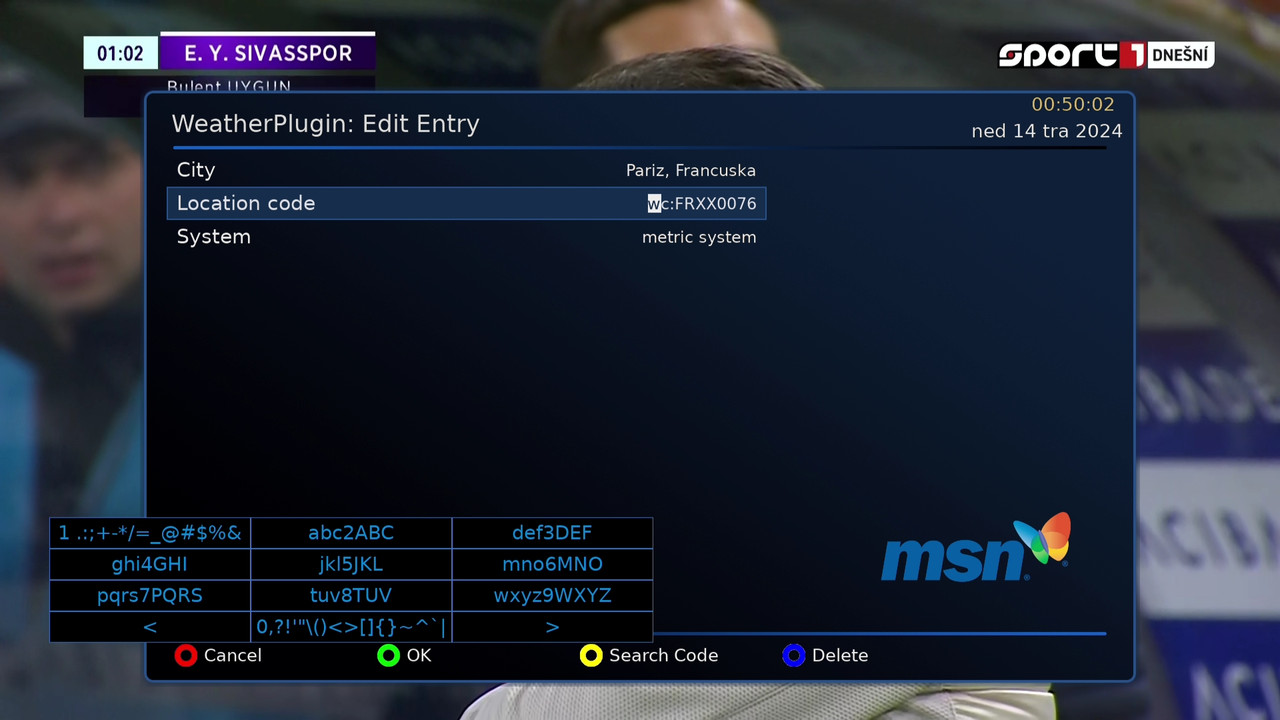
You need to enter manualy all other citys. Add name of city and press yelow button search code. After code is added just save on green button. And all work fine.
-

You need to enter manualy all other citys. Add name of city and press yelow button search code. After code is added just save on green button. And all work fine.
There is no city setting in the Premium-FHD-Blue pro installation menu.
The city setting is already in Istanbul
openATV 7.3
Where else can I enter?
Can you write the path? Thank you
-
Just type name of city and after press yellow to search code.
And it will show you that code. After just press green button to save it.
-
I deleted the MSN Weather and weather plugin and reinstalled it, now there is no problem.
Thanks
-
Can you fix the Oscam or Ncam name confusion?
Thanks
-
Using openATV 7.4 with Premium FHD Black, unable to take a screenshot, tried 'F1' button as normal and others with no success. Any advice please. Beautiful skin design, thanks.

-
With which Plugin you try to make a screenshot?How you Shure,that this is a skin problem and not a plugin problem?I make here screenshots only via Webif and have no problems.
-
Please can you give a look on this Skin,with actuell ATV 7.4 after some changes it comes a error massage,when you try to install this Skin,with your Aglare FHD Skin no problems.
-

Please can you give a look on this Skin,with actuell ATV 7.4 after some changes it comes a error massage,when you try to install this Skin,with your Aglare FHD Skin no problems.
Manually remove the AtileHD plugin directory, then install AtileHD from the feeds.
It's not a skin problem.
odem2014 please don't include AtileHD in the skin, but request it as a dependency during installation.
-
10.5 egami has the same problem, atile error
-
Sorry,tryed this,but error Image remains,I will speak with the ATV Image Devs,if they can fix this.
-
-
Send plugin.py to /usr/lib/enigma2/python/Plugins/Extensions/AtileHD
If you don't want to wait for fix
Or download from https://github.com/openatv/eni…e626b87765dfd996af8d9d62a
Your resource for Enigma2 skins and GUI customization
Download custom themes, get installation support, and find tools to modify your receiver's display. Customize your Enigma2 GUI. Discover and download custom skins, with dedicated support for installation and visual personalization.
Participate now!
Don’t have an account yet? Register yourself now and be a part of our community!

