Aglare FHD by MNASR

There are 1,063 replies in this Thread which was already clicked 261,828 times. The last Post () by haldborg.

  • On the remote control for my VU+ ZERO 4K, there is no INFO button.


    Let me explain my problem again:


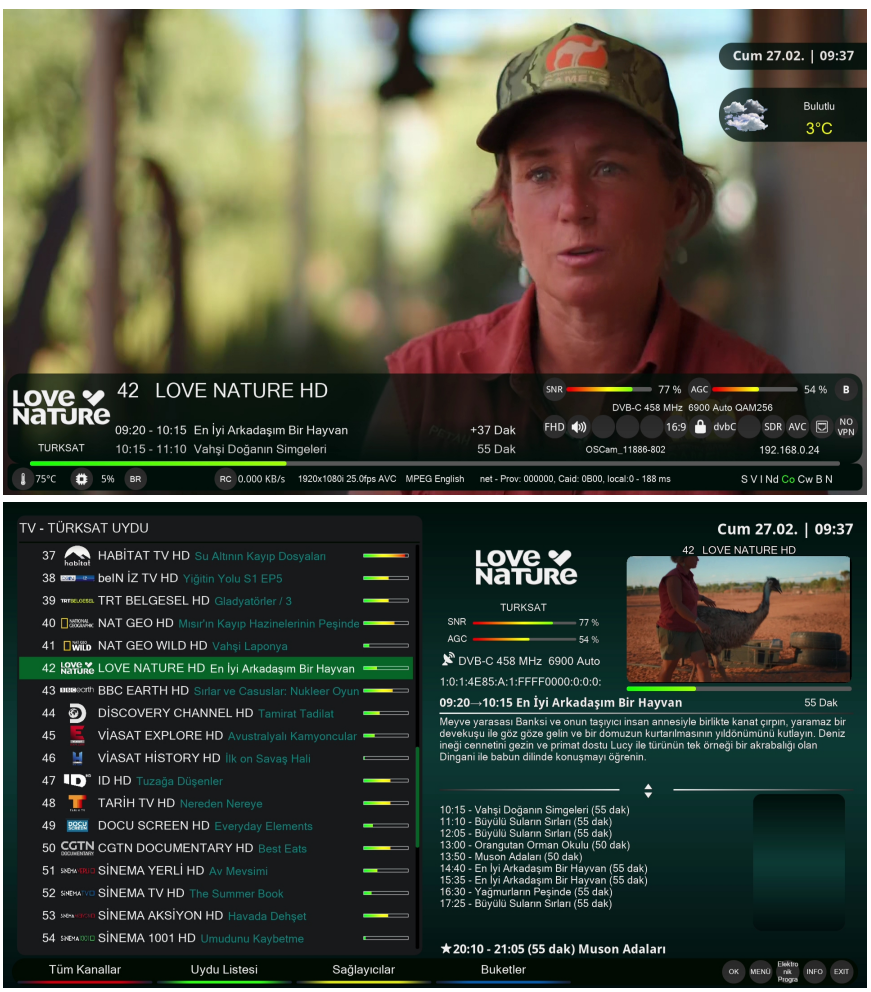
    - When I change channels or press the OK button, the posters appear on the screen (see screenshot #1).


    - When I want to navigate the channel list, I press the up arrow button. At that point, all the channels appear on the screen, but the posters don't appear there; only the frames appear, not the images (see screenshot #3). Shouldn't these images appear in each frame?


    - When I press the OK button and then the OK button again, the window appears (see screenshot #2), and the posters are displayed correctly in this window.


    If someone could test this to confirm what I'm saying...

    • Official Post

    The following images are from satellite channels and not from IPTV channels.


    1.jpg     2.jpg

    :smiling face with sunglasses: well

    You immediately understood the problem... I hadn't noticed...

    I would have to do a regex all around the world for how many names they give to IPTV channels.

  • odem2014 please tell me if you expect do it or not ?

    Regards


  • Bonjour,

    Après avoir lu les réponses de la communauté concernant l'écran Aglare, j'ai enfin trouvé la solution. Le problème se situait bien dans le menu CONFIGURATION DU THÈME, lui-même accessible depuis le menu PARAMÈTRES VU+ (voir capture d'écran).

    Avec ces paramètres, les affiches s'affichent correctement.


    Merci à tous.

    Friend, how did you solve it? I have a Vu+ device, please describe it. The posters aren't showing up for me either.

  • I explained it so it would help everyone.


    Look at the screenshots I posted; all the posters are displayed correctly except for one (the screenshot with the red arrow).

    You need to set the parameters as shown in screenshot #8.

    With FileZilla, you must verify that a directory named "poster" is created either in /tmp or on your USB drive during the Aglare plugin installation.


    I'm using the latest version of the plugin, V7.

  • i have no time now for this , making adjustiments for one image is not easy , i will try to do so if i have time for this .

    • Official Post

    from plugin aglare, option: remove all png poster ;)
    reboot

  • try this , and use the default infobar , and tell me if it is OK

  • Lululla

    odem2014


    2026-03-28_233018.jpg

Enigma2 skins for oe-alliance based images.

Enigma2 skins for OpenATV, OpenDroid, OpenEight, OpenHDF, OpenNRF, OpenSPA, OpenViX and Pur-E2 images.

Participate now!

Don’t have an account yet? Register yourself now and be a part of our community!