Ciefp Plugins

There are 21 replies in this Thread which was already clicked 6,405 times. The last Post () by ciefp.

  • ciefp added a new file:

  • Some remarks regarding the CiefpPlugins add-on:


    You could add the current version of each plugin either in the plugin panel or in their description,

    so that the user knows if there is an update available for a plugin they already have installed, and proceed to update it.

    In some (few) descriptions, the version is mentioned, but not in a consistent location.

    In my opinion, the version should be added in the plugin panel so that the descriptions don't need to be edited every time a new version is released.


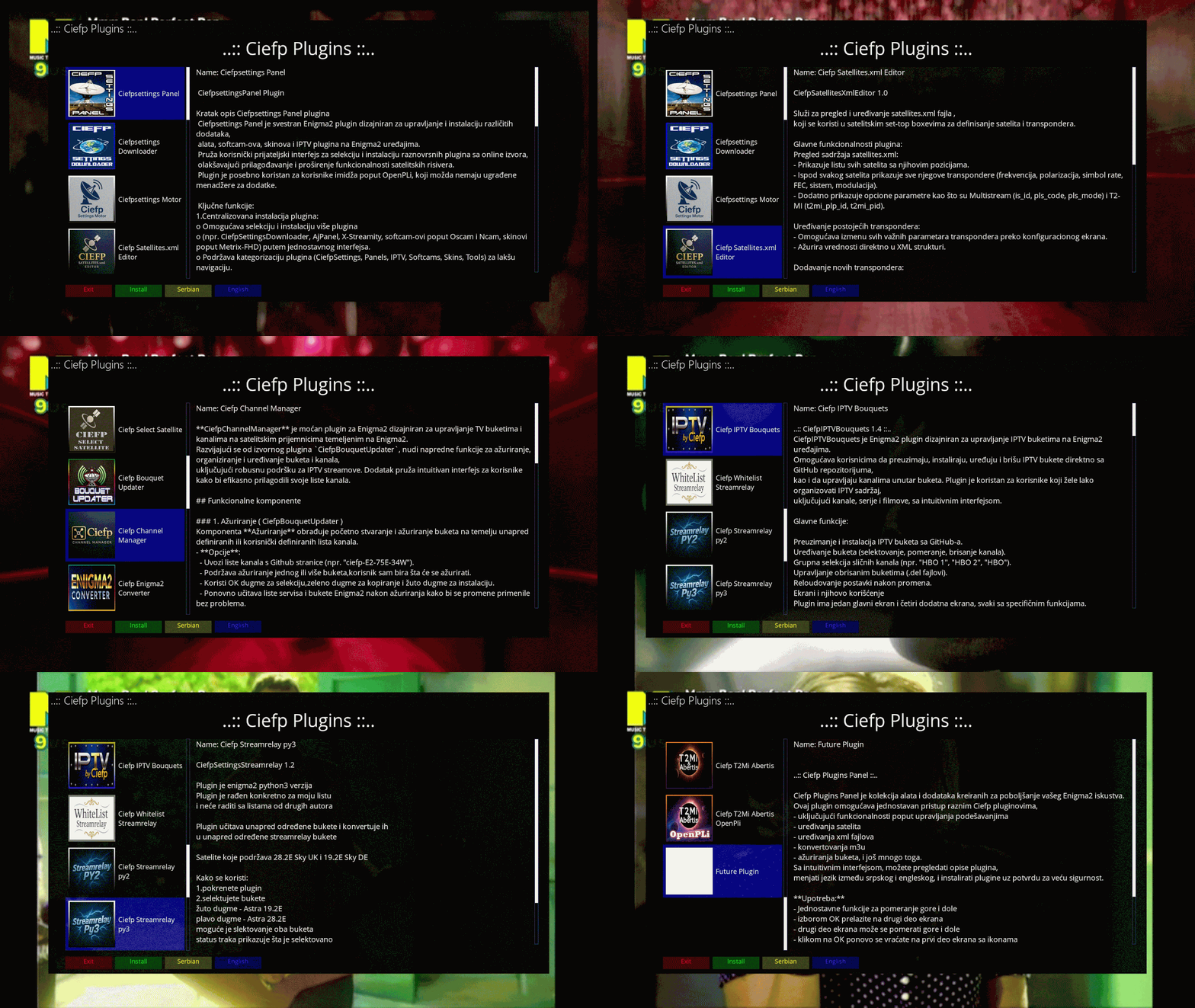
    The font color of the colored buttons should be white to make the captions easier to read.


    1.jpg


    You could ask users to translate the plugin descriptions into their own language, and allow switching between available languages

    by repeatedly pressing the Yellow button (English, Serbian, Greek, etc.).

    I have already translated it since day one and use it for personal use. The Blue button can be used for another function.


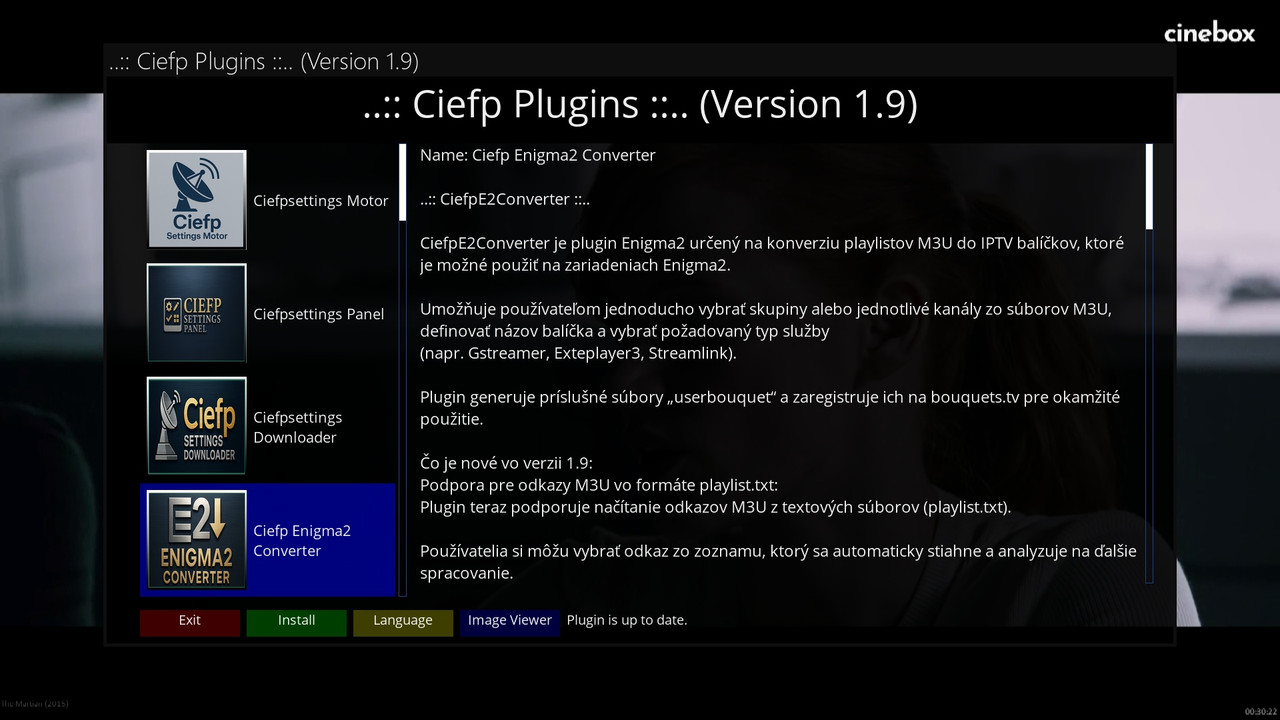
    2.jpg


    In addition to the above, it would be useful, if possible, to automatically check the installed Ciefp plugins on the system,

    and change the function of the Green button to [Install] if the plugin is missing, [Update] if a new version is available, or

    [Uninstall] if it's already installed and the user wants to remove it.

    The Green button should change accordingly every time the selected plugin changes (Ciefpsettings Motor, Ciefpsettings Panel, etc.).


    Thanks

  • Thanks for the suggestions. I was already thinking about adding new options. This for changing the language on the yellow button is a good idea. Then I could use the blue button for, say, an image viewer. I would add a few images for each plugin, but with an image it is easier to show what the plugin is intended for. This for checking the version is also a good idea, but I will see how feasible it is.

  • Thanks for your interest in my suggestions.


    Regarding the functionality of the Yellow button, you could name it [Language] and have it display a pop-up menu with the available languages,

    allowing the users to select the one they are interested in.

    I'll send you the Greek translation to experiment with.

    For the other languages, at least the popular ones (German, French, Spanish, Italian), you can generate them yourself using machine translation.

    AI translation is very good and comes close to human translation, with the risk of including a few irrelevant words, which users can correct.

    Perhaps some users will help by translating the descriptions of the 21 plugins into their native language.


    For switching between panels, the Left and Right buttons could be used instead of the OK button.

    With the OK button, we don’t know whether we’re on the left or the right panel, since there is no visual indication, and sometimes we accidentally scroll the wrong panel.

    With the Left/Right arrows, we know which panel we're on, so we can proceed with scrolling.


    When you have free time, you can rearrange the colored buttons to those plugins that don’t match the layout of the remote control, e.g.


    1.jpg     2.jpg

  • Thanks for the interesting suggestions. I will take all the suggestions into account and see what can be done. I will also make these changes for the colored buttons.

    I have upgraded this bouquet updater with new options and you can find it under the new name CiefpChannelManager. I added in addition to the existing function of upgrading only selected bouquets. I added a bouquet editor where you have the ability to move bouquets up and down as you wish, here you have the ability to select and move one or more bouquets at once.

    There is also a channel editor function here you have the ability to move channels within the selected bouquet, it is also possible to move one or more selected channels.


    I am currently in the process of creating another epg plugin that will cover all epg sources from the epgshare page. When I finish that project, I will move on to other projects that we talked about here that need to be corrected, added, etc.

    BTW this all sources is impossible to load, it is simply too big, it has 22 million lines of text or 1.3 GB

  • ciefp added a new version:

  • Thank you for the new features of the plugin.


    I noticed that when restarting CiefpPlugins, the plugin descriptions revert back to English.

    If possible, it would be helpful for the last selected language to be remembered, so we don't have to search for it every time.

    It would also be useful if the name of the next language appeared on the Yellow button.

    If many languages are added, it would be better to display a list of available languages to choose from when pressing the Yellow button.

  • I set English as the default language. Maybe an option could be added to change the default language in the plugin to the one that suits you. Also, your idea that when the yellow button is pressed, a menu appears where you can choose the language, this sounds like a great idea to me. I will try to do that in a future version. I also plan to move images from the plugin folder to links, which would significantly reduce the size of the plugin. Thanks for the suggestions and ideas for improvement.

  • Thank you for taking users' suggestions into account and for proactively working to improve the functionality of so many plugins.


    Regarding the size of the /pictures/ folder, I wanted to mention that it's quite large, which makes installing and updating the plugin more difficult.

    I was actually going to suggest a way to reduce the size of the .jpg files to one-third without losing image quality, but your idea of using web links is even better

    and will restore the original size of the plugin.

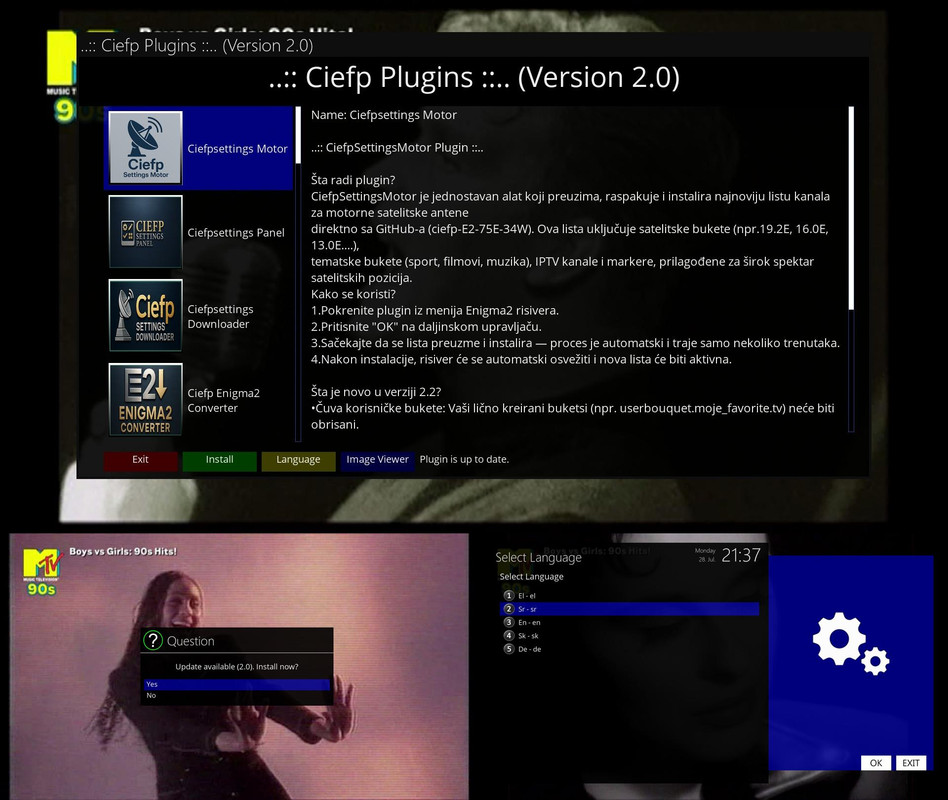
  • ..:: Ciefp Plugins 2.0 ::..


    The new version of the plugin brings great relief to the plugin.

    All images are now loaded online from links from the pictures.txt file, which is located in the plugin folder.

    The new version of the plugin deletes the "pictures" folder, making the plugin 34MB lighter.

    The yellow button launches a choice box where available languages are displayed, i.e. translations of the plugin description texts.

    When the desired language is selected, it is saved in selected_language.txt and on each subsequent launch,

    the plugin immediately launches the selected language. There is no longer a need to re-select the desired language each time it is launched.

    Switching to displaying images online now gives me the ability to display more images for each plugin.

    It also allows me to add new plugins and their image links in future versions.

    Adding new images will now not drastically increase the size of the plugin.


    ..:: CiefpSettings ::..


    spojena-slika-ispravka.jpg

  • Tested and everything works perfectly. Thank you.


    Is there a reason why the language names are shown only by their code? It would be much nicer if the language name appeared alongside the code.


    Consider adding the version number of all plugins in the captions on the left panel. It would help us know if there is any update available.


    Edit

    If it's difficult to display the plugin versions automatically (with a web connection), and you would need to update the CiefpPlugins every time a plugin version changes,

    then it's better to leave it as it is.


    Edit2

    It could be done by pressing a button (e.g. Menu, Info, etc.), which would connect to the web and display a window with the latest versions.

    This way, a connection wouldn't be required every time, but only when the user requests it.

    Edited 2 times, last by giorbak ().

  • ciefp


    Since you have the descriptions for all your good plugins ready, it would be helpful for users to add a Help button to all of them, that display a scrollable text window with the English description for each plugin.

    Thank you

    Edited once, last by giorbak ().

  • Press OK to switch focus between the plugin list and the description text, to scroll the description with the arrows.


    1_0_1_293B_458_1_C00000_0_0_0_20251128160515.jpg ciefp


    Since you have the descriptions for all your good plugins ready, it would be helpful for users to add a Help button to all of them, that display a scrollable text window with the English description for each plugin.

    Thank you

Enhance your Enigma2 with top add-ons panel plugins

Access curated downloads and community support for installation. Download and get support for Enigma2 add-ons panel plugins. Your resource for the best extensions and management tools.

Participate now!

Don’t have an account yet? Register yourself now and be a part of our community!