


..:: Ciefp Plugins Panel ::..
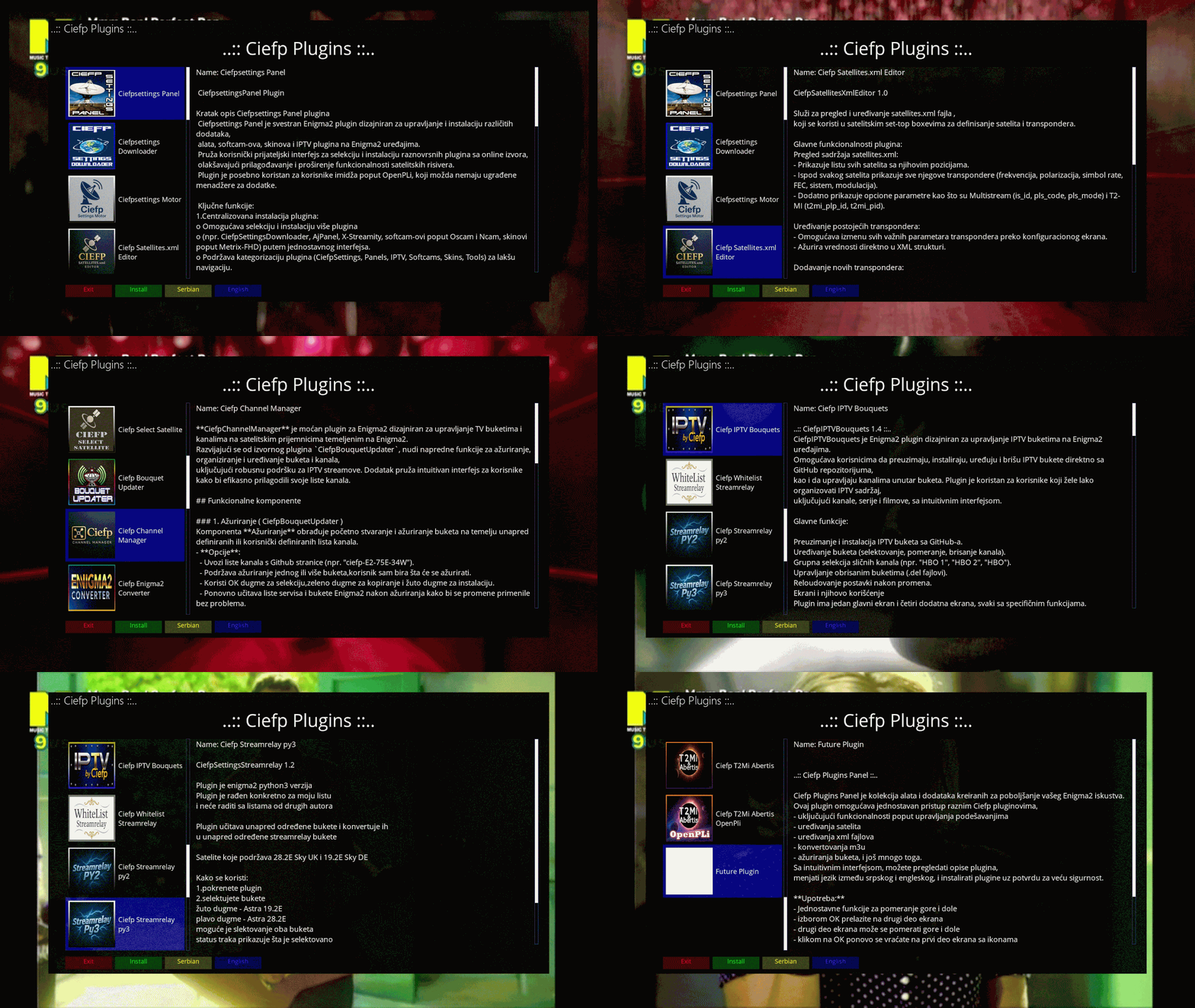
The Ciefp Plugins Panel is a collection of tools and utilities designed to enhance your Enigma2 experience.
This plugin provides easy access to a variety of Ciefp plugins,
- offering features such as settings management
- satellite editing
- xml editing
- m3u converter
- bouquet updates, and more.
With a user-friendly interface, you can browse plugin descriptions,
switch between Serbian and English languages, and install plugins directly with a confirmation prompt for added safety.
**Usage:**
- Simple functions move up and down
- by selecting ok you move to the second part of the screen
- the second part of the screen can move up and down
- clicking ok again takes you back to the first part of the screen with icons
- Red button - Exit
- Green button - Installation
- Yellow button - Serbian description of the plugin
- Blue button - English description of the plugin
..:: CiefpSettings ::..


-
Version 1.9
- ciefp
- 8.42 kB
- 428 Downloads
..:: Ciefp Plugins Panel ::..
Ciefp Plugins is an Enigma2 plugin that provides a user interface for viewing, installing and managing the Ciefp plugin collection.
It allows users to easily install plugins such as Ciefpsettings Motor, Ciefp IPTV Bouquets, Ciefp EPGshare and others,
view their descriptions in multiple languages, view related images and check for updates.
The plugin is designed for easy navigation, with a focus on functionality and a clean look.
How to use
Launching the plugin:
Find Ciefp Plugins in the Enigma2 menu under Plugins and launch it.
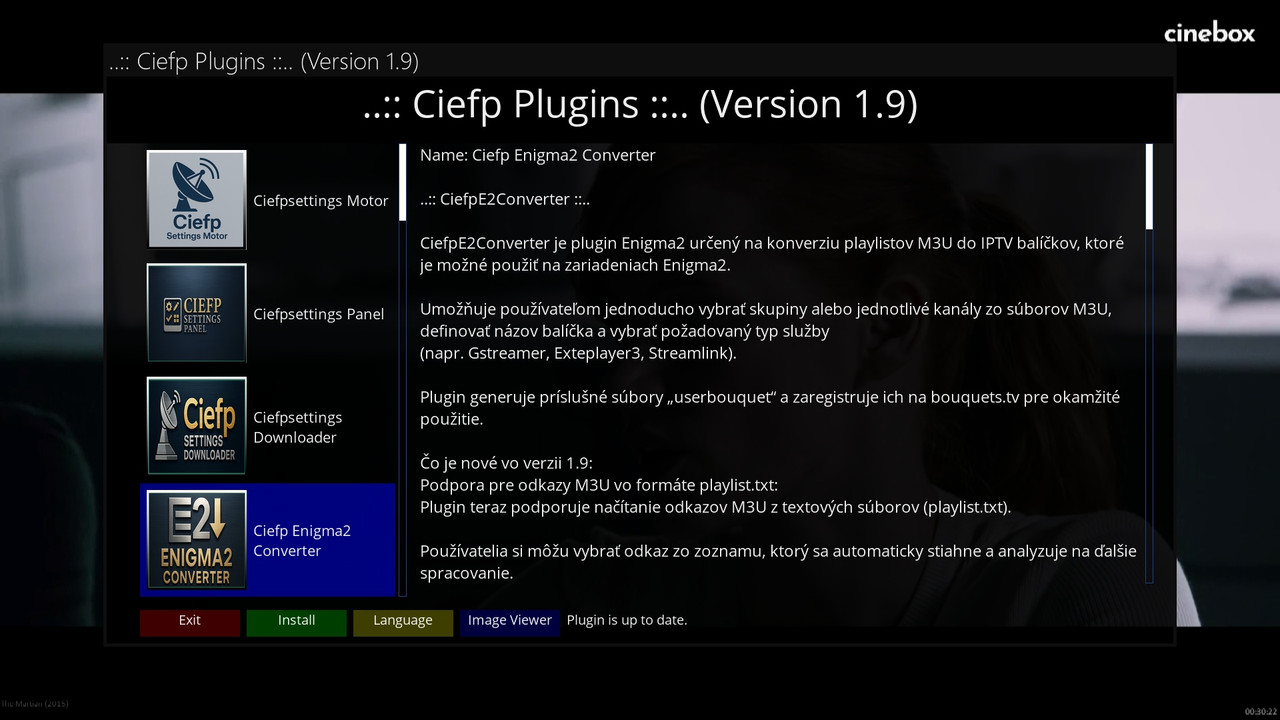
The CiefpPluginsPanel screen will open with a list of plugins on the left, a description on the right and colored buttons at the bottom.
Navigation:
Left side (plugin list): Use the up/down arrows to navigate through the plugin list. Each plugin has an icon and a name.
Right side (description): Displays a detailed description of the selected plugin in the current language (e.g. Name: Ciefpsettings Engine and description text).
Focus: Press OK to switch focus between the plugin list and the description (to scroll the description with the arrows).
Button functions:
Red (Exit): Exits the plugin.
Green (Install): Installs the selected plugin. Confirm the installation via a dialog.
Yellow (Language): Changes the language of the plugin description (e.g. between en, sr, el, de, sk).
Blue (Image Viewer): Opens the ImageViewerScreen to view images associated with the selected plugin
(if images exist in /usr/lib/enigma2/python/Plugins/Extensions/CiefpPlugins/pictures/).
Image Viewer:
The blue button opens the plugin image viewer screen.
Use the green (Previous), blue (Next) or left/right arrows to navigate through the images.
Red or Cancel returns to the main screen.
Status messages:
Status messages (e.g. "Checking for updates", "Installation in progress", "Installation successful")
are displayed in the lower right part of the screen, next to the colored buttons, in the status_label widget.
Automatic update check:
On startup, the plug-in automatically checks if there is a new version at VERSION_URL.
If there is one (e.g. version 2.0), it asks you if you want to update. The update includes a backup of the list of installed plugins and a restart of Enigma2.
What's new in version 1.9
Language support (en, sr, el, de, sk):
The plug-in dynamically loads languages from the folder in /usr/lib/enigma2/python/Plugins/Extensions/CiefpPlugins/descriptions/.
The languages supported are en (English), sr (Serbian), el (Greek), de (German), and sk (Slovak), with the ability to add other languages by creating new folders.
Plugin descriptions are loaded in the selected language, with the default en if the language is not available.
Changing the language is done with the yellow button, with the language name capitalized (e.g. Sr for Serbian).
Automatic update check:
The plug-in checks for the availability of a new version at startup using VERSION_URL.
If a new version is available, it offers the option to update with a backup of the list of installed plugins (INSTALLED_PLUGINS_FILE)
in /tmp/ciefp_plugins_backup.txt.
Status messages in status_label:
Newly added: Status messages (e.g. "Checking for updates", "Installation successful", "Update failed")
are displayed in a separate widget to the right of the blue button, instead of covering the plugin description.
This improves the user experience because the plugin description remains visible during operations.
Plugin List: Shows 23 plugins (e.g. Ciefpsettings Motor, Ciefp IPTV Bouquets, Ciefp EPGshare) with icons and descriptions.
Multilingual Support: Automatically loads languages from the descriptions/ folder, with current support for en, sr, el, de, sk.
Image Viewer: Allows viewing plugin images in a separate screen.
Plugin Installation: Easy installation via scripts from GitHub.
Automatic Updates: Checks for and installs new plugin versions.
..:: CiefpSettings ::..
-
Version 1.0.0
- ciefp
- 2.45 kB
- 187 Downloads
