ciefp added a new file:

QuoteDisplay More..:: Ciefp Oscam Editor ::..
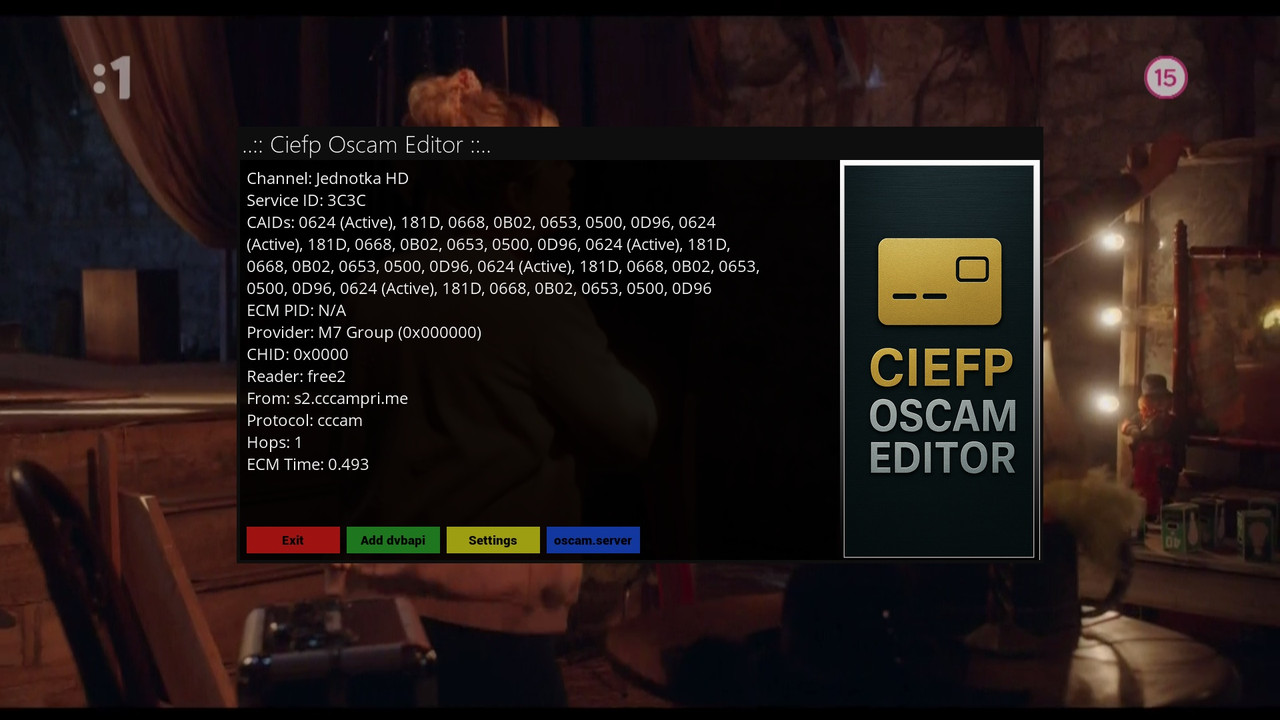
Ciefp Oscam Editor is an Enigma2 plugin designed to edit oscam.dvbapi and oscam.server files directly from the Enigma2 interface.
It allows users to easily manage OSCAM configuration for DVB-API and servers, while displaying information about the current channel and ECM data.
The plugin is tailored for users who want to set priorities, ignore,
map or add lines in the OSCAM configuration, as well as manage readers for the OSCAM server.
Plugin features
Display channel information:
Displays details about the currently viewed channel, including:
Channel name
Service ID
CAIDs (with active CAIDs highlighted)
ECM PID
Provider
CHID, reader, protocol, hops and ECM time (from /tmp/ecm.info).
Editing the oscam.dvbapi file:
Adding lines: Allows adding different types of lines:
P: (Priority) to set the priority of CAIDs and providers.
I: (Ignore) to ignore specific CAIDs or providers.
J: (Join) to join two CAIDs/providers with ECM PIDs.
M: (Map) to map one provider to another.
A: (Add) to add specific NS, SID and ECM PID values.
Possibility to add a comment with the channel name.
Option to restrict the line to a specific channel (Service ID).
View and delete existing lines in oscam.dvbapi.
Editing the oscam.server file:
Adding readers: Configure new readers with parameters such as:
Label, protocol (e.g. CCCam), address/port, user, password.
Inactivity timeout, cacheex, group, EMM cache, CCC version, etc.
View existing readers in oscam.server.
Delete selected readers with confirmation.
Settings:
Select the path to the oscam.dvbapi file (e.g. /etc/tuxbox/config/oscam.dvbapi or variants for oscam-emu, oscam-master, etc.).
Select the language (English or Serbian) for the user interface.
Translation support:
The plugin supports a multilingual interface (currently English and Serbian) for all texts, including titles, button labels and messages.
User interface:
Intuitive GUI with screens for main view, adding lines, viewing files, adding readers and settings.
Support for navigation (up/down) and actions via colored buttons (red, green, yellow, blue).
Conclusion
The plugin is a useful tool for OSCAM users on Enigma2 devices, allowing easy configuration management without the need for manual file editing.
It is suitable for users who want to quickly set priorities, ignore or map CAIDs,
as well as manage readers, with the added flexibility of a multilingual interface.
..:: Ciefp Oscam editor ::..
display ecm info
- channel
- service id
- caid
- caid(Active)
- ecm pid
- provider
- chid
- reader
- from
- protocol
- hops
- ecm time
red button - exit
green button - Add dvbapi - opens screen - Add dvbapi Line
yellow button - settings - opens screen - Ciefp Oscam Editor Settings
blue button - oscam.server - opens screen - oscam.dvbapi Preview
..:: Ciefp Oscam Editor Settings ::..
Path to oscam.dvbapi:
default - etc/tuxbox/config/oscam.dvbapi
osccam-emu - etc/tuxbox/config/osccam-emu/oscam.dvbapi
oscam-master - etc/tuxbox/config/oscam-master/oscam.dvbapi
oscam-smod - etc/tuxbox/config/osccam-smod/oscam.dvbapi
Language:Serbian - English
..:: Add dvbapi Line ::..
display multiple text input tables:
- Priority (P:) caid:provider:sid
- Ignore (I:) caid:provider:sid
- Join (J:) caid1:provider1:sid:ecmpid caid2:provider2:ecmpid2
- Map (M:) caid:oldprovider:sid caid2:newprovider:sid2
- Add (A:) ns:sid:ecmpid:caid:provider:
red button - cancel
green button - Add - adds entered line to oscam.dvbapi
yellow button - Preview - opens screen - oscam.dvbapi Preview
blue button - Future - left button for future function
..:: oscam.dvbapi Preview ::..
- display oscam.dvbapi content file
red button - exit
green button - Save
blue button - Delete - deletes a line from oscam.dvbapi
..:: oscam.server Preview ::..
- display the contents of the oscam.server file
red button - exit
green button - Save
yellow button - Add reader - opens the screen - Add Reader to oscam.server
blue button - Delete - opens the screen - Select Reader to Delete
..:: Add Reader to oscam.server ::..
- display the table of data entry into oscam.server
red button - cancel
green button - Save
..:: Select Reader to Delete ::..
- display the name of one or more readers
selecting with delete deletes all lines related to the selected reader
The entire reader is deleted.
red button - delete
green button - Save
..:: CiefpSettings ::..