CiefpOscamEditor

There are 43 replies in this Thread which was already clicked 9,549 times. The last Post () by giorbak.

  • nice work

    Thanks for the info on oscam.version. I plan to add more features.Next goal: Real-time OSCam Status Monitoring

    Description: Add a screen that shows the current status of the OSCam server in real time, using OSCam WebIf (if available). For example, display statistics about clients, readers, decoding time (ECM time), or connection status (readers active/disconnected). We'll see what comes out in the end.

  • I think 12 lines of translation are missing, all translations are currently on 100 lines

    yes you are right

    i ignore some abbreviations as

    DVB API = Digital Video Broadcasting Application Programming Interface

    ECM = Entitlement Control Message

    PID = Packet Identifier

    SID = Service ID

    NS = Network Service ID

    Cacheex =Cache Exchange

    CRC =Cyclic Redundancy Check

    CWS =Cryptoworks

    EMM = Entitlement Management Message

    because it will be long line translation if it explain on Arabic


    if Arabic user want i will do it, i mean if it understandable as explain not as abbreviations

    it will be like that

    abbreviations Translated
    DVB API واجهة برمجة بث الفيديو الرقمي
    ECM رسالة التحكم في الصلاحية
    PID معرف الحزمة
    SID معرف الخدمة
    NS معرف الشبكة
    Cacheex تبادل المخزن المؤقت
    CRC تحقق التكرار الدوري
    CWS كريبتوروركس (نظام تشفير)
    EMM رسالة إدارة الصلاحية
  • Version 1.1.5

    Added oscam status reader display screen and ecm.info display screen

    Translations have been completely reworked with the help of a.i. check if the translations are suitable for your language

    This was the hardest part of the job to get the reader display

    Error after error, there is nothing I haven't tried more, there came a moment when I thought I would give up on this option.

    But I still didn't give up, it was hard but I managed in the end, there is room for improvement.

    I also plan to add more to the processing of oscan.conf and oscam.user files.


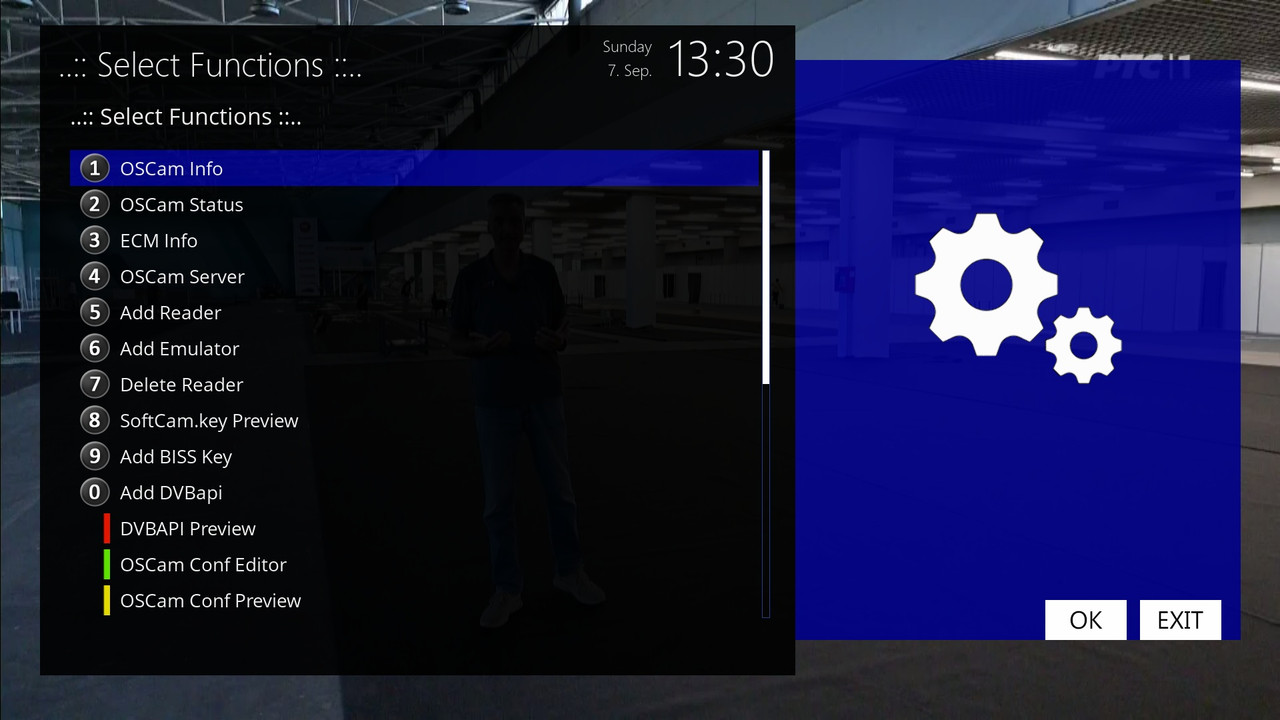
    ..:: Ciefp Oscam editor 1.1.5 ::..

    display ecm info

    - channel

    - service id

    - caid

    - caid(Active)

    - ecm pid

    - provider

    - chid

    - reader

    - from

    - protocol

    - hops

    - ecm time

    red button - exit

    green button - Add dvbapi - opens screen - Add dvbapi line

    yellow button - settings - opens screen - Settings

    blue button - oscam.server - opens screen - View oscam.server


    ..:: Ciefp Oscam Editor Settings ::..

    DVBAPI path:

    default - etc/tuxbox/config/oscam.dvbapi

    osccam-emu - etc/tuxbox/config/osccam-emu/oscam.dvbapi

    oscam-master - etc/tuxbox/config/osccam-master/oscam.dvbapi

    oscam-smod - etc/tuxbox/config/osccam-smod/oscam.dvbapi

    oscamicamnew - /etc/tuxbox/config/oscamicamnew/oscam.dvbapi

    Language:

    ("en", "English"),

    ("sr", "Srpski"),

    ("el", "Greek"),

    ("ar", "Arabic"),

    ("de", "German"),

    ("sk", "Slovak"),

    ("pl", "Polish"),

    ("tr", "Turkish")


    Automatic version detection - Yes,No

    Webif IP: - 127.0.0.1

    Webif user:

    Webif password:

    Refresh interval: 5 seconds,10 seconds,30 seconds,60 seconds

    if you have a user and password set in oscam.conf

    then enter the user and password data

    if you do not have a user and password field in oscam.conf

    in that case leave the user and password field empty


    ..:: Add dvbapi line ::..

    show multiple text input tables:

    - Priority [P:] caid:provider:sid

    - Ignore [I:] caid:provider:sid

    - Merge [J:] caid1:provider1:sid:ecmpid caid2:provider2:ecmpid2

    - Map [M:] caid:oldprovider:sid caid2:newprovider:sid2

    - Add [A:] ns:sid:ecmpid:caid:provider:

    red button - cancel

    green button - Add - adds the entered line to oscam.dvbapi

    yellow button - Preview - opens the screen - Preview oscam.dvbapi

    blue button - oscam_info - opens the screen - OSCam Info


    ..:: Preview oscam.dvbapi ::..

    - display the contents of the oscam.dvbapi file

    red button - exit

    green button - Save

    blue button - Delete - deletes the line from oscam.dvbapi


    ..:: oscam_info ::..

    - display oscam.version file

    red button - exit

    green button - Status


    ..:: OSCam Status ::..

    - display all readers - reader:status:au:idle time:protocol

    red button - Exit

    green button - Refresh - here you can manually refresh the status

    yellow button - ECM Info - opens the ECM Info screen


    ..:: ECM Info ::..

    - display the ecm.info file - etc/tmp/ecm.info

    red button - Exit

    green button - Refresh


    ..:: View oscam.server ::..

    - display the contents of the oscam.server file

    red button - exit

    green button - Free CCCam

    yellow button - Add reader - opens the screen - Add reader

    blue button - Delete - opens the screen - Select reader


    ..:: Free CCCam ::..

    Select source

    1.CCCamia Free

    2.CCcam Premium

    3.CCcamIPTV Free


    ..:: Add reader ::..

    - display the data entry tables oscam.server

    red button - cancel

    green button - Save


    ..:: Select reader ::..

    - display reader name from oscam.server file

    by selecting deletes all lines related to selected reader

    The entire reader is deleted.

    red button - delete

    green button - Save


    ..:: CiefpSettings ::..

  • In add reader , we can add cccam only , can you add mgcamd ? Thank you

    Did you mean to add an option here, say ADD.Mgcamd? Can you write some basic configuration that would appear as default with the option to change it.

    I think that is feasible when the user clicks on add reader, a choicebox appears similar to freeccam, where you would have to select, for example,

    ADD reader:

    1.cccam

    2.mgcamd

    If you choose mgcamd, a table with values for mgcamd would appear.

  • I'm currently finishing version 1.1.6, I added oscam.conf and oscam.user, I still need to do some translations, and I'll probably upload this 1.1.6 tomorrow. So we'll leave mgcamd for version 1.1.7. I haven't used mgcamd for a long time, I need to remind myself a little about what values are important, what can be adjusted, etc... If you use mgcamd, it would be best if you provided some configuration so we can set it as the default with a settings option.

  • Version 1.1.6

    Added a screen for viewing and editing the oscam.conf file

    Added processing of the oscam.conf file

    before adding this option I did a little research on this file and its capabilities

    and looked for a setting that would be optimal for all users

    clicking on the red button opens the oscam.conf editing window

    you get a table for entering parameters with predefined values

    which I found ideal for most boxes

    You have the option to edit all the settings yourself and save the file to the oscam folder

    If the file does not exist then it will be created in the active oscam folder

    If the file exists then it will be overwritten with these new settings


    Added support for viewing and editing oscam.user

    oscam.user comes with predefined accounts dvbapiau,anonymus

    it is also possible to add cacheex with the options YES NO this option is either shown or hidden

    It is also possible to view the existing oscam.user file


    New protocol added to the Add Reader screen mgcamd

    Also added new function Add Emulator


    Add emulator has the ability to add a configuration

    that will use softcamkey from a local folder

    or a configuration that will download softcamkey from the internet

    It is also possible to add ConstantCW reader

    This option is disabled by default but you can enable it

    on the add reader screen there is an option to disable and enable constantcw


    Added new translations:

    translations/

    ├── prevod_sr_cyrl.txt # sr-Cyrl – Cyrillic

    ├── prevod_sr_latn.txt # sr-Latn – Latin

    ├── prevod_hr.txt # hr – Croatian

    ├── prevod_el.txt # el – Greek

    ├── prevod_ar.txt # ar – Arabic

    ├── prevod_de.txt # de – German

    ├── prevod_sk.txt # sk – Slovak

    ├── prevod_pl.txt # pl – Polish

    ├── prevod_tr.txt # tr – Turkish

    ├── prevod_es.txt # es – Spanish

    └── prevod_en.txt # en – English


    ..:: Ciefp Oscam editor 1.1.6 ::..

    display ecm info

    - channel

    - service id

    - caid

    - caid(Active)

    - ecm pid

    - provider

    - chid

    - reader

    - from

    - protocol

    - hops

    - ecm time

    red button - oscam.conf - opens screen - oscam.conf Editor

    green button - Add dvbapi - opens screen - Add dvbapi line

    yellow button - settings - opens screen - Settings

    blue button - oscam.server - opens screen - Overview oscam.server


    ..:: oscam.conf Editor ::..

    display tables for entering parameters for groups:

    global,streamrelay,dvbapi,webif,newcamd,cccam

    it is possible to disable and enable groups newcamd and cccam

    in group webif it is possible to disable and enable fields for user and password

    red button - exit

    green button - save

    yellow button - overview - opens screen - oscam.conf Preview

    blue button - Oscam user - opens the screen - OSCam User Editor

    green button saves the entered parameters and writes the data from the table to the oscam.conf file

    if the file already exists then overwrites it with a new one if the file does not exist then creates it


    ..:: oscam.conf Preview ::..

    preview of the oscam.conf file

    red button - exit

    green button - Edit - currently no function has been added


    ..:: OSCam User Editor ::..

    shows a predefined table that can be edited

    predefined accounts dvbapiau,anonymus

    red button - exit

    green button - Save

    yellow button - Preview

    blue button - Oscam User


    ..:: Ciefp Oscam Editor Settings ::..

    DVBAPI path:

    default - etc/tuxbox/config/oscam.dvbapi

    osccam-emu - etc/tuxbox/config/osccam-emu/oscam.dvbapi

    oscam-master - etc/tuxbox/config/osccam-master/oscam.dvbapi

    oscam-smod - etc/tuxbox/config/osccam-smod/oscam.dvbapi

    oscamicamnew - /etc/tuxbox/config/oscamicamnew/oscam.dvbapi

    Language:

    ("en", "English"),

    ("sr_latn", "Srpski (latinica)"),

    ("sr_cyrl", "Српски (цирилица)"),

    ("hr", "Hrvatki"),

    ("sk", "Slovak"),

    ("el", "Greek"),

    ("ar", "Arabic"),

    ("de", "German"),

    ("pl", "Polish"),

    ("tr", "Turkish"),

    ("es", "Spain")


    Automatic version detection - Yes,No

    Webif IP: - 127.0.0.1

    Webif user:

    Webif password:

    Refresh interval: 5 seconds,10 seconds,30 seconds,60 seconds

    if you have it set in oscam.conf user and password

    then enter the user and password data

    if you do not have a user and password field in oscam.conf

    in that case leave the user and password field empty


    ..:: Add dvbapi line ::..

    show multiple text input tables:

    - Priority [P:] caid:provider:sid

    - Ignore [I:] caid:provider:sid

    - Merge [J:] caid1:provider1:sid:ecmpid caid2:provider2:ecmpid2

    - Map [M:] caid:oldprovider:sid caid2:newprovider:sid2

    - Add [A:] ns:sid:ecmpid:caid:provider:

    red button - cancel

    green button - Add - adds the entered line to oscam.dvbapi

    yellow button - Preview - opens the screen - Preview oscam.dvbapi

    blue button - oscam_info - opens the screen - OSCam Info


    ..:: Preview oscam.dvbapi ::..

    - view the contents of the oscam.dvbapi file

    red button - exit

    green button - Save

    blue button - Delete - deletes a line from oscam.dvbapi


    ..:: oscam_info ::..

    - view the oscam.version file

    red button - exit

    green button - Status


    ..:: OSCam Status ::..

    - view all readers - reader:status:au:idle time:protocol

    red button - Exit

    green button - Refresh - here you can manually refresh the status

    yellow button - ECM Info - opens the ECM Info screen


    ..:: ECM Info ::..

    - view the ecm.info file - etc/tmp/ecm.info

    red button - Exit

    green button - Refresh


    ..:: View oscam.server ::..

    - view the contents of the oscam.server file

    red button - exit

    green button - Free CCCam

    yellow button - Add reader - opens the screen - Add reader

    blue button - Delete - opens screen - Select reader


    ..:: Free CCCam ::..

    Select source

    1.CCCamia Free

    2.CCcam Premium

    3.CCcamIPTV Free


    ..:: Add reader ::..

    - display tables for entering data into oscam.server

    red button - cancel

    green button - Save

    yellow button - Add Emulator


    ..:: Add Emulator ::..

    display predefined table for emulator

    here it is possible to select softcamkey - local or online

    constantcw is disabled by default but it can be enabled

    red button - cancel

    green button - save

    yellow button - Key source - select softcamkey source - local,online


    ..:: Select reader ::..

    - display reader name from oscam.server file

    by selecting deletes all lines related to selected reader

    deletes entire reader.

    red button - delete

    green button - Save


    ..:: CiefpSettings ::..

  • Verzija 1.2.0

    Izmenjene funkcije na glavnom ekranu

    crveno dugme - exit - vraćena funkcija izlaz

    dodan choicebox na zeleno i plavo dugme

    žuto dugme je ostalo ne promenjeno otvara i dalje podešavanja


    crveno dugme se ponovo vratilo na funkciju exit

    Bilo je problema sa openvix dok je crveno dugme imalo funkciju

    nadam se da je sada rešen problem


    Zeleno dugme otvara choicebox i ovde imate sve funkcije iz plugina

    Sada je moguće brže doći do određene funkcije.


    žuto dugme bez promena


    Plavo dugme otvara takođe choicebox

    pojavi se izbor freecccam servera


    U slučaju da automatska nadogradnja ne radi pokrenite ponovo instalaciju

    bilo je problema sa automatskom nadogradnjom na verziji 117,118,119

    ispravljena je na verziji 1.2.0


    #####################################################################################


    Version 1.2.0

    Changed functions on the main screen

    red button - exit - returned the exit function

    added choicebox to the green and blue buttons

    yellow button remained unchanged and opens further settings


    red button returned to exit function

    There was a problem with openvix while the red button had a function

    I hope the problem is now solved


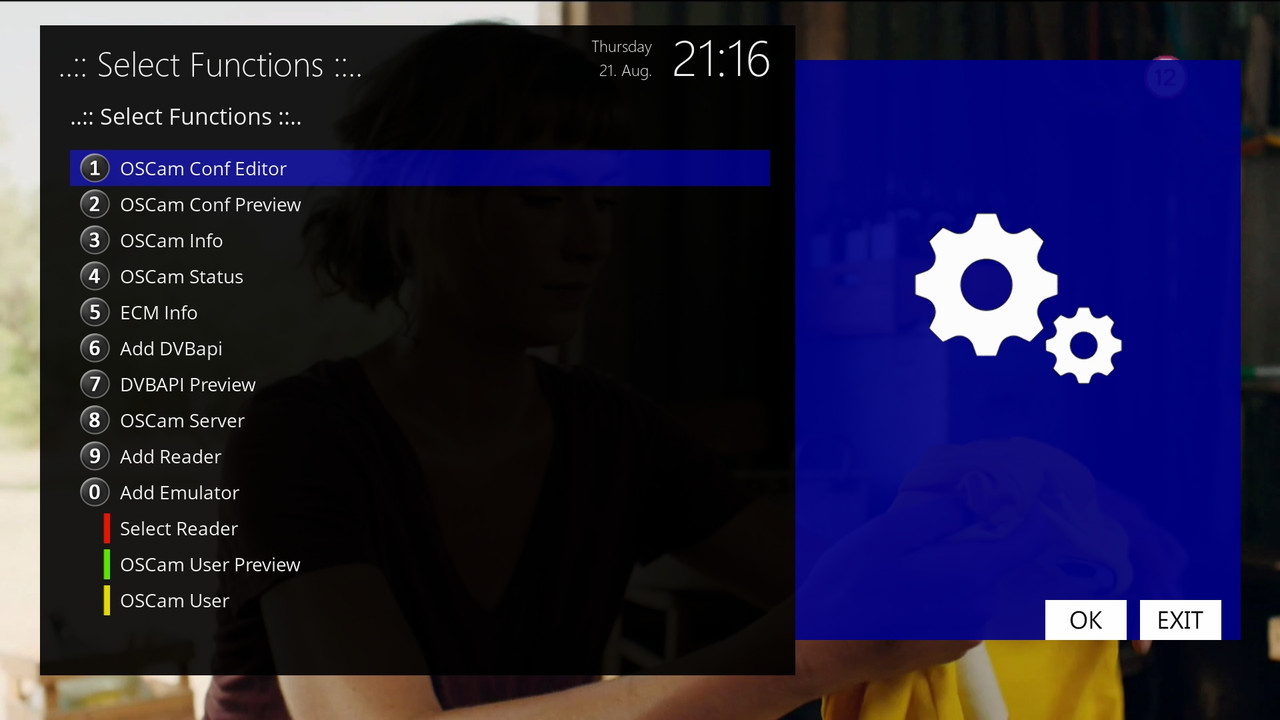
    Green button opens choicebox and here you have all the functions from the plugin

    Now it is possible to get to a specific function faster.


    yellow button without changes


    Blue button also opens choicebox

    freecccam server selection appears


    In case the automatic upgrade does not work, restart the installation

    there were problems with the automatic upgrade on version 117,118,119

    it was fixed in version 1.2.0

    1-0-19-3-F3-AF1-BB-E080000-0-0-0-20250821211616.jpg

  • ciefp added a new version:

  • ciefp added a new version:

  • CiefpOscamEditor


    Online update


    v.1.2.4

    Improved reload oscam option

    Tested and works ok on:

    Openatv 7.4

    Openatv 7.6

    Openplay scarthgap

    Pure2 7.4


    I also tested Reload on openvix 6.7

    so far I haven't found a solution

    after entering the key, a restart must be done manually


    Changed version of key entry F {SID}{VPID} 00 {KEY}


    v.1.2.5

    Improved management of readers ON and OFF

    when the reader is set to OFF it remains in the list,

    now it is possible to restart it with ON


    Improved addition and display of free readers in oscam status

Your resource for Enigma2 softcam plugins

Discover essential Enigma2 softcam plugins. Access downloads and support for tools that manage channel decryption and conditional access. Find downloads, configuration guides, and community support for the latest conditional access and emulation tools.

Participate now!

Don’t have an account yet? Register yourself now and be a part of our community!