ciefp added a new file:

QuoteDisplay More..:: CiefpSatelliteAnalyzer ::..
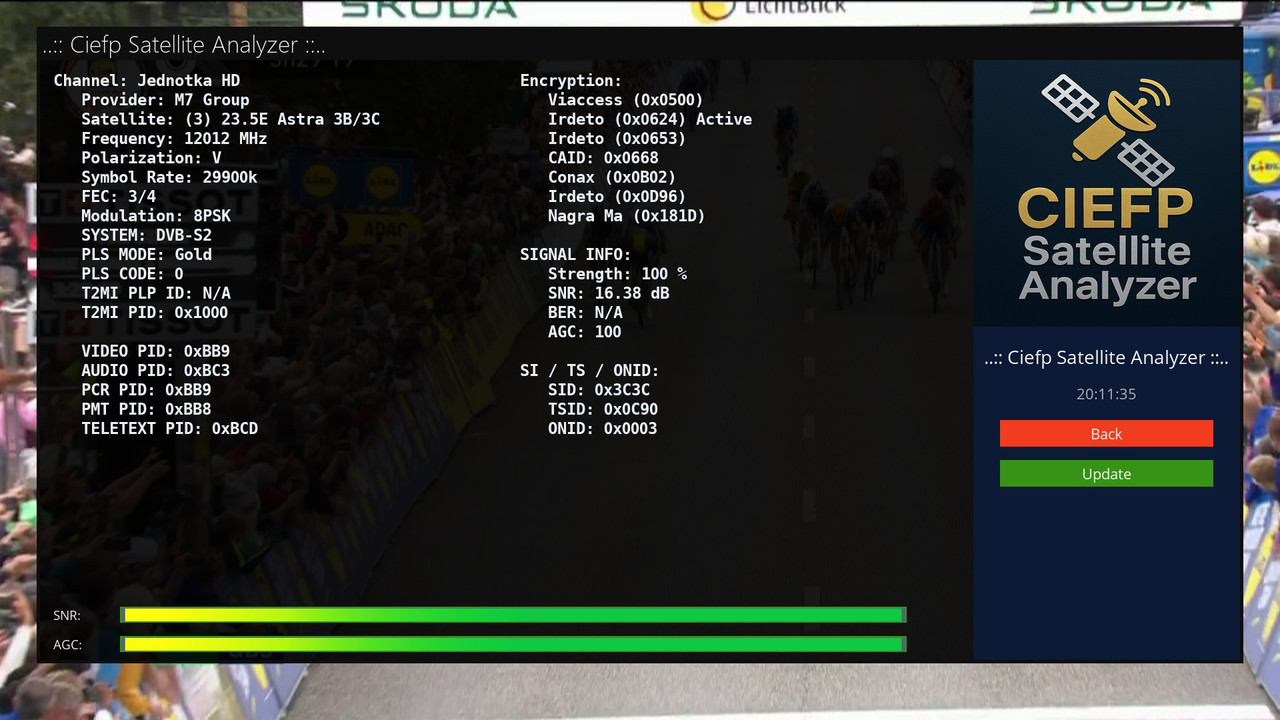
CiefpSatelliteAnalyzer is a plugin for the Enigma2 platform that provides a detailed display of information about the current TV channel and satellite signal.
It is designed for users who want comprehensive technical data about the broadcast, including signal parameters and channel specifications,
in a user-friendly interface.
What can be monitored on the plugin screen:
### Basic information (left part of the screen): ###
Channel name and provider.
Satellite (name and orbital position, e.g. 19.2E).
Frequency (in MHz), polarization (H/V/L/R), symbol rate (in kS/s).
FEC (Forward Error Correction),
modulation (e.g. QPSK, 8PSK),
system (DVB-S/S2, DVB-T/T2, DVB-C/C2).
PLS mode and code, T2MI PLP ID and PID (if present).
Video PID, Audio PID, PCR PID, PMT PID, Teletext PID.
For DVB-T/T2: Bandwidth, Code Rate (HP/LP),
Constellation, Transmission Mode, Guard Interval, Hierarchy.
### Advanced Information (middle of screen): ###
Encoding Status: List of CAIDs (e.g. Viaccess, Nagravision) with active CAID flag.
Signal Information:
Signal Strength (%),
SNR (in dB),
BER (Bit Error Rate),
AGC (Automatic Gain Control).
SI/TS/ONID:
SID (Service ID),
TSID (Transport Stream ID),
ONID (Original Network ID)
in hexadecimal format.
### Signal Bars (bottom of screen): ###
SNR Bar: Shows the signal quality in percent.
AGC Bar: Shows the signal strength in percent.
### Additional features: ###
Time: Displays the current time, updated every second.
Interactive options: Back (red) buttons to exit and Refresh (green) buttons to refresh data.
Data update: Automatically refresh signal information every 5 seconds.
..:: CiefpSettings ::..