


Foreca One Weather Plugin NEW (Lululla Make)
-
- Foreca
- Lululla
- Thread is marked as Resolved.
-
-
skin HD - error in displaying the weather map, shifted to the right by about 360 pixels (probably incorrect ForecaSlideshow.xml)
skin FHD is fine
-
Screenshot_10-3-2026_15744_192.168.1.78.jpeg
on v.1.1.1
I fixed a few reported issues.
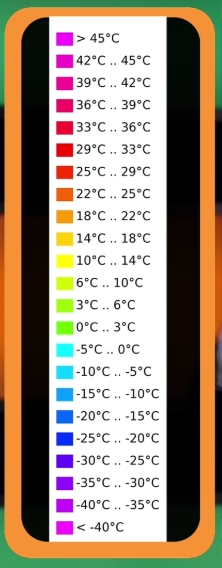
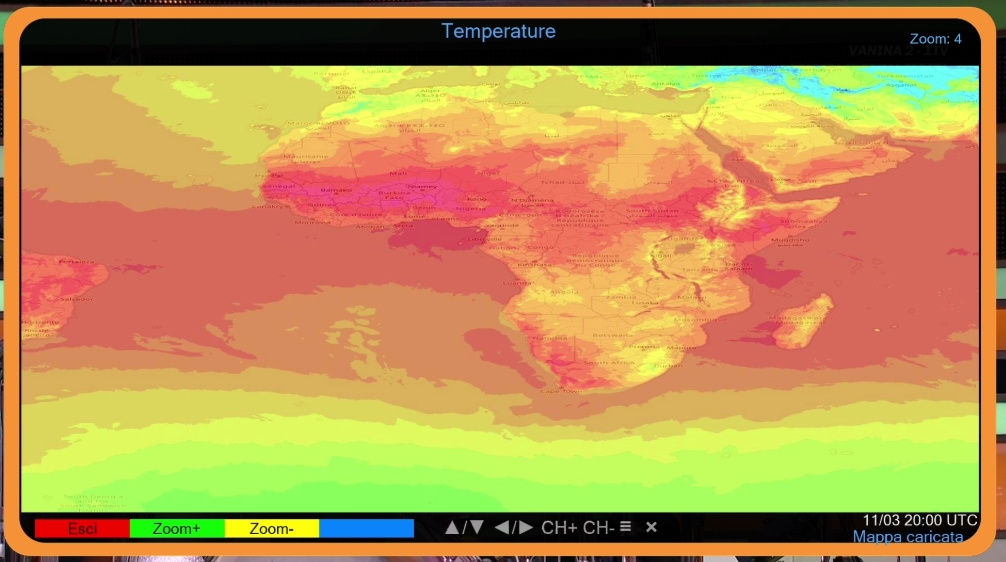
Also, if you press "Info" on the maps, the legend will appear based on the map type.
add Icon solar radiation in to main ;)
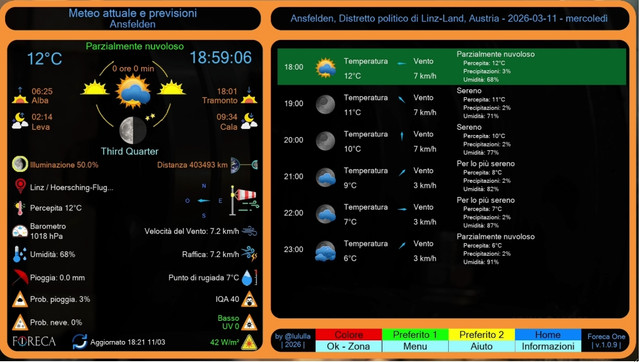
Use arrow for move map and zoom+/-
;)
Now I'd really like to rest. Thank you all.
-
v.1.1.2 fix skin..
-
use wget for last little fix ;)
v.1.1.3 online
-
Okay. I know where the problem is . I will fix the FHD skins.
Please, leave a comment if working.
I inserted the corrected FHD skins and the clock shows completely, but on the right side, with a two-digit wind value, the "h" in km/h is cut off. And the plugin window is a bit small. Is it possible to enlarge it a bit?
-
please use last update
wget command from telnet
and next try.. abd feedback here
-
he Say ol the time no citylist How can I import the list or download
-
km/h in list ok here, but the Date in maps not good to read.
-

he Say ol the time no citylist How can I import the list or download
menu - select city, if city not in list use keyboard: find on official site the plugin ;)
regards -
-

km/h in list ok here, but the Date in maps not good to read.
-

Okay. I know where the problem is . I will fix the FHD skins.
Please, leave a comment if working.
I inserted the corrected FHD skins and the clock shows completely, but on the right side, with a two-digit wind value, the "h" in km/h is cut off. And the plugin window is a bit small. Is it possible to enlarge it a bit?
-
Thank you very much, the installation via telnet helped.
-
Hello. I have installed the last ipk 1.1.3 in the first page but when I lounch it there is nothing displayed on the TV.
I'm with OpenAtv 7.6.0 on VuDuo4KSE.
The plugin does not crash and I can return back to the menu.
I also tried the wget but this does not do anything:
Codewget -q --no-check-certificate https://raw.githubusercontent.com/Belfagor2005/Foreca4/main/installer.sh -O - | /bin/shAny suggestion ?
-
 Display More
Hello. I have installed the last ipk 1.1.3 in the first page but when I lounch it there is nothing displayed on the TV.
I'm with OpenAtv 7.6.0 on VuDuo4KSE.
The plugin does not crash and I can return back to the menu.
I also tried the wget but this does not do anything:
Codewget -q --no-check-certificate https://raw.githubusercontent.com/Belfagor2005/Foreca4/main/installer.sh -O - | /bin/shAny suggestion ?
your command is wrong
-
Display More
Hello. I have installed the last ipk 1.1.3 in the first page but when I lounch it there is nothing displayed on the TV.
I'm with OpenAtv 7.6.0 on VuDuo4KSE.
The plugin does not crash and I can return back to the menu.
I also tried the wget but this does not do anything:
Codewget -q --no-check-certificate https://raw.githubusercontent.com/Belfagor2005/Foreca4/main/installer.sh -O - | /bin/shAny suggestion ?
-
I have a problem - moonrise and moonset are NOT displayed on any images (Vu+ ZERO4K: OpenATV 7.6 - MetrixFHD, KravenFHD and OpenPLi default skin), and a question: where can I translate Cardinal directions, cause currently I have it in Italian

-
From Foreca_Preview.xml
<!-- Compass directions -->
<widget name="icon_wind" position="599,583" size="40,41" scale="1" zPosition="10" backgroundColor="#000000" transparent="1" alphatest="blend" />
<eLabel position="605,545" size="28,28" transparent="1" backgroundColor="#000080" text="P" foregroundColor="#0053a9ff" font="Regular;22" zPosition="10" halign="center" valign="center" />
<eLabel position="605,635" size="28,28" transparent="1" backgroundColor="#000080" text="E" foregroundColor="#0053a9ff" font="Regular;22" zPosition="10" halign="center" valign="center" />
<eLabel position="655,590" size="28,28" transparent="1" backgroundColor="#000080" text="I" foregroundColor="#0053a9ff" font="Regular;22" zPosition="10" halign="center" valign="center" />
<eLabel position="555,590" size="28,28" transparent="1" backgroundColor="#000080" text="L" foregroundColor="#0053a9ff" font="Regular;22" zPosition="10" halign="center" valign="center" />
-
-
-
Your source for Enigma2 weather plugins



