LiveGardenTVPlus – IPTV Player for Windows

There are 27 replies in this Thread which was already clicked 3,690 times. The last Post () by samirson75.

  • Lululla added a new version:


    ## LiveGardenTVPlus – Changelog (v2.8)


    ### 📊 Playlist Comparison (Compare)


    - **New "Compare..." button** in the playlist editor toolbar.


    - **Load second playlist** from local file (JSON/M3U) or from URL.


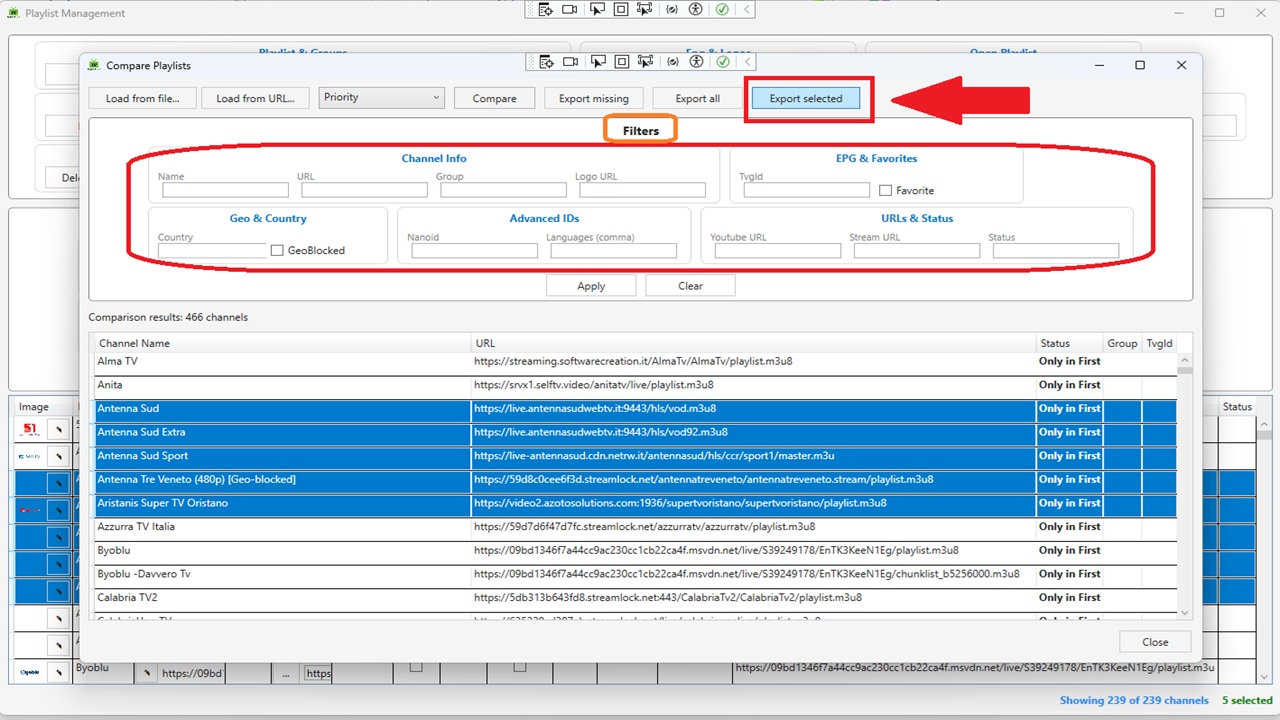
    - **Full filter panel** – Same filters as the playlist editor: Name, URL, Group, Logo URL, TvgId, Favorite, Country, GeoBlocked, Nanoid, Languages (comma), Youtube URL, Stream URL, Status.


    - **Compare by field** – Choose between: Name, URL, TvgId, Logo, Group, Country, Languages, Nanoid.


    - **Smart (Priority) mode** – Intelligent matching with priority:


    1. **URL** – normalized (removes protocol, domain, extensions, common segments). If at least one URL matches, channels are considered equal.


    2. **Name** – normalized (removes quality indicators like `(1080p)`, `[HD]`, etc.).


    3. **TvgId**


    4. **Logo**


    - **Results grid** – Shows status (`Only in First`, `Only in Second`, `In Both`). Click column headers to sort.


    - **Export results**:


    - **Export missing** – exports only channels present in the second playlist but not in the first (useful for integration).


    - **Export all** – exports the entire second playlist.


    - **Export selected** – exports only the rows selected in the results grid.


    - Supported formats: JSON (all fields) and M3U.


    ### 🖥️ Playlist Editor Enhancements


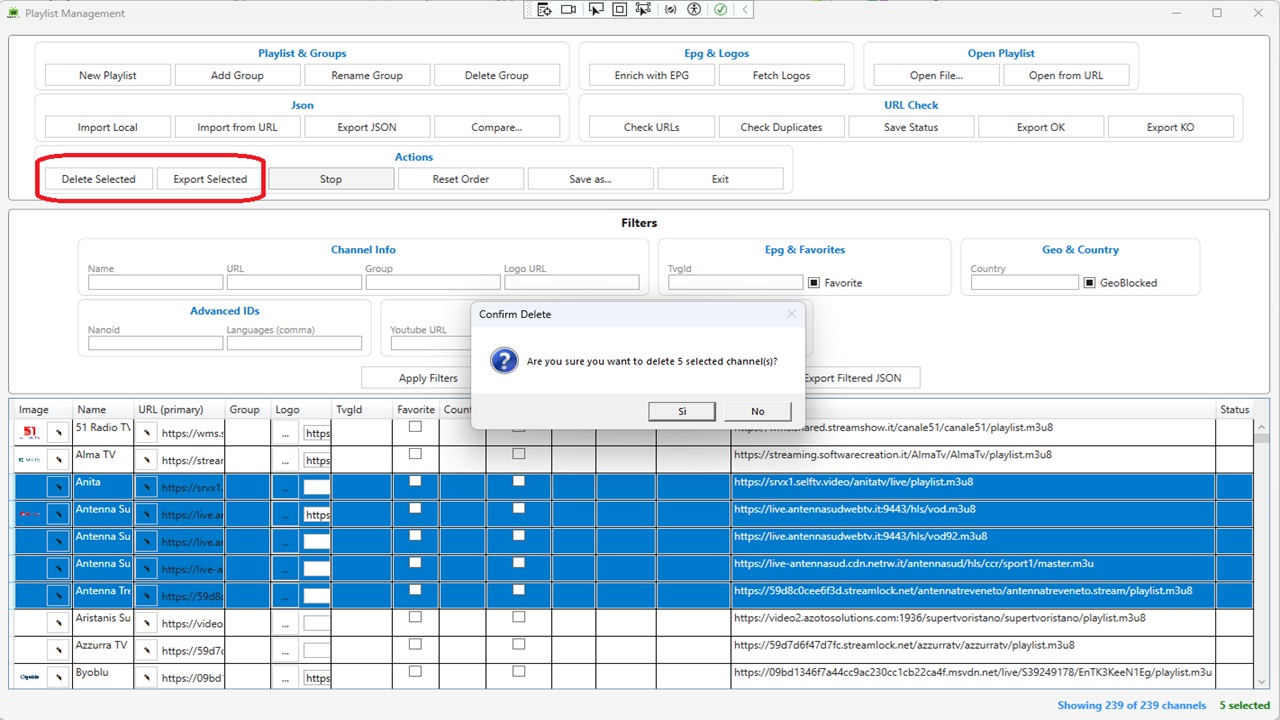
    - **Export Selected** – New button in the Actions group. Exports only the channels selected in the DataGrid (M3U or JSON).


    - **Delete Selected** – Supports multi‑row deletion with confirmation, automatically updates filters and channel count.


    - **Stop Button** – Cancels long‑running operations (URL checks, logo fetching, etc.).


    ### 📋 Main Window Context Menu


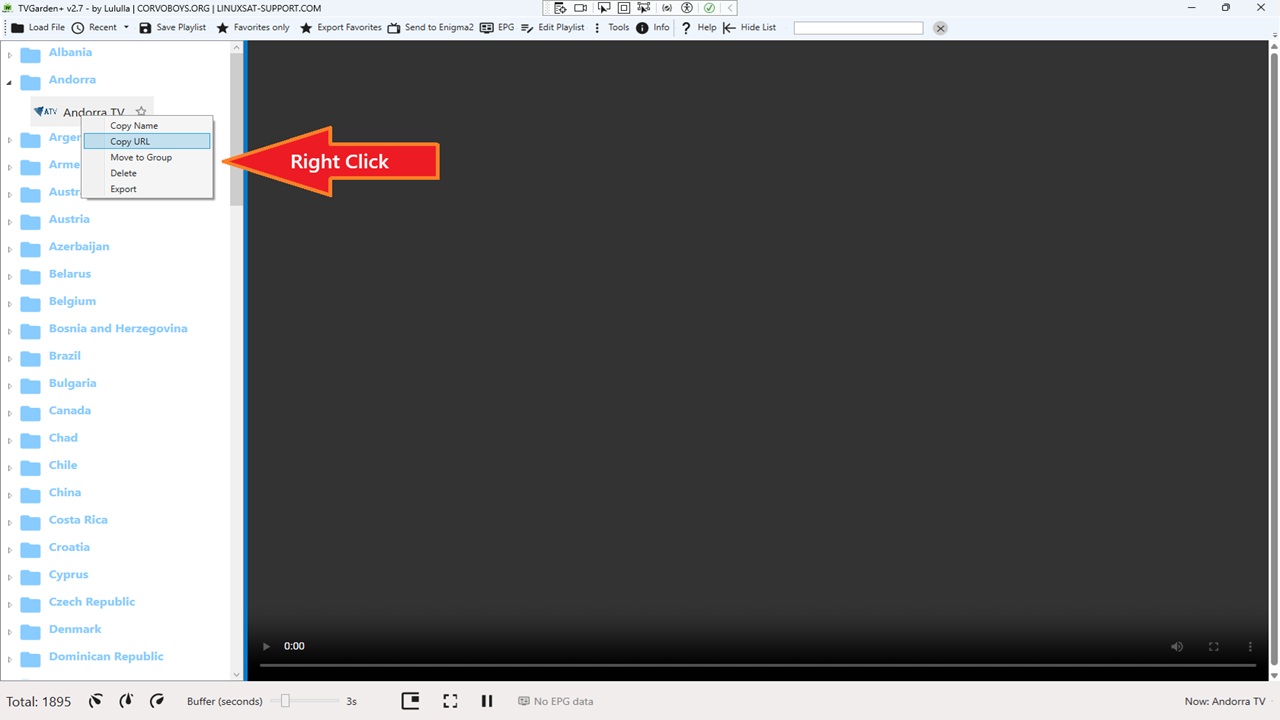
    Right‑click any channel in the left TreeView to access:


    - **Copy Name** – Copies the channel name to the clipboard.


    - **Copy URL** – Copies the channel URL to the clipboard.


    - **Move to Group** – Opens a dialog to select an existing group (or create a new one) and moves the channel.


    - **Delete** – Removes the selected channel with confirmation.


    - **Export** – Exports the single channel as M3U or JSON.


    ### 🎨 Theme Fixes


    - Added `DataGridCell` and `DataGridRow` selection styles to all 16 themes.


    - Selected rows and cells now correctly display with the theme's `AccentBrush` background and white text, eliminating white‑on‑white or black‑on‑black visibility issues.


    ### 🐛 Bug Fixes

    - Fixed DataGrid row selection – text no longer white‑on‑white (or black‑on‑black) across themes.


    - Fixed URL comparison – matching now works URL‑by‑URL (any match = match).


    - Fixed JSON import for deeply nested structures (e.g., `tvg.id`, `tvg.logo`, `group.title`, `http.referrer`).


    ### 🌐 New Translations

    All new strings for filters, export selected, context menu, and comparison features are fully localizable via `LanguageManager`.
    main_new1.jpgcompare-edit_new1.jpg
    compare-filters_new1.jpg


    Visitors Donate Donate

    • Official Post

    in next comming soon version ;)

    simply code paste in to code TAB .. and apply..
    import as channels grid ;)


    ## LiveGardenTVPlus – Changelog (v2.9)


    ### Code Editor Tab in Playlist Editor


    - **New "Code" Tab**

    – Added a second tab in the Playlist Editor alongside the existing "Grid" tab.

    Allows viewing and editing the playlist content as raw code (M3U or JSON).


    - **Two‑way synchronization** –

    - **Grid → Code**: Switch to the "Code" tab to see the current playlist formatted as JSON (default) or M3U.

    - **Code → Grid**: Paste or edit M3U/JSON code, click **"Apply / Import"**, and the playlist grid updates instantly.


    - **Display Format Selection** – Choose how the code is displayed in the editor:

    - **JSON** – full structured view with all metadata.

    - **M3U** – classic M3U format with `#EXTM3U`, `#EXTINF`, and channel URLs.


    - **Import Format Selection** – Choose how the pasted code should be interpreted:

    - **Auto (recommended)** – automatically detects whether the code is JSON or M3U.

    - **JSON** – forces JSON parsing.

    - **M3U** – forces M3U parsing.


    - **Copy to Clipboard** – One‑click copy of the current code (JSON or M3U) to the system clipboard.


    - **Refresh Code** – Regenerates the code from the current grid state.


    - **Fast performance** – Handles playlists with 10,000+ channels smoothly.


    ### 🎮 Mini Player in Playlist Editor


    - **"▶ Play" button** – Added to the Actions group in the playlist editor.

    - **Mini Player window** – Small, draggable, borderless window with WebView2 player.

    - **Play/Pause** – Toggle playback with icon change (▶ / ❚❚).

    - **Stop** – Stops playback and resets to beginning.

    - **Fullscreen** – Toggle fullscreen mode.

    - **Channel Up / Down** – Navigate through the playlist channels without closing the player.

    - **Status display** – Shows current state (Loading, Ready, Playing, Paused, Stopped).

    - **Themed & Translatiable** – Fully respects application themes and language settings.


    ### 🐛 Bug Fixes

    - Fixed auto‑detection for M3U code (now recognizes `#EXTM3U` and `#EXTINF` even with leading whitespace).

    - Added specific error messages for JSON and M3U parsing failures.

    - Prevented UI freezes when generating code for large playlists (async generation).


  • Lululla added a new version:


    ## Changelog

    ## LiveGardenTVPlus – Changelog (v2.9)

    ### Code Editor Tab in Playlist Editor

    - **New "Code" Tab** – Added a second tab in the Playlist Editor alongside the existing "Grid" tab.

    Allows viewing and editing the playlist content as raw code (M3U or JSON).

    - **Two‑way synchronization** –


    - **Grid → Code**: Switch to the "Code" tab to see the current playlist formatted as JSON (default) or M3U.


    - **Code → Grid**: Paste or edit M3U/JSON code, click **"Apply / Import"**, and the playlist grid updates instantly.

    - **Display Format Selection** – Choose how the code is displayed in the editor:


    - **JSON** – full structured view with all metadata.


    - **M3U** – classic M3U format with `#EXTM3U`, `#EXTINF`, and channel URLs.

    - **Import Format Selection** – Choose how the pasted code should be interpreted:


    - **Auto (recommended)** – automatically detects whether the code is JSON or M3U.


    - **JSON** – forces JSON parsing.


    - **M3U** – forces M3U parsing.

    - **Copy to Clipboard** – One‑click copy of the current code (JSON or M3U) to the system clipboard.


    - **Refresh Code** – Regenerates the code from the current grid state.


    - **Fast performance** – Handles playlists with 10,000+ channels smoothly.


    ### Mini Player in Playlist Editor

    - **"▶ Play" button** – Added to the Actions group in the playlist editor.


    - **Mini Player window** – Small, draggable, borderless window with WebView2 player.


    - **Play/Pause** – Toggle playback with icon change (▶ / ❚❚).


    - **Stop** – Stops playback and resets to beginning.


    - **Fullscreen** – Toggle fullscreen mode.


    - **Channel Up / Down** – Navigate through the playlist channels without closing the player.


    - **Status display** – Shows current state (Loading, Ready, Playing, Paused, Stopped).


    - **Themed & Translatiable** – Fully respects application themes and language settings.


    ### New Translations

    All new strings for filters, export selected, context menu, and comparison features are fully localizable via `LanguageManager`.


    ### Bug Fixes

    - Fixed auto‑detection for M3U code (now recognizes `#EXTM3U` and `#EXTINF` even with leading whitespace).


    - Added specific error messages for JSON and M3U parsing failures.


    - Prevented UI freezes when generating code for large playlists (async generation).


    ### Need more help?


    Visit the [GitHub repository]for updates and support.


    tab_code_editor_json.jpg


    tab-code-editor.jpg


    tab_code_player.jpg


    Visitors

    Donate via Ko-fiDonate via PayPal

  • Lululla added a new version:


    Thank's umbra for Logos backgrounds tv - radio


    preview00.jpg


    ## Changelog


    ## LiveGardenTVPlus – Changelog (v3.0)


    **Added:**


    - New **Enigma2** menu in toolbar with:


    - Send to Enigma2


    - Telnet Console


    - Telnet Configuration (direct access to Telnet settings)


    - New **Favorites** menu in toolbar:


    - Save Favorites (toggle all channels as favorite/unfavorite)


    - Export Favorites (export favorite channels to M3U)


    - Recent files now open on hover (mouse over "Recent" in File menu)


    - Images for PayPal and Ko-fi in About window (clickable)


    - Default EPG source set to "it1" in Settings


    - Gradient colors for titles in About window


    **Improved:**


    - File menu now closes automatically after actions (Close Playlist, Recent selection)


    - "Favorites only" toggle is now disabled when no playlist is loaded


    - Toggle shows message "No favorite channels found" when no favorites exist


    - Centralized all images in `/Themes/` folder (removed `/Images/` duplication)


    - `tv.png` and `radio.png` now properly copied to output directory


    ### 📋 Channel Info Window (Context Menu)


    - **New "Info" menu item** – Added to the right‑click context menu on channels in the main TreeView.


    - **Channel Info window** – Displays all channel fields in an editable window:


    - Name, URL, Group, TvgId, Favorite, Radio, Status.


    - Logo preview with live update (URL → image preview).


    - **Live editing** – Modify any field, click **Save** to update the channel in the current playlist.


    - **Refresh after save** – TreeView and favorites are automatically refreshed.


    ### 🖱️ Right‑Click Selection without Playback


    - **Right‑click now selects the channel** without starting the stream.


    - EPG info is still updated, but playback is skipped.


    - Context menu appears without interrupting the current stream.


    ### 📁 Sidebar Visibility


    - **Sidebar hidden at startup** – The channel list (left panel) is now hidden when the application starts.


    - **Auto‑show on playlist load** – When a playlist is loaded (M3U or JSON), the sidebar automatically opens.


    - **Toggle button** – The existing "Show List / Hide List" button works as before (manual toggle).


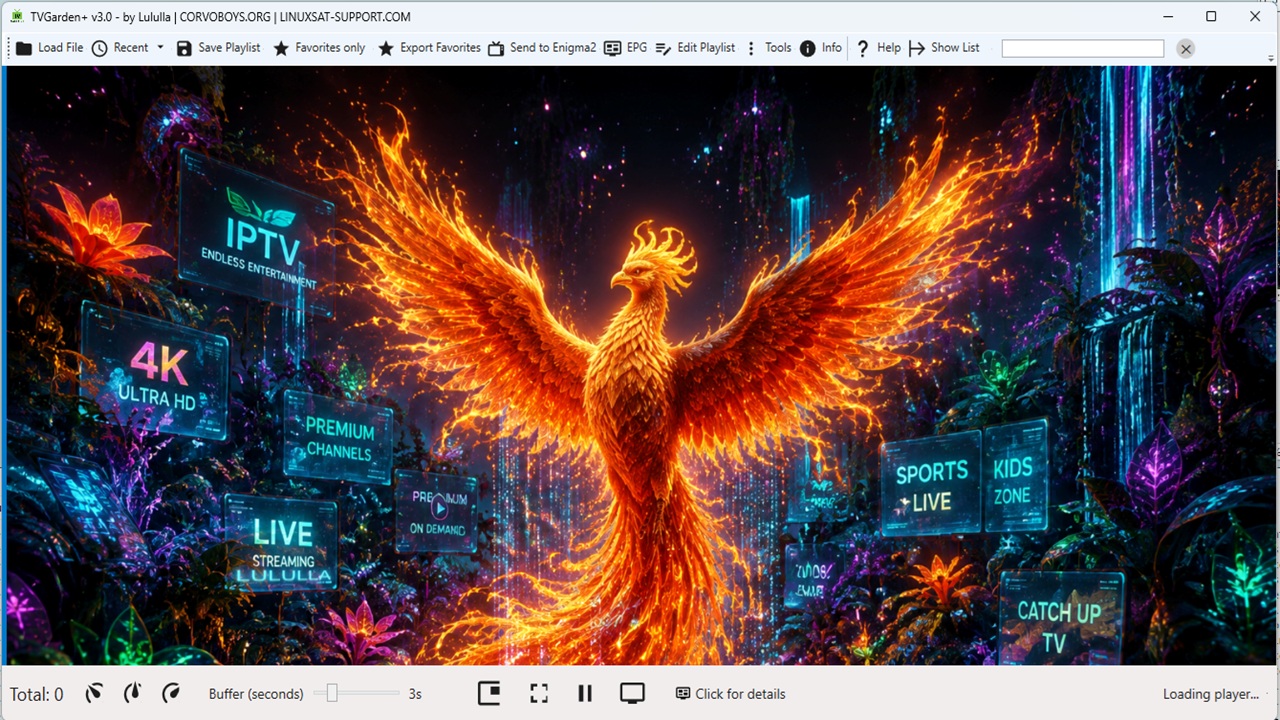
    ### 🎨 TV / Radio Background


    - **Player background** – When no stream is playing or for radio channels:


    - `tv.png` is shown for TV channels.


    - `radio.png` is shown for radio channels.


    - **Auto‑detection** – Radio channels are detected based on URL extensions (`.mp3`, `.aac`, `.ogg`, `.m4a`, `.wma`, `.flac`, `.opus`, `.wav`) and keywords (Radio, FM, Audio).


    - **Background hides when video starts** – For TV channels, the background is hidden when the stream begins.


    ### 🔧 Language Manager Improvements


    - **Separator support** – Fixed `LanguageManager` to correctly parse `.lng` files using `::` (double colon) as the primary separator, with fallback to `:` and `=`.


    - **Keys with spaces** – Keys containing spaces (e.g., `"Language: "`) are now correctly matched and translated.


    ### 🌐 New Translations


    All new strings for the Channel Info window and right‑click menu are fully localizable via `LanguageManager`.


    ### 🐛 Bug Fixes


    **Fixed:**


    - Images not loading in About window (paypal.png, kofi.png)


    - Recent popup not opening correctly on hover


    - Menu File not closing after selecting a recent file


    - Playlist not refreshing after closing playlist


    - EPG combo not setting default value


    - right‑click selection – no longer starts playback accidentally.


    - `LanguageManager` parsing for `.lng` files with `::` separator.


    - sidebar visibility – now shows correctly after playlist load (both JSON and M3U).


    ### Need more help?


    Visit the [GitHub repository](https://github.com/OwnerPlugins/LiveGardenTVPlus) for updates and support.


    Ko-fi


    PayPal


    :backhand index pointing down:


    https://github.com/OwnerPlugins/LiveGardenTVPlus/raw/refs/heads/main/LiveGardenTVPlus_Setup.zip

Your hub for Enigma2 tools and utilities

Get downloads, support, and toolboxes for configuration and management software on Windows, Linux, and Android. Find essential Enigma2 tools for all platforms. Access downloads, support, and utilities for Windows, Linux, and Android to manage your receiver.