


Problems uploading files via ftp

There are 7 replies in this Thread which was already clicked 854 times. The last Post () by rikjaard-real.

  • I am trying to upload some files via ftp


    and it won't let me add any files that arent already there as in I can overwrite existing ones with new versions but I can't create any new ones.


    Any ideas?


    I have checked that the permission of the folder I am trying to upload to = 755


    I installed proftpd if this makes a difference.

    I am not obligated, or connected to any particular brand, seller or retailer so any opinions given are not biased in anyway.
    Any information given is for hobby and research purposes only, and whilst every effort is made to ensure that all my responses are accurate, - Any action you may take based on my replies is done so at your own risk.
    Viewing Premium Channels or Media, without paying for them is illegal and if you do so, you do so at your own risk!

    BpGgW.jpg


  • May be dont have free space what message have ?

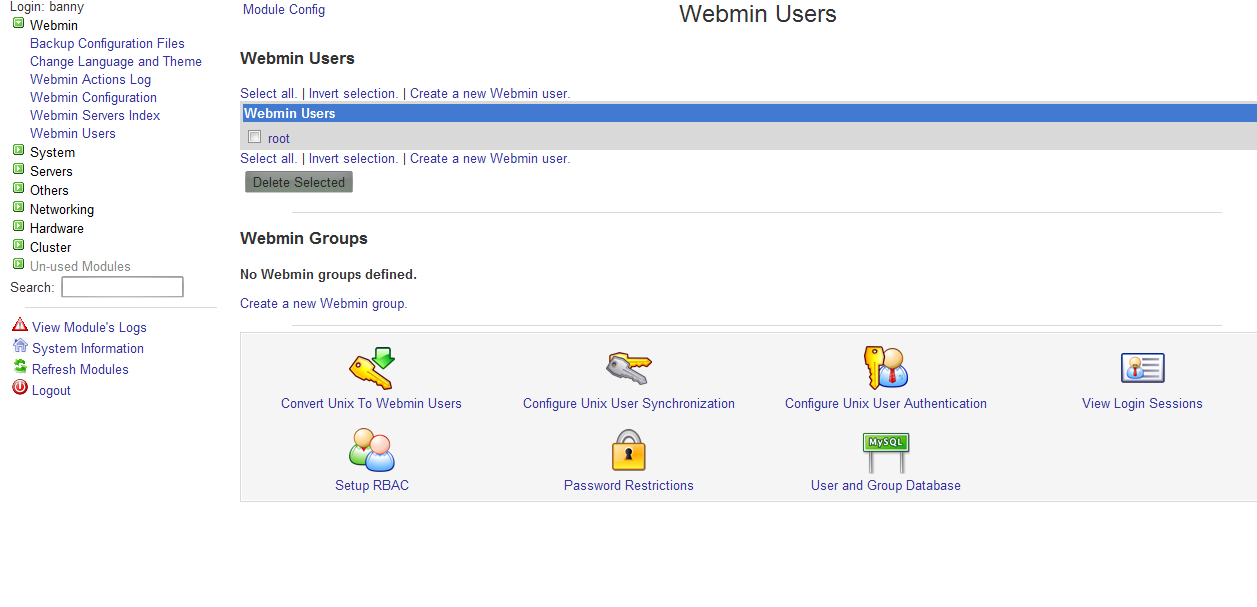
  • ive installed and logged into webmin not sure where to go next though


    ive got as far as this screen -


    There is no group and the FTP account details arent there


    I am not obligated, or connected to any particular brand, seller or retailer so any opinions given are not biased in anyway.
    Any information given is for hobby and research purposes only, and whilst every effort is made to ensure that all my responses are accurate, - Any action you may take based on my replies is done so at your own risk.
    Viewing Premium Channels or Media, without paying for them is illegal and if you do so, you do so at your own risk!

    BpGgW.jpg


  • FTP users are auto jailed (locked) in the home directory when they FTP into a linux server for security reasons, no one in their right mind would allow root access via FTP, port 21 should be blocked and SSH used in it's place, and not port 22 that should also be blocked and the port changed.


    With that said, lets say you wanted to add oscam.user, oscam.server and oscam.conf to your system, you can simply ftp the files to your home dir /home/banny then login via putty and move to the home dir.


    cd /home/banny


    now move the files to lets say /usr/local/etc


    cp oscam.user oscam.conf oscam.server /usr/local/etc


    Thats it, new files have now been moved to that location


    Simply delete the files from the home dir with


    rm oscam.user oscam.server oscam.conf


    Can simply do this with any files, maybe for some it's easier for people to ftp a file to there pc and edit it and put it back rather than using vi or nano


    Just learn basic linux commands for moving, deleting, editing files etc etc

  • That helps a lot, thanks for that :) takes me one step closer anyway


    I am not obligated, or connected to any particular brand, seller or retailer so any opinions given are not biased in anyway.
    Any information given is for hobby and research purposes only, and whilst every effort is made to ensure that all my responses are accurate, - Any action you may take based on my replies is done so at your own risk.
    Viewing Premium Channels or Media, without paying for them is illegal and if you do so, you do so at your own risk!

    BpGgW.jpg


  • Why don't you just use SCP ? :)


    With WinSCP you can do everything thru SSH (port 22) protocol, which is encrypted..


    Also you can copy files from linux to linux with:


    scp user@<hostname of remote server>:/root/file1.txt /root
    -
    copies remote /root/file1.txt to local /root folder.


    scp /root/file1.txt user@<hostname of remote server>:/root
    - copies local /root/file1.txt to remote /root folder.


    But... mayb you already knew this :)

  • Are you logged in correctly ?
    if your using root instead of name used in Automated Debian Oscam CCcam 213 install ?


    Winscp is better in terms of Root access -

    78cm dish on tm2300 metal gear motor + 1m Orb with tm2300 + 1.8m Channel Master on H-H floor mount + 80cm ISS with TM2300 AND Inverto Black LNB,inverto Unicable QUDL 42 LNB,- Global invacom Dscc LNB,- Triax KA LNB, - Yuri LNBF C Band YLF-CDP16C

Your resource for Linux TV servers and smart card readers.

Find software downloads, drivers, and support for server setup and card-sharing configurations. Set up a Linux-based TV server. Access downloads and support for server software and USB card readers for advanced TV reception and management

Participate now!

Don’t have an account yet? Register yourself now and be a part of our community!

