Port protocol tcp?
I'll try it later when i'm back from university
Yes TCP protocol is correct.



Port protocol tcp?
I'll try it later when i'm back from university
Yes TCP protocol is correct.
with N: asdf.dyndns.org 22222 user test 01 02 03 04 05 06 07 08 09 10 11 12 13 14 256 the vps doesnt connect to oscam. with usual c line it does and gets displayed as cccam (2.0.11-2892). Help me :D
with N: asdf.dyndns.org 22222 user test 01 02 03 04 05 06 07 08 09 10 11 12 13 14 256 the vps doesnt connect to oscam. with usual c line it does and gets displayed as cccam (2.0.11-2892). Help me :D
Post your full config rather than just bits of it please hiding any sensitive info.
what do you need more? i already postet oscam.conf, oscam.server and oscam.user.
what do you need more? i already postet oscam.conf, oscam.server and oscam.user.
You only posted your CCcam section of oscam.conf, if the port is forwarded correctly then this is most likely where the error is. Only trying to help you.
Here you go full oscam.conf:
[global]
serverip                      = 192.168.178.29
logfile                       = /tmp/oscam.log
nice                          = -20
maxlogsize                    = 2048
preferlocalcards              = 1
dropdups                      = 1
lb_mode                       = 1


[anticasc]
enabled                       = 1
numusers                      = 1
sampletime                    = 1


[cs357x]
port                          = 12345


[newcamd]
port                          = 22222@09C4:000000
key                           = 0102030405060708091011121XXX
keepalive                     = 1


[cccam]
port                          = 11111
serverip                      = 192.168.178.29
nodeid                        = 5A34B8DA10B61XXX
version                       = 2.3.0
stealth                       = 1
keepconnected                 = 0


[webif]
httpport                      = 83
serverip                      = 192.168.178.29
httpuser                      = grossmeister
httppwd                       = qwertZ58
httphelplang                  = de
httpallowed = 127.0.0.1,192.168.1.1-192.168.255.255TCP port 22222 gets forwarded to 22222 on 192.168.178.29 (Raspberry Pi)
Oh I forgot about the restart. Now the vps connects.
CCcam.cfg on VPS:
######################################################################
#                             connections                            #
######################################################################
N: asdf.dyndns.org 22222 user test 01 02 03 04 05 06 07 08 09 10 11 12 13 14 256
F: test test


######################################################################
#                            Private Einstellungen                   #
######################################################################
SERVER LISTEN PORT : 14102


#SMARTCARD CLOCK FREQUENCY: /dev/sci0 3570000
#TRY ALL CHIDS : /dev/sci0


#SMARTCARD CLOCK FREQUENCY: /dev/sci1 3570000
#TRY ALL CHIDS : /dev/sci1


TELNETINFO LISTEN PORT : 14103
WEBINFO LISTEN PORT : 14104


#WEBINFO USERNAME : root
#WEBINFO PASSWORD : root8422


#TELNETINFO USERNAME : root
#TELNETINFO PASSWORD : root8422Shouldn't I be able to connect from my VU+ Solo2 with this C Line:
C: VPSIP 14102 test test
Oh I forgot about the restart. Now the vps connects.
CCcam.cfg on VPS:
CodeDisplay More###################################################################### # connections # ###################################################################### N: asdf.dyndns.org 22222 user test 01 02 03 04 05 06 07 08 09 10 11 12 13 14 256 F: test test ###################################################################### # Private Einstellungen # ###################################################################### SERVER LISTEN PORT : 14102 #SMARTCARD CLOCK FREQUENCY: /dev/sci0 3570000 #TRY ALL CHIDS : /dev/sci0 #SMARTCARD CLOCK FREQUENCY: /dev/sci1 3570000 #TRY ALL CHIDS : /dev/sci1 TELNETINFO LISTEN PORT : 14103 WEBINFO LISTEN PORT : 14104 #WEBINFO USERNAME : root #WEBINFO PASSWORD : root8422 #TELNETINFO USERNAME : root #TELNETINFO PASSWORD : root8422
Shouldn't I be able to connect from my VU+ Solo2 with this C Line:
C: VPSIP 14102 test test
Yes that should connect, check the vps firewall rules allows port 14102.
got it working now.
what F line does it need to allow that someone can connect his oscam server to the vps and then watch with ONE box connected to that oscam server? I dont get all the different terms like uphop, downhop, reshare etc.
I just want to make sure that only one box can use that F line and prevent resharing.
got it working now.
what F line does it need to allow that someone can connect his oscam server to the vps and then watch with ONE box connected to that oscam server? I dont get all the different terms like uphop, downhop, reshare etc.
I just want to make sure that only one box can use that F line and prevent resharing.
Would be like this after user password 0 0 0 { 0:0:1 }
All is explained here BigBear46,
Getting Started - Flines & Clines For Beginners
i'm wondering what reshare 2 exactly means. does that mean the client can reshare the line to as much clients (1hop away from him) of him as he wants or does it mean he can reshare it only to one client which is one hop away from him?
i'm wondering what reshare 2 exactly means. does that mean the client can reshare the line to as much clients (1hop away from him) of him as he wants or does it mean he can reshare it only to one client which is one hop away from him?
0 0 0 { 0:0:1 } = No reshare - Peer can view for himself only.
0 0 0 { 0:0:2 } = One reshare - Peer can view for himself and his peer can view your card also.
0 0 0 { 0:0:3 } = Two reshare - Peer can view for himself, his peer can view and also pass the share one hop further.
Is it possible with 0 0 0 { 0:0:2 } that the peer and more than one peer can view the card? I mean if the peer can pass the share to more then one of his peers. Because the distance from me the the peers of my peer would always be the same in hops.
Or in a picture: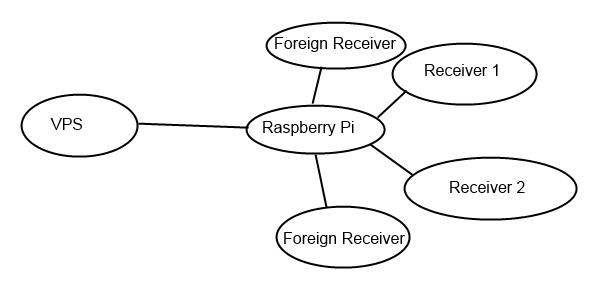
Is it possible to limit my the F line that the peer (raspberry pi with oscam) is only able to share my f line to receiver 1 and 2 but not the foreign receivers?
Is it possible with 0 0 0 { 0:0:2 } that the peer and more than one peer can view the card? I mean if the peer can pass the share to more then one of his peers. Because the distance from me the the peers of my peer would always be the same in hops.
Or in a picture:
Is it possible to limit my the F line that the peer (raspberry pi with oscam) is only able to share my f line to receiver 1 and 2 but not the foreign receivers?
Look back to Getting Started - Flines & Clines For Beginners
But even this doesn't mean the reshare cant be abused by oscam or multics users so monitor the usage & anyone who is taking the piss will stickout like a sore thumb but thats another thread. Glad you are up & running i will close this one now.

Supporting the Enigma2, satellite and IPTV community since 2010.
Independent • Community Driven • Established 2010


