Posts by master G

    well thanks, but can´t get it working.
    you want me to send the scripts and some screenshots?
    don´t want to anoy anybody, but really want the box to auto restart, when oscam crashes.
    thanks anyway
    el pirate:after_boom:


    Ok el pirate i just installed pli on my dm500 to solve this one for you.
    Using DCC
    start telnet & enter


    Code
    crontab -e


    Press the insert button on your keyboard & enter your text


    Now press escape then shift & zz together


    You can check it has saved correctly by ftp to location and viewing the file


    ftp to /var/spool/cron/crontabs then right click & view the file named root.


    let us know how you get on.

    Hi, i found this on the newnigma website. Give it a try


    have a look at:
    Menue->Extentions->WEB Interface


    allow https access yes
    allow http acces (only yes, if your box is not connected to internet, like access via dyndns, otherwise no)


    In your browser (PC) try:
    https://<IP of your box>:443


    If that won't work, try:
    cmd console on your PC an enter:
    telnet <IP of your box> 443


    If you get an error message your web-Interface has a problem, or your firewall is blocking the traffic. If you get no error message (and nothing at all) everything is fine with your web-interface.

    hi all pleas some one help me with this 1 iam new 2 the oscam i never used it and i dont know how it works i have *** uk view asia+zee tv and dm 500 my *** card didnt work in cccam so i download *** uk ready nabilosat oscam4803 _cccam 2.1.3 dm 500 back up and i changed the boxid and it worked fine i acn see the chanel but i dont know if the seting in this back right or same as mine i need help


    i am using my dream box slot to read my card
    *is this setting will update my *** uk card becuse i cant see my entitlement in ccam info php


    This will update your entitlements, you can use oscam webinfo to check them
    In your web browser type


    Code
    http://[COLOR='#FF0000']IpOfDrembox[/COLOR]:8888/


    E.G 192.168.0.9


    Username & password = admin


    Click Readers


    Then view entitlements


    * how to overclock my crad so there be no freez on my card


    There is no need to overclock your card in oscam, if you remove the following line from oscam.server


    Code
    cardmhz = 357


    Oscam will automatically clock it to the recommended speed which is 5mhz for your card using internal reader.


    *iam using port 12000 is this setting right with my ccam port
    here is my oscam confg


    Continue to use whatever port you are, it will not affect the running of oscam unless they clash.


    oscam confg
    [global]
    nice = -1
    WaitForCards = 1
    logfile = stdout
    preferlocalcards = 1
    saveinithistory = 1


    [webif]
    httpport = 8888
    httpuser = admin
    httppwd = admin
    httpallowed = 192.168.1.100 this is not my ip should i make this my ip


    Change this to


    Code
    httpallowed = 127.0.0.1,192.168.0.0-192.168.255.255


    This will allow the full range of your local network.

    # protocols


    [newcamd]
    key = 0102030405060708091011121314
    port = 10000@0963:000000;10001@0963:000000 this is not my port my port is 12000 should i changed this 1


    No, leave as it is.


    oscam server
    [reader]
    label = lower card
    enable = 1
    protocol = internal
    device = /dev/sci0
    caid = 0963:000000
    # 0963 is *** UK.
    boxid =
    # Oscam can read a *** card i.d, but you can also put this
    # in manually
    detect = cd
    cardmhz = 357
    # this helps the card run more smootly
    group = 1
    # Oscam has the concept of groups. Only users in group 1 can
    # use this reader. I'm only using one group.
    emmcache = 1,3,2
    ecmcache = 1
    blockemm-unknown = 1
    blockemm-g = 1
    # these ensure smooth decrypting
    lb_weight = 101
    # for load balancing - can be commented out.


    oscam user


    [account]
    user = test1
    pwd = test2
    monlevel = 0
    uniq = 0
    group = 1,2
    au = 1
    caid = 0963


    thanx all for your help


    Everything else looks fine mate.

    OScam Info in PHP 1.0 Stable


    Thanks to all testers! The first 1.0 stable is ready.


    You need:


    Web server with PHP5
    CURL and mod_curl
    OScam version 1.xx


    Features:


    Auflisting of clients with their current status
    Listing of the reader with current status
    Auflisting of pairs
    Display of Logs
    Auto Refresh
    Statistical analysis of the last 20 ECMs
    Multi-language capability (English and German already in the process)
    Reader ECM History
    Client ECM / EMM History
    Multi-tenancy (multiple servers are defined OSCam)
    Access permissions of the created users. Incl. what's OSCam
    may be Researched.


    installation:
    Unpack the archive and upload to the web server. Following the
    Make configuration process at the following files:


    config.global.php
    config.oscam.php
    config.user.php


    Feedback is welcome!


    Thanks paramite.

    Let us know what card you have so we can recommend what EMU to use.


    If you`ve no card to share then CCcam will be an easy place to start, although oscam is where most are moving too.

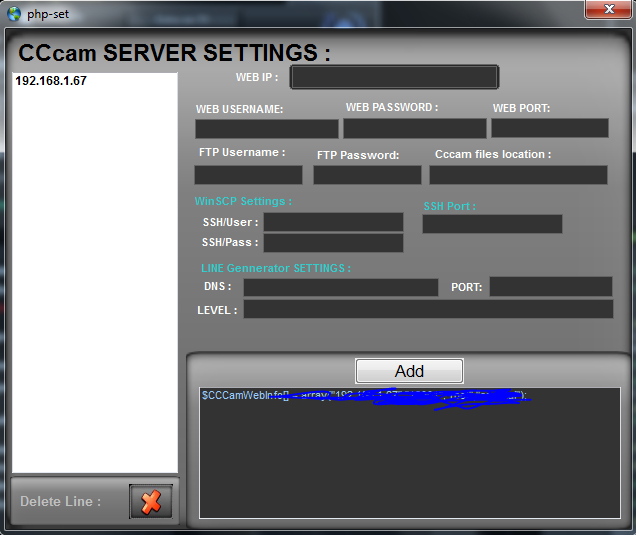
    click on the image as below and a new settings page will appear;


    All the details to edit will be found in CCcam.cfg, default details are below but be advised to change to your own.


    Webip: ip address of your receiver
    Web username: root
    Web password: dreambox
    Web port: 16001


    After you have added these details click ADD like below, then restart cs studio.