


Nice one buddy, thread closed.
Posts by master G
-
-
How to get into the bios [DM 800SE]
! ! ! The box must depend on a DHCP server! ! !
1. First, the box shut down and unplug it (at least 1 minute)
2. Power button on the front page and insert the Box
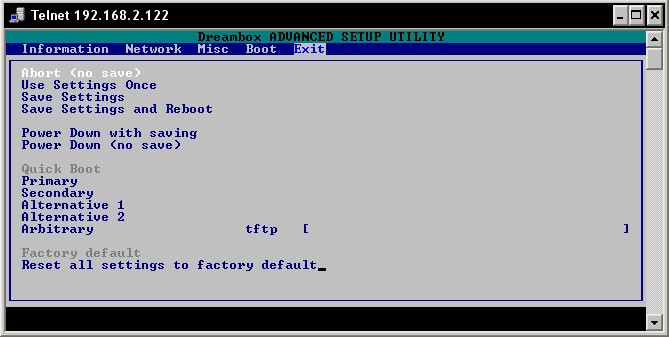
3. Appears on the display xxx.xxx.xxx.xxx DHCP (IP address) *** STOP ***
4. In the Window's Start -> Run -> go and telnet
followed by the IP box type. (E.g., telnet 192.168.2.122) per
configuration on the networkYou will get the bios of the box.
Gracias a Mr.Bunny
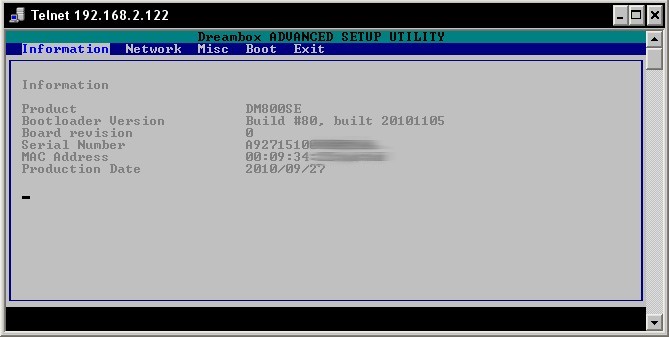
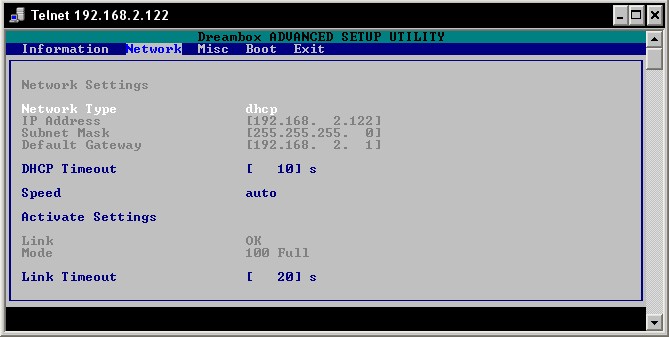
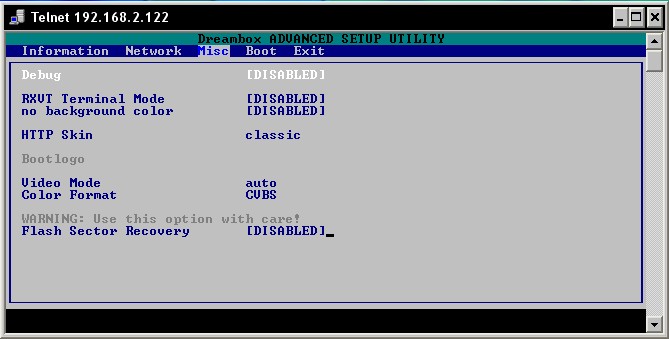
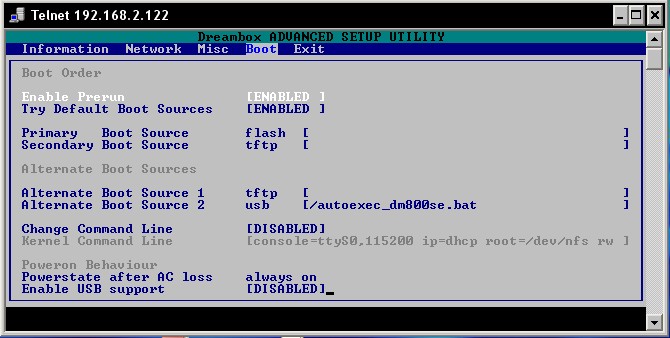
Codes for DM800se - Remote control
DM 800se HD Firmware update via browser
What you need to update the firmware:
You need a current image. Such an image for the DM800HDse has the extension *. nfi.
It is not flash other images like *. img einzuspielen!
Please try not, it does not work.You need either a DHCP server on your Net
zwerk, a configured bootloader or a serial null modem cable and a terminal program like Hyper Terminal.You need a browser and a network cable. Connect your Dreambox directly to a PC, you need a cross-over "(rotated) network cable, if you connect through a switch / hub / router you need a" Non-Cross "(not twisted) network cable.
To flash a new image to the Dreambox, you have the "2nd stage loader in place and undamaged.
The next steps refer to a network with a DHCP server running.
If this is not the case, you have to setup a serial cable, an IP address.- Turn off the dreambox, use this menu item "shut down"from the shutdown / standby menu and then pull the plug on the power supply out of the box.
The standby mode is not enough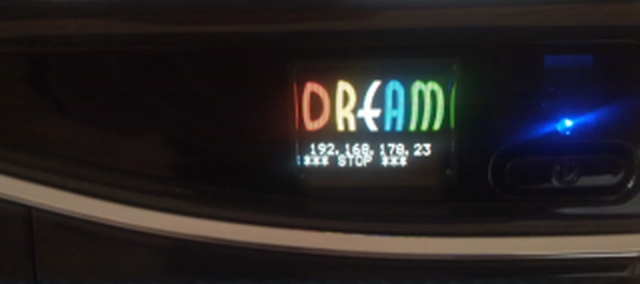
- (1) Press the Power - button on the front panel and hold it.
Now insert the plug of the power supply back into the box.- (2) A text "*** STOP ***"should appear. Now you can release the button.
The boot loader is now in "wait mode".- (3) Above the "*** STOP ***" text, there should now display an IP address are displayed.
(four decimal places, separated by a period).
If there appears the "DHCP" instead of an IP address, the box still searches for a DHCP server. Wait a bit.
However, should appear after a short time an IP address, please check your DHCP server settings and the wiring of your network.
If it does not work, please set manually via a serial console, the IP of your box.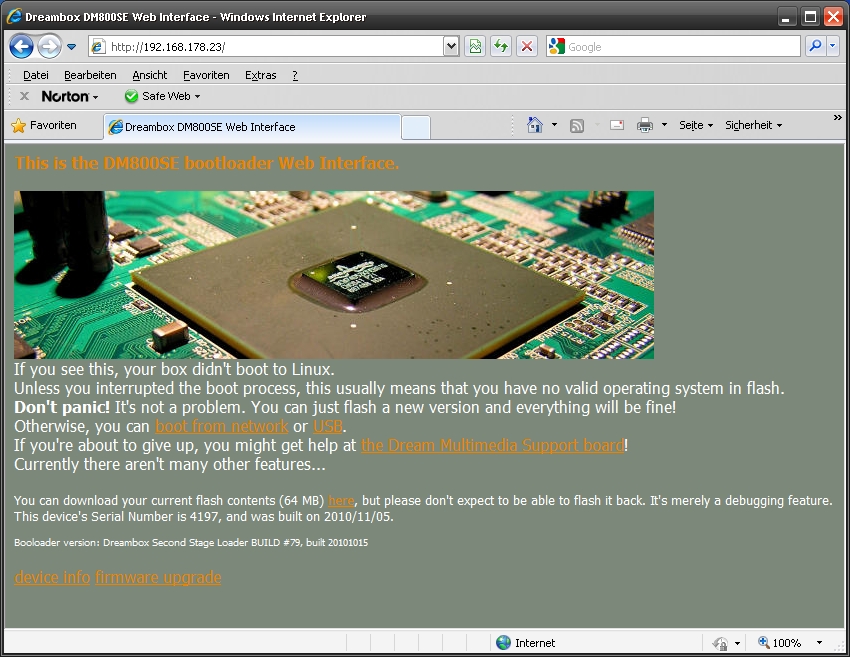
Now open a browser on your PC.
(1) Enter the IP address in the address field of the "http://ip/"field.
(enter the IP address displayed in the LCD).
(2) Press the "firmware upgrade" to the page displayed in the browser.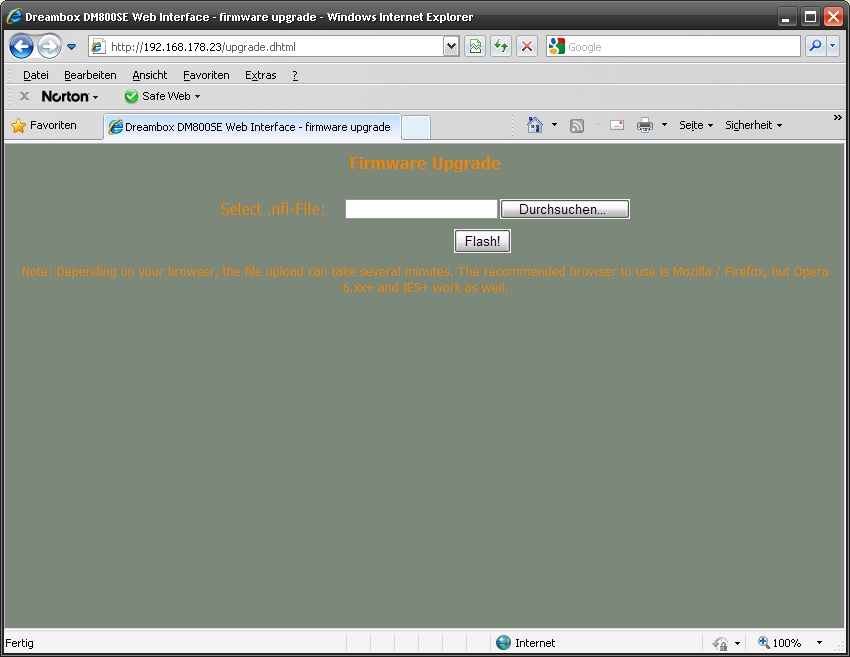
-On the next page you can select the desired image you want to flash the box. Please note the file extension *. nfi to play that
other images is not possible (NO *. img)!- Click to select the images to the "FLASH!" and wait
e has been transferred completely to the image and flashed.-Turn the box off and then on again.
The new operating software should now be recorded, and reboot.gracias al autor
Updating firmware via DreamUpHow do I play with new software DreamUp on the Dreambox DM 800 HD se:
Dreambox 800 HD se and service connection:
If you use the service port (to update the operating software)
would like to work, you must first install the following drivers:VCP Drivers - (USB to UART Bridge Virtual COM Port (VCP) driver)
Crossover cable and USB Type A - Mini USB type B:
DreamUP version 1.3.3.7:
Home / 2 All Receiver - DVB modules and S - C - T / 3 Dreambox / Progs - Tools - Flasher / Flash Software
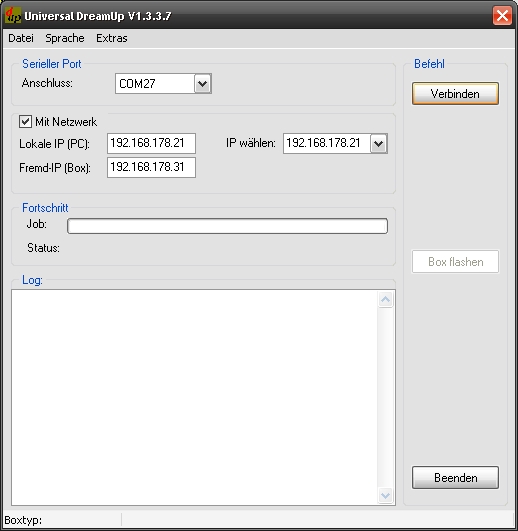
First disconnect the box from main power
start the program "DreamUp"Unplug the Dreambox is the first network
Start the program "DreamUp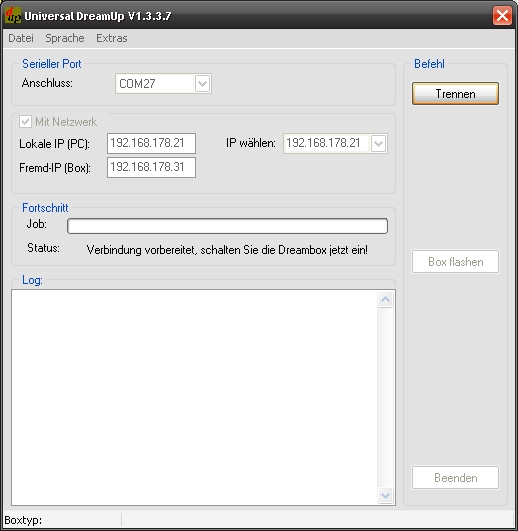
select: comport 1 or 2
use network
if network: enter the local IP from your PC, enter a remote IP for your boxPlease select the Com port to which the Dreambox is connected
Selection: Network / without network
when network: Enter Local IP of the PC, enter a foreign IP for the box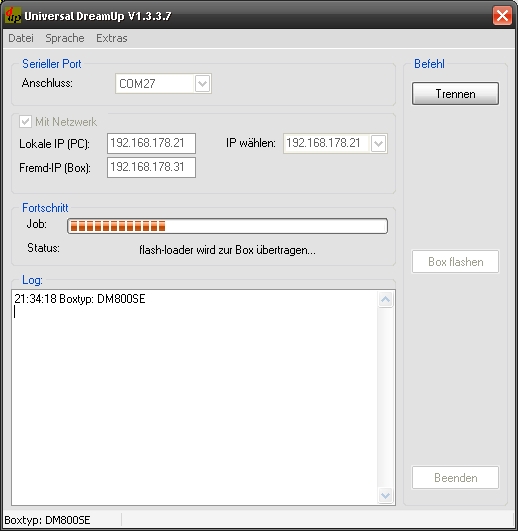
press the "Connect" - button
and then connect the box to main power
please wait nowthe "Connect" button click
and then connect the box to the power plug
Please wait while nowafter the flash loader is Transferred into the box select the firmware by pressing
The "Flash" - buttonafter the flash loader is transferred to the box, select the
Button "box flashing" the operating software from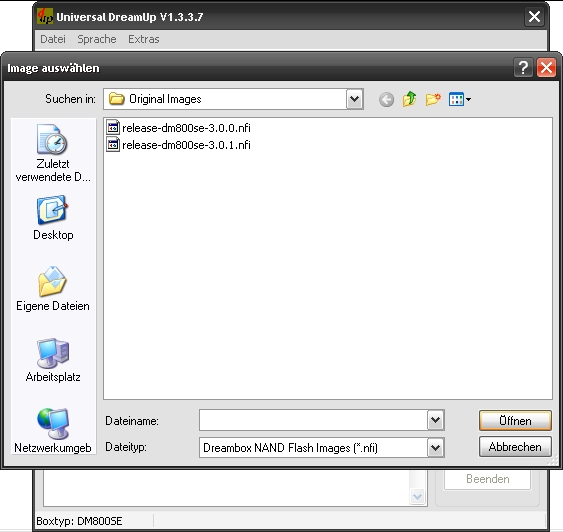
select the firmware and click "open"
Select the firmware and click "open "
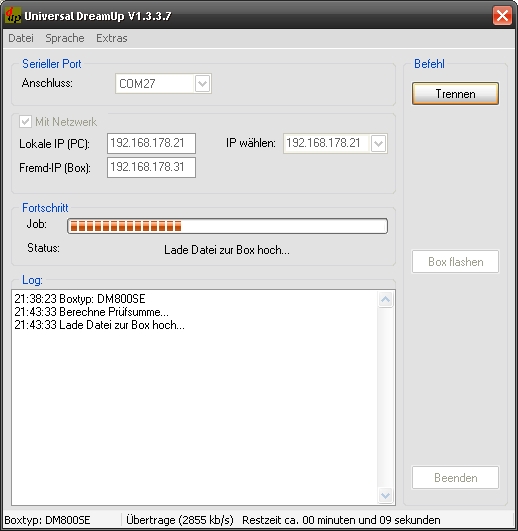
upload starts now, please wait
The upload is started, please wait
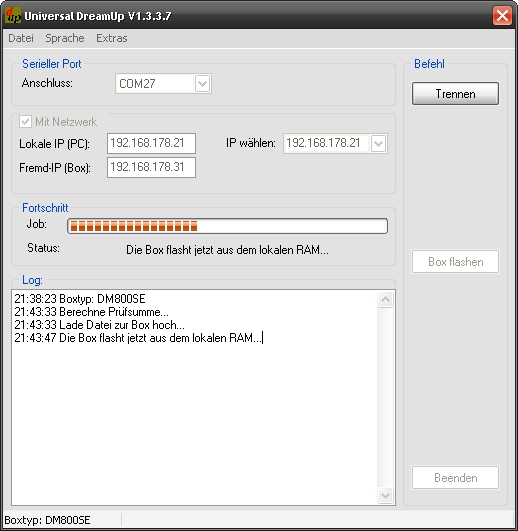
Box is flashing the new firmware into the flash memory, please wait
Box copies the new firmware into the flash memory, please wait
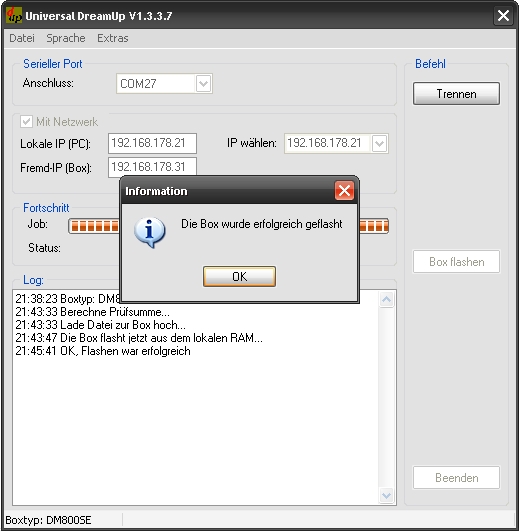
flashing done, press "OK"
press "disconnect then exit"
restart the box"The box was flashed successfully, " click on "OK"
click disconnect then exit "
Box restartthanks ramiMAHER
-
Great stuff buddy, thread closed..
-
Why picons on USB stick? HDD not better? If u have 1.
The HDD needs to be constantly spinning for the picons to show. Normal zapping of channels doesnt call on the HDD to be used so the picons wont show. -
Feature: Streaming server to stream video to your smartphone/computer over internet
Feature: Complete rewrite of the streaming function for VLC > 1.0.5 (better quality and more features)
Feature: Infobar and epg now work with Windows XP too
Feature: Add function to delete the air video thumbnail cache
Feature: Add function to restore the main directory to default and clear the service directory
Feature: Add logo and program name for windows volumecontrol (mixer)
Feature: Check for existing pathes each start
Feature: EPG Refresh now work with the epg refresh plugin from ritzMo
Feature: Copy picon referece from contextmenu to clipboard
Feature: Check for encrypted channel (Not for all channels the data set correct)
Feature: Add russian language file to setup
Critical Fix: Changes on the data now saved direct without save
Fix: Change Air Video channel endocing to ASCII to solve the Problems with umlauts.(All umlauts removed)
Fix: KingOfSat parsing now work with the new design
Fix: Change default CoolTVGuide mini picon size to 50x28
Fix: On load bouquetlist don't flicker anymore
Fix: Save channel from channel > details now saved correct
Fix: Download logo now don't crash anymore when channelname is empty
Fix: Move bouquet channels now select the correct channel and dont show an error
Fix: Air video export channel counting now ignores marker/alternatives
Fix: Check unused picons now works with all directorys and don't remove options picons anymore
Fix: Save as .bef file now saved in the correct format
Fix: Parental control now work from the context menu
Fix: Improve timeout for picon export
Fix: Lyngsat Logo update works now correct
Fix: Some language issues -
hi jane check here
http://streamboard.gmc.to:8001/wiki/CardsList
to see if your card is supported & then setup oscam accordingly
-
satkeynet cccam php info
ver 1.0
First releasever 1.1
Fix yapsver 1.2
Change style on php info
Change buttons style
Change Satkeynet forum browsing
install password: satkeynet.com -
NoviTeam_V.1.2_DM500HD (Genuine)
STABLE version oe1.6 08-06-2011
Branch : Experimental 2.8.1
Distro-Opendreambox : OE1.6
Last KernelFeatures:
CrossEPG 0.62 SVN 300 (Thanks Skaman)
USB DTT Drivers (Thanks Bobsilvio)
New HD Bootlogo
DVB Modules for sim 201 (Thanks mfaraj)
Wizard Setup
All languages
Multibouquet
WebInterface FixedNew Blue Panel Features:
Emu Manager with online cams
IPK Manual Installation
DTT Drivers Installation
DynDNS Inadyn Config
Remove Resources
Restart GUI (Enigma2)
Information
Blue Button Download Settings
Yellow Button Download Addons
Green Button Download Skins
Red Button Utility ManagerUtility Manager:
System
Format USB
Format HDD
Install IPK to HDD
Backup CCcam Settings to USB
Backup CCcam Settings to HDD
UpTime
Restart Network
Clean HDD
IPK Extractor
HDD Status
Keys Clean
Update Time
Hostname
FileSystems
HDD Info
Mount HDD
Mount USB
Mount Points
Backup Enigma2 Settings to HDD
Backup Enigma2 Settings to USB
UnMount HDD
UnMount USB
Keys Download
Reload Backup CCcam Settings
Reload Backup Enigma2 Settings
NetStat
Ping
Modules
Free Space
EmuInfo
Delete Crash Logs
Free Memory
Process List
Download Softcam
HDD TempNotes:
This is the stable versionRingrazio tutti gli utenti di novi-sat.com per il caloroso supporto, il grande contributo e il credo in questo progetto è un qualcosa di unico da parte vostra.
In questa versione 1.2 si può capire come sia stata migliorata ulteriormente questa immagine, per facilitare l'utilizzo infatti è stato realizzato un blue panel in grado di soddisfare tutte le aspettative degli utenti. Vi basta provarla per capire le potenzialità e l'efficacia di questo firmware.Author: Leon
BetaTest: Novi, Thomas99, bamboc1983, ftp21, d2mac, nokia9k8 for Dreambox.it
BetaTest: All members of novi-sat.comNota: per i clone stiamo lavorando.
-
This is the oscam equivalent of the cccam sid assign feature, it will block requests for channels which your card does not open. Very useful if your card is not the full hd package.
Code
Display More# [Variety Pack] caid = 0963 srvid = 125D,125F,1261,158B,151A,D2FF,D2FB,1710,D444,D7E6,C7A6,CC0A,1771,1775,1968,1DB5,1978,1DBF,13F0,13EF,13F3,196A,1DC8,1778,CC0B,1777,CC06,1773,CCBF,CCC4,CCC9,CC07,C481,D0FC,D101,168A,1843,CCCE,247C,247D,1979,1DCE # # [Variety Pack HD] caid = 0963 srvid = 0F15,0EEF,0F22,0F1A,0F10,0F28 # # [Knowledge Pack] caid = 0963 srvid = 1839,183C,122D,138B,1220,1221,1222,2484,CBC9,122F,1966,1DBA,183A,CCB5,1969,1DE2,183F,CCD3,183E,CCBA,1841,D421,CCB0,197A # # [Knowledge Pack HD] caid = 0963 srvid = 0EF8,0F2D,0EDB,0F2F,0F30,0F2E,0F1C # # [Style & Culture Pack] caid = 0963 srvid = 11FC,1456,196C,1DCA,1965,1DB0,183B,CCDD,CD32,D2F9,1840,CCE2,183D,D43F,CB90,1DC4,13A1,CCD8,1652,1592,CB8C,CB91,D7AA,113A # # [Style & Culture Pack HD] caid = 0963 srvid = 0F17,0F18,0F1B # # [News & Event Pack] caid = 0963 srvid = 164E,2490,1391,1223,CFD5,D057,C4AE,139D,D430,132E # # [News & Event Pack HD] caid = 0963 srvid = 0EDC,D83B,0F0A,0F13 # # [Children's Pack] caid = 0963 srvid = 1A94,C611,2329,232F,232C,2332,D426,15B8,D453,15BB,D025,1BBC,1BBE,1BBD,15BA,1591,C7C9,15B9 # # [Children's Pack HD] caid = 0963 srvid = 0F1E,0F1D # # [Music Pack] caid = 0963 srvid = 1B59,1B81,1B5D,1B64,2EE5,C5D5,2EEA,D7AE,1B5A,C5D0,1B60,1B5E,1B66,2EF4,2EEF,1B5B,1B5F,1B6D # # [Music Pack HD] caid = 0963 srvid = 0EDE # # [Movies Pack] caid = 0963 srvid = 1134,1135,11FA,10CF,1133,10CE,1612,232A,232B,10D0,157E,1136,10D1,10D2 # # [Movies Pack HD] caid = 0963 srvid = 0EED,0EF9,0EEB,0EEA,0EE6,0EE7,0F21,0EE9,0EE8,0F16,0EE4,0EEC,0EF9,0F16,0EDF # # [Sports Pack] caid = 0963 srvid = 1203,1332,1076,1078,107D,2462,1070,107E,1581,1205,107B,119F,11A1,1202,1519,151C,153A,132B,132D # # [Sports Pack HD] caid = 0963 srvid = 0F25,0EDA,0F26,0F29,0EEE,0EF0,0EF2,0EF3,0F09 # # [Extra Channels] caid = 0963 srvid = 1224,C5BC,D061,2482,C5A8 # # [Extra Channels HD] caid = 0963 srvid = CFD5,0F02,0F01,0F11 # # [Bonus Channels HD] caid = 0963 srvid = 0F24,0F5C,0F5D,0F5E,0F12,0F23,D3BE,0516 # # [FreeSAT] caid = 0963 srvid = D15B,1772,CC08,2F03,2F08,D158,2F12,2F0D,1E14,1E1E,1E1F,1E23,1E24,D7CB,D15A,C5C1,2EFE,D7C1,1B61 # # [Adult Entertainment] caid = 0963 srvid = D15C,D7C4,D7C3,D7C6,D7C7,D7C8,D7BF,D15D,D7C0,D7C2Ftp the file into the same folder as your other oscam conigs then create a services = line in the reader section of your oscam.server file.Just add the names of the packs that your card opens. The example below is for a uk full card without hd.
Code
Display More[reader] label = lower card enable = 1 protocol = internal device = /dev/sci0 caid = 0963:000000 services = Variety Pack,Knowledge Pack,Style & Culture Pack,News & Event Pack,Children's Pack,Music Pack,Movies Pack,Sports Pack,FreeSAT boxid = detect = cd cardmhz = 357 group = 1 emmcache = 1,3,2 ecmcache = 1 blockemm-unknown = 1 blockemm-g = 1 blockemm-s = 1 lb_weight = 101There is also the option to block only certain packs like the sid reject function of later cccam. This is done simply by placing ! in front of the services name in the oscam.server file.
The example below is for a card that opens everything except adult & HD bonus channelsAll sids are current values at time of writing. I will try to post updates regularly.
Have Fun !!!
-
Glad its sorted, thread closed..
-
Guli he is using blackhole image, that setup is for vix image..
-
The problem with having the picons on a hard drive is that the drive needs to be constantly spinning for the picons to show. Sometimes the picons will show sometimes they wont, this is why USB stick is the best option.
-
Blackhole image will automatically recognise the picons if you place the folder picon in the correct location on the Vu+.
You can FTP the picon folder to your USB stick or usr/share/enigma2. Lets us know how you get on buddy.. -
Once You`ve installed multi quickbutton a reboot is needed. Press green & start multi quickbutton plugin, check to make sure red button is the default for coolman tv guide.
Folder usr/share/enigma2/picon will show your picons automatically in coolman tv guide. But its not recommended to store picons in flash on DM800, best place is on a usb stick.
FTP your picons to USB stick and change the path for picons in coolman guide to /media/usb/picon. -
Use this list to make sure you are searching for the strongest transponder this will make it a lot easier. You should get hotbird on a sly dish without any problems.
-
Make sure the plugin is active, press red so autostart is on ( requires reboot )
The best place to put your picons is on a usb stick as they take up a fair bit of space.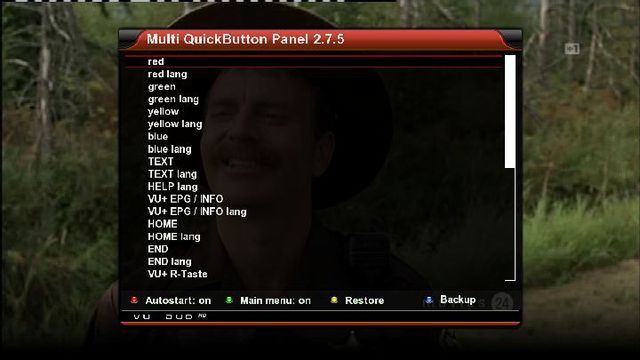
-
Look at attached devices in your router setup to make sure that you have the correct ip for the vitual machine running on windows.
-
Not sure about a command but i would recommend CS Studio by Damirsat ( CCcam Info ). Perfect for tracking peers, works for receiver or pc linux server. Also attached a CCcam.cfg that has all you need for connecting to your CCcaminfo.
-
-
Try adding this to your cfg.
ALLOW WEBINFO: yesAlso can you access the info from the local machine. e.g http://127.0.0.1:16001


