Posts by master G

    Hi & welcome mate here is my opinion.
    First off, thanks for the reply glenviewjf...


    OK, I hear what you say, how do you rate the dreambox 800 HD ???? Bearing in mind that I know nothing. My current set up is a Humax box fed from a static dish and receiving freesat :-(. Which is OK but mostly crap if I am honest.


    Dm800 is a great box i had one myself, but my opionion is if your looking to spend that amount save a little longer and go for a VU+ Solo. You will not be dissapointed.


    Do I need a motorised dish ????
    Can I stay with the static dish and a dreambox, I am guessing not, but I don't know ???
    You can stick with as static dish as many here do but you have no idea how much you are missing, or in your own words ( Which is OK but mostly crap if I am honest )
    IK do have a feed from my router to the humax box :-) so I guess that'd be a good thing whichever box I settle on, and I can just about manage port forwarding (if I can recall the router passowrd, otherwise it'll be the reset button HAh a haah)....
    I am in/around the kingdom of Manchester, or is that too much info Oops


    Mr Griptight


    These are only my own opinions im sure others will differ.
    Good luck with the next step when you decide on it.

    Is it possible to have a motorised dish and a fixed dish connected to the Dreambox 800 HD I had a 2 way diseqc switch: with port A having a fixed dish on 28.2e, and port B a motorised (TECHNOMATE TM 2600 ALL METAL DRIVE MOTOR) dish which i Can use for 23E.19e16e,13e.9E.7E 4.8E 0.8w only.
    Please Help me
    Thanks


    Yes this works fine mate, even 2 seperate motors is possible.Guide to setting switches here.


    How to set up DiSEqC Switches


    OoZooN-Image-dm800se-24-04-2011

    Here is the latest blade bm7000s 122p- 8-4-11 firmware with 9991 secret menu and also the latest streaming software.


    update your channels via menu>settings>blade online to get your 7day epg working.


    please note installing this firmware does NOT affect your existing lines settings if you have a line in cccam.


    Thanks to galaxy


    Mega-Update, with many new powerful functions:


    1. 7 Day EPG: Box is now compatible with 7 Day/PVR EPG streams in Europe and Middle East.


    2. FAV Group navigation: Now you can use << and >> in Channel List mode to change thru FAV Groups.


    3. Blade Online - Now you can download channel files online, without using USB stick.


    4. Timeshift Mode added - Select in MENU>UTILS>DISK MANAGER>Auto Timeshift.


    5. User Online Update added - User can now add their own online update function:-


    MENU>SYSTEM SETTINGS>IP SETTINGS>BLUE (Firmware Update)>BLUE (Edit) - User can now either add IP address or URL of their Blade Stream Media Server. See section below about setting up Blade Stream.


    6. Media Player:-


    Press PLAY or F1 to start player (as before).


    Now users can stream from their PC or another PC across internet as well as normal USB. To set up streaming from PC use Blade Stream software (see section below about setting up Blade Stream software).


    7. NTSC Mode added.


    8. Increased media file compatibility for playback.


    9. Small bug fixes.


    BLADE STREAM
    ------------


    Blade Stream is very powerful software that runs on any Windows PC which will allow a BM7000s to connect direcly to that PC and stream movies, or download firmware or channel data files directly.


    The software does not need any install. It is available at Blade Media in the support pages.


    1. Simply unzip Blade Stream folder to desktop (or your chosen location) and run BLADE Stream.exe


    2. Windows Firewall will ask you to allow access - say YES.


    3. Next, on Blade Stream, click '...' button to browse to your media and channel file (.CDF) folder and click OK. Blade Stream will now minimise to the taskbar and is now ready to stream.


    4. On your Blade Receiver, press PLAY (or F1) on the remote and press YELLOW to ADD OR SELECT SOURCE. Press Blue button to ADD or CONNECT. Here you type the local IP address of the PC that you just put the Blade Stream software on, for example 192.168.1.3 etc.


    Once you enter this and press OK you will see the directory list of your media folder. Now you can play any movie from your PC just by selecting it, or load any firmware or channel files in the list.


    For streaming across the internet to a friend's receiver, do the following: When entering the new source (as above where you entered 192.168.1.3) you will put the external IP or URL of your friend's PC, eg. 93.12.145.76 or myfriend.dynalis.com etc.


    Your friend must also forward port 2008 in his router to his PC that is running Blade Stream.


    Now you can watch media files from your friend's PC across the internet. Note: You will both need fast stable internet for this function, if it is not fast and stable it may make problems with the stability of your receiver. The serving PC can only stream one movie at a time. If a new selection is made it wil stop the first one and start the new one


    No quick answer here mate, we need some more info to narrow it down.


    When the server goes down is what status is your dns updater showing?


    How many clientsare connected to your server?


    How many hops are in use and what reshare level have you set for your peers?


    Features:
    geminiplugins 0.29 r2
    drivers 9-3-2011 modified
    icvs image 24-3-2011
    bootloader:' sim201-ssl82
    size:42 mb compressed 39mb


    skin:
    Ghost-Army


    Bootlogo
    gemini3-avatar-logo


    Plugins:
    default plugins
    Tunisiasat addons manager
    Livefootball 1.2


    cams server by blue panel-addons


    Language


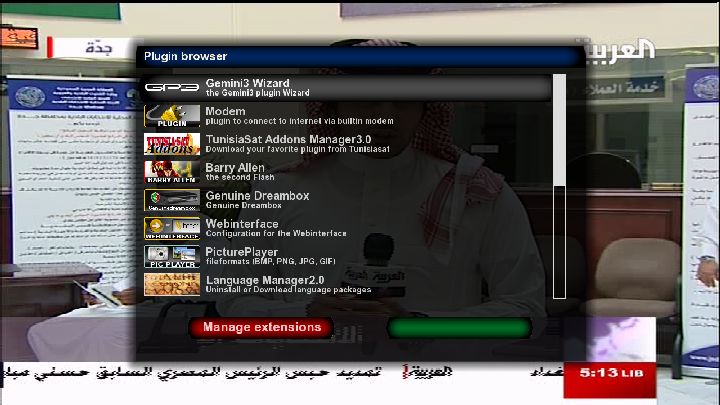
    Only English available but complete default pack can be installed from plugin Language manager in plugins browser


    Cams setup:
    best From Tunisiasat addons manager-gemini3 cams


    Image flashing
    -Internet explorer(recommonded)
    -dreamup


    download


    multiupload


    hotfile


    Do not forget saving your settings before flashing any new image


    Warning;sim201-ssl82 designed for original sim201 dreambox,we are not responsible for any damage if used improperly or with other dreambox types


    Download

    Here's another small announcement that will clearup compatability issues.


    New sim201 ssl82 development
    sim201 team just released the first development stage of sim201-ssl82
    new sim201-ssl82 is compatible with drivers 15-12-2010 and patched drivers released this year
    we hope from all sim201 image developers use sim201-ssl82 in their images.
    attached two files one nfi format and the other bin format for backup purposes


    thank you


    New beta 3.1 from 23/04/2011


    Stand: 22.04.2011 Azbox git + Power of Board functions


    Many errors have remained with certainty the most striking is probably that when you first start hdmi only available


    Download

    Will that also work for vix?


    Not tried myself but i believe it will.
    This is what you need is to have
    1- CCcam.cfg that has all ur settings and lines together.
    2- create a file named CCcam_0.cfg with some of the lines.
    3- create a file named CCcam_1.cgf with other lines.
    4- open cccam.info and press "menu" on the remote.
    5- choose the file u want to activate and click on the green button to activate it.

    Yes just have a second cfg blocking the servers who do not clear it and switch when required.
    The plugin should be on your image, if not ive just added it here.