


Not having that problem myself with this image but i know of others that had the same problem and had to reflash to get it working again.
Have a look HERE, it may help..
Posts by master G
-
-
As far as i`m aware the starview box is only for cable sharing, so if you are sharing a satellite subscription it wont work.
-
You could try installing anyone of these extra Addons servers.
Gemini multi addons server
New Panel Gemini
Sat-land Gemini addons server
Blue Panel: Hablo Addons Enigma1 & Enigma2 Servers Since Gemini Server showing Cam
All these are found in the dreambox plugins and addons section.. -
Have a look here m8, How to setup EPG on BlackHole images.
-
BlackHole EPG Settings
Press Blue then Red.
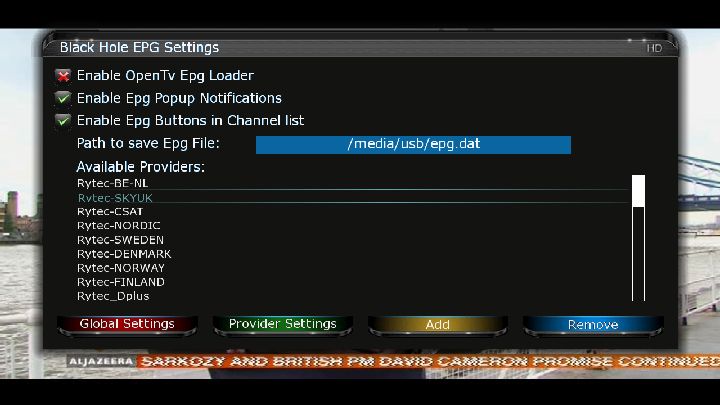
Press Red then setup as below. Press Red to save.
If you are using internal memory to store the epg change the path to /media/cf/epg.dat
If you are using hard drive to store the epg change the path to /hdd/epg.dat
If you are using USB drive to store the epg change the path to /media/usb/epg.dat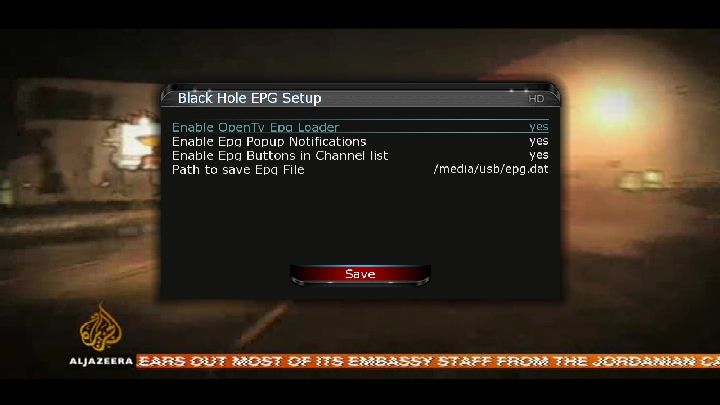
Select Rytec-***UK press OK
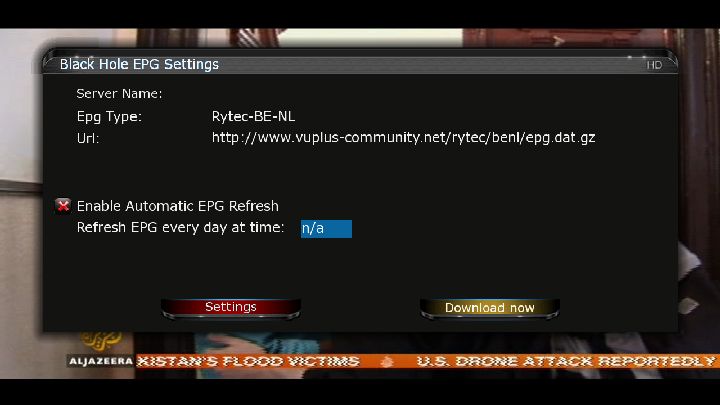
Press Red/Settings and Enable Automatic EPG Refresh and set a time for this action.
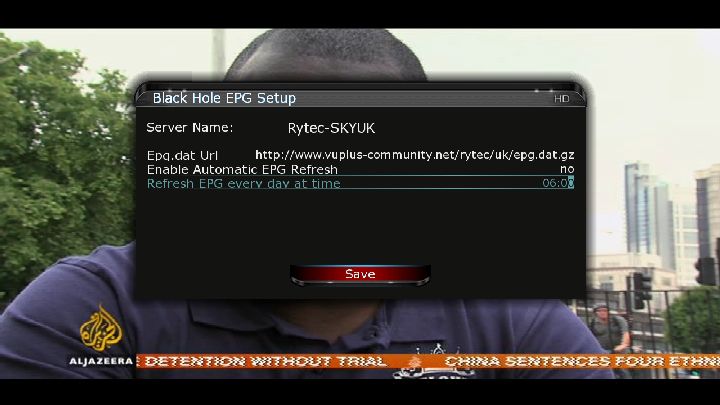
Press Yellow/Download now.
EPG will now be loaded and saved.If at anytime you notice you have lost your epg, restore by using the EPG Backup.
Press Menu then BlackHole EPG Backup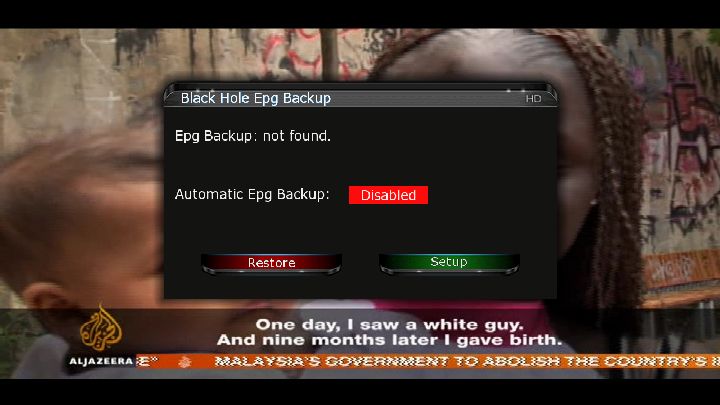
Press Green/Setup, Enable EPG Backup and set the path to either your usb, hdd or internal memory depending on what you used in the first step. Press Red/Save.
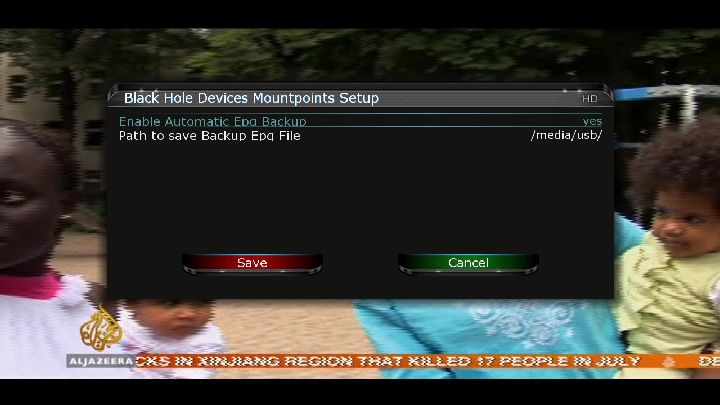

Now you have everything setup all you will need to do if you lose EPG is press Red/Restore in this menu.

-
is this a new image , will it work on clones (500)
The first line of the desciption has said - "Removed the deadly virus for the counterfeit devices". -
-
Next time before you login ckick the remember me box.
You will then remain logged in. -
You will need to flash the correct bootloader before booting into the new image, or use one of the already patched versions for your sim from the clone image section.
-
~ ~ ciefpsettings E1 ~ ~
- - - 24.03.2011 - - -=== Hispasat 1C / Hispasat 1D / Hispasat 1E (30?W) ===
<< Digital+ >>
- Canal+ Toros
- MTV Spain
- EHS (European Home Shopping)
- 24 Horas
- Animax
- Barca TV
- Bloomberg
- Boomerang
- C+Estrellas
- Clan TVE
- Fox News
- Infometeo
- Nick JR=== Express AM44 (11?W) ===
- Capri Store
- Rete Capri
- Radio Capri Television
- Neko TV=== Atlantic Bird 4A / Nilesat 101 / Nilesat 102 / Nilesat 201 (7?W) ===
MBC channels is back on 11938.00MHz, pol.V SR:27500 FEC:3/4=== Atlantic Bird 3 (5?W) ===
Kapital Network, CMC has Left
- TV Sljeme 11472 H 2444 5/6 DVB-s QPSK=== Amos 2 / Amos 3 (4?W) ===
- Mreza Plus / TV1 [ Sarajevo ]=== Intelsat 10-02 / Thor 5 / Thor 6 (0.8?W) ===
- Travel mix=== Astra 1H / Astra 1KR / Astra 1L / Astra 1M (19.2?E) ===
<< Canal Digitaal >>
- TMF/ Comedy Central~ ~ ciefpsettings ~ ~
ciefp E1 53E-30W 24.03.2011.rar -
24/03/2011
New version 1.0
Changes:
- Timer can be created with pre-and post-time
- Help key evidence for the main and the results window


enigma2-plugin-extensions-primetimemanager_1.0-r0_mipsel.rar
-
Ftp the 2.2.1 tgz to tmp and do a manual install.
-
master G, you were on the ball last night with my cccam 2.1.4. is there a tutorial for the cs studio, it looks awsome but complicated to setup
Click the icon that looks like a tool in the top left corner,, just enter the ip address, port 16001, username and password for the dreambox and click add.
Close cs studio down and restart it, click on the ip address in the top right and click update.. -
Check the server listen port in your cfg matches what you have forwarded in your router.
Use Open Port Check Tool to check its forwarded properly.
Also post an example of your cfg ( hiding pass & ports ). -
-
You will find cccam here
Gemini: all Cams + Confg For Gemini Enigma1Yes cccam will update your card entitlements.
-
One thing your forgot to touch on was your hostname, is it updating properly ?
I would recommend using CS Studio for keeping track of your clients and server details.. -


Button Mappings
OK button = Skin with simple information
OK button x 2 = Extra Info Skin
Blue button = Black Hole Blue Panel
Blue button and then Red button = Black Hole Epg Panel
Blue button and then Yellow button = System Monitor Panel
Blue button long press = Extensions
Yellow button = Time Shift
Green button = Black Hole Green Panel
Green button long press = Subservices
Green button and then Red button = Fast Plugin Setup
Green button x 2 = Fast Plugin
Button Red = Start RecordAddons
Green button and then Yellow button takes you to:-
Dedicated server for BlackHole addons
Download and install additional packages from the Black Hole serverWhats New ?
This image is Tring plus ready with all Oscam configs and N line in CCcam.cfg with sid assign.
CCcam 2.1.4
CCcam 2.1.3
Oscam
Latest CCcam Channel info
Latest CCcam Providers
Catseye E2 Settings File 75 East-58 West 21.03.2011Screenshots


PASSWORD:
vuplusUSB:
DownloadNFI:
DownloadEnjoy
Linuxsat-shares Team -
Version 0.6.5
-
Thanks master G, That was the problem, the other suggestions were obviously for a different image. Now I can develop a bit more.Many thanks, incidently, i installed the 214, how does that fair against the 22!?.
All channels clearing again thanks
No noteable difference tbh, stick with what you installed and you will be fine mate.



