


Load your e2 bouquet, click settings then toggle to type 2 then save. The bouquet will now load on your E1 stb.
Posts by master G
-
-
As the guys said. dual lnb or seperate dish. If you are only using 1 box at a time then loop through will work ok.
Watching via both boxes will only work if both are set on channels at the same transponder. -
Downloads satellite pages from w-w.KingOfSat.net and transforms them into Services and Bouquet files for DreamboxEdit. In addition create your own bouquet tree by draging/droping between 2 bouquet trees.


-
If you have an enigma 1 or 2 bouquet and would like to convert it to the other, open up dreamboxedit and load your bouquet,
when its loaded click on tools and select - toggle between versions 2,3 & 4 settings until you get the desired settings and then upload to your box. Alternatively if you use dreamset then try this ~ How to convert Enigma 2 settings to Enigma 1 using Dreamset -
works well m8, but just not needed here. Its bad enough she can pause the telly lol.
-
install the other option mate, also look at swap file & storage options, pli is great but ill only use it on the eagle from now on.
-
Does what it says on the tin, but uninstalled for me.
-
If u have a usb stick plugged in m8 use this. update picons to the images 28.2 all work.
For your last question keep playing with it you will soon work it out. -
In contrast with DM500s Gemini 4.60 GSF Mod , 4.70 GSF Mod comes in a universal flashing format, with a new GSF plugin server, and max free var.
The additions and changes on the official Gemini 4.70 for the DM500s are:---READ ONLY part of the image---
* The "clone" bomb introduced after Gemini 4.3.1 is removed. Fully tested on clones.
* CCcam 2.1.2.
* Fix for the jerky streaming from the receiver to VLC, plus zapstream from Pli.(*1)
* Audio priority for Greek audio, if found in the channel stream.
* Ngrab Plugins (Start/Stop)
* New logos for boot, service scanning and radio mode, provided by minotavrs.
*All downloadable languages are fully functional, plus special modded Greek Fonts.
* New addons server accessible from Blue Panel -> Addons (*2)
* The online image update from Gemini Servers(Menu->Setup->Expert Setup->Software Update->Internet Update) is disabled, to avoid accidental
internet update, and bootloader crash for clone boxes.
* A script for a software change, of the receiver's MAC address, if it's not on the genuine range of dream multimedia.(*3)
* Updated satellites.xml for the range of: Amazonas 1/2 (61.0W) - Eutelsat W5 (70.5E)
* Grab for screenshot taking.
* An small Greek/English language has been added during boot for English menus with Greek EPG.
* All flashing methods available. DreamUp, Flash Wizard and root.cramfs. (*4)
*Other minor fixes. (*5)(*1) For zapstream use just use VLC and open
http://dreamboxip:31344 (where dreamboxip is your receivers IP)(*2) The addon server contains:
- GSF Flexy 1.0.7 with the biggest Greek subtitles database for dreambox use, weekly Greek schedule for Nova (Greek Provider) and many more.
- Drtic 2.2 configured to save subtitles in /tmp.
- RSS Reader with Greek feeds.
- Teletext with Greek characters support.
- New Greek Enigma1 translation from mcelliot_g. The best and most complete till now.
- Greek/English language for English menus with Greek EPG.
- Official Greek language from Gemini.
- CCCam Info 1.1.
- Tuxbox Commander.
- Selected plugins from Gemini servers.(*3) The Gemini team in v4.70 has implemented an additional clone check. If the receiver's MAC address is blacklisted the box can't connect to the
internet.This problem is easily solved using GSF's plugin(Plugins -> Fix my MAC)(*4) The root.cramfs flash method has been tested to Gemini versions greater than v4.
(*5) Besides the fixes, we have disabled the remote control via web interface due to non proper function.
We should mostly thank minotavrs for providing the logos as well as mcelliot_g for his enigma1 translation.
MD5 Hash: 575e263d5b747cdb82900939f40b9215
-
-
Tried the new dreamelite today and was not to impressed with it, thought i would give this one a bash before reverting to pli. No going back now this image is exellent, i recommend it to all.
Use the extra url provided by al1968 for downloading plugins,cams ect
Ftp to tmp, then reboot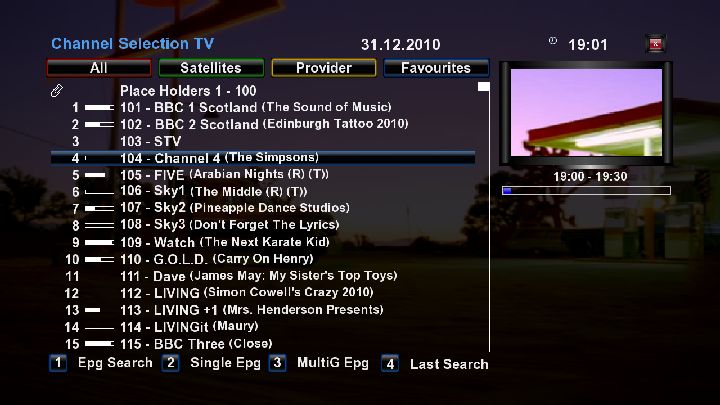


-
-
Mate if you want to get a 800 hd then get one as your a novice to dream it will be no harder to learn than any other dreambox and your on the right forum for help when you do get one...... take the plunge you wont be sorry.
As the man said, buy the box you want and stick here, we will help you all the way. Many on here will agree with this. -
DM_Sims Readme
################################################## ################################################## ##############
Release 0.5 : December 30th, 2010
################################################## ################################################## ##############DM_Sims tool is built to help you to :
DETECT (Better sim/smartcard detection v0.5 for T1 and T2 sims) :
- To DETECT which Dreambox sim card you have
a) Original (From Dream)
b) Sim 1.0 from T1 Ferrari (v00.03, v00.04, v00.05)
c) Sim 1.0, Sim 2.0 or Sim 2.01 from T2
d) Sim Ferrari for DM800 or DM8000 from T1UPGRADE:
- Upgrade your Sim 1.0 T1 SSL69/70 to Sim 1.0 T1 SSL72.
- Upgrade your Sim 1.0 T2 SSL69/70 to Sim 2.01 T2 SSL75-SSL76.
- Upgrade your Sim 2.0 T2 to Sim 2.01 T2 SSL75-SSL76ABCD.
(Ferrari upgrade NEED WINDOWS COMPLIANT USB SMARTCARD READER)
- Upgrade your sim 1.0 T1 SSL69/70/72 v00.03, v00.04 to Sim Ferrari (SSL76F/SSL76FF/SSL76Fv3/SSL78F).
- Upgrade your sim 1.0 T1 SSL69/70/72 v00.05 to Sim Ferrari (SSL76F/SSL76FF/SSL76Fv3/SSL78F).FIX:
- To FIX the sims v1.0 T1 corrupted by the "BombKill" SSL released.
- To FIX the sims v1.0 T1 corrupted by upgrade to Ferrari (Try again with this tool to upgrade).
- To FIX the sims Ferrari DM800 T1 corrupted by the "BombKill" SSL released.
- To FIX the sims v1.0/v2.0/v2.01 T2 corrupted by the "BombKill" SSL released.
- To FIX the sims v1.0 T1 v00.05/4/3 stuck back to Sim 1.0 T1 (With tries counter = Zero)
:download: -
Where do i find DDC
You will find it in both these packages My dream toolbox and DMToolbox. -
I found the easiest way to format as ext3 was using a linux live disk, i had to do this for my usb stick before the DM would reconise it.
-
Works well, a simpler way to install using dcc

click tools/ipkg packages, upload the file reboot and done.
-
How to change the timeshift path
In recording paths scroll to timeshift & press ok


At this screen press menu then select switch to filelist

Now browse to the correct patch and press green to save

You will see the paths are different here this is for an external mount, everything works great except timeshift on hd channels can be a little jumpy.
-
this is for your router
Configuring Static RoutesStatic Routes provide additional routing information to your router. Under normal circumstances, the router has adequate routing information after it has been configured for Internet access, and you do not need to configure additional static routes. You must configure static routes only for unusual cases such as multiple routers or multiple IP subnets located on your network.
From the Main Menu of the browser interface, under Advanced, click on Static Routes to view the Static Route menu, shown below.

Figure 6-9. Static Route Summary TableTo add or edit a Static Route:
1. Click the Add button to open the Add/Edit Menu, shown below.
Figure 6-10. Static Route Entry and Edit Menu
2. Type a route name for this static route in the Route Name box under the table.
(This is for identification purposes only.)
3. Select Private if you want to limit access to the LAN only. The static route will not be reported in RIP.
4. Select Active to make this route effective.
5. Type the Destination IP Address of the final destination.
6. Type the IP Subnet Mask for this destination.
If the destination is a single host, type 255.255.255.255.
7. Type the Gateway IP Address, which must be a router on the same LAN segment as the router.
8. Type a number between 1 and 15 as the Metric value.
This represents the number of routers between your network and the destination. Usually, a setting of 2 or 3 works, but if this is a direct connection, set it to 1.
9. Click Apply to have the static route entered into the table.As an example of when a static route is needed, consider the following case:
o Your primary Internet access is through a cable modem to an ISP.
o You have an ISDN router on your home network for connecting to the company where you are employed. This router's address on your LAN is 192.168.1.100.
o Your company's network is 134.177.0.0.When you first configured your router, two implicit static routes were created. A default route was created with your ISP as the gateway, and a second static route was created to your local network for all 192.168.1.x addresses. With this configuration, if you attempt to access a device on the 134.177.0.0 network, your router will forward your request to the ISP. The ISP forwards your request to the company where you are employed, and the request will likely be denied by the company's firewall.
In this case you must define a static route, telling your router that 134.177.0.0 should be accessed through the ISDN router at 192.168.1.100. The static route would look like Figure 6-10.
In this example:
* The Destination IP Address and IP Subnet Mask fields specify that this static route applies to all 134.177.x.x addresses.
* The Gateway IP Address fields specifies that all traffic for these addresses should be forwarded to the ISDN router at 192.168.1.100.
* A Metric value of 1 will work since the ISDN router is on the LAN.
* Private is selected only as a precautionary security measure in case RIP is activated -
There is one called setup quickbutton that lets you choose which button does what if that makes it easier mate.



