Posts by mrgmx

    5 Users......Wouldn't be worth the extra electric buddy!


    Use the best spec one and stick with that IMO


    You could use 2nd as backup if needed....give it a different static IP > copy lines over > if it goes down change the IP from server1 to server2....but bare in mind if your server went down due to internet both will go down obviously!


    But when setup correctly its the user playing that normally messes it up!...save any updates till midnight and you should be ok! nowadays i go weeks without looking at my server...and the dust on the keyboard tells you how many time ive restarted it lol!


    Get your setup sorted and apart from dodgy internet firm, power cut or end of the world all should be cushty!

    Bootlogos by Mr!


    Jpgs and Mvi in zip file.....boot1.jpg, boot1.mvi e.t.c
    Pick the one you want rename boot1.mvi to bootlogo.mvi e.t.c


    ftp to the usual places


    1st 2 (bootlogo and bootlogo_wait) go in usr/share - radio.mvi goes in /usr/share/enigma2/skin_default (in Vix for example)


    Reboot and logos should now show


    Have Fun!


    no mate either way it is the same!


    Unless your using the mobile version of the site.....in the quick reply section of a thread/post click Go Advanced and you will see the paperclip icon in the top bar as suggested!


    Are you viewing in mobile view....the attachment option isn't available!...select the full site view at bottom of screen! and you should get the desktop view which will allow you to attach!

    Welcome to CS lol


    Lot of Ground to cover in that post so i will try and answer as best as i can!


    1st and formost so we get off on the right ground.....this is a hobby bud....i would like to think that wanting to get involved in a new hobby wouldnt influence whether or not to start buying equipment?! Also get into it for the right reasons.....simply to start a server for 20 odd people wouldnt be the best way to start off in CS lol! Most of us got into without thinking whether we should or not? Costs involved? Time spent working, breaking and fixing things and building relationships with other users on the forum! Just bare that in mind!


    On to your quiestions!


    Dreambox or PC would suffice for a server.......PC would be more stable, allow you to share with other peers abit easier IMO.....and would allow you to have a standalone server....rather then using the reciever that you would have to restart e.t.c when making any alternations on the server side! - You can then link your boxes to the server e.t.c!


    Look here
    Forum Gateway - Powered by DnP Firewall


    and here
    Forum Gateway - Powered by DnP Firewall


    Pc side use a Ubuntu or Debian auto Script! (Oscam or Oscam/Cccam combined) (debain i found easier when starting out) MO


    Oscam on own or Oscam/Cccam combo....both have pro's n con's i found using Oscam only suited me fine...and saved any extra problems/questions when i started lol!


    You will then need a local subbed card (Purchased Subscribed Card) to read/share


    Using a smartgo smartreader or a Omnikey reader to read card into server and using config files from here
    Forum Gateway - Powered by DnP Firewall


    If you get to that stage and your server is working - reading card - you then need to look at the sharing lines section in tutorials and your up n running so to speak!


    Work through each stage, with a clear head....if anything doesn't work or follow the steps like it should just shout! any major problems just restart the install of OS and rerun autoscript! e.t.c (took me a couple of times)

    20 years or so older my guess! lol


    Like a fine wine....he got Brainier with Age!


    If you had the one with the small circles inside a circle in the test WHATS THE ANSWER


    and i think the one where you had to choose some dodgy style triangles ( some closed shape some open lol)


    They must of been at least 12 points each lol


    Oh and the one with the Church like symbols....probably why i got it wrong lol


    Good Stuff! When i have an Exam ill tap you up lol

    :rasta2bigsmoke0gf::rasta2bigsmoke0gf::rasta2bigsmoke0gf::rasta2bigsmoke0gf::rasta2bigsmoke0gf::rasta2bigsmoke0gf::rasta2bigsmoke0gf::rasta2bigsmoke0gf::rasta2bigsmoke0gf::rasta2bigsmoke0gf: 126 must of smoked one too many tonight lol!:rasta2bigsmoke0gf::rasta2bigsmoke0gf::rasta2bigsmoke0gf::rasta2bigsmoke0gf::rasta2bigsmoke0gf::rasta2bigsmoke0gf::rasta2bigsmoke0gf::rasta2bigsmoke0gf::rasta2bigsmoke0gf:


    Good find MusoGEEK hehe!


    :thumbsup:

    Those with both are best placed to comment for both sides!


    But given the posts on forum.....its like a Alfa Romeo vs VW - Both nice to look at....One will give you more problems then the other! lol


    I would go with Vu buddy.....you wont be disappointed and the support here for Vu range is exceptional!

    Yes it is buddy IMO


    If need be do a backup of what you have and put that aside then whack a forum backup from link below


    Forum Gateway - Powered by DnP Firewall


    Tens is most up to date so try that and see how you like it! Im sure you will find it easier!


    If not revert back to BH backup and we will try and help you further!

    lol


    Backup images will be images preinstalled with all the goodies ready to go! (Ondemand, Cams, Channel lists e.t.c)


    Normally a supplier will only put a basic out the box version of the image on a receiver, its then up to you to customise it how you like?


    Some members take the hassle out of that part and create backup images ready to use!


    For channel lists use dreamboxedit.....should be a link on the forum....this will allow you to connect to you receiver..... receiver current list and change accordingly


    Failing that i find autobouquets plugin works a treat and has an option to organise your channels as per SLY if that is what you are after!


    BH will take some getting used to.....but remembers its just visuals so to speak.....image functionality is the same....just most the time different labels/naming e.t.c lol


    You had a look at Vix image?

    For that box mate i doubt that is the issue!


    You could look at making sure the firmware is up to date!


    Have you tried using a different cam Mgcamd (input line manually through menu using details from current line) and see if that works?


    I presume your getting the FTA channels?
    I presume your not getting any PREMIUM channels.....sly 1, sports, movies? Any or None?
    Your internet is working (if you have youtube plugin try and access....you may need to change DHCP in network settings)


    Apart from that it would probably be server end, Your channels are clearing from server (if you have lol) Have you tried line on different box?


    Hopefully one of the above options will get you going

    Where did you download it from? the link i sent


    By Fresh i mean Full Updated Version standalone (no plugins added e.t.c)


    Normally obtained from the Vix link i posted??


    Have you tried reformating USB FAT32


    and you have the folders/files layed correctly when you copy to usb


    i.e vuplus(folder) > solo2(folder) > files 4 or 5 (can't remember lol)

    Have you tried flashing it with a fresh install of the image


    Download latest version from here Forum Gateway - Powered by DnP Firewall


    and try to flash that and see if it comes back to life


    after that you could use a backup image from the Vu Section on the forum


    Try to reformat your USB may be another option...strange one...normally doesn't work or doesn't show up when flashed lol or people forget to press power button

    Learn Raspberry Pi with Linux
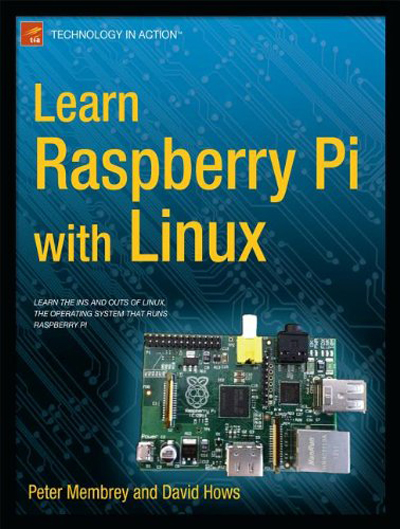


    Learn Raspberry Pi with Linux will tell you everything you need to know about the Raspberry Pi's GUI and command line so you can get started doing amazing things. You'll learn how to set up your new Raspberry Pi with a monitor, keyboard and mouse, and you'll discover that what may look unfamiliar in Linux is really very familiar. You'll find out how to connect to the internet, change your desktop settings, and you'll get a tour of installed applications.


    Next, you'll take your first steps toward being a Raspberry Pi expert by learning how to get around at the Linux command line. You'll learn about different shells, including the bash shell, and commands that will make you a true power user.


    Finally, you'll learn how to create your first Raspberry Pi projects:


    Making a Pi web server: run LAMP on your own network
    Making your Pi wireless: remove all the cables and retain all the functionality
    Making a Raspberry Pi-based security cam and messenger service: find out who's dropping by
    Making a Pi media center: stream videos and music from your Pi


    Raspberry Pi is awesome, and it's Linux. And it's awesome because it's Linux. But if you've never used Linux or worked at the Linux command line before, it can be a bit daunting. Raspberry Pi is an amazing little computer with tons of potential. And Learn Raspberry Pi with Linux can be your first step in unlocking that potential.
    What you'll learn


    How to get online with Raspberry Pi
    How to customize your Pi's desktop environment
    Essential commands for putting your Pi to work
    Basic network services - the power behind what Pi can do
    How to make your Pi totally wireless by removing all the cables
    How to turn your Pi into your own personal web server
    How to turn your Pi into a spy
    How to turn your Pi into a media center


    Who this book is for
    Raspberry Pi users who are new to Linux and the Linux command line.


    Enjoy


    I am looking for a box that will allow me to record two channels while watching another channel.


    So you will need 3 tuners - Ultimo as suggested would be best option....or solo2 with an external tuner (that way you will have the latest machine)


    Quote

    Would like it to have internal HDD option, HD, an EPG that allows you to record program's say a week or two in advance, and any other options that are needed.


    Solo2 and Ultimo will take HDD (solo2 2.5 though) EPG (just make sure it setup and up to date) e.t.c dependant on Image....i would advise Vix to start with as its one of the easiest to use, function wise and on the eye also!


    Quote

    Ps. Do all boxes come with firmware installed, and if not which is best.?


    If you buy from a reputable seller they should install and image of your choice - Normally Vu Original, BlackHole, Vix


    Failing that its simple and we can guide you through it using images on the forum

    Muso should confirm,


    but i think it has something to do with running software update on a image that has TSPANEL already installed!


    If you choose to use TsPanel i think the workround is


    Install Image > Do a Backup! say backupsimple


    Add TsPanel and Plugins e.t.c > do a settings backup (settingsback)


    When a new update is ready either do a fresh install and then run settings backup


    or revert to backupsimple > run update > run settings backup!

    Yep using Vlc player (windows media player a bit bit or miss) and logging into webif from your lappy Will allow you to stream!


    Using your Box Ip Address > type into Internet browser > select bouquet > select channel > to the left of channel listing should be a computer screen icon > click that and stream should download (depending on settings it will auto open or you may have to open with VLC) > stream should now play


