
perhaps polish provider is worth taking a look at - I'm sure a few boys on here got polish cards for scottish footbal!
:mrgmx: Rik


perhaps polish provider is worth taking a look at - I'm sure a few boys on here got polish cards for scottish footbal!
:mrgmx: Rik
Here is another CCcam total package file containing a 64_bit version for those wishing to use oscam with CCcam 2.1.3 on machines with 64bit architecture.
Contains CCcam.x86_64
The same installation instruction apply - Follow Tutorial @ the top of this page . :rikjaard2:
VU+ (2) range is now being released and has better chipsets making them faster than anything else out there - DM7020 is getting "old" now in technology terms i believe -
Other people i have spoke with suggest the tm twin is a great value receiver with decent processor too -
"Best" can be very hard to define in a hobby with so many variables -
:rikjaard2:
If thats connected and says au on then its time to leave your box on SSports1 or Snews HD or any premium channel until you see unique emm arrive in reader status page ¬ BE PATIENT - When you see unique emm ( i have 4 ) you know card has received entitlement update - CHECK entitlements ! Date should have changed.
b3670109df04a2f95440aad22.png
Again i wish to you good luck with plenty patients ¬ Be sure they will arrive ! :rikjaard1:
in oscam make this account
[account]
user = vu
pwd = duo
group = 1
au = 1
caid = 0963
ident = 0000:000000
cccmaxhops = 0
cccreshare = 3
cccignorereshare = 0
cccstealth = 1
keepalive = 1
Add this to oscam config
[newcamd]
port = 10086@0963:000000
key = 0102030405060708091011121314
keepalive = 1
mgclient = 1
in cccam on duo add N:Line
N: blacksox.server.ip 10086 vu duo 01 02 03 04 05 06 07 08 09 10 11 12 13 14
save everything and reboot -
when you see vu connected on status page of oscam web interface CLICK users ,Then edit user with Pencil option on Right hand side and ADD 1 to AU
[TABLE='class: config, width: 750']
[TD='bgcolor: #EEEEEE, align: left']Monlevel:[/TD]
[TD='bgcolor: #EEEEEE, align: left'] 0 - no access to monitor 1 - only server and own procs 2 - all procs, but viewing only, default 3 - all procs, reload of oscam.user possible 4 - complete access [/TD]
[TD='bgcolor: #EEEEEE, align: left']AU:[/TD]
[TD='bgcolor: #EEEEEE, align: left']1
[/TD]
[/TABLE]
Go to the bottom of the page and SAVE
now check status page and you should see ONin AU column
[TABLE='class: status, width: 100%']
[TR='class: c']
[TD='class: statuscol0, bgcolor: #F1F5E6'][/TD]
[TD='class: statuscol1, bgcolor: #F1F5E6'][/TD]
[TD='class: statuscol2, bgcolor: #F1F5E6']c[/TD]
[TD='class: statuscol3, bgcolor: #F1F5E6']4[/TD]
[TD='class: statuscol4, bgcolor: #F1F5E6']vu[/TD]
[TD='class: statuscol5, bgcolor: #F1F5E6']ON[/TD]
[TD='class: statuscol6, bgcolor: #F1F5E6']ON[/TD]
[TD='class: statuscol7, bgcolor: #F1F5E6']ip.of.duo[/TD]
[TD='class: statuscol8, bgcolor: #F1F5E6']43848[/TD]
[TD='class: statuscol9, bgcolor: #F1F5E6']newcamd (CCcam)[/TD]
[TD='class: statuscol10, bgcolor: #F1F5E6']06.01.13 17:53:53[/TD]
[TD='class: statuscol11, bgcolor: #F1F5E6']0:00:56[/TD]
[TD='class: statuscol12, bgcolor: #F1F5E6']0000:0000[/TD]
[TD='class: statuscol13, bgcolor: #F1F5E6'][/TD]
[TD='class: statuscol14, bgcolor: #F1F5E6'][/TD]
[TD='class: statuscol15, bgcolor: #F1F5E6']0:00:56[/TD]
[TD='class: statuscol16, bgcolor: #F1F5E6']OK[/TD]
[/TR]
[/TABLE]
Good Luck :rikjaard2:
FTP latest TS panal ipk to your /tmp folder and follow installation instruction through VU+ menu ¬ i use vix - = menu ,setup ,vix ,install local extension - ok/green button.
You can get everything you need there Thanks to the hard work by TS panel Admin.(Ten Below)
:rikjaard1:
is there a firewall you can control ?
Well done junger ¬ Glad to see you got things sorted out @ Last.
Use ts panel to create a backup of your settings/image
:rikjaard1:
YES ,
but the Unknown emm being blocked in oscam should prevent anything untoward happening !
blockemm-u = 0
blockemm-s = 0
blockemm-g = 0
blockemm-unknown = 1
mine works with the settings below ¬
blockemm-unknown = 1
blockemm-g = 1
saveemm-u = 1
saveemm-s = 1
You also need AU on
Change This
ecmwhitelist = FFFF:3B;FFFF:3E;FFFF:42;FFFF:44;FFFF:45;FFFF:47;FF FF:4B;FFFF:4E;FFFF:4F;FFFF:53;FFFF:54;FFFF:56;FFFF :5F;FFFF:61;FFFF:62;FFFF:65;FFFF:66;FFFF:67;FFFF:6 8;FFFF:69;FFFF:6A;FFFF:6B;FFFF:6C;FFFF:6D;FFFF:6E; FFFF:6F;FFFF:71;FFFF:72;FFFF:73;FFFF:74;FFFF:76;FF FF:77;FFFF:78;FFFF:79;FFFF:7A;FFFF:7C;FFFF:7D;FFFF :7E;FFFF:80;FFFF:82;FFFF:85;FFFF:8B
mine is like this
ecmwhitelist = 0963:3E,42,44,45,47,4E,4F,5F,53,54,6C,61,62,66,67, 68,69,6A,6B,6D,6F,70,71,72,73,76,77,78,79,7A,7C,7D ,7E,80,85,8B,82
oscam global config
oscam server
oscam user
[reader]
label = reader-1
enable = 0
protocol = pcsc
device = /dev/ttyUSB0
pincode = ****
caid = 0963
boxid = 12345678
ecmwhitelist = 0963:3E,42,44,45,47,4E,4F,5F,53,54,6C,61,62,66,67, 68,69,6A,6B,6D,6F,70,71,72,73,76,77,78,79,7A,7C,7D ,7E,80,85,8B,82
ecmheaderwhitelist = 0963:3E,42,44,45,47,4E,4F,5F,53,54,6C,61,62,66,67, 68,69,6A,6B,6D,6F,70,71,72,73,76,77,78,79,7A,7C,7D ,7E,80,85,8B,82
detect = cd
mhz = 600
cardmhz = 600
ident = 0963:000000
group = 1
emmcache = 1,3,2
auprovid = 000001
i only use whitelist ¬ never seen ecmheaderwhitelist in a config before ! Try removing it !
LG has launched a 55in (140cm) OLED TV - kickstarting a battle over the next-generation of high-quality screens.
OLED - which means organic light-emitting diode - is more energy efficient than LCD (liquid crystal display) and plasma-based alternatives.
LG's model will be sold in South Korea first with other markets, including Europe, to follow thereafter.
Both LG and Samsung announced 55in OLEDs last year, but LG is the first to make its available.
The firms showcased their televisions at last January's Consumer Electronics Show (CES) in Las Vegas, but until now neither company had managed to get a product to market.
LG's headstart on its rival helped give it a 5.4% share price boost on Wednesday.
The 1080p (1920 x 1080 pixels) OLED television will sell for 11 million won ($10,300; £6,300). Analysts said the technology was unlikely to become more affordable until at least 2015 - but that this latest release was more about cementing LG's position as a market leader.
That said, global sales of OLED televisions are expected to grow to 1.7 million by 2014, according to research firm DisplaySearch.
BendyOLED screens have been touted as the successor to the popular liquid crystal displays (LCD).
The technology allows for the display of darker and deeper blacks, and can be made thinner than competing display methods.
Smaller OLED screens are already in mass distribution. Samsung uses the technology in its smartphones, and Sony's PlayStation Vita handheld console also utilises the thin, light technology.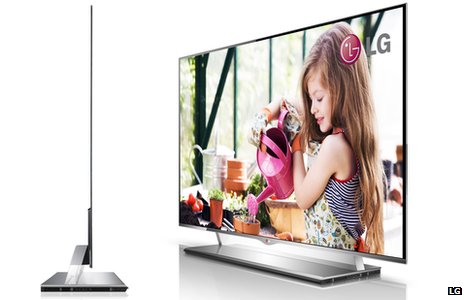 OLED technology can be used to make ultra-thin televisions
Many predict that OLED screens will allow for the development of a new generation of "bendy" gadgets, some of which are expected to be unveiled over the course of the year.
But larger OLED screens have proven difficult to manufacture due mainly to cost and reliability constraints.
Another technology, known as 4K, has also been given a lot of attention from manufacturers.
Dubbed "Ultra HD", 4K offers 8 million pixels per frame - four times the resolution of 1080p high-definition displays - making it particularly well suited for extra large screens. 110in (279cm) models are expected to be put on show at CES next week.
Existing 4K TV sets are LCD-based. But according to some purists, OLED offers a richer quality display so might be better the better option for 55in screens.
Rik - taken from BBC News - LG launches first next-generation OLED 55in television
Display More2013/01/02 17:10:13 1702 r02 Cannot open device: /dev/sci0
2013/01/02 17:10:16 1697 s init for all local cards done
2013/01/02 17:10:16 1697 s anti cascading disabled
2013/01/02 17:10:16 1697 s dvbapi: dvbapi disabled
2013/01/02 17:10:18 1697 s client(1) connect from 127.0.0.1 (pid=1706, pipfd=13)
2013/01/02 17:10:18 1706 c01 encrypted newcamd:10000-client 127.0.0.1 granted (linuxsat, au=***uk)
2013/01/02 17:10:18 1706 c01 user linuxsat authenticated successfully (CCcam)
2013/01/02 17:10:18 1706 c01 AU wont be used on this port -> disable AU
2013/01/02 17:10:32 1697 s client(2) connect from 127.0.0.1 (pid=1721, pipfd=14)
2013/01/02 17:10:32 1721 c02 encrypted newcamd:10000-client 127.0.0.1 granted (linuxsat, au=***uk)
2013/01/02 17:10:32 1721 c02 user linuxsat authenticated successfully (CCcam)
2013/01/02 17:10:32 1721 c02 AU wont be used on this port -> disable AU
2013/01/02 17:10:32 1721 c02 Connection closed to client
2013/01/02 17:10:32 1721 c02 linuxsat disconnected from 127.0.0.1
2013/01/02 17:10:50 1706 c01 linuxsat (0963&000000/0EDA/67:DF7F): rejected user ident (120 ms)
2013/01/02 17:10:56 1706 c01 linuxsat (0963&000000/0EDA/67:9333): rejected user ident (120 ms)
2013/01/02 17:11:01 1706 c01 linuxsat (0963&000000/0EDA/67:4D7F): rejected user ident (121 ms)
2013/01/02 17:11:08 1706 c01 linuxsat (0963&000000/0EDA/67:7AA1): rejected user ident (120 ms)
2013/01/02 17:11:13 1702 r02 ERROR opening device /dev/sci0
2013/01/02 17:11:13 1702 r02 Cannot open device: /dev/sci0
2013/01/02 17:11:16 1706 c01 linuxsat (0963&000000/0EDA/67:9EA0): rejected user ident (120 ms)
2013/01/02 17:11:24 1706 c01 linuxsat (0963&000000/0EDA/67:56AF): rejected user ident (120 ms)
2013/01/02 17:11:32 1706 c01 linuxsat (0963&000000/0EDA/67:1D81): rejected user ident (120 ms)
2013/01/02 17:11:40 1706 c01 linuxsat (0963&000000/0EDA/67:F53F): rejected user ident (122 ms)
2013/01/02 17:11:48 1706 c01 linuxsat (0963&000000/0EDA/67:D150): rejected user ident (120 ms)
2013/01/02 17:11:56 1706 c01 linuxsat (0963&000000/0EDA/67:53B3): rejected user ident (120 ms)
2013/01/02 17:12:04 1706 c01 linuxsat (0963&000000/0EDA/67:8F29): rejected user ident (120 ms)
this is what is read at ip:8888, at least the oscam has turned green, but still not clearing the card, any ideas most welcome
i am not sure about your receiver i never used that hardware but it could be /dev/sci1 instead of sci0 if there 2 card readers -
come to think of it ? is there 2 slots ? did you try them both ??
i just tested ! BOXNATION is black screen without 65 added to oscam whitelist in reader ¬
i use
Compiled by Gianni8127 source: trunk@1.20-unstable_svn7209
IN debian -
with TM800 connected using CCcam with N: Line i get blank screen mate ?
perhaps i should try NEWER Oscam version - ? joint10
its interesting that you dont use white list ¬ i found that certain channels didn't clear without it - namely boxnation.
and perhaps a few others ! cant remember which off hand joint10 ?
This all relates back to CCcam not clearing pick tv - Thats when OScam became a must - with white list following accordingly ¬
i cant find where the streamboard wiki says NOT to use white list ? All i found is
[TABLE='class: wiki']
Provider
[/td]Satellite
[/td]CAID
[/td]Provider ID
[/td]Card
[/td]Crypt
[/td]ECM Header Whitelist: (value in hex)
[/td]additional information
[/td]B***B/FreeCard
[/td]28,2° East
[/td]0963
[/td]000000
[/td]?
[/td]NDS
[/td]80703B00,80704200,80704400,80705F00,80706500,81703B00,81704200,81704400,81705F00,81706500
[/td]
[/TABLE]
Although white CARD is not mentioned the relevant ECM Header Whitelist: is Listed !
I HAVE conducted a test and with newcamd client and cccam client from debian server using oscam and omnikey boxnation will NOT clear without 65 added to Whitelist - so Whitelist is needed with oscam server and white card with premium services added perhaps !
if you get freezing on FTA channels you can be sure its signal related issue -
High Ecm times will cause glitching ¬
Be sure to read the rules . . . . . . . . . . . . . ¬ namely >13<
get yourself a half decent local and find yourself a good peer !
i have read your other posts and you say you have motorised so you can benefit by sharing a local.
:rikjaard1:
BUT- 1)... what key type should it go under ?
2)... what MHz should it be ?
1) your boxkey is the serial number from your receiver - it will be in decimal format and requires converting to hexadecimal - there are many converter programs available via our friend mr google !
once converted it needs to be placed in CCcam.cfg next to where it says BOXKEY remove the #(hash) and add your hex number as i have in green - yours will obviously be different.
THIS IS ASSUMING YOUR USING CCcam ?
# overrule the nds boxkey (4 byte hex)#
# BOXKEY: <device> <byte1> <byte2> <byte3> <byte4>#
#example#
BOXKEY: /dev/sci0 034b4c37
1a) if using oscam copy these configs adding your own BOXKEY as i have again in green !
[reader]
label = reader-0
description = ***_uk
protocol = pcsc
device = 0
caid = 0963
boxid = 034b4c37
ecmwhitelist = 0963:3B,3E,42,44,45,47,4B,4E,4F,5E,5F,53,54,56,61,62,65,66,67,68,69,6A,6B,6C,6D,6F,70,71,72,73,74,76,77,78,79,7A,7C,7D,7E,80,82,85,88,8B
detect = cd
mhz = 480
cardmhz = 370
ident = 0963:000000
group = 1
emmcache = 1,3,2
blockemm-unknown = 1
blockemm-g = 1
saveemm-u = 1
saveemm-s = 1
lb_weight = 101
ccchop = 1
B) mhz is set to 470 in my oscam
mhz i cannot find in my cccam.cfg so i assume now your using oscam !
i dont use a openbox mate - hope this helps you !
Rik
compiled here are peoples reports of signals received and dish size used ! note the 60cm dis in north africa - lol - 310cm in central france and a 140cm in south UK . i previously used a 1.5m and that had similar results . However i aint finished YET - if i get it screen shots will be posted !
i have been playing (Thanks to Andy-Ray) with channel master 1.8M dish today ! No joy with AD sports hd -
Just about everything else but not the HD irdetto2 sport channels ¬ Admittedly this is the 1st attempt.I will try tweaks throughout the week to see if i can get it ! _ There are many arabic channels available from that bird with an 80cm dish however as stated not the good ones we all want ! :rikjaard2: ¬


