


If you got to the Linux Server and Card Sharing sections, you will find loads of tutorials, covering this.
Posts by Banny
-
-
Ahh, its probably as I have two Omnikeys attached, to mine, not that they are up to much at the mo.
-
I haven't got an s16, but can't you backup your settings, to usb, its good practice to do that before any firmware upgrade anyway, just in case the worse happens (shame I don't practice what I preech).
Then you can reapply your channel/sat settings etc?
-
I think you are mixing two logins up here, the one you use to login when then machine boots and the login you are using over a telnet/ssh session (via putty).
When you server boots login using your 'normal' login details, connect to your linux based machine using putty then login using the sudo -i command.
-
turn your receiver off by using the rear switch
then holding the on button on front till stop appears then release & in the small display will show I.PI appreciate the help, but this doesn't work when the box has this error mate, hence my problem.
As my router doesn't have DHCP Reservations, I can't even give it an IP Address that way.
-
Why do you have
device = 0 and id also add the line
ident = 0100:000068
As per the configs found here - http://linuxsat-support.com/os…cam-oscam-cyfra-seca.html
Not sure how much it will help, but its a starting point
-
Ok, the guide there is for a DM800 HD, and not the SE.
Dreambox SE Users should use the cracked version of the sun ray flasher application.
The problem I now have is how do I flash the box as it doesn't seem to have an IP Address, well I can't see it in the routers settings anywhere.
-
My searching skill have gone down hill, thanks for that, ill try that one.
I blame this laptop.
-
I thought I had, but that aint the issue currently, the issue is getting the box to a point i can put an image on.
-
Can some please tell me the step im taking wrong or missing?
Run Dreambox Optiflasher
Setup as follows -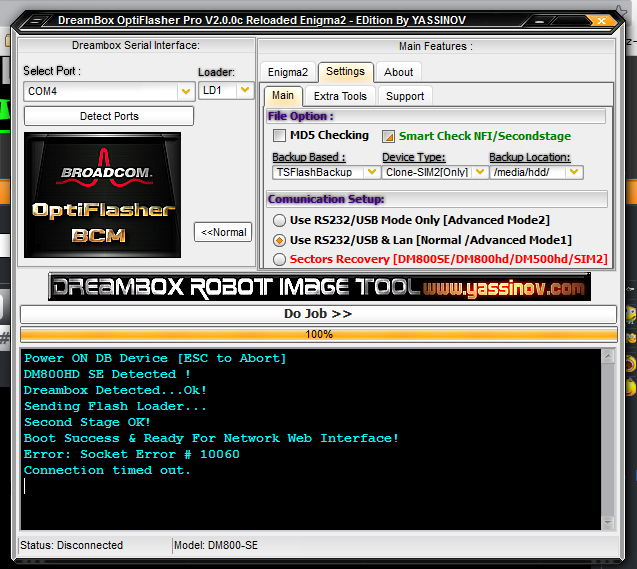
Towards end of process is asking me for the ip currently on the stop screen which I input.
No matter what I do next, I go back to square 1 (No CA Error)
-
wich are the differences with the "cache" feature of oscam??, oscam handle cache too.
nice post btw
The main difference is the cache feature of oscam requires oscam to oscam.
CSP uses newcamd and CWS connections.
-
Ok did some digging into this, and then I got totally lost, I did get a better understanding of OSCam out of it though.
What I was hoping to do was be able to use DHCP Reservation, and setup a vpn of some sort, well two possibly and depending on which device depends on which vpn it uses.
So for example
Widows pc, PS3 could use American based ip
Linux laptop uk, duo stb uk based ipAny suggestions which firmware I could use as a base, and still stick oscam on top, or am I askng too much... lol
Also how would i connect the omnikeys to the router?
-
I come across this one version 5, not sure how uptodate it is but its the most recent -
The file is dated 14.06.12, if it turns out to not be any good let me know and ill remove it.
-
Usoris Systems released a new version of its popular Remote Utilities remote desktop software – a powerful remote access program which can be used for remote administration and remote support alike.
Description: Remote Utilities is remote desktop software for secure access to workstations, servers and laptops over a LAN or over the Internet. You can view the remote PC screen and control its mouse and keyboard as if you were sitting right in front of the PC. With the Free Edition you can help your friends and family members and administer your own home network at no cost.
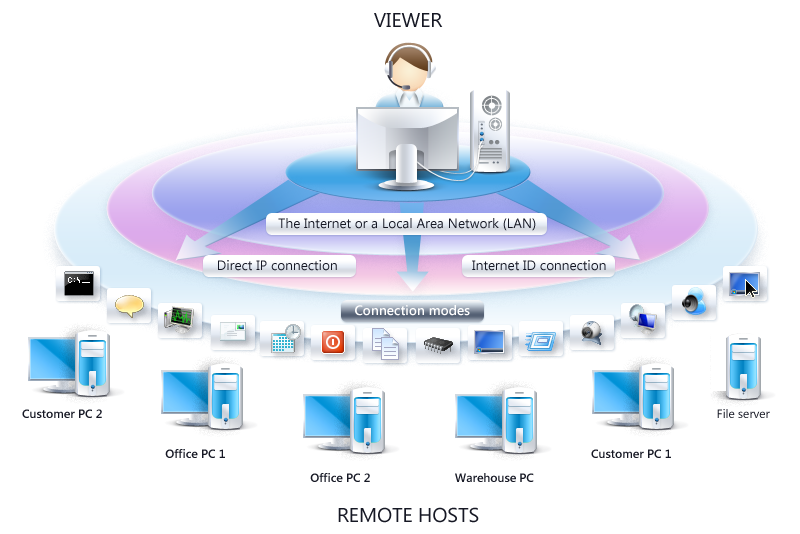
Features:
- Full Control and View, File Transfer and other useful modes. Remote Utilities includes 15 different connection modes, such as Full Control and View, File Transfer, Power Control, Telnet etc. You can change the modes on-the-fly without disconnecting from the remote PC.
- Unattended and attended access. Use the lightweight remote Agent module for spontaneous support and the installable Host module for total 24/7 unattended access to your PCs. You can connect to remote Agents and Hosts side-by-side from a single Viewer module.
- Direct IP/DNS connection or easy-to-use ID connection. If you are computer-savvy configure a direct IP-to-IP access to your PCs for ultimate lag-free performance. Alternatively, you can go with the easy-to-use ID connection that does not require any configuration. Both types of connection will work on a LAN and over the Internet.
- Multiple simultaneous connections. Remote Utilities supports an unlimited number of simultaneous connections in both directions — from a local PC to a remote PC and vice versa.
- Remote webcam access and monitoring. Connect to a remote webcam attached to a remote PC and see what is happening in the room where that PC is located.
- No annoying “Buy me” messages. The Free Edition does not nag users with commercial banners – it’s absolutely clean and free for personal use. There are no time or traffic limitations.
Home page -
Download - -
Im not the biggest expert in shell scripts but
Code
Display More#! /bin/sh #DESCRIPTION=Script will reduce your ram. echo "#######################################################################" echo "before cleaning" free echo "#######################################################################" echo ".............cleaning" sync echo 3 > /proc/sys/vm/drop_caches sleep 1 echo 0 > /proc/sys/vm/drop_caches echo "#######################################################################" echo "after cleaning" free echo "#######################################################################" exit 0Couldn't the same be achieved almost by excuting the command free
-
I am new in this field, and I would very much appreciate your cooperation.
Regards,
ppp43As we would require yours, in accordance with forum rules please post an intro thread - http://linuxsat-support.com/introductions/
Then id suggest using the search to find the info you need.
If you are still stuck with what you are trying to do make a post in the appropriate section.If your post above was an attempt to get information, it tells us nothing, the more information you put in a post requesting help... The better the response and more likely it will answer your question/resolve your issue.
-
promo can you give a more detailed reply about the boxnation channel comment,did you bin cccam totally as a server on your setup?
His response, gave all the information required, perhaps you should word you question differently.
CCCam doesn't work well, if indeed at all with box nation as a local.
-
Time to have a clear out of old bits and pieces.
I know the value of some of these items is minimal but thought it might help out some people.
Im not putting prices and am open to any reasonable offer -
Tenda 150MBPS Bridge/AP (got install disc, but haven't got original box)
WiFi Part for DM800
2400Mhz Inline Amplifier
32GB SD Card
TP Link WN722N (have driver disc)
Cable Tuner for DM Box -
Who are you cachexing with? how large is the size of you cache?
-
Aren't all the interesting frequencies encrypted now?

